Business

Your SOC 2 Audit Will Find the Gap Between What You Say and What You Do

Your security policy says every employee uses MFA. Your production logs say otherwise. Your offboarding procedure promises immediate access revocation. An ex-employee’s account is still active. Your change-management policy requires peer review. Someone merged a critical production change without one.

Welcome to SOC 2: where good intentions meet evidence.

The uncomfortable truth?
You can have excellent security policies, a polished compliance dashboard, and a folder full of documentation—and still fail to demonstrate that your controls actually work.
The problem isn’t paperwork. It’s the gap between documented processes and operational reality.

And the most expensive time to discover that gap is after your SOC 2 observation window has started.

Three control domains that deserve attention

Before your observation period begins, focus on the controls most likely to expose weaknesses in everyday engineering and IT operations.

1. CC6 — Access Control: Who Can Actually Get In?

A policy requiring MFA means little if a legacy identity provider, cloud account, or service account bypasses it.

What good looks like:

  • Enforce MFA across all relevant identity providers and privileged access paths.
  • Use role-based access control (RBAC) and least privilege for production systems.
  • Automate joiner, mover, and leaver workflows so access changes happen promptly.
  • Run quarterly access reviews, with documented approvals and remediation of inappropriate access.

Real-world failure:
An employee leaves the company, HR closes the ticket, and the SaaS accounts are forgotten.
The policy exists; the control failed.

2. CC7 — System Operations: Can You Detect Trouble?

Collecting logs isn’t the same as monitoring your environment.
If nobody reviews alerts—or alerts disappear into a noisy queue—you have visibility without effective detection.

What good looks like:

  • Centralize security-relevant logs from cloud infrastructure, endpoints, identity providers, and critical applications.
  • Define alert ownership, severity levels, escalation paths, and response-time expectations.
  • Track vulnerability findings through remediation, with risk-based deadlines and documented exceptions.
  • Run incident-response tabletop exercises and record lessons learned and follow-up actions.

Real-world failure:
A suspicious administrator login is recorded, but nobody investigates it until an auditor asks who reviewed the alert.

3. CC8 — Change Management: Can You Trust What Reaches Production?

Fast releases are good. Uncontrolled releases are not. The goal is to make the safe path the easiest path.

What good looks like:

  • Require peer review and protected branches for production-bound code.
  • Integrate automated tests and static application security testing (SAST) into CI/CD pipelines.
  • Restrict production deployment permissions and separate build and release responsibilities where appropriate.
  • Log deployments, approvals, exceptions, and emergency changes in a traceable system.

Real-world failure:
Your policy requires two-person approval, but a developer can approve and merge their own change.
The process depends on human discipline rather than technical enforcement.

Stop preparing for an audit. Start building an auditable system.

The difference is architectural.
Instead of collecting screenshots every quarter, capture evidence from the systems where controls operate. Instead of maintaining a spreadsheet of access permissions, reconcile it against your identity providers. Instead of asking engineers whether they followed the release process, make your deployment pipeline enforce it.

For each control, ask four questions:

  • Enforcement: Is the control technically enforced, or does it rely on someone remembering?
  • Evidence: Can we retrieve trustworthy, timestamped proof that it operated?
  • Ownership: Who investigates failures and drives remediation?
  • Exceptions: Are deviations approved, time-bound, and tracked to resolution?

One important distinction: SOC 2 Type II evaluates control effectiveness over a defined observation period.
Building controls before that period starts gives you a stronger foundation, but it doesn’t replace the evidence needed to demonstrate that they operated effectively throughout the period. Your auditor should confirm the appropriate scope and evidence requirements.

The bottom line: Make Security a Competitive Advantage

SOC 2 shouldn’t be a tax on engineering velocity. Done right, it becomes an asset: fewer security surprises, less time wasted on evidence collection, and fewer enterprise deals stuck in procurement.

But there’s a catch.
A compliance dashboard can tell you what’s missing.
It can’t replace the work of fixing it.

The goal isn’t to look audit-ready. It’s to build a system where security controls are enforced, evidence is collected continuously, and compliance doesn’t depend on engineers dropping everything before an audit.

That’s exactly what we’re building at EspressoLabs.

We implement and operate the technical controls, automate evidence collection, and help companies get ready for a SOC 2 audit—without making compliance another full-time job for your engineering team.

Trying to get SOC 2 done without the six-figure headache?

Check out the EspressoLabs SOC 2 offer and book a free 30-minute call to understand your timeline, requirements, and path to audit readiness.
Stop preparing for security reviews. Start using security to win deals.
Be strong.

Standard
Business

The AI Capability Funnel: Why Everyone Is Experiencing a Different Technology

…or if you like the good/old one: The future is here it’s just not evenly distributed — and this time it’s on AI (or SI as from last week).

There is a growing disconnect in the AI/SI conversation, and it’s not because one side is wrong. It’s because people are having radically different experiences with the same technology.

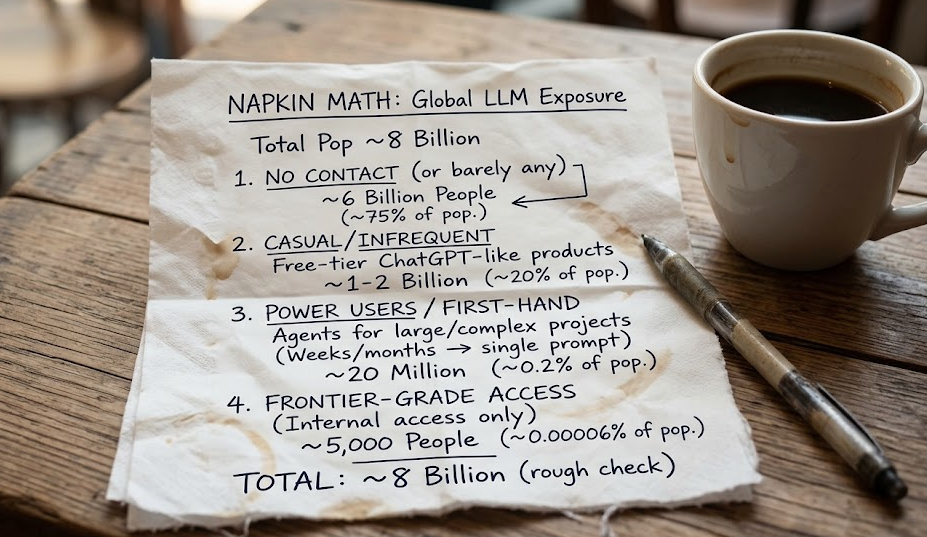
Andrej Karpathy has been pointing at this for months, but his latest framing makes the problem particularly clear: the gap between what people think frontier AI can do and what it can actually do is widening, not closing. He describes a steep capability funnel, with most people near the wide end and a tiny group at the narrow end experiencing something that looks almost like a different technology.

Consider the distribution.

Around six billions people have barely touched AI. Another billion or two use free chat interfaces for search, writing, brainstorming, and the occasional questionable answer. For them, ChatGPT AI is useful, sometimes impressive, but hardly revolutionary.

Then there are roughly 20 million people, many working in technical fields, using paid frontier models and agentic tools on serious, multi-day projects. They are handing agents entire codebases, complex mathematical problems, and substantial research tasks that once required weeks of focused human effort. Increasingly, they return to find much of the work done.

At the very narrow end are perhaps a few thousand people with (free!) access to the latest internal systems. They are experimenting with fleets of agents working for days or weeks on substantial software and research projects, including security-sensitive work such as vulnerability discovery and exploit development.

These numbers should be understood as estimates illustrating the distribution, not a precise census. The important point isn’t whether the boundaries are exactly right. It’s how dramatically the experience changes as you move down the funnel.

And that’s where things get interesting.

Continue reading →
Standard
Business

SOC 2 vs. ISO 27001: Which One Does Your Company Actually Need?

If you are a growing technology company and a customer suddenly asks, “Do you have SOC 2 or ISO 27001?”, it is easy to assume they are basically asking for the same thing.
They are not.
Both frameworks are designed to demonstrate that you take security seriously, both require policies, controls, evidence and ongoing management, and both can become an important part of enterprise sales. But they solve slightly different problems, and choosing the wrong one can mean spending a lot of time and money proving things your customers never actually asked you to prove.

The simplest way to think about it is this: SOC 2 is primarily about demonstrating that your company has effective controls around security and the services you provide, while ISO 27001 is an international standard for establishing and operating an Information Security Management System (ISMS).

SOC 2 is particularly common among U.S.-based SaaS and technology companies selling to other businesses, while ISO 27001 has stronger international recognition and is often preferred or required by larger global organizations and companies operating across multiple regulatory environments.

So which one should you get?
For many U.S. SaaS companies, the answer is SOC 2.

Continue reading →
Standard
AI

The Dependency You Didn’t Choose

AI coding agents are making software supply-chain attacks easier to scale—and harder to notice.
You ask your coding agent to “add relative timestamps to the activity feed.” Forty seconds later, it’s done.

The diff looks clean.
The tests pass.
The feed says “3 minutes ago.”
You skim the component, approve the PR, and merge.
You reviewed the code it wrote.
Hopefully.

But did you review the code it installed?
Probably not.

That innocent-looking line in package.json can introduce an entire dependency tree: someone else’s code, their dependencies, and whatever their installation scripts decide to execute on your machine.

And your machine might have your SSH keys, npm tokens, cloud credentials, and access to production.
In 2026, this isn’t theoretical anymore.

Continue reading →
Standard
Business

Your Insurance Carrier Is Now Your Auditor

Cyber insurance used to be a safety net. In 2026, it’s also a security exam. And the test is no longer optional.

There was a time when buying cyber insurance was simple.
Fill out a questionnaire. Pay the premium. File the PDF somewhere between your business license and that printer manual nobody has opened since 2019.

Then ransomware happened.
And insurers realized something uncomfortable: companies were buying protection against cyberattacks without necessarily doing much to prevent them. So the questions changed.

Welcome to the new underwriting reality

The 2026 underwriting bar is increasingly specific:

  • Over 90% of applications ask detailed MFA questions, including RDP, VPN, cloud, and privileged accounts. SMS-based MFA is increasingly flagged as insufficient.
  • Over 80% of carriers require EDR or MDR across all endpoints.
  • Immutable backups are becoming a hard requirement, not a nice-to-have.
  • Documented proof is replacing checkbox answers. Some renewals now involve independent audits or evidence reviews.

These figures reflect the underwriting picture in our brief; requirements vary by carrier and policy. The message, however, is clear: saying you have security is no longer enough. You need to prove it.

Continue reading →
Standard
webdev

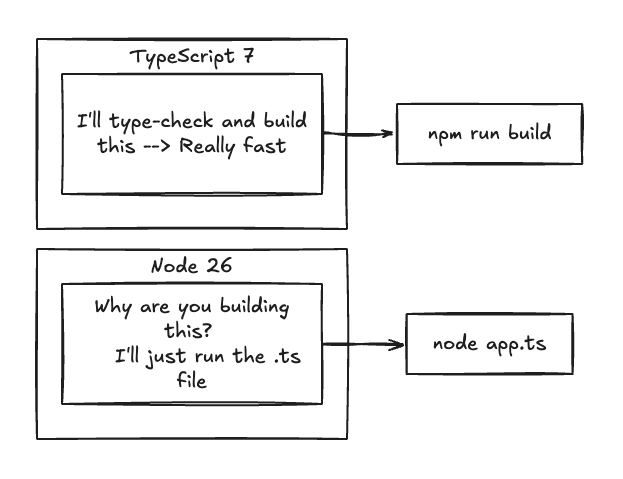
Your 2026 Node + TypeScript Stack Has Two Speed Buttons & They Fight. A little.

There was a time when “TypeScript build” was something you tried to make disappear.

It was slow. It added another tool. It created another dist/ folder. It made stack traces worse. And if all you wanted was to run a 200-line Node script, compiling it first felt like putting on a suit to take out the trash.

So the obvious optimization was: don’t compile TypeScript. Just run it.
In 2026, Node can do exactly that.

Then TypeScript 7 showed up and made the opposite optimization almost as good: just compile it. It’s fast now. Actually fast.
Which leaves us in a slightly funny place.

Your Node + TypeScript stack now has two speed buttons. They are not pointing at the same thing.

The interesting question is not which one is faster.
It’s: when should you use which one?

A short trip down memory lane

I wrote about this before.

Continue reading →
Standard
AI

One Question, Many Minds: What I Learned Building a Multi-LLM Application

A practical follow-up to “The Power of Many”—from a small Ollama experiment to a workbench for comparing local and cloud LLMs.

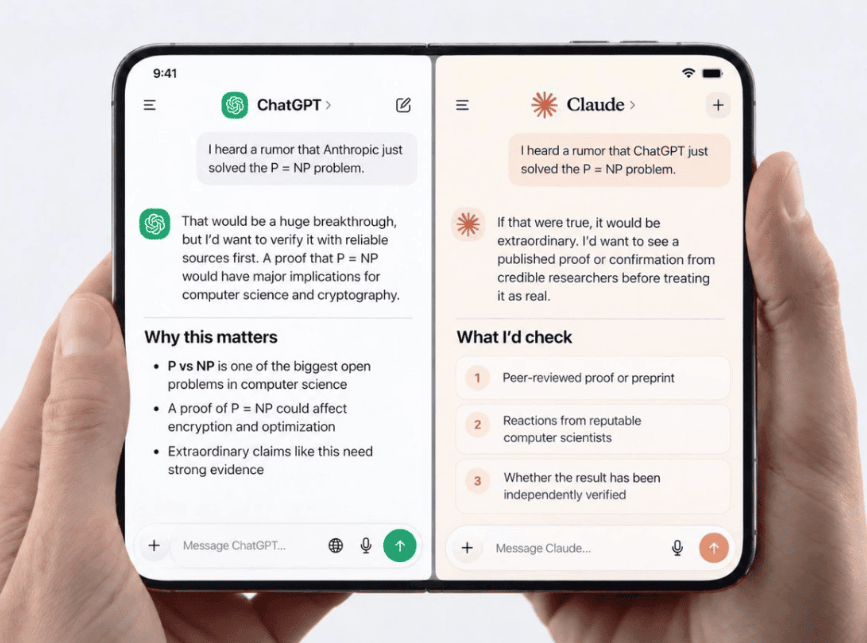
A couple of years ago (2024… but it feels like 217 years ago in the AI world), I wrote about an idea that felt slightly unusual at the time: why settle for one large language model when you can ask several?

The argument was straightforward. Different models have different strengths. One might be better at explaining a tricky concept, another at writing code, and a third at spotting the holes in an otherwise convincing answer. Asking more than one model gives you something a single answer cannot: a comparison.

That was the idea behind my little open-source project, Multi-LLM-at-Once.

The original version was modest. It queried local models through Ollama and displayed their answers together. Useful, but still very much an experiment.

Since then, the experiment has become a rather more serious tool.

The question is no longer “Which model is best?”

This is where I think many of us are asking the wrong question.

Continue reading →
Standard
AI

Your Agents Have Credentials. Nobody Owns Them.

Your company already has hundreds — maybe thousands — of non-human identities.

Service accounts. API keys. Cloud workloads. CI bots. That one “temporary” token from 2023 that is still in a GitHub Actions secret.
And now: AI agents.

Ask one question before you ship the next one:

Who owns its credentials?

Not who built the agent. Not who owns the Slack channel it posts into. Who is accountable for what it can access, what it can do, and when that access should die?

For a lot of companies the honest answer is: nobody.

That’s a problem. An agent is not “just another service account.”

Continue reading →
Standard
JavaScript, webdev

Schedule WhatsApp Messages with wacli Mission Control

Send later, finally

You’re deep in a terminal-based workflow, firing off messages with wacli, and then it hits you: you need to send this at 9am, not right now. So you either wait around, or you lose the moment. Every other headless messaging tool leaves you stuck with that choice.

Not anymore.
Scheduled sends are the headline feature of wacli Mission Control — and honestly, the reason I built it.

The gap it fills

If you’re a developer, power user, or sysadmin, you’ve probably felt the friction of modern desktop messaging apps: memory-hungry, closed to automation, and standing between you and your own data.

CLI tools like wacli solve that — speed, privacy, SQLite storage, full-text search, all from the terminal. But once you’re juggling a dozen active threads, rich media, emoji reactions, and scheduled replies, raw terminal output stops scaling.

So I built a UI for wacli (wacli-ui): a lightweight, high-density, local-first web console for people who want terminal-grade speed and privacy with a UI that doesn’t get in the way — including a proper interface for the send-later queue that started this whole thing.

Why

Most third-party messaging integrations fall into one of two traps:

  1. Cloud-hosted relays that compromise end-to-end privacy by transmitting authentication tokens and message history through remote third-party servers.
  2. Fragile web scrapers that consume gigabytes of RAM and break every time a web layout updates.

wacli Mission Control takes a completely different path:

  • 100% Local-First & Private: Binds exclusively to 127.0.0.1. No external tracking, no cloud telemetry, no proxy relays.
  • Powered by Local SQLite & FTS5: Queries your messages instantly using SQLite’s Full-Text Search index.
  • Safe by Default: Starts in read-only mode with explicit two-step mutation guardrails to prevent accidental dispatches.
  • Zero-Polling Realtime Stream: Uses a supervised background daemon with an HMAC-SHA256 verified webhook listener and real-time WebSockets.

Continue reading →
Standard
AI

Why Code Verification Is the Real Bottleneck Now — and What Developers Should Do About It

For most of software history, writing code was the expensive part.

A developer might spend hours or days implementing a feature, while review was a relatively small step at the end. AI coding tools have quietly flipped that equation. A model can now draft a function in seconds and produce an entire feature in minutes. In other words, producing code become cheap. Way too cheap. But the review (hopefully with human in the loop) is still expensive.

The bottleneck hasn’t disappeared. It has moved.

Today, the scarce resource is increasingly the work that comes after code generation: reading the code, understanding its behavior, testing it, identifying what is wrong, and deciding whether it is safe to ship.

This isn’t simply a matter of perception. Research on AI-assisted development has found that delivery stability can decline as teams adopt more AI, while developer trust in AI-generated code remains far from universal. In one controlled study of experienced open-source developers, AI assistance actually made participants about 19% slower on real-world tasks—even though they expected to be faster and believed afterward that they had been.

The extra time went into prompting, reviewing generated code, debugging it, and fixing things that didn’t quite work.

The lesson isn’t that AI coding tools are bad.
Quite the opposite: they are extremely good at making code cheap.

The problem is that everything downstream of code generation—understanding it, validating it, and trusting it—hasn’t become cheap at the same rate.

That changes where engineering teams need to invest.

Verification Is a Stack of Filters, Not a Single Gate

Code verification isn’t one activity.
It’s a stack of increasingly expensive filters, each designed to catch problems the cheaper layers missed:

  • Type checkers and linters — fast and inexpensive, catching mechanical mistakes and violations of known rules before code runs.
  • Automated tests — validate behavior that static checks cannot. A function can be perfectly typed and still return the wrong answer.
  • Static analysis and security scanning — look for deeper structural, reliability, and security problems that ordinary linters and tests may miss.
  • Human review — evaluates things machines struggle to judge reliably:
    Is this the right design?
    Does it fit the architecture?
    Does it solve the actual problem?
    Will someone be able to maintain it six months from now?
  • Production monitoring — the final safety net, detecting problems that survived everything before it.

These filters fall broadly into two categories.

Continue reading →
Standard