
There was a time when “TypeScript build” was something you tried to make disappear.
It was slow. It added another tool. It created another dist/ folder. It made stack traces worse. And if all you wanted was to run a 200-line Node script, compiling it first felt like putting on a suit to take out the trash.
So the obvious optimization was: don’t compile TypeScript. Just run it.
In 2026, Node can do exactly that.
Then TypeScript 7 showed up and made the opposite optimization almost as good: just compile it. It’s fast now. Actually fast.
Which leaves us in a slightly funny place.
Your Node + TypeScript stack now has two speed buttons. They are not pointing at the same thing.
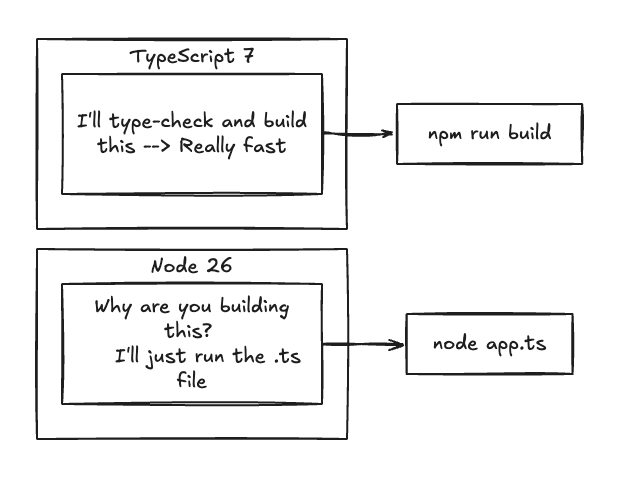
The interesting question is not which one is faster.
It’s: when should you use which one?
A short trip down memory lane
I wrote about this before.
In Speeding Up Node & ReactJS Build Times, I was still talking about the old pipeline: newer Node, caching, parallelization, faster bundlers like esbuild, and making CI do less work.
That was the right conversation then. The equation was:
TypeScript → compiler → JavaScript → bundler → production artifact
If that pipeline was slow, you optimized the pipeline.
I followed it with Optimize Node.js Apps in Production on Ubuntu — squeeze the machine, memory, CPU, processes, caching, deployment. Those posts still have useful bits. The TypeScript part of the story, though, is just different now. Two releases later, some of the assumptions behind the old advice are stale.
Enter TypeScript 7
On July 8, 2026, TypeScript 7.0 shipped.
The big change is not a new type-system trick. It’s the compiler.
TypeScript 7 is a native implementation written in Go. It replaced the old JavaScript-based compiler. Microsoft’s numbers: typical full-build speedups of 8–12x versus TypeScript 6. VS Code, Sentry, Playwright — the large projects — all dropped hard.
VS Code, from Microsoft’s published benchmark:
| TypeScript 6 | TypeScript 7 | |
|---|---|---|
| Full build | 125.7s | 10.6s |
That’s not “a little faster.” That’s a different afternoon.
Editor responsiveness and type-checking get the same native, parallel treatment. Opening a file with errors used to feel like waiting for a kettle. Now it doesn’t.
So one of the classic arguments against TypeScript builds just got weaker:
“I don’t want to wait for TypeScript.”
Fair. Neither does anyone else. You may not have to.
Meanwhile, Node learned to eat TypeScript
Node went the other way.
Modern Node can execute TypeScript directly:
node app.ts
No build step.
What Node does is strip TypeScript syntax and replace it with whitespace. That whitespace trick matters: source locations stay aligned, so stack traces still point at the original .ts line.
Try this:
// hello.tsinterface User { name: string; age: number;}const user: User = { name: "Jack", age: 27};console.log(`Hello ${user.name}`);
Run:
node hello.ts
That’s it.
For a script, a CLI, a migration, a small internal tool — this is how TypeScript should have felt all along.
But there’s a catch. A real one.
Node strips types. It does not type-check your program.
interface User { name: string;}const user: User = { name: 123};console.log(user.name);
Node is happy to erase the annotation and run the leftover JavaScript.
It does not care that 123 is not a string.
Node type stripping ≠ type checking
That’s the line I would tattoo on the inside of every package.json in 2026.
Type stripping makes TypeScript executable. It does not make TypeScript correct.
Which is why this still belongs in CI:
npx tsc --noEmit
Same command as last year.
The compiler just got much faster at saying no.
And now the two approaches start fighting
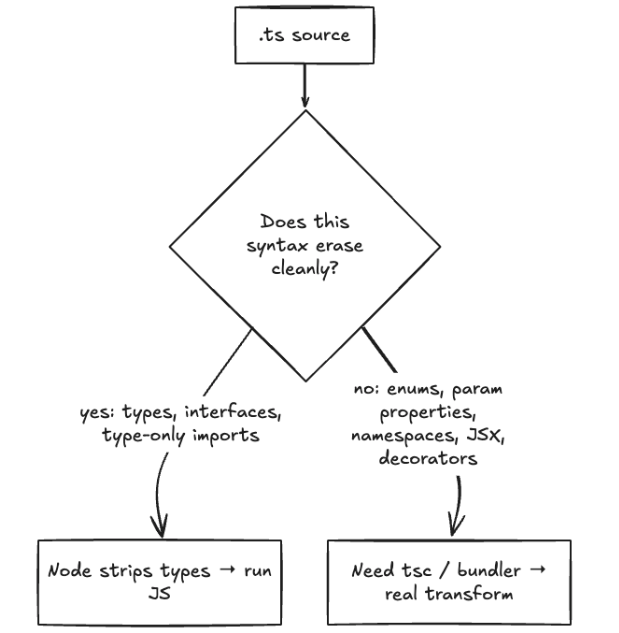
Node’s strategy is conservative on purpose:
If the TypeScript syntax does not change runtime behavior, strip it.
That works for this:
const name: string = "Smith";function add(a: number, b: number): number { return a + b;}
The types vanish. The JavaScript underneath is basically the same.
Some TypeScript features are not just types. They need runtime code.
That’s where Node says: nope.
Traditional enums:
enum Status { Pending, Running, Done}
An enum is not an annotation.
It creates JavaScript. Node’s stripper does not want to invent that JavaScript.
Same story for parameter properties, some namespace patterns, some decorator setups.
Node 26 also removed the old --experimental-transform-types path. The boundary is now explicit: built-in support is lightweight type stripping, not a second TypeScript compiler.
So this:
class User { constructor(public name: string) {}}
is not “delete the types and you’re done.” You need a real transform. That’s tsc, or another TypeScript-aware toolchain.
JSX makes the decision even easier
function Hello() { return <h1>Hello World</h1>;}
Node is not your JSX compiler.
If you’re building React, you already live in a build pipeline. Vite, esbuild, SWC, webpack — something is transforming JSX and usually bundling the app anyway.
Trying to make node app.tsx your entire frontend toolchain is missing the point. Use the tool that already owns that job.
Same thing for published libraries
If you’re shipping my-awesome-library/, consumers usually need:
dist/ index.js index.d.ts
You’re not just running your source. You’re producing artifacts for someone else.
That’s a compiler’s job. Declaration files are another reason tsc stays in the pipeline:
tsc --declaration --emitDeclarationOnly
Node will not generate .d.ts files for your users.
Runtime execution and package production are different problems. Pretending they aren’t is how you ship a library that only works on your machine.
So what should we actually do?
well… Use Node’s native TypeScript for small executable things.
Good candidates:
scripts/- tools
- CLI utilities
- database migrations
- one-off automation
- internal developer tools
- experiments
- small services
// cleanup.tsimport { readdir } from "node:fs/promises";const files = await readdir("./tmp");for (const file of files) { console.log(file);}
node cleanup.ts
Done. No build directory. No ceremony.
Use TypeScript 7 when TypeScript is part of the product.
Reach for tsc when you need:
- type checking
- declaration files
- JSX transformation
- decorators
- runtime TypeScript transforms
- library publishing
- controlled compilation targets
tsconfig-driven behavior
And don’t be scared of the build anymore. A project that used to spend minutes type-checking may now spend seconds.
The sweet spot is both
This is the part that’s easy to miss. You do not have to pick a religion.
Use Node for execution. Use TypeScript for verification.
{ "scripts": { "dev": "node src/index.ts", "check": "tsc --noEmit", "build": "tsc" }}
During development: npm run dev — Node runs the TypeScript.
In CI: npm run check — TypeScript 7 verifies the program.
For a library or a production artifact: npm run build — you get compiled output.
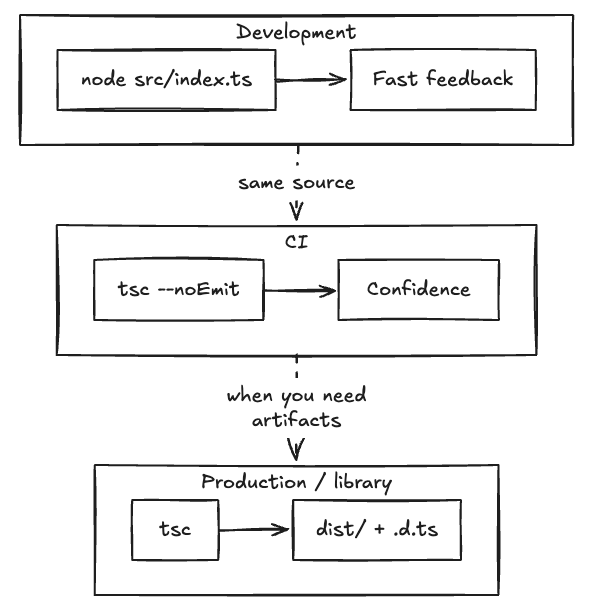
That’s the cleanest architecture I’ve found for this stack in 2026.
Don’t confuse fewer tools with fewer bugs
There’s a recurring instinct:
“If I can kill the build step, I have simplified the application.”
Sometimes that’s true. Sometimes you just moved the complexity into a darker room. Removing tsc does not remove type checking. It means you are no longer doing it before the code runs.
Removing dist/ does not remove the need to know what you are actually shipping.
This is where my old obsession with verification still applies. Fast execution is not verification. Node can tell you: this JavaScript can run. TypeScript can tell you: this program satisfies the types you declared.
Those are different guarantees. You probably want both.
My 2026 Node + TypeScript setup
For a small Node project, I’d start with Node 26 and TypeScript 7. Then keep the scripts deliberately dull:
{ "scripts": { "dev": "node src/index.ts", "check": "tsc --noEmit", "build": "tsc" }}
A few extra flags worth putting in tsconfig.json if you plan to lean on Node’s stripper: erasableSyntaxOnly and verbatimModuleSyntax. They yell at you before Node does, which is the polite order of operations.
If the app doesn’t need compilation, don’t compile it.
If it does, compile it. If you need JSX, decorators, runtime transforms, or .d.ts generation, don’t fight Node’s type stripper. Use the compiler.
And no matter how you execute the code:
tsc --noEmit
belongs in CI.
Because stripping types isn’t type checking. That’s the line I would put above every Node + TypeScript project in 2026.
The build step didn’t disappear. It became optional.
That’s the real change.
In 2025, a TypeScript app generally assumed:
write TS → compile TS → run JS
In 2026 we have another legitimate path:
write TS → run TS
And we also have a dramatically better compiler:
write TS → TypeScript 7 → compile / type-check
The mistake is thinking one makes the other obsolete. They solve different problems.
Node 26 optimizes the path from source to execution. TypeScript 7 optimizes the path from source to confidence and artifacts.
For scripts and tools, I’ll take the first one. For libraries, React apps, and anything that needs a real transform, I’ll take the second.
For anything I actually have to operate in production?
I’ll take both.
Run fast. Build when necessary. And verify the code either way 👊🏽
Discover more from Ido Green
Subscribe to get the latest posts sent to your email.

