JavaScript, webdev

Maybe You Don’t Need a Password Manager

Every young company has a #passwords problem. Someone needs the staging database password, so they paste it into Slack. A few minutes later, that password is sitting in Slack search, notification history, laptop caches, exports, backups, and probably a dozen places nobody thought about.

Then six months later someone asks, “Who had access to that password?”
Good luck answering that.

The obvious answer is: “Use a company password manager.”
And yes, you probably should.

But there is a surprisingly large gap between “Bob pasted the password into Slack” and “Let’s buy another SaaS product, create accounts for everyone, manage licenses, configure policies, train the team, and make this another system everyone has to use.”

That gap is what I wanted to explore.
So I built Secure Share.

Continue reading →
Standard
webdev, php

PHP2Shell: One Vulnerable PHP Server Can Become Your Next Major Security Incident

The vulnerability is in PHP. The real failure may be in your IT operations.

On October 21, 2026, security researchers disclosed two critical vulnerabilities in PHP that can allow an unauthenticated attacker to execute code remotely. Within days, exploitation reports emerged, and CISA added both vulnerabilities to its Known Exploited Vulnerabilities catalog.

The vulnerabilities, tracked as CVE-2026-109618 and CVE-2026-109619, are collectively known as PHP2Shell. Both received a CVSS 4.0 severity score of 9.2. PHP is widely deployed, making the potential attack surface enormous.

This isn’t a theoretical risk to put on next quarter’s security roadmap.
It’s an operational problem that needs attention now.

Why PHP2Shell is different

Most people hear about a vulnerability and immediately ask: Which application is affected?

Continue reading →
Standard
webdev

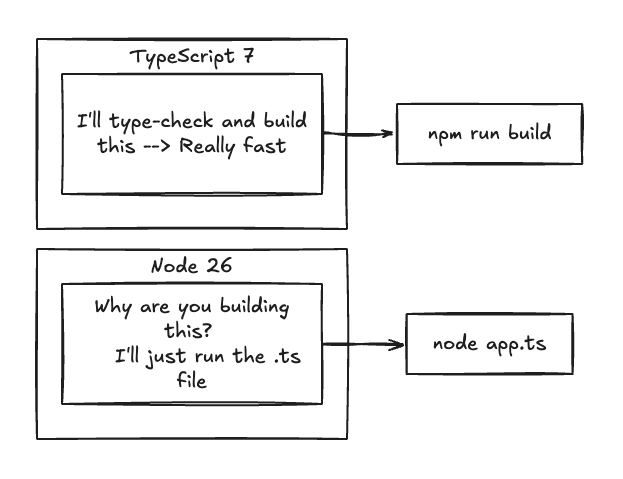
Your 2026 Node + TypeScript Stack Has Two Speed Buttons & They Fight. A little.

There was a time when “TypeScript build” was something you tried to make disappear.

It was slow. It added another tool. It created another dist/ folder. It made stack traces worse. And if all you wanted was to run a 200-line Node script, compiling it first felt like putting on a suit to take out the trash.

So the obvious optimization was: don’t compile TypeScript. Just run it.
In 2026, Node can do exactly that.

Then TypeScript 7 showed up and made the opposite optimization almost as good: just compile it. It’s fast now. Actually fast.
Which leaves us in a slightly funny place.

Your Node + TypeScript stack now has two speed buttons. They are not pointing at the same thing.

The interesting question is not which one is faster.
It’s: when should you use which one?

A short trip down memory lane

I wrote about this before.

Continue reading →
Standard
JavaScript, webdev

Schedule WhatsApp Messages with wacli Mission Control

Send later, finally

You’re deep in a terminal-based workflow, firing off messages with wacli, and then it hits you: you need to send this at 9am, not right now. So you either wait around, or you lose the moment. Every other headless messaging tool leaves you stuck with that choice.

Not anymore.
Scheduled sends are the headline feature of wacli Mission Control — and honestly, the reason I built it.

The gap it fills

If you’re a developer, power user, or sysadmin, you’ve probably felt the friction of modern desktop messaging apps: memory-hungry, closed to automation, and standing between you and your own data.

CLI tools like wacli solve that — speed, privacy, SQLite storage, full-text search, all from the terminal. But once you’re juggling a dozen active threads, rich media, emoji reactions, and scheduled replies, raw terminal output stops scaling.

So I built a UI for wacli (wacli-ui): a lightweight, high-density, local-first web console for people who want terminal-grade speed and privacy with a UI that doesn’t get in the way — including a proper interface for the send-later queue that started this whole thing.

Why

Most third-party messaging integrations fall into one of two traps:

  1. Cloud-hosted relays that compromise end-to-end privacy by transmitting authentication tokens and message history through remote third-party servers.
  2. Fragile web scrapers that consume gigabytes of RAM and break every time a web layout updates.

wacli Mission Control takes a completely different path:

  • 100% Local-First & Private: Binds exclusively to 127.0.0.1. No external tracking, no cloud telemetry, no proxy relays.
  • Powered by Local SQLite & FTS5: Queries your messages instantly using SQLite’s Full-Text Search index.
  • Safe by Default: Starts in read-only mode with explicit two-step mutation guardrails to prevent accidental dispatches.
  • Zero-Polling Realtime Stream: Uses a supervised background daemon with an HMAC-SHA256 verified webhook listener and real-time WebSockets.

Continue reading →
Standard
AI, webdev

Unlocking WhatsApp: Your Local Analytics Dashboard

A few months ago I wrote about building a local analytics dashboard for WhatsApp using the amazing WaCrawl project.
If you haven’t read it yet, start here:

Unlock Your WhatsApp Data with a Local Analytics Dashboard

Since then, the project has evolved dramatically.
It is no longer just a visualization of your messages—it’s becoming a complete analytics platform for understanding years of conversations while keeping every byte on your own computer.

If you’re the kind of person who has accumulated hundreds of thousands (or millions) of WhatsApp messages, you’ll probably discover things about your communication habits that you never noticed before.

Why Another WhatsApp Analytics Tool?

Most messaging analytics products have one major problem:

They require uploading your conversations to someone else’s servers.
That’s a non-starter for most people.

The dashboard follows one simple rule:
Your messages never leave your machine.

The application reads the local SQLite archive produced by WaCrawl and exposes a read-only API that is only accessible from localhost.

Continue reading →
Standard
Five agents collaboratively repairing a complex machine labeled Mega-Device X1 in a futuristic lab filled with tools and monitors.
AI, webdev

5-Agent Framework for Code Audits

I’ve been seeing the same anti-pattern everywhere lately.
Someone opens Cursor, Copilot or Claude and pastes a giant prompt:

Continue reading →
Standard
Tangled cables with floating social media app icons above an e-waste recycling bin
webdev

How to Clean Up Homebrew (brew) and Maximize macOS Storage

At some point, every dev hits it.
You’re installing something routine—npm install, a Go build, whatever—and macOS throws it in your face:

Disk Full.

You check storage, expecting the usual suspects. Not your videos. Not even Docker (okay, maybe a little).
It’s Homebrew quietly eating your SSD in the background.

Left unchecked, Homebrew turns into a museum of bad decisions:

  • tools you needed once, 14 months ago
  • duplicate runtimes “just in case”
  • dependencies of dependencies of dependencies

Let’s fix it—without nuking your setup.

Continue reading →
Standard
JavaScript, webdev

Building PowderCast: The Ultimate Open Source Weather App for Snowboarders 🏂

If you know me, you know I love two things: writing code that solves real problems, and shredding fresh powder.

For years, I’ve been frustrated with generic weather apps. You know the struggle – the app says “partly cloudy and 30°F” for the town near the resort, but when you get to the summit, it’s a whiteout with 50mph gusts and wind-hold on every lift.

The delta between “base village weather” and “summit weather” can be the difference between the best day of your season and a frostbitten disaster.

So, I did what any engineer would do:

I built my own solution: PowderCast.

Continue reading →
Standard
bots, Business, JavaScript

Streamline Engineering Updates with Slack to Notion Bot

There’s been a lot of noise lately about productivity tools and the “perfect” engineering workflow.
Let’s slow down and separate what actually works from what just creates more overhead.

Here’s a boring truth: Slack is incredible for quick, ephemeral communication.
Here’s a less comfortable truth: It is an absolute nightmare as a system of record.

If you lead an engineering team or run a startup, you probably have a #daily-updates or #eod-reports channel.
The theory is sound.

Everyone drops a quick note at the end of the day: what they shipped, what blocked them, what’s next.

But here is what actually happens:

Those updates get posted.
Someone replies with an emoji.
A thread erupts about a weird bug in production.
Someone posts a picture of their dog.

By Friday, when you’re trying to answer a simple question—“What did we actually accomplish this week?”—those reports are buried under a mountain of noise.

You find yourself scrolling endlessly.
It’s exhausting.
And it doesn’t scale. Not to mention that if you will need SOC-2 (and you will 🙂 ) –> you can’t say “we have everything in Slack”

Why not just force everyone into Jira or Linear?

You could.
But engineers hate context-switching just to write a status update.
Slack is where the conversation is happening.
The friction to post there is zero.

The problem isn’t the input. The problem is the storage.

So I (=Gemini+Claude) built a bridge.

Meet the Slack → Notion EOD Sync Bot

I got tired of losing track of momentum, so I wrote a bot that does the tracking for us.

It’s a lightweight NodeJS service that automatically extracts End-of-Day reports from Slack and structures them beautifully in a Notion database.

Continue reading →
Standard
AI, webdev

Maximize Productivity in Your Codebase with gemini-cli

If you’ve ever opened a legacy project and felt your soul briefly leave your body, this one’s for you.

You know the scene:

  • 200k+ lines of code
  • Three architectural “eras” living in the same repo
  • Tests that pass… somehow
  • A PR review queue that feels like airport security

Let’s fix that.

This post is a practical, hands-on guide to using gemini-cli as a serious productivity multiplier — not as a gimmick, not as a toy, but as a real engineering tool you can plug into your daily workflow today. Btw, I’m not ‘with’ Google for many years now… so it’s all my personal thoughts.

By the end, you’ll know exactly how to:

  • Explore massive codebases without losing your mind
  • Refactor safely and confidently
  • Pre-review your own PRs
  • Generate useful tests (not garbage)
  • Debug failures faster
  • Automate repetitive dev work
Continue reading →
Standard