

A few months ago I wrote about building a local analytics dashboard for WhatsApp using the amazing WaCrawl project.
If you haven’t read it yet, start here:
Unlock Your WhatsApp Data with a Local Analytics Dashboard
Since then, the project has evolved dramatically.
It is no longer just a visualization of your messages—it’s becoming a complete analytics platform for understanding years of conversations while keeping every byte on your own computer.
If you’re the kind of person who has accumulated hundreds of thousands (or millions) of WhatsApp messages, you’ll probably discover things about your communication habits that you never noticed before.
Why Another WhatsApp Analytics Tool?
Most messaging analytics products have one major problem:
They require uploading your conversations to someone else’s servers.
That’s a non-starter for most people.
The dashboard follows one simple rule:
Your messages never leave your machine.
The application reads the local SQLite archive produced by WaCrawl and exposes a read-only API that is only accessible from localhost.
No cloud.
No account.
No tracking.
No telemetry.
No AI reading your messages.
Just your data.
Install in One Command
Getting started is now ridiculously easy.
npx wacrawl-dashboard@latest
If your archive lives somewhere else:
WACRAWL_DB=/path/to/wacrawl.db npx wacrawl-dashboard@latest
That’s it.
The dashboard opens automatically in your browser.
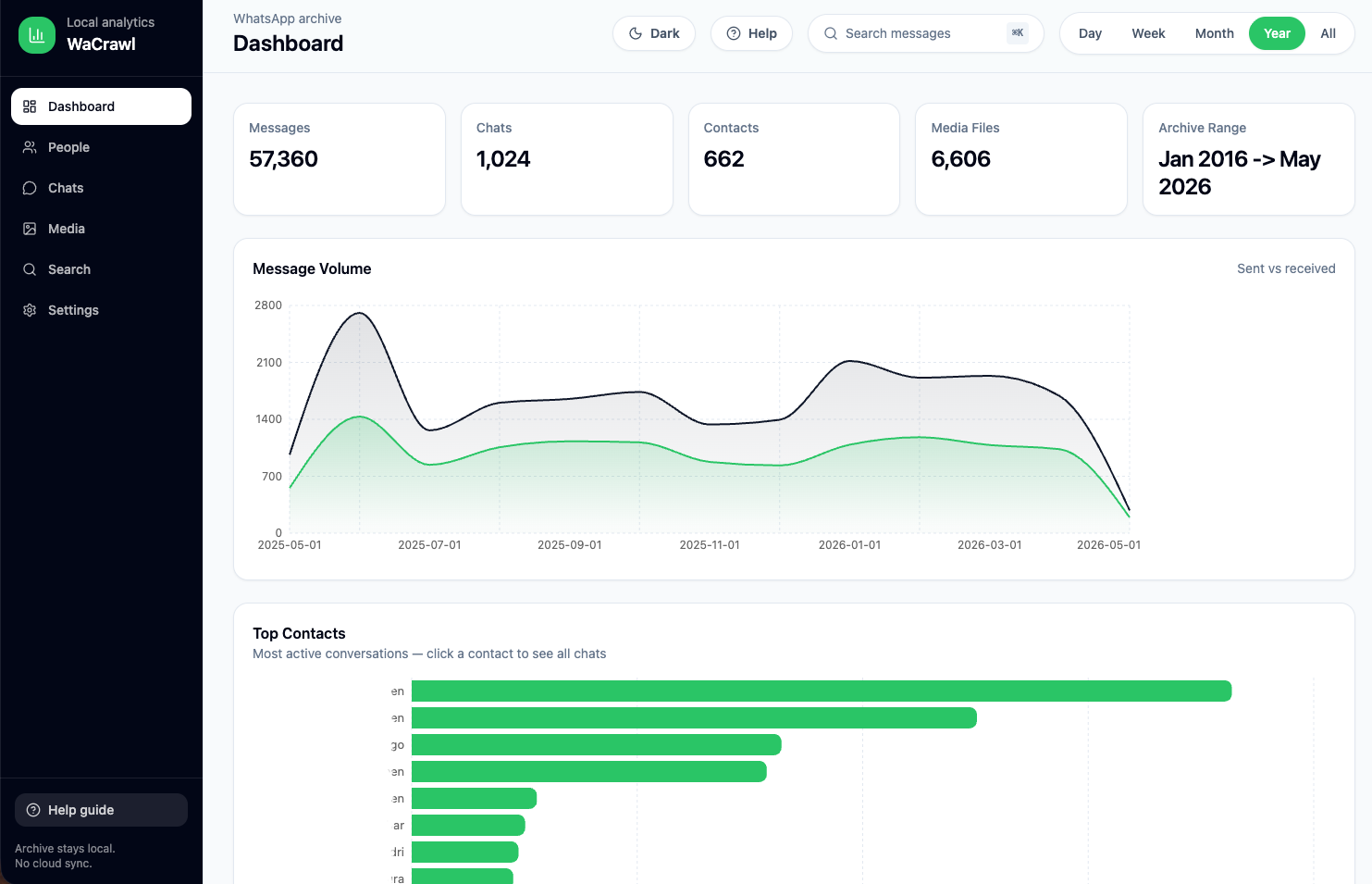
A Dashboard Built for WhatsApp Power Users
The project has grown from a few charts into a comprehensive analytics suite.
Instead of just counting messages, it tries to answer questions like:
- Who do I actually talk to the most?
- Which conversations are growing?
- Which friendships are fading?
- Who always starts conversations?
- How quickly do people reply?
- Which emojis define each relationship?
- What links get shared the most?
- What time of day am I most active?
- Which groups dominate my attention?
These are surprisingly difficult questions to answer manually—even if you’ve been using WhatsApp for ten years.
Conversation Dynamics
This is probably my favorite addition.
The dashboard now analyzes relationships rather than just message counts.
It includes:
- Who usually starts conversations
- Average conversation depth
- Ghost score (messages that never received a reply)
- Late-night conversations
- Relationship trajectory over time
Instead of only seeing how much you talk to someone, you start seeing how your relationship changes over months and years.
Emoji Intelligence
Emoji usage turns out to be surprisingly interesting.
The dashboard now tracks:
- Most-used emojis
- Sent vs received emojis
- Unique emoji count
- Favorite emoji per contact
- Biggest emoji users
It’s a fun feature—but it also reveals communication styles across different people and groups.
Link Intelligence
One of the newest features analyzes every URL shared in your archive.
Instead of browsing thousands of links manually, you get:
- Most shared domains
- Link categories
- News vs social vs video vs shopping
- Timeline of shared content
- Domain leaderboards
- Per-person sharing patterns
You quickly discover who constantly sends YouTube videos, who shares technical articles, and who only sends shopping links.
Full-Text Search That Is Actually Fast
Searching years of WhatsApp history shouldn’t feel slow.
The dashboard uses SQLite FTS5 to provide fast full-text search across:
- Messages
- Sender names
- Chat names
Search results include context, media previews, copy support, and link detection.
After syncing new messages, simply rebuild the search index:
npm run optimize-db -w @wacrawl/api
Media Explorer
Finding an old image from three years ago is usually impossible inside WhatsApp.
The Media section makes it much easier.
Browse:
- Photos
- Videos
- Audio
- Documents
with thumbnails, previews, infinite scrolling, and a built-in lightbox.
People Analytics
The People page ranks every contact by activity and includes:
- Total messages
- Sent vs received
- Media exchanged
- Last interaction
- Conversation volume
It quickly answers questions like:
- Who do I message every day?
- Which contacts have gone quiet?
- Which conversations dominate my archive?
Keyboard Shortcuts Everywhere
Power users love keyboard shortcuts.
The dashboard supports:
- ⌘+K → Search
- ⌘+1 Dashboard
- ⌘+2 People
- ⌘+3 Chats
- ⌘+4 Media
- ⌘+5 Search
- ⌘+6 Settings
Dark mode and light mode are included as well.
Privacy Was the First Feature
Many analytics tools talk about privacy.
This project was designed around it.
The API:
- runs only on
127.0.0.1 - opens the database in read-only mode
- never modifies your archive
- never uploads messages
- never requires authentication because nothing leaves localhost
You stay in complete control of your data.
Open Source
Everything is open source.
That means you can:
- inspect the code
- contribute features
- customize analytics
- build your own visualizations
- extend the API
If you’ve ever wanted to explore your own communication patterns, this is a fun project to hack on.
What’s Next?
I have a long wishlist, including:
- AI-powered conversation summaries (fully local)
- Semantic search
- Topic clustering
- Communication health scoring
- Timeline replay
- Cross-year comparisons
- Exportable reports
- More relationship analytics
If you have ideas, feel free to open an issue or contribute.
Final Thoughts
Most of us have accumulated years of conversations containing memories, decisions, travel plans, technical discussions, jokes, photos, and friendships.
They’re one of the richest personal datasets we own.
The goal of this project is simple:
Give people powerful ways to explore that data without giving up their privacy.
If you’re a WhatsApp power user, give it a try.
You may be surprised by what your own conversations reveal.
Discover more from Ido Green
Subscribe to get the latest posts sent to your email.

