A glowing app icon launching from a futuristic digital cube platform with sparks and fragments
AI, Business, cloud

Migrating from Lovable: Steps to Self-Host Your App

Lovable is a remarkable product.
You describe what you want. It builds it. You ship in hours instead of weeks.
That’s genuinely impressive, and I’ve used it to launch things I would have otherwise shelved for “when I have more time.”

But “when I have more time” eventually arrives.

And when it does, you start asking different questions:

“What happens if they change pricing?”
“Can I run this on my own infrastructure?”
“Where exactly does my data live?”

Those aren’t paranoid questions. They’re the right questions.
This post is about answering them — practically, with actual steps you can follow.

Continue reading
Standard
AI, Business

Building a CMMC Readiness Calculator That People Can Actually Finish

Most compliance tools look great in screenshots.

Far fewer are useful on a random Tuesday afternoon when someone in operations, IT, or leadership is trying to answer a simple question:

“How ready are we, really?”

That’s the problem we set out to solve.

Not certification.
Not auditing.
Not replacing consultants.

Just helping defense contractors get a realistic picture of their CMMC readiness before investing weeks of meetings, spreadsheets, and assessment calls.

The result is a simple CMMC Readiness Calculator that turns a short questionnaire into:

  • an estimated readiness score
  • an estimated SPRS score
  • a count of missing or partially implemented controls
  • a three-year compliance cost projection
  • a comparison between traditional and managed compliance approaches

Nothing magical.
Just useful.

Continue reading
Standard
Sport

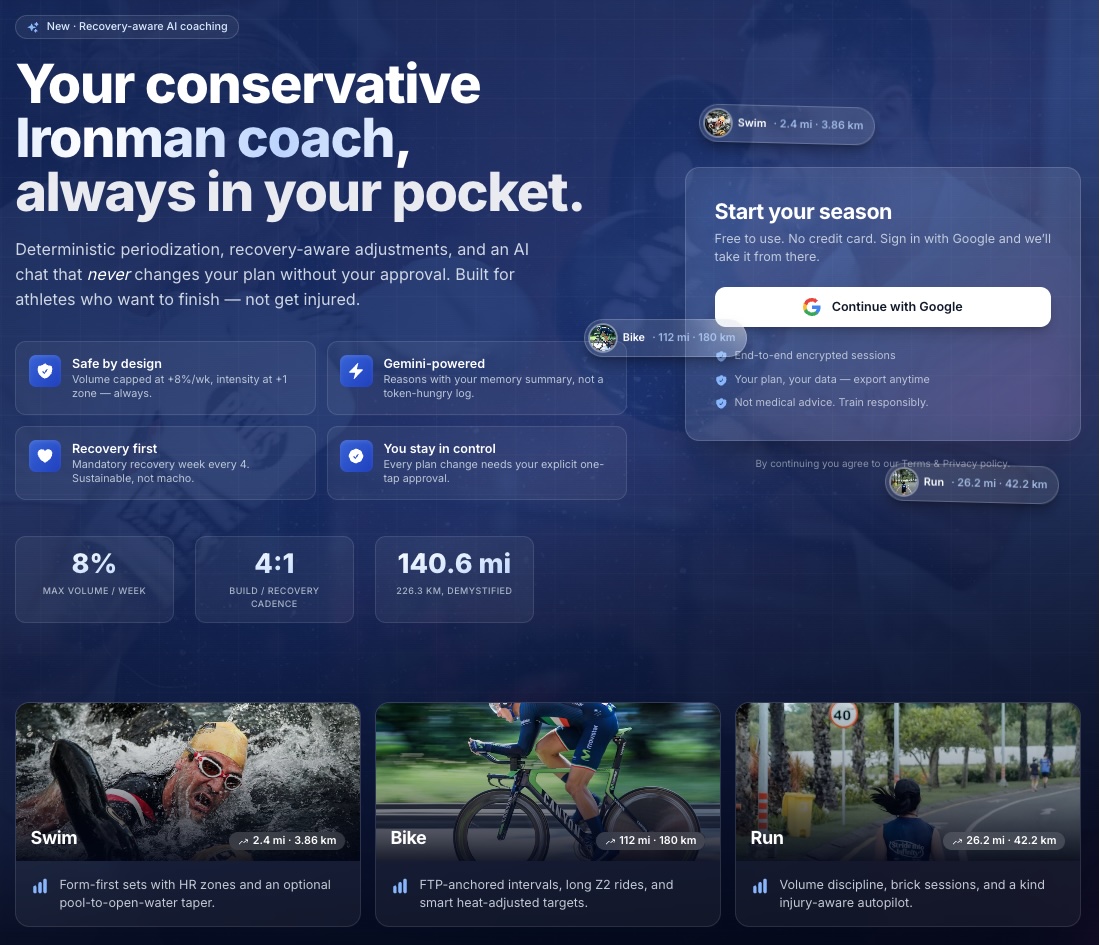
Train Smarter for Your Ironman with EnduraCoach — The AI Companion That Actually Delivers

A few months ago, I finished a long ride—just over 100 miles, solid climbing, felt strong the entire way. The kind of session that makes you think, I’m on track.

The next week, I pushed again. Then again.

Nothing dramatic—just a bit more volume, a bit more intensity. Exactly what most self-coached athletes do when things feel good.

Two weeks later, I was flat. Not injured. Not sick. Just… off. Power was down, runs felt heavy, motivation dipped. The frustrating kind of fatigue where nothing is clearly wrong—but nothing is clearly right either.

When I looked back, the pattern was obvious:

  • I had increased load too quickly
  • Skipped a proper recovery week
  • Let “feeling good” override structure

What’s worse: all the data was there.
Garmin had it.
The workouts were logged.
The signals existed.

I just didn’t have a system that could connect the dots, enforce discipline, and still adapt intelligently.

That’s the gap.

Most tools today fall into two extremes:

  • Static plans that ignore what you actually did
  • “AI coaching” that sounds smart but you can’t really trust

I wanted something in between:

A system that keeps me honest on the fundamentals—while still helping me think, adapt, and improve.

That’s where EnduraCoach started.

Continue reading
Standard
life, Sport

Optimize Your Murph Challenge Experience with This Tracker

The Murph Challenge isn’t a workout.
It’s a systems failure conducted at heart-rate redline.

If you’ve ever tried to remember whether you’re on rep 183 or 193 of squats while your lungs are filing a formal complaint, you already know: human memory is not a reliable datastore under load.

So I built a Murph tracker that does exactly one job well—count reps—while I focus on the important things, like not dying.

🎖️ What is Murph (and why people keep doing it)

The Murph Challenge is performed on Memorial Day to honor Lt. Michael P. Murphy, a Navy SEAL killed in Afghanistan in 2005.

It was his favorite workout. Originally named “Body Armor”, which feels accurate in the same way “production incident” feels accurate.

The canonical version:

  • 1 mile run
  • 100 pull-ups
  • 200 push-ups
  • 300 squats
  • 1 mile run

Optional difficulty modifier: wear a 20 lb vest and rethink your life choices.

Continue reading
Standard
Chrome, JavaScript, webdev

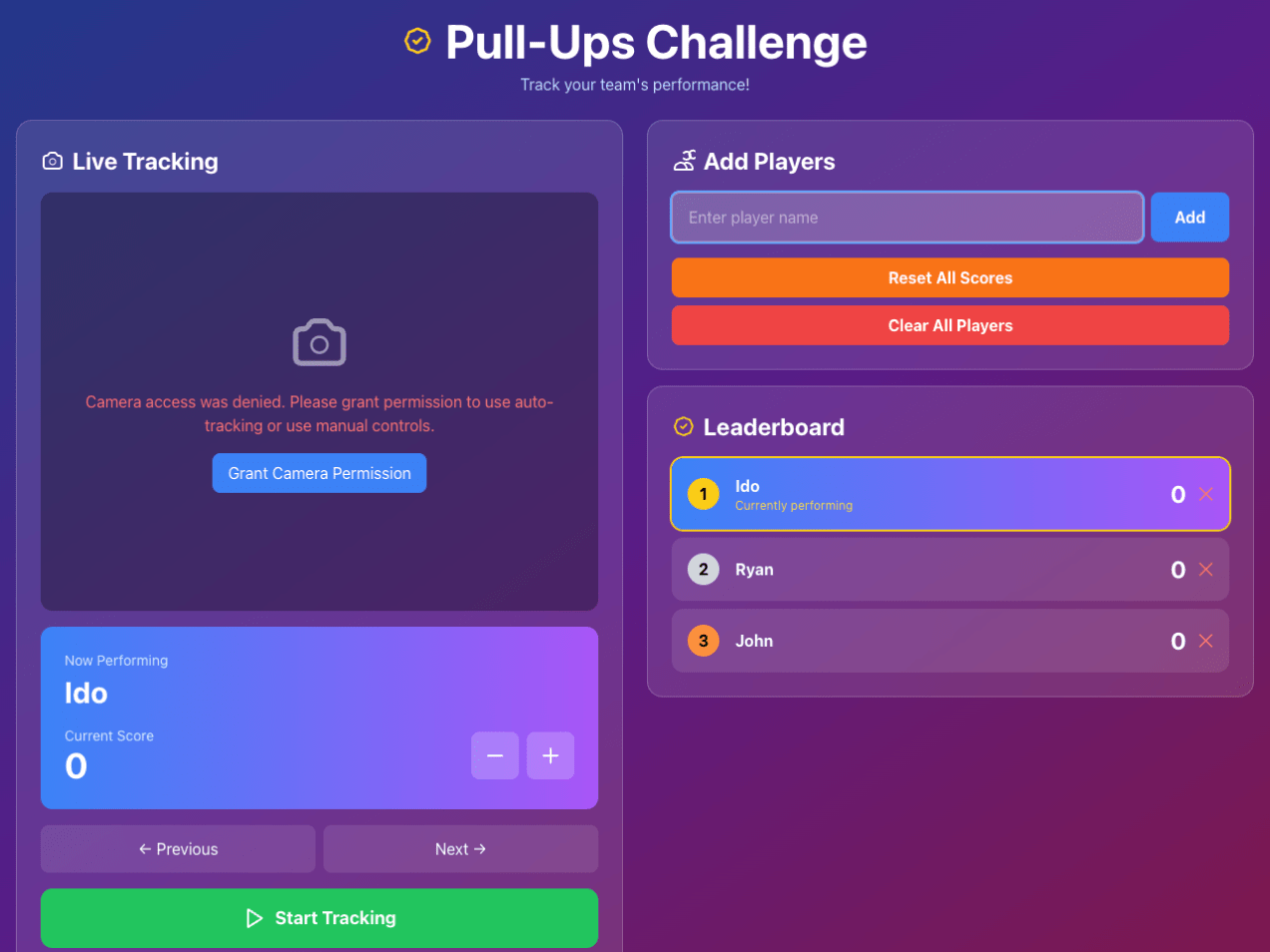
Building a Real-Time Pull-Up Tracker: How I Taught The Browser to Count Our Pain

It started as a simple idea my son brought up: Can we make a web app that counts our pull-ups during our pull-up games?

Turns out, teaching a machine to recognize human suffering is both hilarious and complicated.
What began as a “let’s make a quick pull-ups app” spiraled into an intense journey through computer vision, browser quirks, and a few accidental infinite loops that made our laptop sound like a jet engine.

The “Simple” Goal

I wanted to automatically count pull-ups using a web camera.

Easy, right?

Just detect a human, see when they go up and down, and count.

Continue reading
Standard
life, Sport

Weather 4 Bike: From Forecasts to Ride Decisions

Why

Most weather apps just tell you the numbers—temperature, wind, UV, etc.—but as cyclists, we need to know what those numbers mean for the ride.

Weather 4 Bike bridges that gap: it translates raw weather forecasts into clear, activity-aware guidance for road, gravel, and MTB. With one glance, you know whether to head out, wait, or change routes.

Continue reading
Standard
Chrome, HTML5, JavaScript, webdev

HTML5 APIs At Google Developer Group Haifa (Hebrew)

html5-cakeIt was the first meeting of GDG Haifa at the technion. I gave the first talk about HTML5 (new) APIs that front-end developers should leverage. It was a good kick-off event and it seems that this group will produce many more quality events. You can check the demos and the slide at my project site.
Enjoy.

Continue reading

Standard
Chrome, HTML5, JavaScript, mobile, webdev

Building Better Mobile Web Apps

When we thinking on web apps and specially mobile web apps, we wish to make them smooth a responsive as possiable. The main problem is latency/network and luckily we have enough APIs in HTML5 to make sure we can achieve this goal. A good recent example is fastbook (yep… just like facebook but working FAST with HTML5). Here I’ll summaries some of the main points you wish to pay attention when you building your next amazing mobile web app. Start with ‘offline first’ (after all, you are on the right path with ‘mobile first’ already).

Coding

Offline First

  • You should store all the main assets of your application. There are several APIs you can use:
    • AppCache – for the main index.html page and all your JS, CSS code. You could also use it for images and other static data.
    • Filesystem – You have an option to work with files: text and binary data. This is a great option for cases where you have a lot of images/mp3/videos etc’. In order to manage the work with files there is a great library – filer.js
    • Storing state/data:
Standard
Chrome

The New Chromebook And New DevTools Tips

Let’s start with some cool features you should use in Chrome DevTools:

  • Device emulation – You can set a new User Agent so your web app will think you are now access it from a mobile phone/tablet etc’. This is a great feature that used to be something you needed to use a Chrome extension in order to have.
  • Dimension overriding – This is very cool because it let developers debug mobile web apps on different devices and operating systems via the Settings Menu. You can emulate the exact device metrics of many devices (e.g. iPad/iPhone, Galaxy Nexus/Tablets and even BB) so your media queries will run without any bugs.
  • Touch event emulation to make it easier to debug mobile applications on the desktop. Of course, you can have other simulators (e.g. Android and iOS) but here you have it inside Chrome!
  • If you wish to play with the latest and greatest features that are under ‘experiments’. You should go to: chrome://flags/ and click ‘Enable’ on: ‘Enable Developer Tools experiments’ then in the setting panels of the devtools you will have more granular control on the specific feature you wish to use. For more checkout the official page of chrome developer tools.

You can watch the 10min episode on our GDL-IL page.

As you all know, last week we had the launch of the new Chromebook for everyone. I’m really existed about this new device because it’s a combination of cheaper (249$ on amazon), better (lots of improvements + important security capabilities), faster (well, lighter). Some of the interesting specs are:

  • 11.6’’ screen
  • 0.7 inches / 2.42 pounds
  • 6.5 hours of battery (I had it running for more then 8h – but maybe, it because I was working mostly with email/docs and cloud 9 and not watching movies).
  • Boots up in less than 10 seconds
  • 100 GB of Google Drive free for 2 years – Yep, 100G.

You can test the water with it on several locations in the US (e.g Best Buy) and ‘feel’ it. I can say that in the past months I’ve worked with a very close model and it was a great device. If you ‘live’ in the cloud and do not need photoshop (like 99% of the internet users) it might be a device you want to checkout. As web developers, if you are using a cloud IDE (e.g. like one from this list) It might be very good option.

The Chromebook for everyone

Compare the new device to his ‘older’ brother

I had an urge to do the same video but then I’m notice this one… so here you go. It’s cover the major differences in terms of the hardware. As for the OS and the new features in Chrome… It’s the same (of course).

Standard
Chrome, HTML5, JavaScript, php

Java Posse Podcast Episode On Great Web Apps

In the last Java Posse Roundup (=the best unconference you can attend) we had many very interesting meetings. In this one hour conversation we were talking about modern great web apps and what does it means to different developers. Some of the topics we spoke about where around new JavaScript MV* frameworks (ember, backbone, spine, angular etc’). What we used to do 35 years ago (main frames days!) and what is similar (or not) today. Thanks to @joelneely for correcting me with the title by making a great point on replacing the word ‘modern’ with ‘great’. Some of the topics that were discussed:

Since we had no-snow and free time, we did few ‘rolling’ hackathons in the afternoons. You can browse the coding projects on GitHub JavaPosseRoundup. Checkout, some cool Scala, Android, HTML5 apps that are there. Lastly, I also gave a talk about this topic before the conference at a Google developer meetup. Here are the “Modern Web Apps slides from my talk that contain more good information about the subject.

Standard