You know that feeling. It’s Friday afternoon. The sun is shining (or the rain is pouring, depending on where you live), and your team has just wrapped up a sprint. You’ve deployed code, fixed bugs, and maybe even sneaked in a feature or two. You’re ready to close your laptop and grab a cold beverage.
But wait. A Slack notification pops up.
“Hey, can you send out the release notes?”
The dread sets in. You open GitHub. You scroll through the closed Pull Requests. “Fix typo,” “Update dependency,” “WIP,” “Revert ‘WIP’,” “Actually fix the thing,” “Merge branch ‘main’ into ‘feature/fix-typo’.” It’s a mess. Organizing this into something your manager (or your users) can actually read is a task that sucks the soul right out of your weekend.
Meet the “Release Notes Generator”
I built a tool—let’s call it Release-Relay. It’s a CLI tool that does the heavy lifting for you. It connects to your GitHub repository, grabs all the merged PRs between two dates, and turns them into a beautiful, structured Markdown report.
But it’s not just a git log dump. Oh no, we have standards here.
Here’s a boring truth: Cybersecurity and Infrastructure Security Agency publishes critical cybersecurity advisories.
Here’s a less comfortable truth: Most teams never check them.
CISA maintains the Known Exploited Vulnerabilities (KEV) catalog. These are not “theoretical risk under certain lab conditions” bugs. These are vulnerabilities attackers are actively exploiting in the wild, right now, against real systems.
When something lands in KEV, it’s not a polite suggestion. It’s a flare in the sky that says: patch this, or prepare for visitors.
And yet—no one wakes up thinking, “Before coffee, let me refresh a federal website.”
We’re building product. We’re shipping features. We’re arguing in Slack. We’re trying to remember where that one Terraform variable is defined.
This post is a sort of TL;DR about OpenClaw –> What it is, why it matters, and how to integrate it into real workflows
OpenClaw is an open-source AI agent framework that enables you to build conversational and automated systems running on your own infrastructure. Unlike typical “chatbot SDKs,” OpenClaw turns large language models into agents that do real work — handling messages, executing workflows, and integrating with tools and APIs.
For web developers, this opens up a new category of integrations: intelligent assistants embedded into your app, autonomous workflows triggered via REST or webhooks, and programmable bots that connect multiple systems.
“with great power comes great responsibility”
What OpenClaw Actually Is
At its core, OpenClaw consists of these components:
Agent Core – orchestrates conversation state and skill invocation.
Channels – adapters that connect your agent to messaging platforms (Telegram, WhatsApp, Slack, SMS, browser UIs, REST endpoints).
Skill Engine – modular plugins that define actionable logic (e.g. work in your browser with your permissions, read email, fetch data, run a workflow).
Sandbox – a safe execution environment for custom code. Start with it and move slowly to allow it more permissions (OpenClaw)
Importantly for developers: OpenClaw is model-agnostic — you choose the LLM provider (OpenAI, Claude, or self-hosted models). It’s also fully open source (MIT), so you can extend and embed it in your deployments without vendor lock-in.
For the past few years (2024, 2022, 2019, 2018, 2017, 2016, 2015, 2014, 2013), I’ve wrapped up the year by summarizing books and sports events—running, biking, gravel fun/suffering, and other questionable life choices.
2025 is no different. Except it kind of is, because this was the year AI stopped being “the future” and the world become more (and more) crazy by the minute.
Let’s start with the books.
Books That Made Me Think
Clean Code – Robert C. Martin Yes, I re-read it. Again. Apparently I still need to be reminded on many good aspects of ‘clean’ code. Uncle Bob remains annoyingly correct.
Murakami – What I Talk About When I Talk About Running I wrote about this one earlier this year. It’s not really about running. It’s about showing up, embracing boredom, and quietly grinding forward. Which is also the most accurate description of debugging production on a Friday afternoon.
The Psychology of Human Misjudgment – Charlie Munger I summarized Munger’s lessons this year. The man spent nearly a century documenting all the creative ways humans confidently shoot themselves in the foot. Smart people don’t avoid mistakes—we just build better stories around them.
Range: Why Generalists Triumph in a Specialized World – David Epstein Turns out being “kind of good at many things” isn’t a flaw—it’s a survival strategy. Epstein makes a compelling case that breadth wins in messy, unpredictable systems. Which explains both modern tech careers and the contents of my garage.
Project Hail Mary – Andy Weir A man, a spaceship, impossible physics problems, duct tape, and an alien who communicates via jazz hands and math. Pure joy. If The Martian made you happy, this one will make you irresponsible with sleep.
The Year on Two Wheels (And Two Feet)
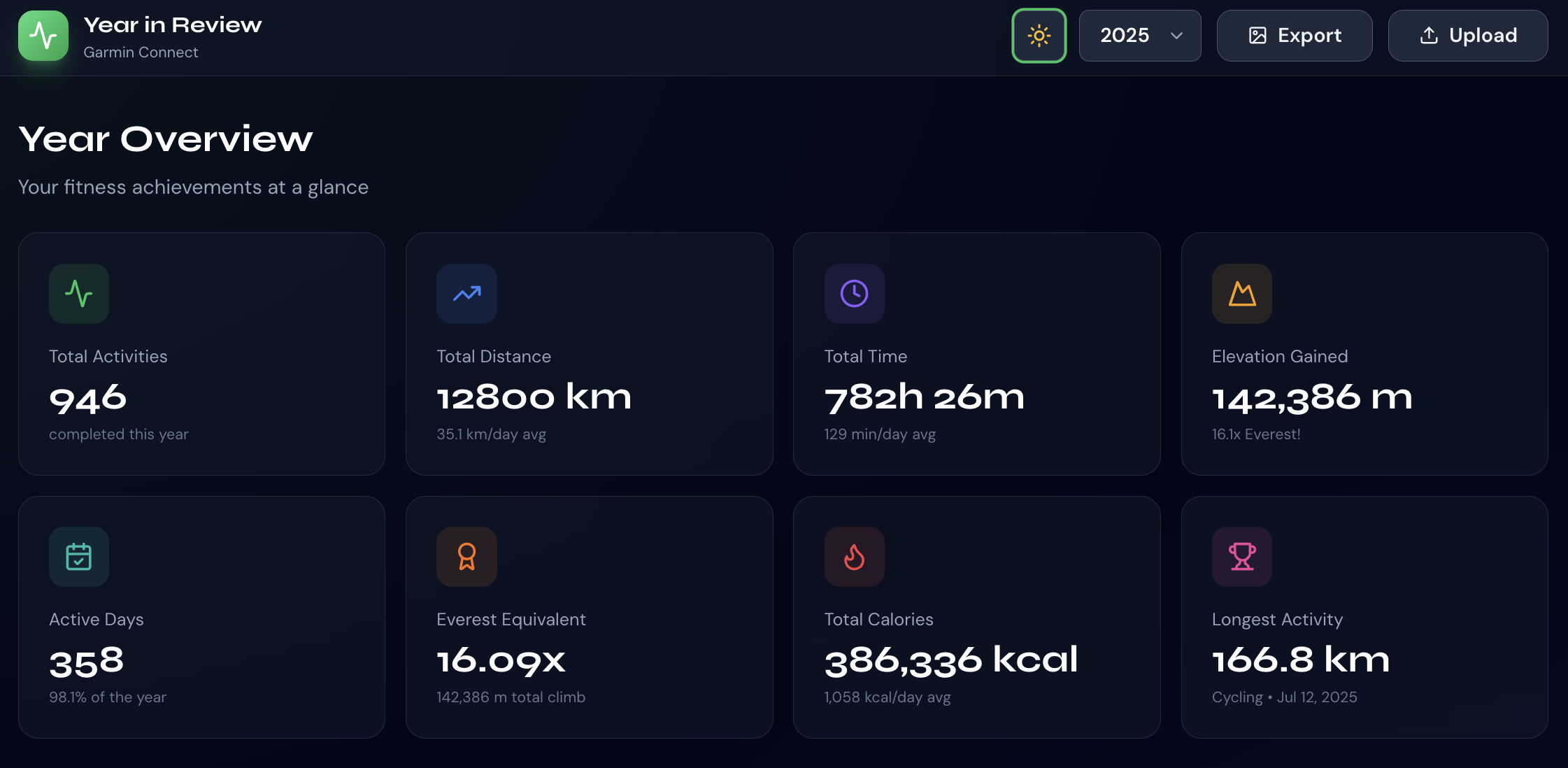
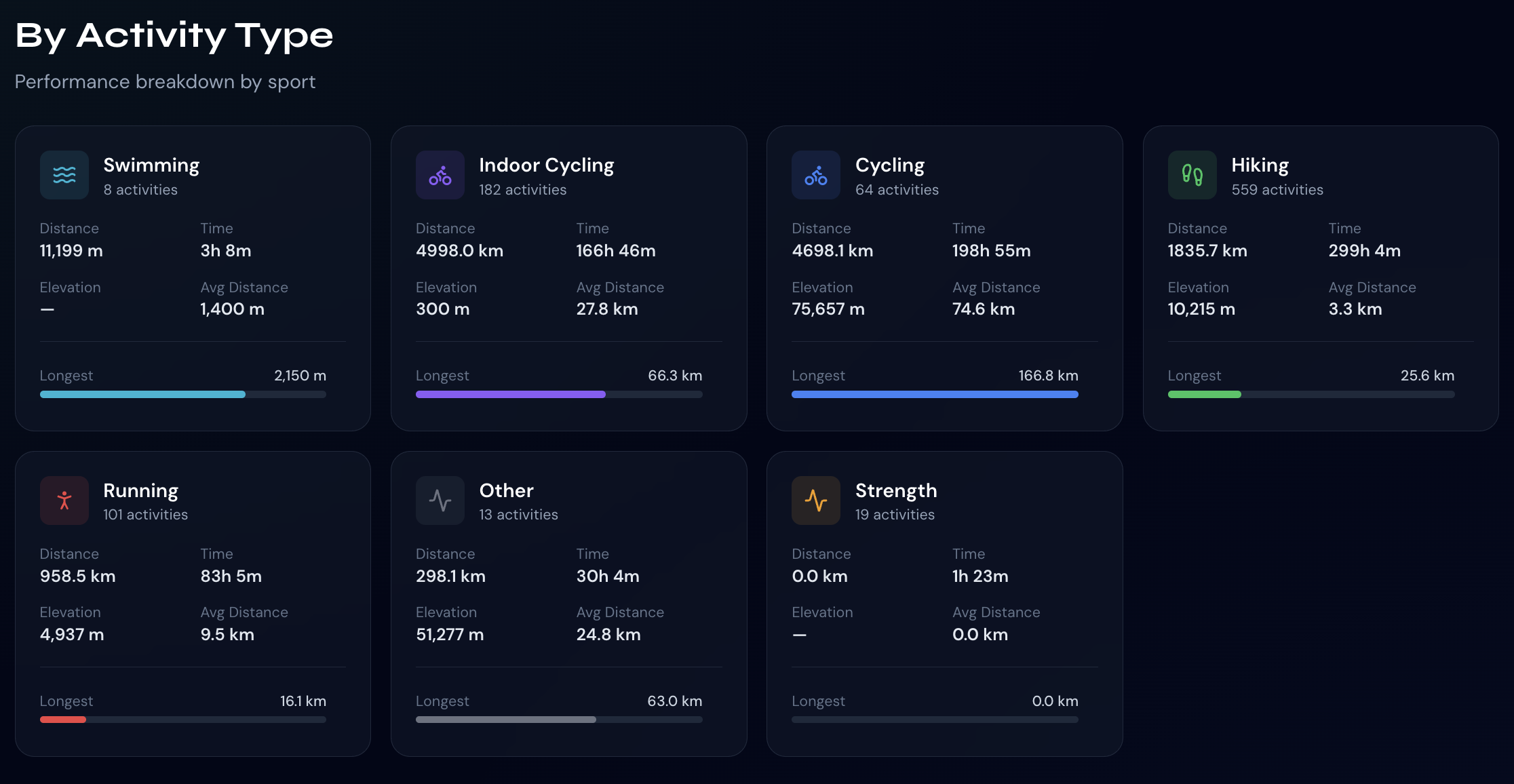
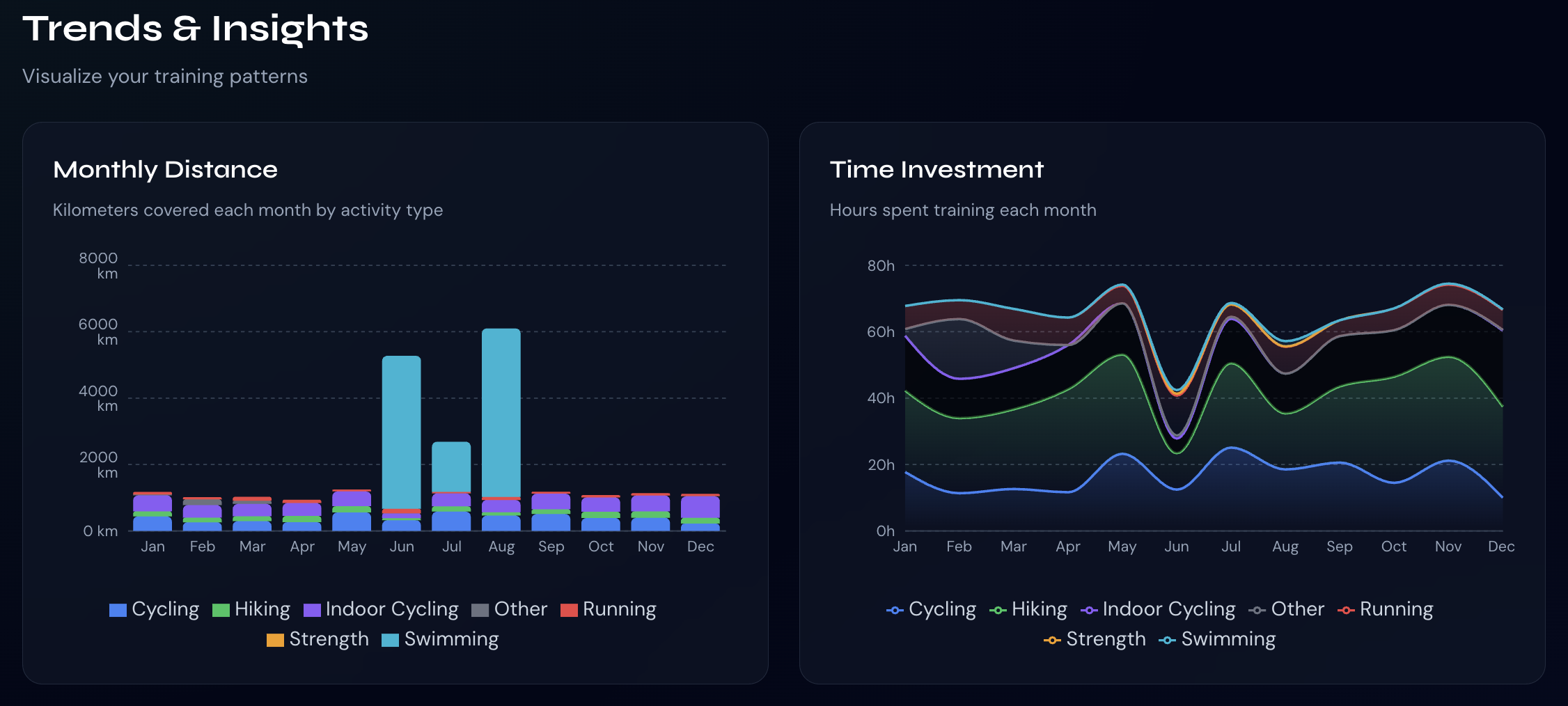
2025 was the year I finally admitted that gravel racing is just mountain biking for people who think they’re still road cyclists. 2025 was not about dabbling. It was about distance, stubbornness, and rides long enough to require negotiations with your own legs. According to Strava, my idea of “a good day on the bike” is apparently anything north of 120 miles.
Here are some numbers
And next are the top 5 rides of the year, ranked by pure, unapologetic mileage:
1. California Death Ride (a.k.a. “Let’s See What Breaks”)
166.8 miles · 8h05m · 4,350 m climbing This was the big one. Alpine County served up altitude, endless climbing, and the kind of fatigue that makes basic arithmetic difficult. Long, brutal, beautiful—and exactly as advertised. Legs emptied. Brain quiet. Highly recommended if you enjoy earning your recovery week.
2. Marin County Mega Ride
161.5 miles · 5h32m · ~2,000 m climbing Fast, flowy, and just enough climbing to keep things honest. One of those rides where everything clicks, the weather cooperates, and you start making wildly optimistic plans for the rest of the season. Dangerous mindset. Great day.
3. Three Lakes to Morgan Hill (Because One Lake Is Never Enough)
134.7 miles · 5h05m · ~1,500 m climbing Long, steady, and sneaky-hard. The kind of ride that doesn’t feel epic until mile 110, when your legs quietly file a complaint. Classic endurance builder. Zero regrets. Some soreness.
4. Old La Honda to Half Moon Bay and Back
126.2 miles · 4h48m · ~1,850 m climbing A greatest-hits tour of local suffering. OLH never disappoints, Half Moon Bay always lies about the wind, and the ride home is where humility is restored. Did this voluntarily just for a good espresso. Would do it again.
5. Windy Hill + Butano (Name Checks Out)
121.2 miles · 5h19m · ~2,300 m climbing Rolling climbs, long stretches of solitude, and enough elevation to remind you that “endurance ride” is just code for “extended negotiation with gravity.”
The Pattern (In Case It Wasn’t Obvious)
Lots of long days
Serious climbing
A recurring belief that anything under 120 miles is “kind of short”
Strava confirms what I already suspected: 2025 was about volume, consistency, and seeing how far you can go before snacks become critical infrastructure.
The pain faded but the data remained.
I also finally nailed my race week taper strategy. The secret is doing less while eating more. Years of preparation paid off.
It started as “I’m tired of losing recipes in browser tabs” and escalated into a full-stack AI-powered cooking platform. React, Prisma, Node.js, OpenAI—and long philosophical debates with Cursor about database schemas at 1 a.m.
It now helps people manage recipes, generate new ones, and stop Googling “easy chicken recipe” for the 47th time. My family uses it – so that’s already a win.
The pattern is clear: AI is incredibly useful—as long as you treat it like a very confident intern who occasionally hallucinates entire APIs.
Security Became Personal
I got strangely passionate about password security and MFA/passkeys this year. Mainly, after seeing some friends being hacked by some (really) bad actors. It’s far from being fun and with a few simple steps you can remove ~90% of the attackers. The TL;DR: * Turn on MFA. * Use a password manager. * Stop trusting your memory from 2014. Seeing “password123” still alive in 2025 does emotional damage.
The Pull-Up Counter That Actually Worked
My son asked, “Can we build something that counts our pull-ups?”
So we did. A real-time pull-up tracker using TensorFlow.js and a webcam. Teaching a machine to recognize human suffering was harder than expected—but now we have data-driven trash talk.
Because if it’s not measured, did it even hurt?
Things I Learned (The Hard Way)
Focus beats options. You can’t cross a canyon in two jumps. This applies to startups, training plans, and side projects that “just need one more feature.”
Charlie Munger was right. Especially about how intelligence doesn’t protect you from bad decisions—it just helps you justify them.
Great teams scale via systems, not heroics.Google, Facebook, Netflix all figured this out. Burnout is not a strategy.
Tapering is a skill. Your brain will beg for “just one more hard session.” It is lying.
AI coding tools are magic—until they aren’t. Then you lose 30 minutes debugging code that confidently imports a library from an alternate universe.
Looking Ahead
2026 will probably look similar. More books. More miles. More yelling at AI. Definitely more coffee—especially since I wrote a guide on dialing in espresso.
If you made it this far, thanks for reading. Here’s to another year of breaking things, building things, and occasionally fixing the things we broke.
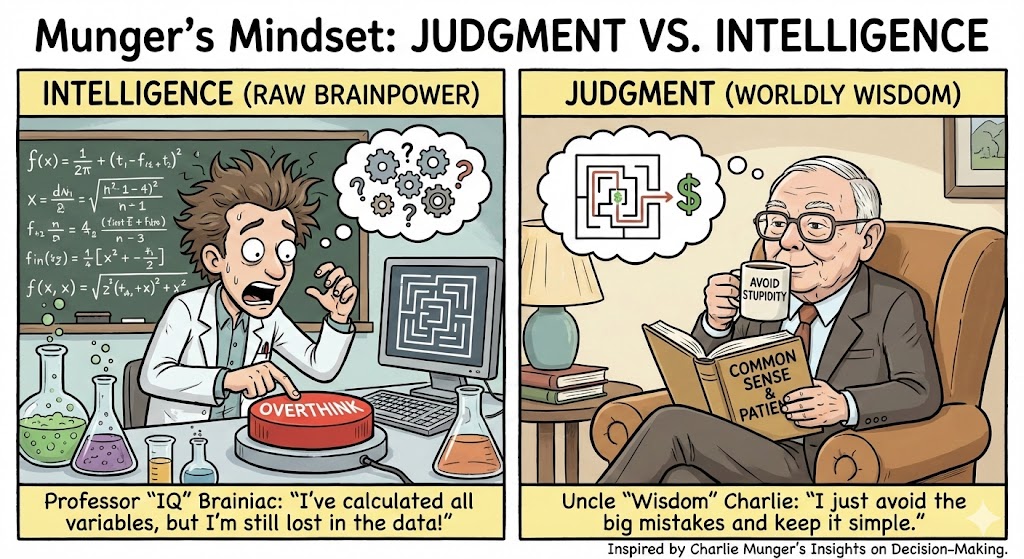
Charlie Munger spent nearly a century studying how humans outsmart… themselves. The man treated bad decisions the way a forensic detective treats fingerprints. And the funny part? Most of the traps he identified hit smart people harder than everyone else. Intelligence doesn’t protect you—it just lets you come up with more elegant ways to be wrong.
Here’s the Munger playbook, rewritten in plain English and spiced with some real-world bruises. Ahh… it’s also much shorter then the original work. However, you do with to read the original as he is much better writer.
Let’s start with the elephant Munger kept in the room: brains aren’t the bottleneck—judgment is. You can have a rocket scientist mind and still steer straight into a mountain if you use it wrong.
1. Using One Mental Model Is Like Using One Dumbbell
When someone only uses the tools from their field, they distort reality to fit their toolbox.
If the Internet were a city, most people would be walking around with their front doors wide open, a neon sign flashing “Help Yourself!”, and a note taped to the fridge that says, “Password is 123” And then they’re shocked — shocked! — when someone strolls in and steals their stuff.
This is exactly why Multi-Factor Authentication (MFA) exists. It’s the digital equivalent of adding a deadbolt plus a very grumpy dog who hates strangers.
And yet… people still avoid it. Too annoying. Too many steps. Too much friction. …or add here your favorite excuse for not doing something important.
Meanwhile attackers don’t “hack” into accounts — they log in with leaked passwords floating around the dark web like lost socks in a laundromat. Note to self: I should make t-shirts with the last statement.
Let’s cut the nonsense: You must enable MFA on every account you own. All of them.
Your bank. Your Gmail. Your GitHub. Your kid’s Minecraft account. Everything.
Why MFA Isn’t Optional Anymore
A password is flimsy. One data breach from a service you used once in 2014, and that password is suddenly being tried against your bank, Facebook, email, cloud storage, crypto exchange, Netflix…
Hackers don’t guess. They reuse. (=another good t-shirt I should make) It’s industrialized credential abuse.
MFA breaks that system. Even if someone has your password, they hit a wall they can’t climb.
This is why almost every major breach — from corporate meltdowns to everyday account takeovers — starts with:
“Attacker logged in using stolen credentials.”
No lasers. No movie hacking montage. Just: Username. Password. Boom.
Unless you enable MFA.
Use Google or Microsoft as Your Identity Anchor (SSO FTW)
Some people try to manage MFA across 20–70 different websites. That’s chaos.
There’s a better way: Put your strongest MFA on Google or Microsoft, then use Single Sign-On (SSO) anywhere that supports it.
Why this matters:
• You centralize security instead of scattering it like digital confetti. • You get enterprise-grade MFA without paying enterprise-grade prices. • Losing your phone doesn’t trigger 47 “account recovery” nightmares. • You sign in faster — one fortified account instead of typing passwords everywhere like it’s 2008.
Turn Google/Microsoft into your fortress. Everything else becomes a room inside it.
Passkeys: The Future Is Here
Passkeys are the first security upgrade in decades that’s actually less annoying than what came before them.
A passkey replaces your password entirely. No typing. No remembering. No “Was it my dog’s name plus an exclamation mark this time?”
Your device uses cryptography to prove it’s you. And because the private key never leaves your device:
• A database breach can’t leak your passkey. • Phishing tricks stop working. • Password spraying becomes irrelevant. • Credential stuffing dies instantly.
If a website offers “Sign in with Passkey,” choose it every time.
And when your passkeys sync through Google or Microsoft, you get seamless recovery on new devices without sacrificing security.
This combination — Passkeys + Big Identity Provider — is the closest thing we have to a cheat code for staying safe online.
Real-World Cases That Make the Point Painfully Clear
1. The Startup That Lost Its GitHub
One developer reused a password on a random site. That site got breached. Attacker logs in → inserts malicious code → catastrophic week. With MFA or a passkey, the attacker would’ve hit a locked door.
2. The CEO Who Lost Email For Over A Month
No MFA. Password reused. Attacker logged in, forwarded email, deleted messages, locked the account. Recovery required government-level documentation and a patience buffer only monks possess.
3. The Big-Tech Breach You Definitely Remember
A giant company got compromised because an engineer used a recycled password leaked years earlier. One weak credential cost them hundreds of millions. A passkey would’ve prevented the entire thing.
The Bottom Line
Turn MFA on everywhere.
Switch to passkeys whenever you see them. Use Google or Microsoft as your identity backbone with SSO.
Your future self will be thrilled — ideally while not trying to explain to customer support why you apparently logged in from Romania at 3:12 a.m.
We imagine hackers as trench-coat wizards hammering keyboards while green code rains down the screen. Reality is less Matrix and more lazy cat burglar.
They don’t “hack in.”
They log in, using the same password you used for LinkedIn in 2014 and also for your Gmail, bank, gym, YMCA portal, and that meditation app you opened (only) once.
Every developer has that moment where they stare at the screen and wish for a magic wand. Something that can unscramble a legacy codebase, sketch a UI without endless Figma tabs, or summarize a 300-page API doc that reads like… and create some good tests out of nothing.
Google just dropped something dangerously close.
Gemini 3 isn’t another “slightly better benchmark” release. It’s a real step forward—especially for people who build things for a living.
If you’ve been coding anytime in the past year, you’ve probably heard the buzz about Cursor — the AI-powered IDE that promises to write your code, clean your code, and maybe even refactor your soul.
It’s built on top of VS Code, so it feels instantly familiar. But the moment you hit that shiny AI shortcut, you realize: this thing is smarter than your codebase and hungrier than your wallet.
After a few months of using Cursor — and after accidentally vaporizing a scandalous number of API tokens — I’ve learned how to stay productive and solvent. And yes, the TL;DR is that you can still combine Cursor with Ollama + local models to get many of these benefits for free. Here are my 8 hard-earned tips to make Cursor your loyal sidekick within the limits of your budget.
The #1 tip: Control context scope aggressively – This is the biggest win
Cursor auto-includes files, diffs, and history—this explodes token usage.
Do this:
Manually select only the exact files/functions needed















 Ido Green