
 In our GDL-IL today, I’ve talked about a fun project I did in the past. It’s a single web page application that let you manage an event. We covered some of the basic components we used in order to built this site and then we jumped into the app script code and showed how to work with the online IDE that let you write, run and debug your server side code. The site gives you basic functions like: Continue reading
Tag Archives: software
Chrome Extension For Enterprise Internal Usage
 At the beginning of the year, I’ve worked with a big organization that wanted to avoid the automatic suggestions Chrome is making in the omnibox (=the top field in Chrome, where you type searches and see the url).
Their main requirement was the need to allow employees to type a word and get the internal site that they are use to see. For example, the user will type ‘sale’ and Chrome will redirect them to the internal portal of sales. If you won’t modify Chrome it will run a google search on ‘sale’ and the results will be something like:
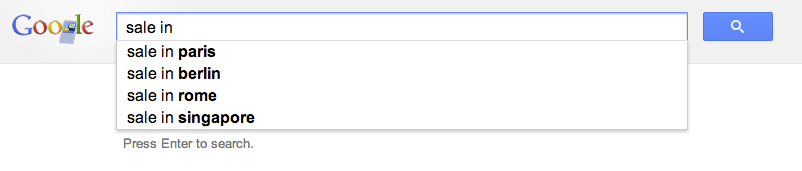
The good news is that with this little extension you will be able to control the redirect of the users to the right internal location. Let’s jump into code.
This is the code of our manifest file that describe the extension
This file contains hidden or bidirectional Unicode text that may be interpreted or compiled differently than what appears below. To review, open the file in an editor that reveals hidden Unicode characters.
Learn more about bidirectional Unicode characters
| { | |
| "name": "Omnibox customization example", | |
| "description" : "To use, type 'get' plus a search term into the Omnibox.", | |
| "version": "1.1", | |
| "background": { | |
| "scripts": ["background.js"] | |
| }, | |
| "omnibox": { "keyword" : "get" }, | |
| "manifest_version": 2 | |
| } |
Important to notice is that we setting the keyword ‘get’ in order to activate this extension. You can choose something shorter if you like. Another aspect is the “manifest_version”: 2 which making sure we are compatible with the latest spec.
This is the code of our background page
This file contains hidden or bidirectional Unicode text that may be interpreted or compiled differently than what appears below. To review, open the file in an editor that reveals hidden Unicode characters.
Learn more about bidirectional Unicode characters
| // each time the user updates the text in the omnibox this event | |
| // is fired and we will use it to suggest search terms for | |
| // our internal users. | |
| chrome.omnibox.onInputChanged.addListener( | |
| function(text, suggest) { | |
| suggest([ | |
| {content: "CRM" , description: " fetch the internal CRM"}, | |
| {content: "ERP" , description: " fetch the internal ERP"}, | |
| {content: "sales", description: " fetch the lastest sales report"} | |
| ]); | |
| }); | |
| // This event is fired with the user accepts the input in the omnibox. | |
| chrome.omnibox.onInputEntered.addListener( | |
| function(text) { | |
| if (text.indexOf("/") < 1) { | |
| text += "/"; | |
| } | |
| if (text.indexOf("http") < 0) { | |
| text = "http://our-internal-portal/" + text; | |
| } | |
| alert('We are taking you to: "' + text + '"'); | |
| navigate(text); | |
| }); | |
| function navigate(url) { | |
| chrome.tabs.getSelected(null, function(tab) { | |
| chrome.tabs.update(tab.id, {url: url}); | |
| }); | |
| } |
Here we will listen to the events of omnibox.onInputChanged and omnibox.onInputEntered in order to execute our logic.
Another point you might want to consider is to go to:
chrome://settings/ -> Advanced -> and then to disable these options:
- Use a web service to help resolve navigation errors
- Use a prediction service to help complete searches and URLs typed in the address bar
- Predict network actions to improve page load performance
It doesn’t matter if you are working in a startup of few people or a big organization with 2.2M employees (e.g. Walmart). In both cases, you probably have internal network and internal systems that your users will love to access with few keywords like: CRM, ERP, Sale, Marketing, QA etc’.
Happy coding & Happy Passover.
Mobile Web Apps
 Last week I had the pleasure to give this talk in Multi Screen-X event we had in Campus TLV. Mobile web apps are built using web technologies: HTML5, Javascript and CSS. The main advantage is that you write your application once (e.g. one source code) and deploy it on every platform: Android, Chromebook, Chromebox, Chrome and ya… even iPhone and iPad. Why it’s important today?
Well… as we know, the web is a huge platform and the one common application in any platform is the browser. One look at this set of devices (which is just the tip of the iceberg) will tell the story:
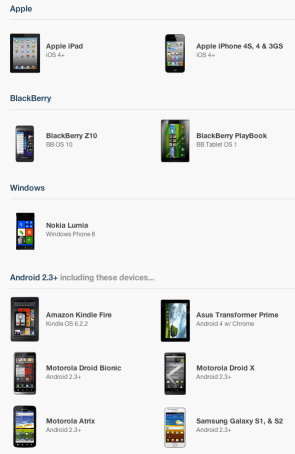
On mobile devices the browsers’ current state, in terms of HTML5 support is (even) better then on desktops. You can see it per API in CanIUse.com or mobilehtml5.org Continue reading
DevConTLV Summary
 Last week, I had the pleasure to present at DevConTLV for the 3rd time. It a great conferance that bring to Tel Aviv some rock-stars from companies like: Github, CouchDB, Amazon and many others. The location (Ozen Bar) is a cool place where you can hear live music during the nights and drink good coffee during the mornings. So it is a natural location to such an event. Ahh… and yep, the opening of the day was done with a live rock band! (just like JSConf). Continue reading
Web Components Talk At HTML5-IL Meetup
 Last week I had the pleasure to take part in the first HTML5-IL meetup. If you are a front-end developer that live in Israel you should try and come to this group events. Lots of great developers, designers and others that share the same passion for the web. Great stuff. Unfortunately I didn’t have more then 30min for this new, hot, complicated topic. So I hope to have more time to cover some of the aspects during the next meetup. From the four main aspects we touched only on the first two: Continue reading
HTML5 APIs At Google Developer Group Haifa (Hebrew)
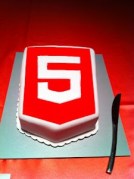 It was the first meeting of GDG Haifa at the technion. I gave the first talk about HTML5 (new) APIs that front-end developers should leverage. It was a good kick-off event and it seems that this group will produce many more quality events. You can check the demos and the slide at my project site.
Enjoy.
Web Components On Google Developers Live Israel (Part 1)
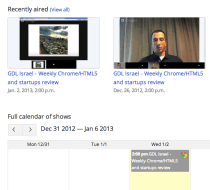
Today, in our weekly Google Developers Live Israel show we spoke about HTML5 and web component. It was a macro level overview on this new edge of front-end development. This new project is composed of a group of technologies that should help us (web developers) create moderan web apps using HTML, CSS and JS. They do this by allowing toolkit makers to encapsulate their widgets and UI elements as easily reusable components.
We covered the main players:
- Templates – We can think on it as a new HTML element. It allow us to inert chunks of clonable DOM that can be activated for later use (e.g MDV). You can think of it as objects you creating out of your class definition. This new ‘object’ can contain markup (=CSS) and script (=JS) so it’s much more powerful from the ‘just’ CSS that we have today. We can use it as a decorator to give new style and functionality to our custom (new) HTML element.
- Custom elements – which can be looked as our toolbelt when we are coming to build a new web app and we wish to reuse ‘wheels’ and not reinvent them. We showed how to create new HTML elements by expanding HTML’s existing vocabulary.
- Shadow DOM – It’s like the regular DOM you know (and love) but it’s down in the ‘shadows’ hidden from our eyes. It’s main goal is to give us encapsulations. It’s the glue that let us insert and work with our components. Think of a ‘tab’ component that you don’t need to ‘know’ about it’s style, functionality etc’. It will work for you and you can’t break it from your JS code because you forgot to use a namespace for your app logic.
- Mutation Observers – and how to watch for changes in the DOM in the most efficient way. Continue reading
How To Prevent Your Chromebook From Going To Sleep
 There are some cases where you wish your chromeOS, Chromebook (or Chromebox) will not to enter into sleep mode. A quick example is when you wish to use it in a conference to present a cool web experiment and you don’t want it to vanish after few minutes. Here are two quick ways to achieve it. Both are a bit of a hack… but it’s not a complicated process.
The hacker way
- Login with the admin user.
- Open a terminal by hiting CTRL+ALT+T
- Type the following
- shell (to drop into a standard bash shell)
- sudo stop powerm – to disable sleep when lid is closed. You could go with the longer version of: sudo initctl stop powerm but there is no reason to type more…
- sudo stop powerd – to disable all other power management features.
- Now logout from the menu – But do not restart! Why? because these settings won’t survive it.
The easy way
Install this Chrome extension – Caffeine after your clone/fork it from Github. It is an experimental extension for Google ChromeBooks that overrides the default power settings.
It is using this API:
chrome.experimental.power.requestKeepAwake()
which is still under experiment so you will need to enable it before the installation.
How to install:
- Go to about:flags on your Chromebook, enable “Experimental Extension APIs” and then restart your Chromebook.
- Go to extensions, toggle on Developer Mode, and click load unpacked extension.
- Choose the folder containing this source.
- Toggle / unToggle the menu icon to keep Chrome awake. Is it easy or what?
Happy new year!
[Update Sep 2014] – You can now have Keep Aware extension from the Chrome Web Store. This is the easiest way and it got two option: full system awake (sun is up) or display will go to sleep but network and the rest will continue to work (moon is up).
Frontend Development Sources
Here are a few new/cool sources I’ve bumped into during last week events (and meetings). It is always a great fun to talk with developers and learn on new tools that they are using in order to do their work. If you have something interesting, please don’t be a stranger and let me know…
HTML5
- Wanna see what can WebRTC do for you? Check out this cool demo of moving html5 slides with your hand like Tom in “Minority Report”.
- Let your IE users enjoy the power of HTML5 with this new great tutorial that explain how to bind Chrome frame to your site. Continue reading
A Hangout On HTML5 APIs And CSS3 (New) Layouts
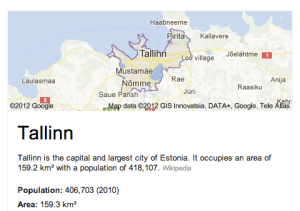
Last night, I gave this talk to Google Developer Group Tallinn about the new APIs that we have today in HTML5 and CSS3. It was (another) great hangout where you can ‘touch’ people that are quite far from your location and speak with them about mutual interest.
Some of the topics that I covered during the talk where: Continue reading
 Ido Green