JavaScript, webdev

Why/How Senior Engineers Embrace AI Tools in Development?

How can you do better (or succeed more) with AI coding tools?

Senior engineers who use AI tools (co-pilot, claude.ai, cursor, etc.) are like master chefs who know when to use the microwave and when to actually cook with fire.

Here are some of the bold aspects I’ve noticed in the past year:

Continue reading
Standard
JavaScript, webdev

Cleaner Code: The Importance of Dependency Injection in Software Development

Dependency Injection (DI) is a software design pattern that addresses the problem of managing dependencies between objects in a program. In traditional programming, objects are often tightly coupled, meaning they directly create or reference other objects they depend on.
This can lead to rigid, hard-to-maintain code that is difficult to test or reuse.
Dependency Injection solves this problem by separating the creation and configuration of dependent objects from the objects that use them.
It is a design pattern where a class receives its dependencies from external sources rather than creating them internally. Think of it as “outsourcing,” the creation and management of objects that your class needs to work on.
Instead of directly instantiating or referencing its dependencies, an object receives them through its constructor, methods, or properties.
This decoupling makes the code more flexible, testable, and maintainable.
In large-scale projects, Dependency Injection becomes especially important as the codebase grows in complexity. With many interdependent components, DI helps manage the web of dependencies, making it easier to swap out implementations, replace third-party libraries, and test individual components in isolation.
This improves the overall modularity and scalability of the system.

Continue reading
Standard
JavaScript, webdev

The Power of Many: Why You Should Consider Using Multiple Large Language Models

Large Language Models (LLMs) have taken the world by storm. These AI systems can generate text, translate languages, write different kinds of creative content, and answer your questions in an informative way. But with so many LLMs available, each with its own strengths and weaknesses, how do you choose the right one for the task? 

The answer might surprise you: it’s about more than picking just one. Here’s why using multiple LLMs can be a powerful approach.

Continue reading
Standard
cloud, JavaScript, webdev

Mastering the Linux Shell: A Developer’s Guide to Unleashing Its Full Potential

Introduction

The Linux shell, also known as the command-line interface (CLI), has been a cornerstone of Linux-based operating systems since their inception. It provides developers a powerful and efficient way to interact with the system, execute commands, and perform various tasks. It’s one of the main factors that made Linux the most popular OS worldwide.

In this post, we’ll briefly discuss the history, explore its advantages and disadvantages, and discuss how developers can leverage its potential to streamline their work and enhance productivity.

History of the Linux Shell

The roots of the Linux shell trace back to the early days of computing. The concept of a command-line interface predates graphical user interfaces (GUIs) and originates in the mainframe era. 

I still remember the first time (At Tel Aviv University) we wanted to interact with a computer (mainframe) back in the day. It was with this black terminal. That was the only interface you had. We are talking here in mid-1980.

Even before that, in 1969, Ken Thompson developed the first Unix shell, the Thompson shell, which laid the foundation for future shell implementations.

Over the years, various shells were introduced, each offering unique features and improvements. In the mid-1980s, the Bourne shell (sh) became the standard shell for Unix-based systems, inspiring the Bourne-Again Shell (bash) development in 1989. 

Today, bash remains one of the most widely used shells in the Linux ecosystem. 

Ahh… if you are on MacOS, you can taste the same shell.

Continue reading
Standard
Business, cloud, JavaScript

OpenAI API – 101 Tutorial

OpenAI is a research organization focused on developing advanced artificial intelligence technology, and one way it achieves this is by making its technology available to developers through APIs. 

This blog post will explore what OpenAI API is and how to use it from Node.js – We will show a few examples you can take and combine with your current applications.
Other good examples to explore the API are at openai.com.

What is OpenAI API?

OpenAI API is a powerful tool allowing developers to access cutting-edge AI models that OpenAI researchers train. 

It’s (also) a mouthful, no?

These models can be used for various applications, including natural language processing, translation, image recognition, chatbots, etc.

The OpenAI API is designed to be easy to use, with a RESTful API that can be accessed using any programming language.
It also includes pre-built models that can be used out of the box and the ability to train custom models using your own data.

Continue reading
Standard
JavaScript, webdev

SkyMass: A New Way to Build Web Apps

If you’re searching for a fresh approach to developing web applications, SkyMass offers an innovative solution. It provides a more efficient method for swiftly crafting functional web applications for your internal APIs.

Over the past few months, I’ve had the opportunity to collaborate with SkyMass on multiple projects, and the results have been impressive. Instead of starting from scratch with a React app each time, SkyMass has enabled me to swiftly define the essential components and have a working prototype in a matter of hours or days, rather than the weeks or even months it would typically take.

Continue reading
Standard
JavaScript, webdev

JavaScript Objects 101

The Object type represents one of JavaScript’s data types. It’s important stuff as we will use them—a lot.

It is used to store various keyed collections and more complex entities. Objects can be created using the Object() constructor or the object initializer / literal syntax. Did you know that all modern JavaScript utilities for working with objects are static?

Here is an example of a JavaScript object that contains two names and one key:

let obj = {
  name1: "John",
  name2: "Jane",
  key: "value"
}
Continue reading
Standard
JavaScript, webdev

RegEx 101

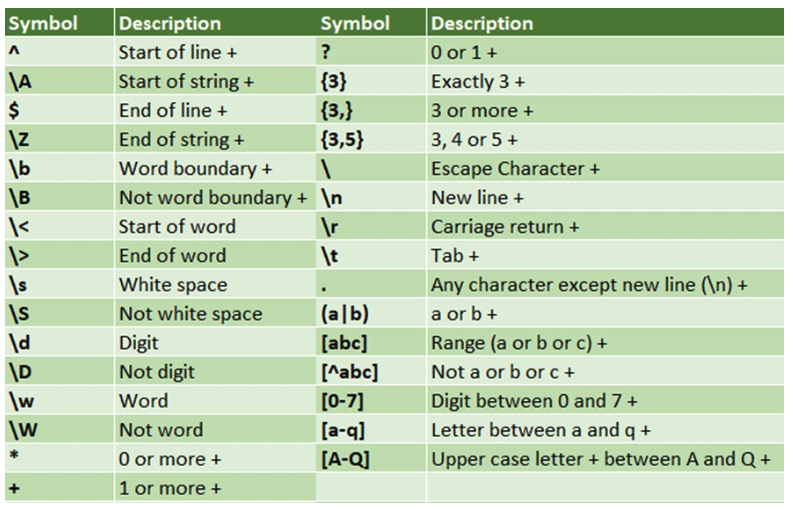
Regular expression or in short Regex is a string of text that lets you create patterns that help match, locate, and manage text. It’s an important tool in a wide variety of computing applications, from programming languages like JS, Java and Perl, to text processing tools like grep, sed, and vim.

Here are a few helpers to refresh your mind when you need some ‘simple’ regex to do the job.

Continue reading
Standard
cloud, JavaScript

Integrate JFrog Xray with Slack

The need to protect your software and to be updated about vulnerabilities is getting stronger. JFrog Xray is unique in its capabilities to perform analysis of all the binaries you are consuming in your project. It works with Artifactory to perform a deep analysis of binary components at any stage of the application lifecycle. Xray provides great visibility into issues lurking in components anywhere in your organization and there are many cases where you wish to get notified on a security violation (or a license breach) directly to Slack.

Getting Started

We will use Xray’s Webhooks to define our server’s and base on the policies/rules our Webhook will be notified with the alerts about violations (security or licenses).

Continue reading
Standard
cloud, JavaScript

Export Violations From JFrog Xray to CSV

The trend of #DevSecOps is growing fast and it is no longer just part of your security team. More and more organizations wish to integrate their security team in all the phases of development and operations. To achieve it, there are cases where you need to export data from JFrog Xray (in our case to a CSV format) so you can ingest it to your current logging/monitoring system. 

What is Xray?

In a nutshell, JFrog Xray works with JFrog Artifactory to perform a deep analysis of binary components at any stage of the application lifecycle. It provides full transparency that leads to more trust in your software. 

By scanning binary components and their metadata, recursively going through dependencies at any level (think on the layers you have in any Docker container), JFrog Xray provides great visibility into issues lurking in components anywhere in your organization.

Xray API

One of the best parts is that JFrog Xray is also fully automated through a rich REST API. We will use it to create this Exporter. Please feel free to clone/fork the code below and use it, but remember you might need to add pagination and a watchdog for a real system.

Continue reading
Standard