AI, Chrome, webdev

Transforming Recipe Chaos with SeasonApp

Some projects start with ambition.

This one started with annoyance.

I was tired of juggling recipes across bookmarks, screenshots, messages, and the occasional scribble in a notes app.
A normal person would’ve organized things.
I opened Cursor.

The plan was simple: a quick weekend hack.
Nothing serious. Just a tiny tool to help me stop losing recipes.

But then it worked. And I liked using it.
Then I showed it to a couple of friends.
Then my family started using it.
Then those friends shared it with their friends.

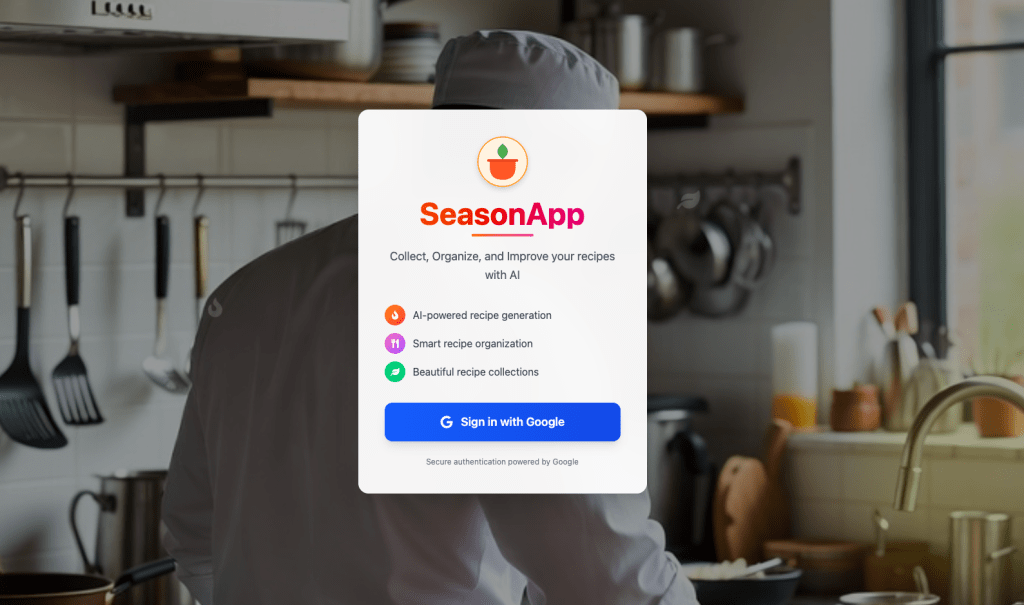
That’s when the “weekend hack” quietly transformed into SeasonApp—a small but mighty full-stack platform for cooking, powered by AI and built to remove friction from the kitchen.

Why SeasonApp Exists

If you cook regularly, your digital life eventually turns into a disorganized pantry. Tabs everywhere. Screenshots mixed with flight confirmations. Recipe blogs where you scroll past a childhood memoir before finding the ingredient list. And once you finally want to cook something, you can’t find the right recipe—or you’re missing one ingredient and the whole plan collapses.

SeasonApp brings order to that chaos.

It gives recipes a home.
It helps you create new ones.
And it actually understands what you want to do with whatever’s in your fridge.

The more people around me used it, the more obvious the need felt.
Everyone had the same pain; they just tolerated it.
SeasonApp gives them a better way.


Continue reading
Standard
Chrome, JavaScript, webdev

Building a Real-Time Pull-Up Tracker: How I Taught The Browser to Count Our Pain

It started as a simple idea my son brought up: Can we make a web app that counts our pull-ups during our pull-up games?

Turns out, teaching a machine to recognize human suffering is both hilarious and complicated.
What began as a “let’s make a quick pull-ups app” spiraled into an intense journey through computer vision, browser quirks, and a few accidental infinite loops that made our laptop sound like a jet engine.

The “Simple” Goal

I wanted to automatically count pull-ups using a web camera.

Easy, right?

Just detect a human, see when they go up and down, and count.

Continue reading
Standard
Chrome, JavaScript

Effortlessly Compare Strava Activities with This New Tool

If you’re a cyclist, runner, or triathlete, chances are you’ve spent more time than you’d like clicking back and forth between Strava tabs to figure out where you gained or lost time on a ride. I’ve been there — juggling two activity pages, scrolling, mentally matching segments, and trying to keep my eyes from glazing over.

That’s exactly why I built the Strava Segment Comparator Extension.

It’s a lightweight, privacy-friendly tool that runs entirely in your browser, lets you quickly compare any two Strava activities, and shows segment-by-segment differences in both time and speed. Whether you’re racing a friend, analyzing your improvement, or just curious how different routes stack up, this extension saves you time and keeps your focus where it matters — the data.

You can also see all the TL;DR here.

Continue reading
Standard
Chrome, JavaScript, webdev

Optimize NodeJS Apps in Production on Ubuntu

Why PM2 is Essential for Applications in Production?

When deploying a Node.js application in a production environment, ensuring stability, efficiency, and reliability is crucial. This is where PM2, a powerful process manager for Node.js applications, becomes an invaluable tool. PM2 simplifies process management, enhances performance, and provides robust monitoring capabilities. In this post, we’ll explore why PM2 is essential for running Node.js applications in production.

To ensure a Node.js app keeps running smoothly in production on Linux/Ubuntu, there are many ways to achieve this, but here are some of the essential steps that will help you elevate your application’s performance to the ‘next level’:

  1. Regularly monitor system resource usage to prevent bottlenecks
  2. Implement error handling and logging to quickly diagnose and fix issues as they arise
  3. Utilize process managers like PM2 or Forever to automatically restart your application in case of failures
  4. Ensure that your dependencies are always updated and secure to avoid vulnerabilities
  5. A bonus step: consider employing load balancing and clustering techniques to enhance the app’s scalability and availability. Nginx is great here even if you have one instance.

1. Use a Process Manager (PM2)

PM2 is a popular process manager for Node.js applications that provides automatic restarts, logging, and monitoring.

Install PM2 globally:

npm install -g pm2

Start your application with PM2:

pm2 start app.js --name myNodeJSAppButInProd

Managing different configurations for development, testing, and production environments can be cumbersome. PM2 allows you to define environment-specific variables using an ecosystem file:

module.exports = {
  apps: [{
    name: "my-app",
    script: "app.js",
    env: {
      NODE_ENV: "development",
    },
    env_production: {
      NODE_ENV: "production",
    }
  }]
};

This ensures that your application loads the appropriate settings based on the environment, reducing configuration errors.

Ensure PM2 restarts on reboot:

pm2 startup
pm2 save

Continue reading
Standard
Chrome, JavaScript, webdev

Top Resources to Learn JavaScript and TypeScript Effectively

JavaScript is the backbone of modern web development. TypeScript (TS)—its statically typed super-set — has rapidly gained traction in professional environments.

Whether you’re an aspiring developer or a seasoned programmer, this guide will help you level up your skills. It will assist you in navigating the learning path for JS and TS.

We’ll share various resources and courses to suit different learning styles. We will finish with three exciting project ideas to put your knowledge into practice.

Getting Started with JavaScript

Before diving into TypeScript, it’s crucial to have a solid understanding of JavaScript fundamentals.

Here are some steps and resources to get you started:

Continue reading
Standard
Espresso at sunrise
Chrome, cloud, webdev

Personal Cyber Security

In today’s digital world, it’s more important than ever to ensure that your personal cyber security is up to date. With the ever-growing number of threats on the internet, it’s essential to take the necessary steps to protect yourself and your data.

The first step in protecting yourself is to be aware of the threats that exist. The second step is to use the right tools to protect yourself. There are many different types of cyber threats, such as malware, phishing, and ransomware.

Continue reading
Standard
Chrome

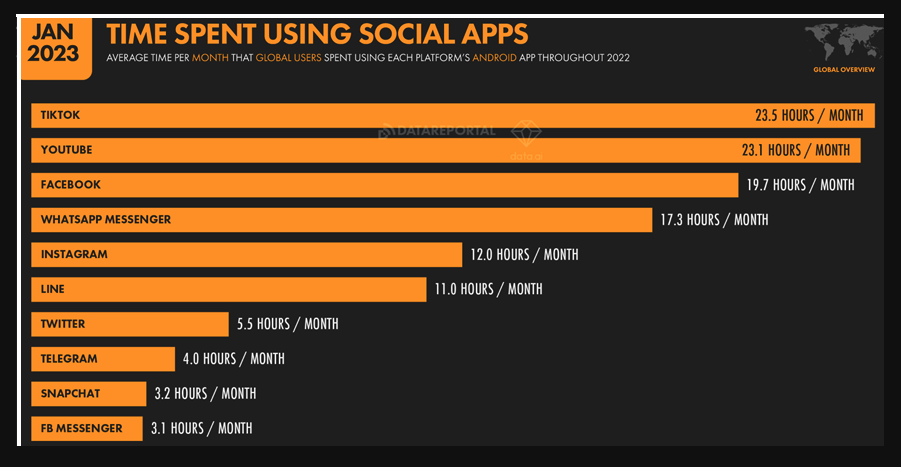
How To Avoid Spending Too Much Time on Social Apps

We all know how easy it is to get sucked into social media apps like TikTok, Twitter, Facebook, Instagram, and YouTube. It’s easy to lose track of time by scrolling through your newsfeed and watching videos. 

But spending too much time on these apps can harm your mental health and productivity. 

Continue reading
Standard
Chrome

How To Interview A Product Manager?

“A great product manager is both trusting and trustworthy.
She knows the difference between trust and blind faith, and invests in building a working environment where people have each others’ backs.
She sets an example with her own behavior and works from the assumption that people have good intentions. She listens and always strives to understand others’ context, point of view and perspective.”

— Lawrence Ripsher

An interview – like yoga on the water – is a tricky thing.

An interview is always a challenge.

It’s far from a perfect solution but in many cases, it’s the only option you have in order to decide if a person will be a good fit to your needs.

In some roles you will need more technical skills and in some it will be more about the leadership and strategic thinking.

The main aspects you wish to have in a product manager for a technology company:

  1. Intellectual ability
  2. Great Communication skills
  3. Leadership
  4. Culture Fit
  5. Deep understanding of what users want
  6. Strategic thinking
  7. Analytical capabilities
  8. Technical knowledge
  9. Entrepreneur at heart

Below are some ideas for questions that will help you identify if the person have some of these aspects. It’s still “work in progress” so if you find something ‘funny’ please let me know.

Continue reading
Standard
Chrome

Do You Need A Binary Repository?

Any developer knows that you must have a source code repository (e.g. Git) but from time to time I get the question “why do I need a binary repository”?

Here is the short answer:

Faster and more secure software development – Any company is a software company these days and the best companies release updates on daily/hourly bases. The ability to push updates quickly is a real competitive advantage. The minute you have few engineers on your team you wish to avoid ‘fetching the all internet’ with every ‘npm install’.
A binary repo will give you the option to cache these libraries and make sure you are working with the correct ones (vs a hacked one). From the developer perspective, it is a big boost for their productivity as it saves time during development and on each build. Even better, from the DevOps perspective, the ability to control all the packages/libraries (and scan them for vulnerabilities) is a huge advantage. It enables the internal engineering team to control the releases better as they have full transparency (e.g. quality, performance, security, licenses, etc’) on everything the ‘compose’ the release version. Check the 12-factor app manifesto for more on dependencies (declaration and isolation).

Continue reading
Standard
Chrome

Raspberry Pi As Security Camera With Motion Detection

It was a fun weekend project I did with my kids. We started with a new Pi Zero and in a few hours (of many ‘paths’ to nowhere) we got into the point of having a useful security camera. The useful part is when the camera sends you alerts (email or Telegram messages) when it detects movements.

We open the package and connected the Pi Zero to a USB power, a keyboard, a mouse and monitor. We cut a bit a corner by buying an SD card with NOOBS on it but it wasn’t working (nothing was coming up on the screen when we boot the Pi). So we downloaded a new version from Raspian Jessie 4.4 from NOOBS and install it. Now when we boot the Pi we got a new screen. We open the terminal and typed:

Continue reading
Standard