AI

Unlock WhatsApp Data with Local Analytics Dashboard

Most people think of WhatsApp as “just messaging.”

But after years of conversations, support threads, customer discussions, team coordination, and random life moments… it quietly becomes one of the richest personal datasets you own.

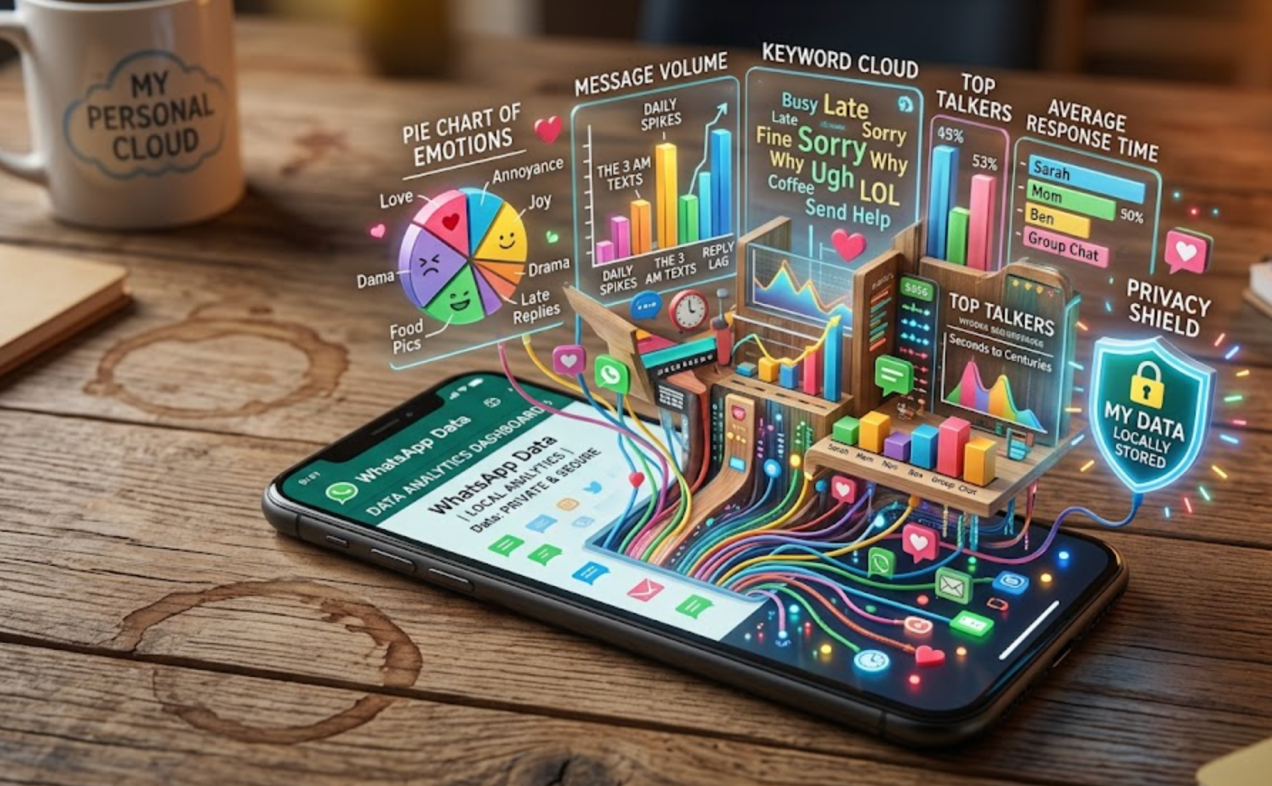
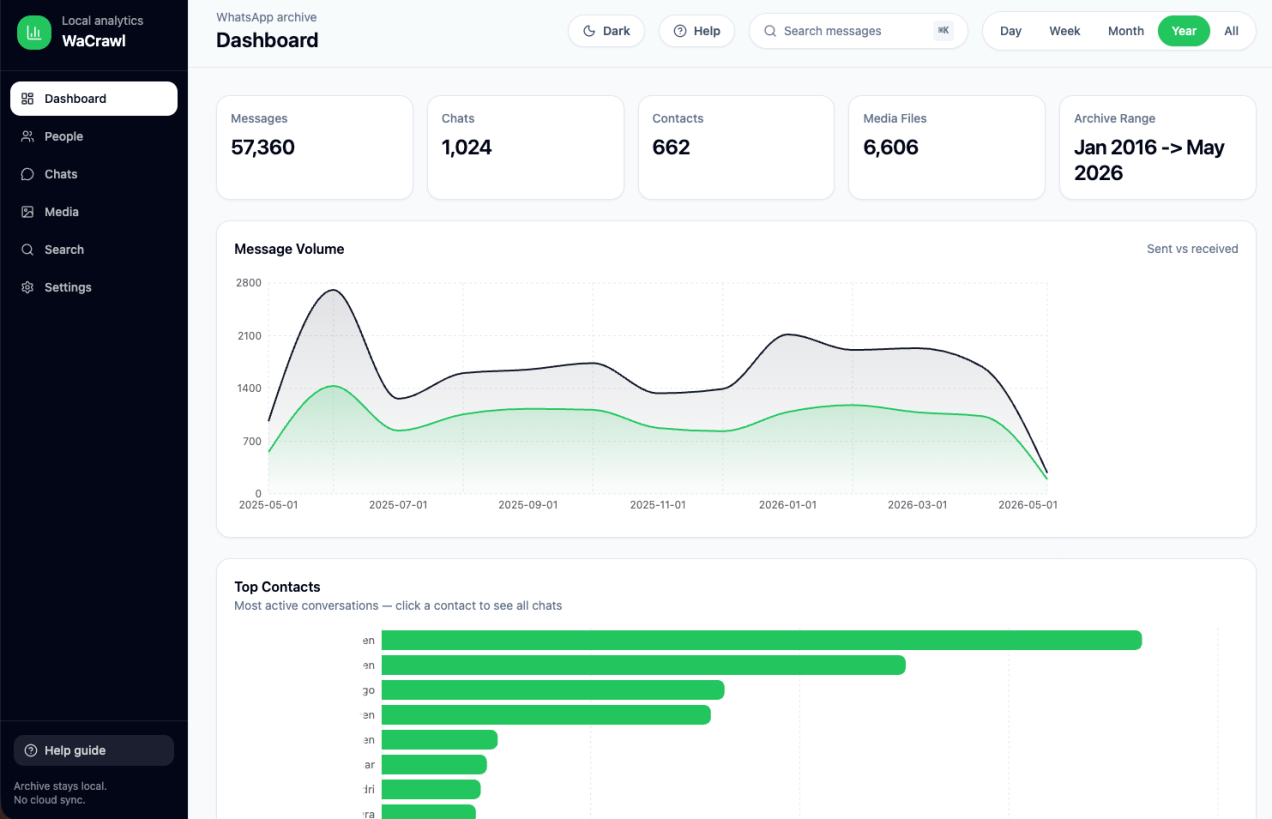
So I built wacrawl-ui — a local analytics dashboard for WhatsApp archives generated by wacrawl.

The idea is simple:

  • Your data stays local
  • No cloud sync
  • No browser extension
  • No scraping APIs
  • No “AI magic” uploading your chats somewhere

Just a fast local dashboard on top of SQLite.

What’s inside:

  • Full-text search (FTS5) – It’s working quite fast. Even on ~100k messages.
  • Messaging activity analytics
  • Contact insights
  • Media browsing
  • Response-time patterns
  • Word clouds
  • Group activity stats
  • Read-only local API
  • React + Vite frontend
  • Express backend
  • Zero external dependencies once running – You only need to make sure you run ‘wacrawl sync‘ before.

A few things I found interesting while building it:

  1. SQLite is still absurdly powerful
    People underestimate what you can do locally with FTS indexes and good schema design.
  2. “Local-first” UX matters more than ever
    We’ve normalized uploading deeply personal data to random SaaS products. We should challenge that assumption.
  3. Personal analytics is an untapped category
    Not surveillance. Not ad targeting.
    Tools that help you understand your own data.
  4. Read-only architectures reduce risk dramatically
    The app intentionally avoids mutation flows. That constraint simplified security and reliability decisions across the stack.

The whole thing runs with one line:

npx wacrawl-dashboard@latest

No complicated setup.

Still early, but I think there’s a broader shift happening toward:

  • local AI – Ollama for the win.
  • local analytics – secure, private and handy.
  • local search – that works fast.
  • user-owned datasets – It’s not for everyone, but it’s useful.

Well, that future feels healthier.

Feel free to check the repo: github.com/greenido/wacrawl-ui and contribute.

Be strong.

Standard
AI

Understanding MCP vs Agent Skills: Key Differences Explained

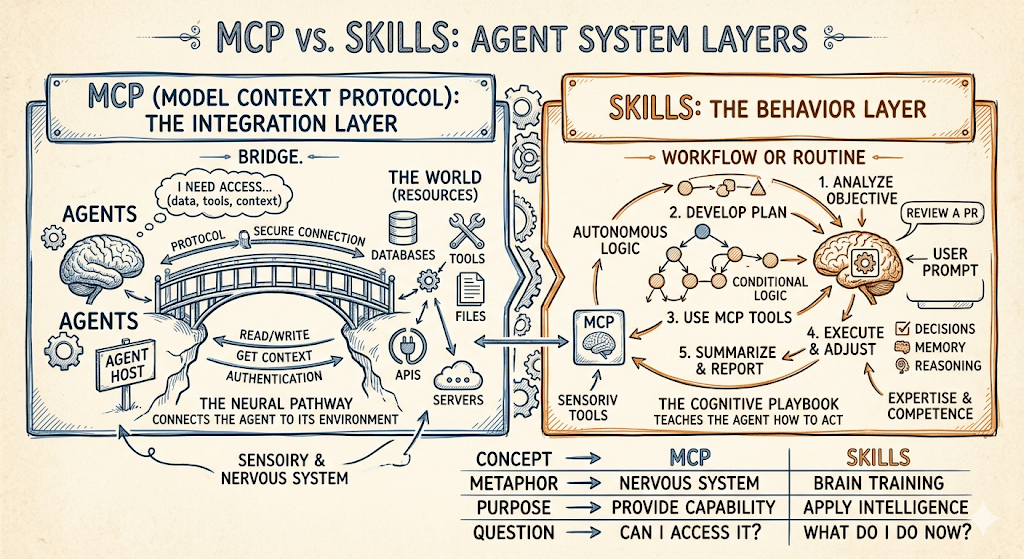
There’s a lot of confusion right now between MCP (Model Context Protocol) and “Agent Skills.” They’re often mentioned in the same breath, but they solve different problems. If you treat them as interchangeable, you’ll either over-engineer simple workflows or underpower serious integrations.

Here’s the clean way to think about it.

The Core Difference

MCP is about connecting agents to systems.
Skills are about teaching agents how to do things.

That distinction alone gets you 80% of the way.

Integration Model

MCP is a client-server protocol. You stand up an MCP server, expose tools, and now multiple agents can talk to multiple backends through a consistent interface. It’s a hub.

Skills are much simpler: a folder with a SKILL.md file. The agent loads it when triggered and follows the instructions. No protocol, no network layer, no abstraction.

Implication:

  • MCP scales across teams and services
  • Skills scale across use cases and workflows
Continue reading
Standard
Tangled cables with floating social media app icons above an e-waste recycling bin
webdev

How to Clean Up Homebrew (brew) and Maximize macOS Storage

At some point, every dev hits it.
You’re installing something routine—npm install, a Go build, whatever—and macOS throws it in your face:

Disk Full.

You check storage, expecting the usual suspects. Not your videos. Not even Docker (okay, maybe a little).
It’s Homebrew quietly eating your SSD in the background.

Left unchecked, Homebrew turns into a museum of bad decisions:

  • tools you needed once, 14 months ago
  • duplicate runtimes “just in case”
  • dependencies of dependencies of dependencies

Let’s fix it—without nuking your setup.

Continue reading
Standard
AI, Business

Building Continuous AI Agents with OpenClaw and Ollama

Most people are still using AI like it’s 2023:
prompt → response → done.

That’s not where things are going.
The real shift is toward agents that run continuously and do work for you. And one of the most interesting ways to get there today is:

OpenClaw + Ollama

Before diving in, quick grounding.

What OpenClaw and Ollama Actually Are

OpenClaw is an open-source agent framework.
It’s not a chatbot—it’s a system that can:

  • plan tasks
  • call tools (browser, APIs, files)
  • maintain memory
  • run loops without constant input

Think: a programmable worker, not a Q&A interface.

Ollama is the simplest way to run large language models locally.
It handles:

  • downloading models (Llama, Gemma, etc.)
  • running them efficiently on your machine
  • exposing them via a clean API

Think: Docker for LLMs.

Put them together and you get:

A local, autonomous agent system with zero API costs and full control.

Continue reading
Standard
bots, Business, JavaScript

Streamline Engineering Updates with Slack to Notion Bot

There’s been a lot of noise lately about productivity tools and the “perfect” engineering workflow.
Let’s slow down and separate what actually works from what just creates more overhead.

Here’s a boring truth: Slack is incredible for quick, ephemeral communication.
Here’s a less comfortable truth: It is an absolute nightmare as a system of record.

If you lead an engineering team or run a startup, you probably have a #daily-updates or #eod-reports channel.
The theory is sound.

Everyone drops a quick note at the end of the day: what they shipped, what blocked them, what’s next.

But here is what actually happens:

Those updates get posted.
Someone replies with an emoji.
A thread erupts about a weird bug in production.
Someone posts a picture of their dog.

By Friday, when you’re trying to answer a simple question—“What did we actually accomplish this week?”—those reports are buried under a mountain of noise.

You find yourself scrolling endlessly.
It’s exhausting.
And it doesn’t scale. Not to mention that if you will need SOC-2 (and you will 🙂 ) –> you can’t say “we have everything in Slack”

Why not just force everyone into Jira or Linear?

You could.
But engineers hate context-switching just to write a status update.
Slack is where the conversation is happening.
The friction to post there is zero.

The problem isn’t the input. The problem is the storage.

So I (=Gemini+Claude) built a bridge.

Meet the Slack → Notion EOD Sync Bot

I got tired of losing track of momentum, so I wrote a bot that does the tracking for us.

It’s a lightweight NodeJS service that automatically extracts End-of-Day reports from Slack and structures them beautifully in a Notion database.

Continue reading
Standard
life, Sport

Optimize Your Murph Challenge Experience with This Tracker

The Murph Challenge isn’t a workout.
It’s a systems failure conducted at heart-rate redline.

If you’ve ever tried to remember whether you’re on rep 183 or 193 of squats while your lungs are filing a formal complaint, you already know: human memory is not a reliable datastore under load.

So I built a Murph tracker that does exactly one job well—count reps—while I focus on the important things, like not dying.

🎖️ What is Murph (and why people keep doing it)

The Murph Challenge is performed on Memorial Day to honor Lt. Michael P. Murphy, a Navy SEAL killed in Afghanistan in 2005.

It was his favorite workout. Originally named “Body Armor”, which feels accurate in the same way “production incident” feels accurate.

The canonical version:

  • 1 mile run
  • 100 pull-ups
  • 200 push-ups
  • 300 squats
  • 1 mile run

Optional difficulty modifier: wear a 20 lb vest and rethink your life choices.

Continue reading
Standard
Design, webdev

Essential System Design Tips for Startups

You’re launching your first startup… Well, Congrats!

Whether it’s a SaaS invoicing tool, an e-commerce shop for handmade goods, or a new social app, you’ll quickly hit a truth: system design is your blueprint.

Done right, it makes your app boringly reliable. Done wrong, you’ll spend more time firefighting than building features.

This post is based on Sean Goedecke’s excellent piece on system design, reshaped with a founder’s lens: lean, practical, and ready for bootstrapped growth.


Continue reading
Standard
life, Sport

Weather 4 Bike: From Forecasts to Ride Decisions

Why

Most weather apps just tell you the numbers—temperature, wind, UV, etc.—but as cyclists, we need to know what those numbers mean for the ride.

Weather 4 Bike bridges that gap: it translates raw weather forecasts into clear, activity-aware guidance for road, gravel, and MTB. With one glance, you know whether to head out, wait, or change routes.

Continue reading
Standard
cloud, webdev

How to Use ngrok and LocalTunnel: Expose Your Local APIs to the World

Intro

As developers, we often face the challenge of testing our local applications with external services, webhooks, or mobile devices. Whether you’re developing APIs that need to communicate with AWS/GCP/Azure services, testing webhook integrations, or simply want to demo your work from different devices, exposing your localhost to the internet becomes essential.

This guide will walk you through two popular solutions: ngrok and LocalTunnel, showing you how to securely expose your local development server to the world.

What Are Tunneling Services?

Tunneling services create a secure tunnel from a public endpoint to your local machine, allowing external services to reach your development server without complex network configuration or deployment.

Common Use Cases

  • Testing webhooks from third-party services (Stripe, GitHub, etc.) — You can connect your local code directly and debug it more efficiently.
  • Sharing your work-in-progress with clients or team members — Instead of pushing it to some remote server. Useful in all the cases, where you are still ‘not ready’.
  • Testing mobile applications that need to connect to your local API — A must have in almost all cases.
  • Integrating with AWS services that require publicly accessible endpoints
  • Cross-device testing and debugging
Continue reading
Standard
webdev

Mastering Clean Code: 15 Key Lessons for Software Developers

Years ago (when Java was ‘new’), I got a recommendation from a good friend to check out “Ah, Clean Code by Robert C. Martin”. He told me, “It’s not just a book; it’s a must-read to anyone who wishes to be a professional software developer.”

He was right. This is still one of the top five books that I recommend developers read. It focuses on some simple but important concepts that will make your Code better, simpler, and easier to debug.

More than aesthetics, clean Code is about clarity, maintainability, and efficiency. Investing in writing clean Code might seem time-consuming, but it pays off exponentially in debugging, collaboration, and scaling efforts.

Think of messy Code as a tangled web: complex to navigate and easy to get stuck in. Clean Code teaches you to weave a well-structured tapestry instead—clear, elegant, and easy to extend.

Here are 15 powerful lessons every developer should carry from this book, with practical examples:

Continue reading
Standard