Some (raw) thoughts on what are the elements that give you a quality and testable code.
It’s not a full list of TODOs but some best practices that should serve you as a good baseline. If you have any suggestions, please feel free to comment.
Tests
If we agree that you must have tests in your project – The next good question is what is a good test?
It’s FAST – The tests should run fast in order to encourage developers to use them constantly during the development process.
Stable – The test doesn’t break often. You wish to minimize the false-positive ratio as much as you can. This is why you need ‘small’ tests that are encapsulated and give you a clear sign on what is working (or not).
Easy to read and understand.
Catches Bugs! When a test fails it’s most probably a bug.
Code without tests is bad code. Even if it’s looking clean and efficient. Without tests you can’t change it in a verifiable way.
You can’t know if your code is getting better or not.
It’s not a new idea.
But it’s amazing how many times developers will ‘cut’ corners or won’t implement tests because they are too busy to ship a new feature.
In many cases, it’s the opposite case, if you wish to move faster and safer – you need a good tests suite that give you the confidence that your changes didn’t break anything. You wish to have unit tests (wide coverage of functionality and running fast in an automated way), integration tests (a bit slower but still fast and in many cases, with mock data) and end to end tests (Yes, in many cases, in a real production environment). Continue reading →
Last week, I meet with few startups to talk about their web apps. After few basic questions like: how do I save data on the client without cookies? or something like: “Can I get a video input from the browser?” I thought it might be a good idea to touch on some of the APIs that are out there today in most browsers and developers can use. The best part is that in most cases, you can start using these APIs with very little code. In this demo page you can hack around some basic HTML5 features and see the code snippets that will let you do some cool things like: save information locally (local storage for the rescue here), Geo location, device orientration, Getting Video/Audio (with WebRTC), Visibility API etc’.
Today I had the pleasure to talk (again) at DevCon Tel Aviv. In this talk, I’ve covered some of the aspects that developer should think about in the design phase, coding phase and after the ‘production time’. It was a good opportunity to put a simple demo page that contain some basic HTML5 features you might want to use. Why? because in cases like the ‘Summary/Detail’ element you get the option to have expendable/collapsable areas without any JavaScript. It’s great to have the ability to communicate to the browser our needs without doing some ‘hacks’ in JS. Other great options like: visibility API, Geo and device orientration are all working on most modern browsers. You can check out the slides and the links to the resources in them. Continue reading →
In this week we spoke about Google APIs and how you can work with them from the client (e.g JavaScript) and from the server (in this case, it was with PHP but there are many more options).
The main link that you will want to start with is: code.google.com/apis/console/ which give you the option to ‘activate’ which APIs you are going to use and later on each and every one of them you can click on the ‘question mark’ and jump to a starting guide. Another good tool is the API-Explorer which give you the option to test APIs quickly and see what each end-point will return. Continue reading →
Today I did a hangout on air with O’Reilly. It was a good opportunity to dive into some of the aspects of modern web application and check what are the main things we wish to think about when we design, build and ship our apps. Modern web apps are rich, interactive applications.
I tried to cover the following:
Defining the modern web app
Designing a modern web app
HTML5 Power tools/APIs
Tips & best practices on DevTools and Google Cloud Endpoints.
Web Workers is a good way to improve the performance of your web applications. It’s not a new HTML5 API but for some reason not too many front end developers are using it. This short episode will give you the intro to why and how you can leverage this simple and powerful API to enter the world of multi threads in the browser. Continue reading →
In our GDL-IL today, I’ve talked about a fun project I did in the past. It’s a single web page application that let you manage an event. We covered some of the basic components we used in order to built this site and then we jumped into the app script code and showed how to work with the online IDE that let you write, run and debug your server side code. The site gives you basic functions like: Continue reading →
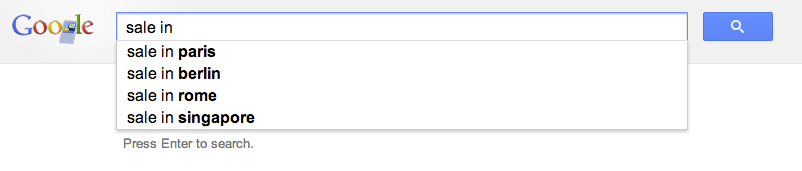
At the beginning of the year, I’ve worked with a big organization that wanted to avoid the automatic suggestions Chrome is making in the omnibox (=the top field in Chrome, where you type searches and see the url).
Their main requirement was the need to allow employees to type a word and get the internal site that they are use to see. For example, the user will type ‘sale’ and Chrome will redirect them to the internal portal of sales. If you won’t modify Chrome it will run a google search on ‘sale’ and the results will be something like:
The good news is that with this little extension you will be able to control the redirect of the users to the right internal location. Let’s jump into code.
This is the code of our manifest file that describe the extension
This file contains hidden or bidirectional Unicode text that may be interpreted or compiled differently than what appears below. To review, open the file in an editor that reveals hidden Unicode characters. Learn more about bidirectional Unicode characters
Important to notice is that we setting the keyword ‘get’ in order to activate this extension. You can choose something shorter if you like. Another aspect is the “manifest_version”: 2 which making sure we are compatible with the latest spec.
This is the code of our background page
This file contains hidden or bidirectional Unicode text that may be interpreted or compiled differently than what appears below. To review, open the file in an editor that reveals hidden Unicode characters. Learn more about bidirectional Unicode characters
Here we will listen to the events of omnibox.onInputChanged and omnibox.onInputEntered in order to execute our logic.
Another point you might want to consider is to go to:
chrome://settings/ -> Advanced -> and then to disable these options:
Use a web service to help resolve navigation errors
Use a prediction service to help complete searches and URLs typed in the address bar
Predict network actions to improve page load performance
It doesn’t matter if you are working in a startup of few people or a big organization with 2.2M employees (e.g. Walmart). In both cases, you probably have internal network and internal systems that your users will love to access with few keywords like: CRM, ERP, Sale, Marketing, QA etc’.




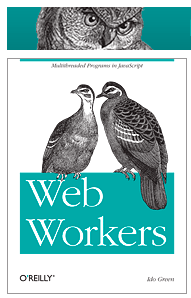
 Web Workers is a good way to improve the performance of your web applications. It’s not a new HTML5 API but for some reason not too many front end developers are using it. This short episode will give you the intro to why and how you can leverage this simple and powerful API to enter the world of multi threads in the browser.

 Ido Green