Business, cloud, JavaScript

OpenAI API – 101 Tutorial

OpenAI is a research organization focused on developing advanced artificial intelligence technology, and one way it achieves this is by making its technology available to developers through APIs. 

This blog post will explore what OpenAI API is and how to use it from Node.js – We will show a few examples you can take and combine with your current applications.
Other good examples to explore the API are at openai.com.

What is OpenAI API?

OpenAI API is a powerful tool allowing developers to access cutting-edge AI models that OpenAI researchers train. 

It’s (also) a mouthful, no?

These models can be used for various applications, including natural language processing, translation, image recognition, chatbots, etc.

The OpenAI API is designed to be easy to use, with a RESTful API that can be accessed using any programming language.
It also includes pre-built models that can be used out of the box and the ability to train custom models using your own data.


Continue reading
Standard
JavaScript, webdev

SkyMass: A New Way to Build Web Apps

If you’re searching for a fresh approach to developing web applications, SkyMass offers an innovative solution. It provides a more efficient method for swiftly crafting functional web applications for your internal APIs.

Over the past few months, I’ve had the opportunity to collaborate with SkyMass on multiple projects, and the results have been impressive. Instead of starting from scratch with a React app each time, SkyMass has enabled me to swiftly define the essential components and have a working prototype in a matter of hours or days, rather than the weeks or even months it would typically take.

Continue reading
Standard
Espresso at sunrise
Chrome, cloud, webdev

Personal Cyber Security

In today’s digital world, it’s more important than ever to ensure that your personal cyber security is up to date. With the ever-growing number of threats on the internet, it’s essential to take the necessary steps to protect yourself and your data.

The first step in protecting yourself is to be aware of the threats that exist. The second step is to use the right tools to protect yourself. There are many different types of cyber threats, such as malware, phishing, and ransomware.

Continue reading
Standard
webdev

How to write a useful bug report?

Writing a useful bug report is a critical part of the software development process.
A good bug report can help developers quickly identify and fix the issue, while a poorly written one can cause confusion and delay the process. Here are some tips to help you write a practical bug report:

Make Sure You Have All the Necessary Information

Before you start writing your bug report, make sure you have all the necessary information. This includes:

  • A detailed description of the bug.
  • Steps to reproduce the bug.
  • The expected behavior.
  • The actual behavior.
  • Screenshots or videos of the bug in action.
  • The version of the software you are using.
  • Your operating system and browser.
Continue reading
Standard
Business, webdev

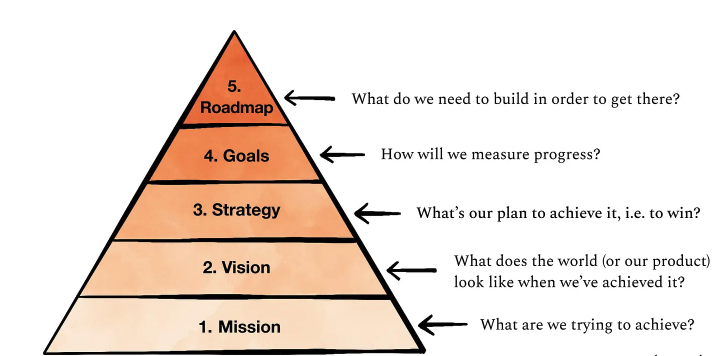
Product Management – From Mission to Roadmap

When we are talking about a roadmap in the context of product management, we mean a shared source of truth that outlines the vision, direction, priorities, and progress of a product over time.
It’s a plan of action that aligns the organization around short and long-term goals for the product or project and how they will be achieved.

It is an essential tool for product planning and serves as a communication channel between product management and other stakeholders. Product managers need to understand how to create a product roadmap and how to keep it updated, and keeping it updated with reality is the challenging part.

As Mike said: “Everyone has a plan until they get punched in the mouth.”
Or in other version (popular in the army) – “No plan survives first contact with the enemy.”
That’s why we must invest in keeping it as close as possible to the changing reality.

Continue reading
Standard
Business, webdev

How to record a Demo/Meeting on MacOS

To record a meeting or a demo on a Mac, you can use the built-in QuickTime Player app.

Here’s how:

1. Open the Quicktime Player app from your Applications folder.
QuickTime Player is the default media player for your Mac.
It lets you record audio and video.
You can use Spotlight (cmd+space bar) to open it.

2. In QuickTime Player, choose File > New Screen Recording.
This will open Screenshot and display the tools.

Continue reading
Standard
JavaScript, webdev

JavaScript Objects 101

The Object type represents one of JavaScript’s data types. It’s important stuff as we will use them—a lot.

It is used to store various keyed collections and more complex entities. Objects can be created using the Object() constructor or the object initializer / literal syntax. Did you know that all modern JavaScript utilities for working with objects are static?

Here is an example of a JavaScript object that contains two names and one key:

let obj = {
  name1: "John",
  name2: "Jane",
  key: "value"
}
Continue reading
Standard
JavaScript, webdev

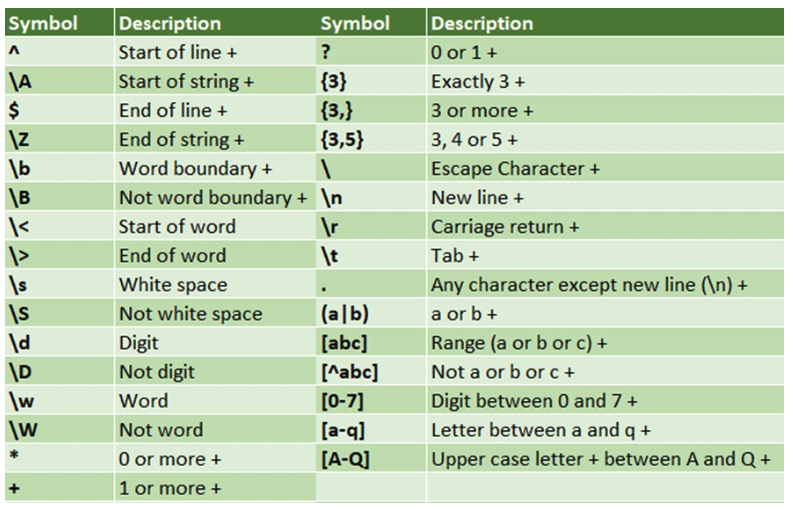
RegEx 101

Regular expression or in short Regex is a string of text that lets you create patterns that help match, locate, and manage text. It’s an important tool in a wide variety of computing applications, from programming languages like JS, Java and Perl, to text processing tools like grep, sed, and vim.

Here are a few helpers to refresh your mind when you need some ‘simple’ regex to do the job.

Continue reading
Standard
cloud, JavaScript

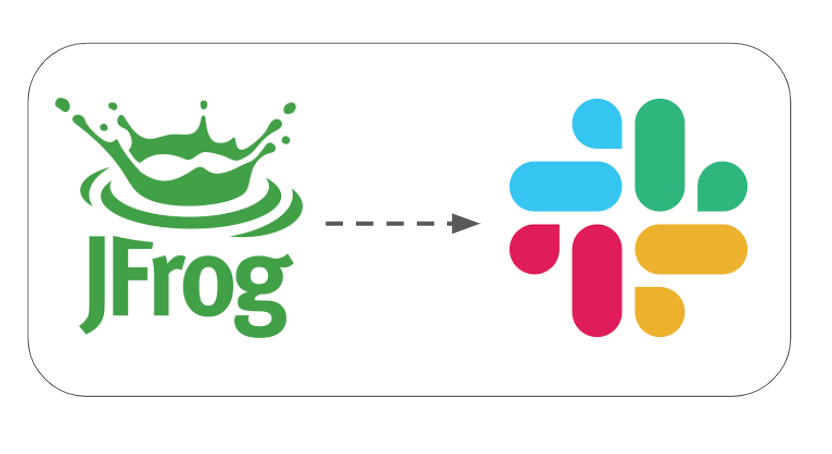
Integrate JFrog Xray with Slack

The need to protect your software and to be updated about vulnerabilities is getting stronger. JFrog Xray is unique in its capabilities to perform analysis of all the binaries you are consuming in your project. It works with Artifactory to perform a deep analysis of binary components at any stage of the application lifecycle. Xray provides great visibility into issues lurking in components anywhere in your organization and there are many cases where you wish to get notified on a security violation (or a license breach) directly to Slack.

Getting Started

We will use Xray’s Webhooks to define our server’s and base on the policies/rules our Webhook will be notified with the alerts about violations (security or licenses).

Continue reading
Standard
cloud, JavaScript

Export Violations From JFrog Xray to CSV

The trend of #DevSecOps is growing fast and it is no longer just part of your security team. More and more organizations wish to integrate their security team in all the phases of development and operations. To achieve it, there are cases where you need to export data from JFrog Xray (in our case to a CSV format) so you can ingest it to your current logging/monitoring system. 

What is Xray?

In a nutshell, JFrog Xray works with JFrog Artifactory to perform a deep analysis of binary components at any stage of the application lifecycle. It provides full transparency that leads to more trust in your software. 

By scanning binary components and their metadata, recursively going through dependencies at any level (think on the layers you have in any Docker container), JFrog Xray provides great visibility into issues lurking in components anywhere in your organization.

Xray API

One of the best parts is that JFrog Xray is also fully automated through a rich REST API. We will use it to create this Exporter. Please feel free to clone/fork the code below and use it, but remember you might need to add pagination and a watchdog for a real system.

Continue reading
Standard