Chrome, HTML5, JavaScript, webdev

Web Development – Some ‘Good To Great’ Tools

I’ve started to create a list of some great online tools that will help you (and me) in the next project. Some of the tools are helping to achive a certain effect (=gradients) while others are more a ‘hello world’ examples to hack around it in order to understand a new HTML5 API (e.g. HTML5 File API) and then harness it to your next web app. You might say it’s not a tool and you might be right. I guess it is more a list of resources that might help you get better at what you do.

If you got some other good sources please let me know… Here is the list:

Browser capability

Before you start your project you need to check what is the set of features and which browser will support them. There are few sites that will give you good answers. The lastest one is: html5please.us and other good sources are caniuse.com which include mobile browsers as well and mobilehtml5.org that is all about capability for mobile browsers.

JavaScript MVC frameworks

There is a new kid on the block – Thorax I like that fact that it is an opinionated backbone application framework. It is a combination of several tools:

Another framework that is worth the time to look into is: emberjs and Trello tech stack that is coming from the great dudes of ‘Fog Creek’.

If you wish to check what other options you have today – I would go to this site and check some of the most popular MVC framework that are out there.

Work and share javascript online

I also found myself using Simple JSON viewer in cases you wish to find out a specific parameter in a large JSON object.

Playing with CSS3

Libraries for Fonts

  • Google Web Fonts API – Google Web Fonts makes web fonts quick and easy to use for everyone, including professional designers and developers. We believe that there should not be any barriers to making great websites.
  • TypeKit – Simple, bulletproof, standards compliant, accessible, and totally legal fonts for the web.

Offline Libraries & Frameworks

  • ManifestR – a bookmarklet for creating an AppCache manifest file.
  • LawnChair – a library that provides a lightweight, adaptive, simple and elegant persistence solution.
For Mac Web Developers

    • LiveReload monitors changes in the file system. As soon as you save a file, it is preprocessed as needed, and the browser is refreshed. When you change a CSS file or an image, the browser is updated instantly without reloading the page.
    • CodeKit automatically compiles Less, Sass, Stylus & CoffeeScript files. It effortlessly combines, minifies and error-checks Javascript. It even optimizes images, auto-reloads your browser and lets you use the same files across many projects.

Mobile web development – Some good reads

It is far from being a full list – just a beach-head to start have a source for some tools that will make you more productive.

Standard
Chrome, HTML5, webdev

HTML5 Training Day (Mountain View) – Summary

Well, in the past month I was busy organizing this HTML5 Training Day for business web developers. You may want to stop and ask:
What Is HTML5 Training Day? So, our main goal is to have an open conversation with business web developers and to provide them with tools and knowledge to implement HTML5 features into their web apps. In this one day event, world-class experts talk about tools, tips and best practices in web development with focus on business.

It was a lot of fun and last week, we had in Google more then 24 companies that came to learn about the latest and greatest in the open web technologies.

We started the day with a short presentation that I gave on ‘The State of ChromeOS’. It’s amazing to see how fast is the pace and I suspect we are going to have a great 2012. After that (and two more cups of coffee) we got Pete LaPege (an excellent speaker, if I may) talking about: “HTML5 and new breed of web application” which aim to cover what defines a great Web App and show you how you can use HTML5 to create a new breed of web application that will delight and amaze your users.

Another cup of java and another web ninja: Mr. Eric Bidelman gave great talk with lots of demo on the ‘bleeding edge features in Chrome and the open web platform“.
and some HTML5 offline features. 

For the developers who wish to do ‘mobile first’ – we had a surprise from the snow country. Mr. Boris Smus (that build web stuff that make you – wow! for real) talking about A mobile web app technology stack. Here in his own words: “…Learn what it takes to build modern mobile web apps. We will start with the ideas of “adaptive apps” and “offline first”. Next, we’ll dive into some of the technologies, including MVC frameworks, templating engines, CSS frameworks, laying out views and multi-touch input. Finally, we’ll close off with mobile-specific tips and sweet demos.”

After Boris we had the pleasure to host David Kaneda (for the few that don’t know, David Kaneda is a creative web technologist. He created jQTouch, a jQuery plugin for mobile web development, and Outpost, the original iPhone app for Basecamp.) David gave another great talk on “Abstracting CSS for Complex Theming Systems.”

In the afternoon, Mr. Seth Ladd (The Michael Jordan of Dart) spoke about Dart and how it is a comprehensive effort to help app developers build complex, full featured, high fidelity apps for the modern web. He gave some nice short demos that showed the language, libraries, and editor of Dart.

Last but not least, Mr. Christos Apartoglou (The Chrome Web Store Chief) spoke about  Success stories in CWS. He talked about some bold success stories and showed what makes apps in the Chrome Web Store successful.

You can see the format of the day with the full descriptions of the talks over the public schedule that we kept for that day. It was a good tool to have a back channel (using the chat feature on the document) and to allow everyone to keep updated with the last minute changes. I hope to have some videos from that day public… I will post them here and on my G+ page.

See you all in our next Training day.

Standard
Chrome, HTML5, webdev

Mobile Web Performance

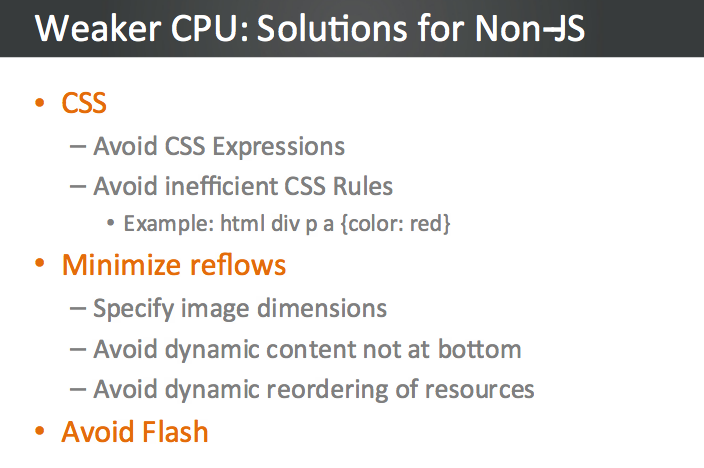
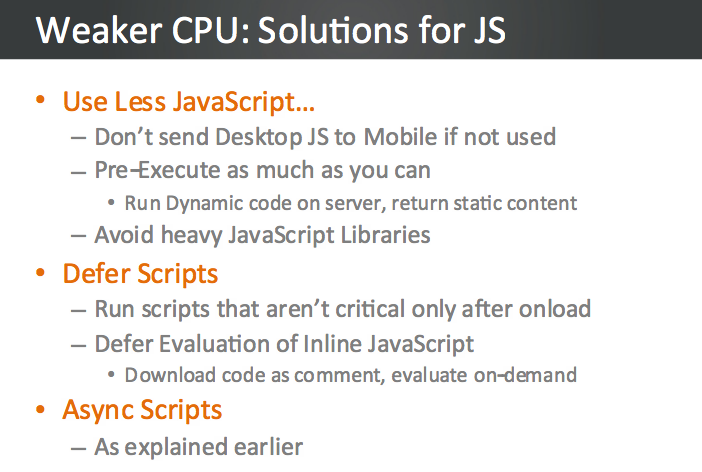
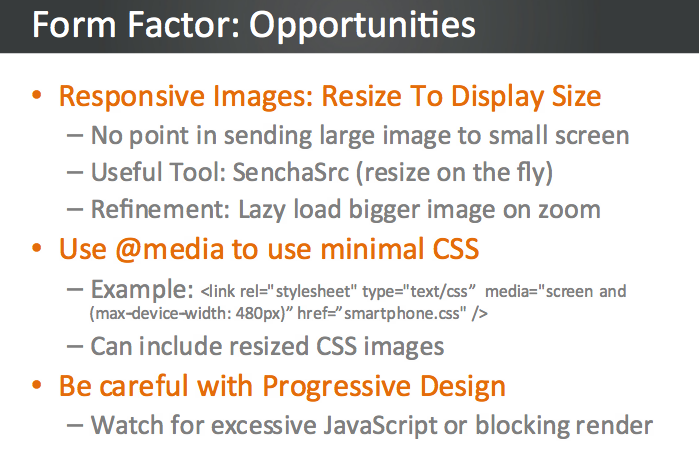
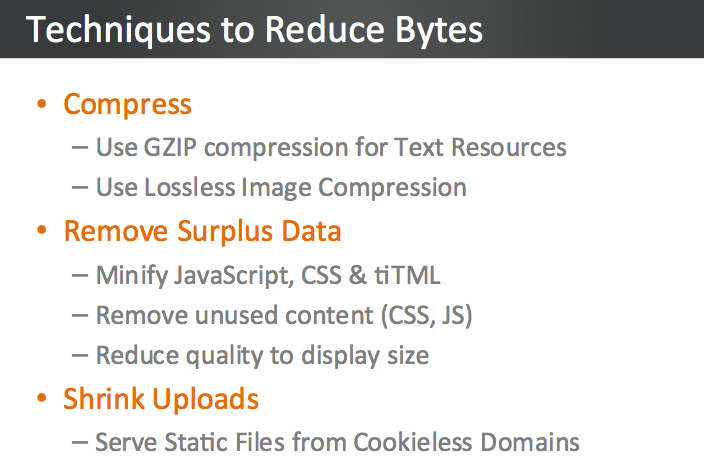
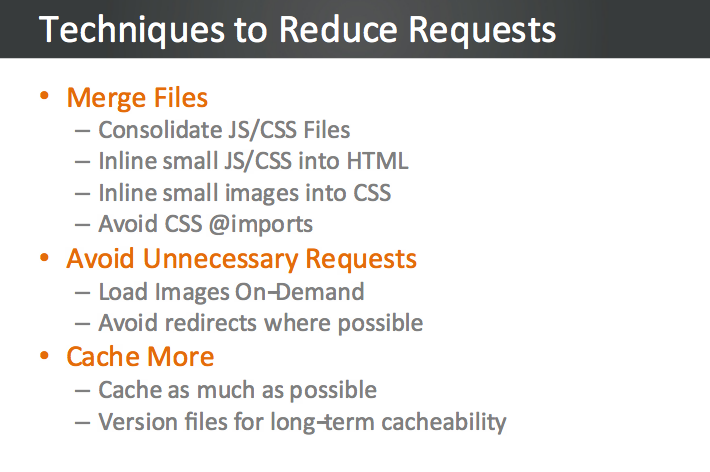
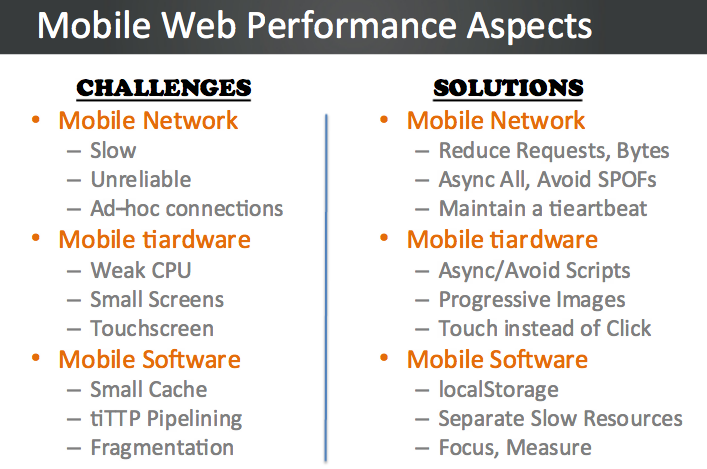
“You can’t manage what you can’t mesure” And it’s not easy to manage or get a clear picture on mobile web browsers. Since this is a very important subject to any web developer and specially those who focus on their ‘mobile first’ plan. I’ve saw this good presentation on this subject and wanted to share with you my main takes. Studies show that Mobile users expect equal or better performance than desktop, where they demand 2s load times. This is a hard requirement to fulfill, give the limitations mobile imposes. Guy Podjarny (the CTO of blaze.io) go over the different aspects of mobile: network, hardware & software. We’ll review the challenges each presents, understand how they affect web performance, and show ways to overcome those challenges. We’ll also show the impact of these optimizations on real world sites, gleaned from manipulating and measuring websites using Blaze technology. We’ll summarize with updates on the recent mobile OS releases, followed by Q&A.

The video of this talk

My notes from the talk

  • You will lose 13% of your users after 2sec! and 25% of your users after 4sec of load time.
  • HTML5 is supported on mobile so use HTML5 localStorage for caching: It’s available on all major mobile platforms. It doesn’t expire and it will survives power cycle. Its size limit is around 5MB so it’s most useful for caching javascript and CSS files (like Bing and google search pages are doing on mobile browsers).
  • Scriptable access enables other optimizations.
  • Use far-future expiry dates
  • You got more then ‘2 connections’ on modern mobile browsers (e.g. Galaxy S got a max of 12 connections) – so use them in parallel as you can.

 Other good tips

The presentation

Happy new year!

Standard
Chrome, HTML5

HTML5, ChromeOS And Chrome Web Store (Video)


Here is a talk I gave in Tel Aviv GTUG. The title of the talk was “Html 5, Chrome OS & Chrome Web Store” and it’s all in Hebrew this time. The event was very cool with two other talks that were very interesting. If you work with Google technologies I would recommend you check out the GTUG (=Google technology user group) near your home town. It’s a great way to meet other strong developers, product managers and anyone that love the open-web.

and our HTML5 dude:

Standard
Chrome, HTML5

HTML5 And Offline – Videos From Google Developer Day 2011

Demos in the keynote


The Chrome HTML5 demos are starting around 40:34…

Bleeding Edge HTML5

The GDD TLV Clip

I hope to get others as well… I’ll update this post with them.

If you wish, the full list of videos from this event is here on youtube.

Standard
Chrome, HTML5, webdev

HTML5 On Mobile Devices (iOS, Android & Windows)

More and more we see mobile devices with stronger browsers that implement a lot of HTML5 APIs. This is other factors are the root cause that mobile development has taken off. Many developers are choosing to go the mobile web route instead of writing the same application repeatedly for each different mobile platform. However, one of the things that you give up by “going web” is the application frameworks that make life easier for developers of native mobile applications. As a result, several web application frameworks are emerging. In this post I will look at some of the best frameworks: jQueryMobile and Sencha Touch. There are some other very good MVC frameworks that are worth look into: SproutCore, Cappuccino and backbone.js but that will be in another story (=post).

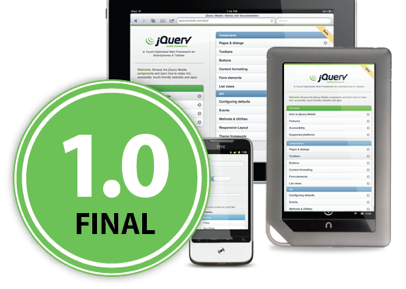
Let’s start with one of the most popular JavaScript library – jQueryMobile It’s now in version 1.0 and it’s a powerful HTML5-based user interface system for all popular mobile device platforms. They have a set of UI components that give the developers a lot of power. Its lightweight code is built with progressive enhancement, and has a flexible, easily themeable design. If you are developing apps for business (think components like grids) you might want to take a closer look at Sencha ExtJS and other products. They have a good integration with GWT (if you use it) and overall, they give the developer a lot of power: clean component model, powerful UI widgets etc’. There are some new capabilities that give more native look and feel to your web apps. The first is the Fixed position – Psss… its great for your menu at the top of the screen. I hope will see its adoption on other mobile browsers (and not just the safari 5+). Another cool aspect is the new ‘Path‘ button dynamics all in pure CSS and scroller live demo.

The wave of HTML5

The wave of HTML5 apps is here

Deployment

One of the ‘easy’ parts it the deployment. Once users added your web app as shortcut to their home screen it will be there and updated each time they starting it. You can also, use the Android, iOS stores with a webUI wrapper and tools like AppsGeyser or AppCelerator that will do the work of wrapping for you. I hope that in the future the webUI that we get in iOS/Android will be as good as the webkit we have in the browser on the same platform. Currently, it’s got some limitations. Lastly, in case you wish to check what HTML5 features will work on each device you are targeting: This is a good source: http://mobilehtml5.org/ and for more stats and development tips checkout my last post on html5 on mobile.

Be strong.

Standard
HTML5, JavaScript, webdev

Convert WebSQL To IndexedDB Tutorial

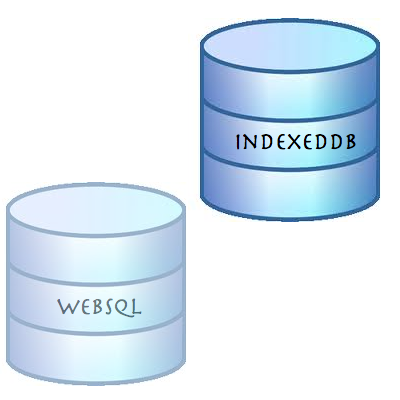
Exactly a year ago on November 18, 2010, the W3C announced that Web SQL database is a deprecated specification. Many major browsers including Chrome, Safari, Opera and nearly all Webkit based mobile devices support WebSQL, however, if you are going to start a new project and/or you wish to have your code running with the new version of client side database (that will receive updates and improvements) you should implement indexedDB as your client side database. In this short post we will see what are the main steps to refractor your WebSQL code to IndexedDB.

First lets create the databases


// WebSQL 
database = openDatabase('todos1', '1.0', 'todo list example db', 2*1024*1024);

// InxededDB
var todoDB = {};
var indexedDB = window.indexedDB || window.webkitIndexedDB || window.mozIndexedDB;
todoDB.indexedDB = {};
todoDB.indexedDB.db = null;


Create Table/ObjectStore

In both cases we need some ‘space’ to save our information


// WebSQL - creating a new table
 database.transaction(function(tx) {
     tx.executeSql("CREATE TABLE IF NOT EXISTS tasks (id REAL UNIQUE, text TEXT)", []);
   });

// IndexedDB - creating a new object store that will hold our data
todoDB.indexedDB.open = function() {
        var request = indexedDB.open("todos");

        request.onsuccess = function(e) {
          var v = "2.0 beta"; // yes! you can put strings in the version not just numbers
          todoDB.indexedDB.db = e.target.result;
          var db = todoDB.indexedDB.db;
          // We can only create Object stores in a setVersion transaction;
          if (v!= db.version) {
            var setVrequest = db.setVersion(v);

            // onsuccess is the only place we can create Object Stores
            setVrequest.onsuccess = function(e) {
              if(db.objectStoreNames.contains("todo")) {
                db.deleteObjectStore("todo");
              }
              var store = db.createObjectStore("todo",
              {keyPath: "timeStamp"});
              todoDB.indexedDB.getAllTodoItems();
            };
          }
          else {
            todoDB.indexedDB.getAllTodoItems();
          }
        };
        request.onfailure = todoDB.indexedDB.onerror;
      }

Add Item

Now it’s time to add some data to our database, no?


// WebSQL
function addTodo() {
        var todo = document.getElementById("todo");
        var task = {
          "id": new Date().getTime(),
          "text": todo.value };
        
        database.transaction(function(tx) {
          tx.executeSql('INSERT INTO tasks (id, text) values (?, ?)', [task.id, task.text]);
        });
        // now let clean it to the next todo
        todo.value = "";
        showAll();
      }
      
// IndexedDB
todoDB.indexedDB.addTodo = function(todoText) {
        var db = todoDB.indexedDB.db;
        var trans = db.transaction(['todo'], IDBTransaction.READ_WRITE);
        var store = trans.objectStore("todo");

        var data = {
          "text": todoText,
          "timeStamp": new Date().getTime()
        };

        var request = store.put(data);

        request.onsuccess = function(e) {
          todoDB.indexedDB.getAllTodoItems();
        };

        request.onerror = function(e) {
          console.log("Error Adding: ", e);
        };
      };

Fetch Items

After you have data it’s only make sense to show it to the world (and your dear friends)


// WebSQL
function showAll() {
        document.getElementById("ourList").innerHTML = "" ; 
        database.transaction(function(tx) {
          tx.executeSql('SELECT * FROM tasks', [], function (tx, results) {
            var len = results.rows.length, i;
            for (i = 0; i  Todo text: " + results.rows.item(i).text);
              
              var a = document.createElement("a");
              a.textContent = " [Delete]";
              a.setAttribute('data-key', results.rows.item(i).id);
              a.setAttribute('data-val', results.rows.item(i).text);
              a.addEventListener("click", function() {
                deleteTodo(this.getAttribute("data-key"),this.getAttribute("data-val") );
              }, false);
              li.appendChild(t);
              li.appendChild(a);
              document.getElementById("ourList").appendChild(li);
            }
          });        
        });
      }

// IndexedDB
function showAll() {
        document.getElementById("ourList").innerHTML = "" ;   
        var request = window.indexedDB.open("todos");
        request.onsuccess = function(event) {
          // Enumerate the entire object store.
          var db = todoDB.indexedDB.db;
          var trans = db.transaction(["todo"], IDBTransaction.READ_ONLY);
          var request = trans.objectStore("todo").openCursor();
  
          request.onsuccess = function(event) {
            var cursor = request.result || event.result;
            // If cursor is null then we've completed the enumeration.
            if (!cursor) {
              return;
            }
            var element = document.createElement("div");
            element.textContent = "key: " + cursor.key + " => Todo text: " + cursor.value.text;
            document.getElementById("ourList").appendChild(element);
            cursor.continue();
          }
        }                    
      }


Delete Item

In rare cases we wish to delete stuff… It’s easy.


// WebSQL
function deleteTodo(id, text) {
        if (confirm("Are you sure you want to Delete "+ text +"?")) {
          database.transaction(function(tx) {
            tx.executeSql('DELETE FROM tasks WHERE id=?', [id]); 
          });
          showAll();
        } 
      }

// IndexedDB
todoDB.indexedDB.deleteTodo = function(id) {
        var db = todoDB.indexedDB.db;
        var trans = db.transaction(["todo"], IDBTransaction.READ_WRITE);
        var store = trans.objectStore("todo");

        var request = store.delete(id);

        request.onsuccess = function(e) {
          todoDB.indexedDB.getAllTodoItems();
        };

        request.onerror = function(e) {
          console.log("Error Adding: ", e);
        };
      };


As Oscar Wilde said: “…Consistency is the last refuge of the unimaginative…” – so in our case, let’s save data locally and have more performance in our web apps (with some consistency).

Live Example

All the code is on github – https://github.com/greenido/WebSQL-to-IndexedDB-example

and you can play with a live example.

Standard
Chrome, JavaScript

Chromebook and window.open()

I got few questions last week on #GDDDE (=Google Developers Day 2011 and #GDD11 which is the popular hash tag both in G+ and Twitter for these events) about window.open() in Chromebook. Here is a summary of the answers.

Few things you might didn’t know about window.open() in ChromeOS:

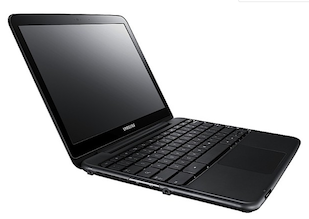
  • window.open() will open a new tab if the window size > 50% of the width or 60% of the height of the window. So it will be a bit different in Samsung and Acer due to the different screen sizes.
  • An app / extension can use the chrome.window API to call chrome.windows.create() which takes a “type” parameter which will always be obeyed. (Panel windows will be constrained to 80% of the screen width and height). Let’s have a look on how to use it.

First, let the browser ‘know’ what type of window you wish to have use this:

 chrome.windows.create(object createData, function callback) 

Creates (opens) a new browser with any optional sizing, position or default URL provided. You should use ‘type’ as part of the ‘createData’.

 type - ["normal", "popup", "panel"]  
This is the source of true about the window object API. Be strong.
Standard
Chrome, HTML5

Google Developers Days (Tel Aviv & Berlin) And One CloudCon

It was a busy week. Busy but with lots of fun. It’s so great to meet wonderful developers that push the web forward and know (and love) their profession. Last sunday, we had Google Developers Day in Tel Aviv (or Airport city if you want to be accurate) – it was well organized event with more then 1400 developers. In the keynote we had three demos:

  • Android – Ice cream sandwich new capabilities (maps, nfc, HD and other features. To dive deeper, go check Romain Guy’s blog).
  • Chrome/HTML5 amazing new features – I did the demos and I hope to post a list next week.
  • G+ – the new hangout APIs with a robot that eat falafel and drink beers.
Here you can check some coverage:
 The CloudCon was also impressive in terms of the audience (mainly, CIO/CTO dudes) – they liked the story of HTML5 and ChromeOS. I got some good questions on new features: offline, notifications, threads and even on web audio. It could be great to have the new Chromebooks in Israel, it seems that the market really want them. The one argument (or selling point if you want to push here) that conviense IT people is that the TCO (=Total cost of ownership) is 60%-70% cheaper. Yes – these are the numbers… so if your organization can work with web apps (and Citrix for the apps that you don’t want to move to the web) it might be a perfect solution for you.

I hope to get some photos soon (from our dear wonderful photographer) – so I’ll update this post with fresh photos of some great looking people.

Tomorrow we are going to rock Berlin – so keep up with us using G+ with #GDD11 tag  or this blog next week. Btw, for Berlin GDD you might want to search after #GDDDE

Be strong.

This slideshow requires JavaScript.

In case you want to follow the slides from my Talk in CloudCon – The ‘love’ story of HTML5 & ChromeOS.

From Google Developers Day in Berlin here are the talks:

Standard
Chrome, HTML5, webdev

Web Workers (Part 3 Out Of 3) – Shared Wrokers

Shared Worker Example

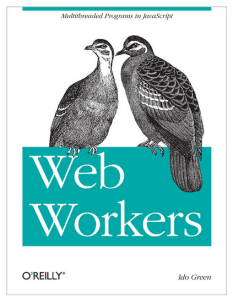
Web Workers - The bookA web worker is a single JavaScript file loaded and executed on a separate thread (=background and not the UI thread). Dedicated web workers are linked to their owner/creator which is the script that called and loaded them. Shared web workers allow any number of scripts to communicate with a single worker.
Btw, if you missed Part1 and/or Part2 of this series, you might want to read them first.
Shared web workers are identified in two ways: either by the URL of the script used to create it or by explicit name. In the code below we will see how it can be done.

<!DOCTYPE HTML>
<html>
<head>
<meta charset="utf-8" />
<title>Shared Web Workers: Show And Tale</title>
</head>
<body>
<h1>Shared Web Workers: Show And Tale</h1>
<article>
To create a shared web worker, you pass a JavaScript file name to a
new instance of the SharedWorker object:
<br/>var worker = new SharedWorker("jsworker.js");
<br/>
<output id="result"></output>
</article>
<script>
var worker = new SharedWorker('sharedWorker1.js');
worker.port.addEventListener("message", function(e) {
document.getElementById('result').textContent += " | " + e.data;
}, false);
worker.port.start();
// post a message to the shared web worker
console.log("Calling the worker from script 1");
worker.port.postMessage("script-1");
</script>
<script>
console.log("Calling the worker from script 2");
worker.port.postMessage("script-2");
</script>
</body>
</html>
// This is the code for: 'sharedWorker1.js' file
// Shared workers that handle the connections and Welcome each new script
//
var connections = 0; // count active connections
self.addEventListener("connect", function (e) {
var port = e.ports[0];
connections++;
port.addEventListener("message", function (e) {
port.postMessage("Welcome to " + e.data +
" (On port #" + connections + ")");
}, false);
port.start();
}, false);

Shared web workers can:

  • load further scripts with importScripts()
  • attach error handlers, and
  • run the port.close() method to prevent further communication on a specific port.

Continue reading

Standard