Chrome, HTML5, JavaScript, webdev

Dart Hackathon In Tel Aviv

In the last weekend of April there we are going to have a Dart Global Happy Hour around the world. Luckily, we will have Tel Aviv on the map as well. Fitst, for the ones that still think we are speaking here about

Well, we are not talking about dart game in the irish pub. Although it’s good fun…

So… what is Dart?

Dart is structured web programming for the entire modern web. Like a good draught, Dart is fresh yet familiar, with unique touches that help create a delightful new experience for aficionados of software development. Dart delivers a smooth pour of a new language, libraries, virtual machine, and compilation to modern JavaScript. Dart will make web development crisp and refreshing again.

So in order to gain more feedback (and have fun hacking) we are going to have a #Dart hackathon in the last weekend of April. The keynote will be giving by +Gilad Bracha and we will have other Dart experts, helping during the hackathon. The event is going to take place at the Hub in Tel Aviv so if you wish to attend you better register asap at hackathon-israel.eventbrite.com/ and for the schedule and more details on the event: http://goo.gl/iFccu

We ask all the participants to bring their own laptops and power cords. Please make sure to have Java, Dart SDK and the Dart Editor on your laptop before the hackathon. Here is a good page that will guide you on the process: http://www.dartlang.org/docs/getting-started/editor/. The hub will provide WiFi and we will make sure there is enough food/drinks. If you wish to ‘test the water’ before the event – dartlang.org is an excellent resource to test the language and get a feel to the power of the APIs.

  • Disclaimer: Dart is “technology preview” (not yet even alpha). This hackathon is for experienced developers.
Standard
Business, Chrome, webdev

Great Web App Session

At the last day (for me) in the Javaposse roundup 2012 we started (like any good day) with camp 4 coffee. Then, after you can speak (more or less) we sat to talk on what does we mean when we say: “Modern web app” or as Joel N. said: “Don’t use the word modern because it will become obsolete before you know it”. When we try to define a great web app here are some common aspects we found:

  • Self Contained
  • Functional
  • Immersive
  • Interactive
  • Works Offline
  • Device Aware
  • App Styled Navigation
  • Client Side Architecture
Few important things we can learn from Amazon web kindle app:
  • Does it cost more to support browser X than it generates?
  • Is the browser older than the mayo in your fridge?
  • Is an exorcist required to debug the app’s behavior?

The lesson is to be explicit about the browsers you support (just like Amazon). One of THE success stories about mobile web apps if the Financial times app. You might want to check the slides in order to get the full details of their success story.

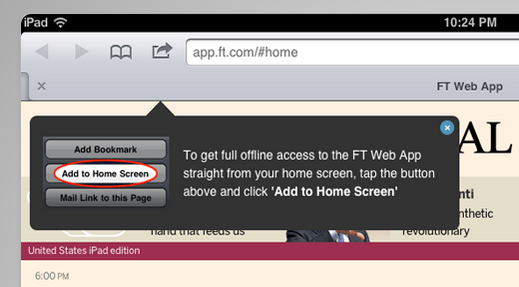
Btw, in you can have this new script to help you popup the message for users to add your web app to their home screen. It will make the engejment of your app better and the user will be able to ‘treat’ your web app as any other app.
==

Here are my slides from the lighting talk on Great Web Apps that I gave later this day.

Standard
Chrome, HTML5, JavaScript, webdev

Google App Script Session

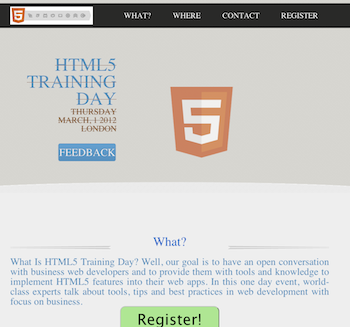
On the second day of the JPR12 we had a good coding dojo (which is a meeting where a bunch of coders get together to work on a programming challenge) during the afternoon activities on Google App Script. The idea was to create a simple, yet functional, system to organize an event. The event could be a training day, hackathon, birthday party, running race, etc’. We started with a template site I’ve created that is built on top of twitter bootstrap-responsive and modernizr (but of course).

The site gives you basic functions like:

  • What  – What is the event goal/mission or why should I come.
  • Where – Information on the venue and where to park. We use some nice custom google map in order to follow the rule: “one picture is worth 10,000 words”.
  • Contact – Who is running the event and ways to get in touch.
  • Registration – Using Google forms and app script, as our backend, we will have a system to keep track on the registration process.
In the system backend code we got:
  • Set up the maximum number of people that could participate in this event.
  • Send a confirmation email.
  • Send a waiting-list email to the ones that are filling the registration form after the maximum number of participate is being reach.
  • Send a reminder email (a week and/or a day) before the event.
  • Lastly, after the event, send an email with a link to a feedback form. We want to be able to improve…
The two interesting parts of this system are:
  1. Simple one page app that will render nicely on phones, tablets and desktops.
  2. Backend that let us run the communication with the participates and keep tracks on the registration process.
Ready to see some (simple) code?
Here is the part that we use in #2:


//
// Call this when you want to send the call 
// for Feedback email AFTER the event is done
//
function sendFeedbackEmail() {
  // Get our main spread sheet into ss obj.
  var ss = SpreadsheetApp.getActiveSpreadsheet();

  // Fetch the sheet with the list of emails
  var dataSheet = ss.getSheetByName("Registration");

  // Fetch the range the contain our information for the email
  var dataRange = dataSheet.getRange(2, 2, 
      dataSheet.getMaxRows() - 1, 
      NUM_FORM_QUESTIONS + 1);

  // First row of data to process
  var startRow  = 2;  

  // Get the email template (you may use html template here)
  var templateSheet = ss.getSheetByName("Email Templates");
  var emailTemplate = templateSheet.getRange("A5").getValue();
  
  // Create one JavaScript object per row of data.
  objects = getRowsData(dataSheet, dataRange);

  // For every row object, create a personalized email from a template and send
  // it to the appropriate person.
  for (var i = 0; i < objects.length; ++i) {

    // Get a row object
    var rowData = objects[i];

    // Only contact people who are 'yes' status
    if (rowData.status == YES) {  

      // Generate a personalized email.
      // Given a template string, replace markers (for instance ${"First Name"}) with
      // the corresponding value in a row object (for instance rowData.firstName).
      var emailText = fillInTemplateFromObject(emailTemplate, rowData);
      var emailSubject = dataSheet.getRange("P2").getValue() + " Reminder";
      
      MailApp.sendEmail(rowData.emailAddress, emailSubject, emailText);
      
      // Make sure the cell is updated right away in case the script is interrupted
      SpreadsheetApp.flush();
    }
  } 
}


Here is the full code for the event site: https://github.com/greenido/events-site-template please feel free to fork, pull and do something cool with it. For more details on the new options and capabilities in Google App Script: https://developers.google.com/apps-script/templates

Standard
Business, Chrome, life, webdev

Tools That Make You More Productive

Java posse roundupDuring the first day of Java posse roundup 2012 I’ve took some notes from all the interesting session I’ve been in. The first day was a great start to the conference with two session that were very interesting with lots of good stuff to start and checkout. Here are some of the notes I’ve took from the session about “Tools that make you more productive”.

The first suggestion was (surprise – surprise) Whiteboards with some good tips like:

  • Big boards for work in meetings
  • Small portable boards that people can take back to their desks
  • Pictures of boards for later reference/distribution – good mobile apps for that are:
    • CamScanner+ phone-based scanning to PDF, etc.
    • Camera+ with its text mode filter.

My favorite editor Sumblime Text was next in line. There are many great tips and ways to make you efficiant using it. I will try to post on that later this week. You can start by using ctrl-p for smart search and improve your knowledge of short-cuts.

Productivity tools:

  • Workfloy.com – good for plan/todo anything that need list/sharing and a nice web app.
  • join.me – Hassle free screen sharing.
  • Evernote/SpringPad  – Everything you want to remember on every device you use.
  • Plain-text – good for note-taking, searching
  • SimpleNote
  • Lightscribe pen – It’s not a pure online tool (but it can be uploaded). It’s a good solution for people that like pens but want to be able to have their drawing/writing digitize for future search.

ToDo:

  • Any.do
  • “do it tomorrow” – for Android
  • Pomodoro technique – Tomatoes.com web-site for pomodoro

For the (web/Java) developers among us:

  • Standing desk
  • large monitor (or even 2-3 of them).
  • best mouse, keyboard, monitor you can buy. On every tool that you use daily you want to buy the best.
  • SSD (or hybrid HDD/SS)

How to handle interruptions:

  • Turn off all distractions: facebook, twitter, IM, IRC etc’
  • Work at home
  • Headphones
  • Go in early – the few hours without people around in the morning are your 1-2 productive hours of the day.

email considerations:

  • Establish policy/reputation of NOT responding rapidly/frequently to emails – unless it is something urgent and then the other team members know to IM you or just call.
  • Use email header/subject to distinguish FYI, ACTION REQUIRED, URGENT then you can use priority box in gmail (or filters) to make sure you get to the most important stuff first.
  • Boomerang for gMail – It is a good extension that let you set the time of sending so people will get the emails at the start of their work day and not in 23:45 at night.
  • Separate user account on workstation that has no email access
  • Use email search for trouble-shooting hints, etc.

Software (Java) development:

  • JRebel – with and without GWT.
  • Play framework – It was great to have a session in the zero day with James ward on play with Java and Scala. Very cool stuff under the hood of Play.
  • Write more tests – focus on the parts that you don’t want to do.
  • Pair programming (in disciplined doses)

Team communication:

  • hipchat.com
  • Yammer
  • Campfire and it’s ‘brother’ Propane apps.
  • Google hangouts (with screen sharing) is powerful tool for meetings.
  • Skype.

General hints:

  • Environmental hooks (e.g. SBT)
  • Python scripting
  • Command-? on Mac to drive menu from keyboard
  • Avoid the mouse; use keyboard shortcuts
  • Mylyn with Eclipse
  • Time tracking per task
  • Reviewing “painful things” per iteration
  • Track time spent on interruptions

If you have more, please let me know in the comments or g+

As for the lighting talks, I was able to hack a little site: jpr12ns.appspot.com (It’s JPR12 and NS for ‘no snow’) to hold all my talks since we had only two nights for the lighting talks so I got some talks ready for next year.

Standard
HTML5, JavaScript, mobile, webdev

We Must Be ‘On’ Mobile

the mobile webWhat does it means? It’s not an easy short answer. We see a big wave of developers/startups and (even) big organizations, all claim they are ‘on’ mobile. It seems that in the past 12-18 months, mobile replace social as the must have word in any presentation for a new venture. Yet, so few are really doing it right. By ‘right’ I mean having a successful mobile application that works across multiple devices and leverage the capabilities of strong devices while let other devices still be functional and useful. On slide 10 you could see why

  'High expectations' + 'Harsh reality' === failure

Below is a short presentation that shows how to execute a mobile web project successfully with a cross-disciplinary team. I like that fact that they include a set of helpful tools and practices to get you started and help educate your coworkers and clients at the same time.

Main topics:

  • Selling the mobile-first philosophy and strategy. For example: apps.ft.com
  • Overcoming people’s tendency to think anything made for mobile needs to be a native app.
  • How to create future-friendly mobile web experiences.
Standard
Chrome, HTML5, JavaScript, webdev

The Web Platform Cutting Edge

There are many ways to keep yourself updated with the latest improvements in Chrome and the web platform. One option is to follow Chrome Developers On G+ and another is to open ChromeStatus.com and see what is cooking in canary and going to make its way to stable soon. Another is to sit and see some screen-casts. Videos are great option but it’s rare to find such a great quality like +Alex Komoroske (from Chrome) created. The  screen-casts below shows some of his favorite capabilities of the cutting edge of the web platform. The total time of all the three is around 15min so take the time and enjoy it.

Building on foundations


This video goes over how the web platform has been fixing various historical shortcomings and building upon its core strengths, like:

  • Complicated graphical effects
  • Composability
  • Advanced text layout.

Earning from other platforms


In this video he reviews how the web platform offers new capabilities inspired by successes on other platforms with things like:

  • Push notifications
  • Payment APIs
  • Web intents.

The edge (Watch not to fall!)


In this video he demonstrates some of the new tricks: webcam access, powerful audio APIs, and complicated 3D graphics.

If you’re interested in learning more about the technology behind any of the demos, check out the Meet the Web Platform companion guide (http://www.chromium.org/developers/meet-the-web-platform-companion) or the Chromium blog (http://blog.chromium.org/2012/03/meet-web-platform-again-for-first-time.html)


Standard
Chrome, mobile, webdev

Mobile Web App Stack (Hebrew)

Here is short talk I gave in DevCon 2012. I’ve spoke about four topics:

  • The State of the mobile web
  • Design philosophy
  • How to build mobile web app
  • Tips and some knowledge from my (short) experience.
If you think about this situation:

You realize that there is no choice to stand on the side and not create a ‘mobile first’ approach to your business/organization. In a world where mobile devices are going to pass desktop users and keep the ‘up and to the right’ line even steeper there is no option not to be there. It’s going hand in hand with ‘offline first’ approach and the (huge) amount of JS MVC frameworks that let us create modern web apps. We wish to provide users with great web apps and offline is one critical factor.

Some of the main tips to be more productive when you develop your web apps are:

  • Try full tech stack like: thorax.js
  • When you aim to iOS its Safari console can be used for logging (Settings -> Safari -> Developer)
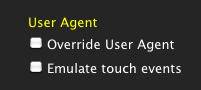
  • Simulate touch events on desktop with MagicTouch.js OR try the new feature we have in Chrome DevTools (only on Canary for now). You can simulate touch event.touch events in chrome dev tool
  • Remote debugging hack with jsconsole.com or if you have Chrome on Android you can do remote debugging

Feel free to browse the slides of my talk. When you see a dot in the bottom left corner – just click on N and you will get some more information on the current slide.

Standard
Business, Chrome, HTML5, JavaScript, webdev

HTML5 Training Day (Tel Aviv)

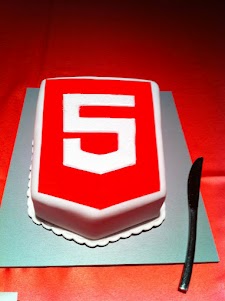
Lets start from the end… It was a great experiance to meet wonerful, smart (web) developers both in London and Tel Aviv. We had 80+ developers in the London event and 130+ developers in Tel Aviv. Like any good event – we started with a good cup of HTML5 coffee and some special HTML5 cake.

After the coffee and some food we got to the ‘talking’ part which went very well. In London we had the pleasure to have Alex Russell who spoke about Chrome Frame (link to his great presentation is in the bottom of this post). In Tel Aviv day we had two external experts: Nimrod Luria and Ron Reiter. Nimrod gave a talk about HTML5 security issues and how to use the best parctices in order to avoid them. Few examples where:

  •  Hacking Facebook with HTML5 using Cross-Origin Resource Sharing.
  • Web sockets (open ports that listen to in bound connections)
  • Good old ‘data cleaning’ and data validation.
  • Client side injections to local databases.
  • XSS by using encoding and new formats that are supported.

Ron gave a talk about backbone.js and how to leverage some frameworks and tools in order to build moden mobile web apps.

Here are the talks (with their slides) from both days:

Time Session Title Description
10:00-11:00 HTML5 and new breed of web application Web developers have nearly perfected their skill at building great web sites, but everything is shifting towards building apps.  We’ll take a look at what defines a great Web App and show you how you can use HTML5 to create a new breed of web application that will delight and amaze your users. Ido Green
11:00-11:55 Platform, Storage, Prediction, Translation and more Google Cloud Platform latest and greatest Barak Regev
13:00-14:00 mobile web app HTML5 stack A -For modern mobile browsers Learn what it takes to build modern mobile web apps. We will start with the ideas of “adaptive apps” and “offline first”. Next, we’ll dive into some of the technologies, including MVC frameworks, templating engines, CSS frameworks, laying out views and multi-touch input. Finally, we’ll close off with mobile-specific tips and sweet demos Ido Green
14:00-14:50 HTML5 threats and attack vectors + some attacks demo +
Countermeasures
Security for business web apps – best practices and tips for the real world. Nimrod Luria
Q.rity – Quality Security Solutions Ltd.
A short coffee break to make sure everybody is awake…
15:10-15:35  Chrome Dev Tools Tips and best practices to work with Chrome Dev Tools. Ido Green
15:35-16:30 HTML5 mobile web apps Backbone.js and other tools with real world examples Ron Reiter

More sources from the talks and questions:

and for the ones that wish to try ChromeOS: https://greenido.wordpress.com/2012/01/09/install-chromiumos-on-your-old-laptop/ and https://greenido.wordpress.com/chrome/

Or the Ubuntu guys that want to have Canary.

Standard
Chrome, HTML5, webdev

Google Chrome For Android

Google Chrome is now available in Beta on Android devices with Android 4.0 (Ice Cream Sandwich). This is a huge deal for the mobile web. I’m sure we are going to see some amazing changes in the near future. Since the lunch of the iPad the safari was (the!) popular app and this is a good sign that Chrome is going to rock it on Android. To be able to experience the Chrome interface, but on a mobile devices – so cool. Moreover, under the hood, Chrome for Android includes key support for HTML5 and other open web technologies, which means you can share code across the desktop and mobile platforms. Last but not least, as a developer you want to be able to be productive as possible – so yep, you can now, take advantage of the complete set of Chrome’s powerful Developer Tools through an easy hookup with a desktop system.
A nice explanation

For developers, here is the list of key features in this initial beta release:

  • You now got remote debugging! check ‘how to do it
  • Solid position: fixed support. Yep, you can now have your menu, navigation buttons in the same place without any hacks.
  • IndexedDB support for storing data – It’s time to save data on the client and make you app work offline. You can also use the HTML5 FileSystem support for assets
  • Smooth scrolling of pages and elements
  • Hardware accelerated CSS transforms/transitions, canvas
  • Web Socket support
  • Web workers.

Resources:

  • Get Chrome on Android Market (Currently available in: United States, Canada, United Kingdom, France, Germany, Spain, Australia, Japan, Korea, Mexico, Argentina, Brazil).
  • FAQ – It contains some answers to things you wish to ask… Check it out.
  • http://code.google.com/chrome/mobile/
  • The Official post from Chrome Blog
  • Found a bug? Please help us by reporting it here at crbug.com
  • Pss… The new Chrome for Android including AppCache, localStorage, WebSQL, the File APIs (File, FileList, FileReader, Blob), and IndexedDB. All these technologies enables your web app to access data offline. In addition to the IndexedDB interfaces, data can be accessed offline through use of the localStorage API.
Standard
Chrome, HTML5

How To Get Your Web App Into The Chrome Web Store

It use to be very easy to upload your web app to the Chrome web store. This short and simple tutorial showed you the main steps. However, things are now (even) simpler. All you need to do it to open Appmator web app. This online tool will help you put your web app into the Chrome Web Store in minutes (less then 10 in most of the cases and that include making coffee in the last 3 minutes).

Here are the main steps you should follow:

  1. Go to Appmator web app.
  2. Add you web app url to the main line. We’ll it’s the only line there – so you can’t go wrong.
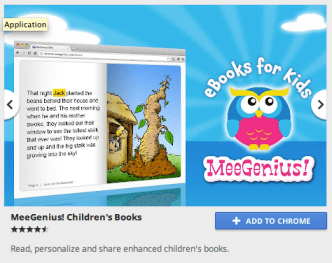
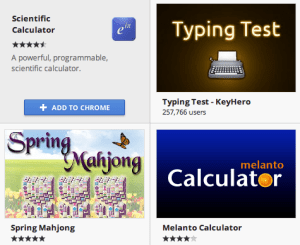
  3. Add some amazing graphics. Seriously, your icons and images should be really good. It makes all the difference in the world to have assets that show the user how attractive your web app is looking. You can check at the bottom of the post for some examples on the small image graphics and at the top on some larger image. A good example of a web app that take this point is Gojee.
  4. Download the zip file.
  5. Go to the Chrome developer dashboard section and upload your web app. An important tip is to make sure the detailed description includes the terms your users are likely to search for. You might want to check out listings for similar apps to get ideas for how you should present your app.
  6. Go have a drink.

Btw, if you already have a web app (or extension) in the Chrome Web Store – you might want to take a look at this good tutorial that my friend Sam Dutton wrote on ‘how to update your assets’.

Standard