
 I was lucky enough to be in the room for their final rehearsal (yep… it was in the same room that I gave my I/O talk). However, I could not focus on preparing, because their stories were so powerful and inspiring. Each and everyone had a story that kept the ‘wow’ effect. If you have time this weekend… you won’t regrat it. Continue reading
Tag Archives: technology
HTML5 APIs – Hangout With O’Reilly
 Today I did a hangout on air with O’Reilly. It was a good opportunity to dive into some of the aspects of modern web application and check what are the main things we wish to think about when we design, build and ship our apps. Modern web apps are rich, interactive applications.
I tried to cover the following:
- Defining the modern web app
- Designing a modern web app
- HTML5 Power tools/APIs
- Tips & best practices on DevTools and Google Cloud Endpoints.
The slides
And you can watch the video recording of the talk:
Google I/O 2013 – Mobile Web App Demo
- Read more on the last post: google-io-2013-mobile-web-and-cloud-the-triple-crown-of-modern-applications/
- Slides: picturesque-app.appspot.com/slides
- Application: picturesque-app.appspot.com
- For all I/O 2013 sessions, go to https://developers.google.com/live
Google I/O 2013 – Mobile, Web and Cloud – The Triple Crown of Modern Applications
 Can we had a better title for our talk? I’m not sure… But the description was along the lines of “…Ready to rock the world with your next application? Odds are you are thinking about mobile, web and the cloud.” So far… so good.
In this session we talked about building a modern mobile web application that takes advantage of the Google Cloud Platform. We touch on the powerful combination of the “mobile web AND the cloud” and in the process we tried to show the power of Google cloud endpoints and modern HTML5 apis. We built a fun little mobile web app “Pictureque” that give you the options to take photos (even on airplanes) and then share them with the world. Continue reading
Web Workers Intro On Google Developers Live Israel
 Web Workers is a good way to improve the performance of your web applications. It’s not a new HTML5 API but for some reason not too many front end developers are using it. This short episode will give you the intro to why and how you can leverage this simple and powerful API to enter the world of multi threads in the browser. Continue reading
HTML5 And Google App Script
 In our GDL-IL today, I’ve talked about a fun project I did in the past. It’s a single web page application that let you manage an event. We covered some of the basic components we used in order to built this site and then we jumped into the app script code and showed how to work with the online IDE that let you write, run and debug your server side code. The site gives you basic functions like: Continue reading
Chrome Extension For Enterprise Internal Usage
 At the beginning of the year, I’ve worked with a big organization that wanted to avoid the automatic suggestions Chrome is making in the omnibox (=the top field in Chrome, where you type searches and see the url).
Their main requirement was the need to allow employees to type a word and get the internal site that they are use to see. For example, the user will type ‘sale’ and Chrome will redirect them to the internal portal of sales. If you won’t modify Chrome it will run a google search on ‘sale’ and the results will be something like:
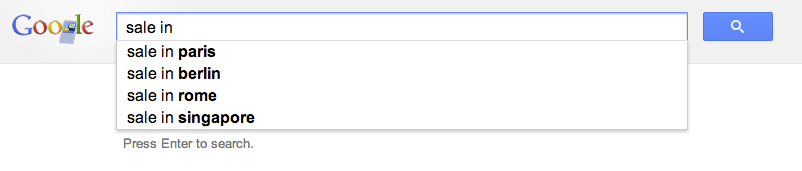
The good news is that with this little extension you will be able to control the redirect of the users to the right internal location. Let’s jump into code.
This is the code of our manifest file that describe the extension
This file contains hidden or bidirectional Unicode text that may be interpreted or compiled differently than what appears below. To review, open the file in an editor that reveals hidden Unicode characters.
Learn more about bidirectional Unicode characters
| { | |
| "name": "Omnibox customization example", | |
| "description" : "To use, type 'get' plus a search term into the Omnibox.", | |
| "version": "1.1", | |
| "background": { | |
| "scripts": ["background.js"] | |
| }, | |
| "omnibox": { "keyword" : "get" }, | |
| "manifest_version": 2 | |
| } |
Important to notice is that we setting the keyword ‘get’ in order to activate this extension. You can choose something shorter if you like. Another aspect is the “manifest_version”: 2 which making sure we are compatible with the latest spec.
This is the code of our background page
This file contains hidden or bidirectional Unicode text that may be interpreted or compiled differently than what appears below. To review, open the file in an editor that reveals hidden Unicode characters.
Learn more about bidirectional Unicode characters
| // each time the user updates the text in the omnibox this event | |
| // is fired and we will use it to suggest search terms for | |
| // our internal users. | |
| chrome.omnibox.onInputChanged.addListener( | |
| function(text, suggest) { | |
| suggest([ | |
| {content: "CRM" , description: " fetch the internal CRM"}, | |
| {content: "ERP" , description: " fetch the internal ERP"}, | |
| {content: "sales", description: " fetch the lastest sales report"} | |
| ]); | |
| }); | |
| // This event is fired with the user accepts the input in the omnibox. | |
| chrome.omnibox.onInputEntered.addListener( | |
| function(text) { | |
| if (text.indexOf("/") < 1) { | |
| text += "/"; | |
| } | |
| if (text.indexOf("http") < 0) { | |
| text = "http://our-internal-portal/" + text; | |
| } | |
| alert('We are taking you to: "' + text + '"'); | |
| navigate(text); | |
| }); | |
| function navigate(url) { | |
| chrome.tabs.getSelected(null, function(tab) { | |
| chrome.tabs.update(tab.id, {url: url}); | |
| }); | |
| } |
Here we will listen to the events of omnibox.onInputChanged and omnibox.onInputEntered in order to execute our logic.
Another point you might want to consider is to go to:
chrome://settings/ -> Advanced -> and then to disable these options:
- Use a web service to help resolve navigation errors
- Use a prediction service to help complete searches and URLs typed in the address bar
- Predict network actions to improve page load performance
It doesn’t matter if you are working in a startup of few people or a big organization with 2.2M employees (e.g. Walmart). In both cases, you probably have internal network and internal systems that your users will love to access with few keywords like: CRM, ERP, Sale, Marketing, QA etc’.
Happy coding & Happy Passover.
Mobile Web Apps On Google Developers Live Israel
 This is the talk I did in Google Developers Live Israel. It’s a weekly show that we have every WED at 14:00 (Israel time). You are most welcome to hangout with us in the future and ask questions or comments on anything that is related to startups, technology and (of course) Chrome/HTML5.
For more information about the talk you can read in the last post on mobile web apps.
Startups Best Practices
 In the past 18 years I’ve started six companies (the last cool one is HighGearMedia). In this talk, I shared some of the best practices that I learned the hard way. There are few aspects that I did my best to covered, from technology to design to following your dreams with the best tools you can allow yourself in a certain point in time. In the slides, there is a section that is devoted to Campus TLV and what is the role (as I see it) of a mentor that works with startups on a daily bases. If you are going to visit the Campus in the future, please don’t be a stranger.
There are many more aspects for building a new company. I guess, one of the most critical success factor is finding the right partners and share the load of the work. It’s one of those ‘easy to say hard to do’ things but this is part of the fun.
Good luck!
Mobile Web Apps
 Last week I had the pleasure to give this talk in Multi Screen-X event we had in Campus TLV. Mobile web apps are built using web technologies: HTML5, Javascript and CSS. The main advantage is that you write your application once (e.g. one source code) and deploy it on every platform: Android, Chromebook, Chromebox, Chrome and ya… even iPhone and iPad. Why it’s important today?
Well… as we know, the web is a huge platform and the one common application in any platform is the browser. One look at this set of devices (which is just the tip of the iceberg) will tell the story:
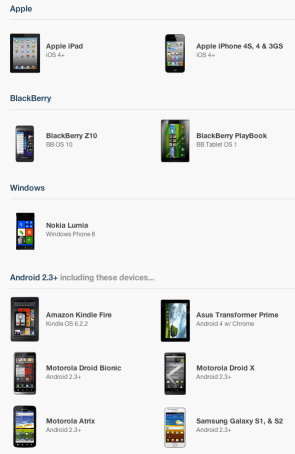
On mobile devices the browsers’ current state, in terms of HTML5 support is (even) better then on desktops. You can see it per API in CanIUse.com or mobilehtml5.org Continue reading

