Chrome, HTML5, JavaScript, webdev

DevCon TLV – HTML5 APIs (Talk & Slides)

DevCon TLV Logo

Today I had the pleasure to talk (again) at DevCon Tel Aviv. In this talk, I’ve covered some of the aspects that developer should think about in the design phase, coding phase and after the ‘production time’. It was a good opportunity  to put a simple demo page that contain some basic HTML5 features you might want to use. Why? because in cases like the ‘Summary/Detail’ element you get the option to have expendable/collapsable areas without any JavaScript. It’s great to have the ability to communicate to the browser our needs without doing some ‘hacks’ in JS. Other great options like: visibility API, Geo and device orientration are all working on most modern browsers. You can check out the slides and the links to the resources in them. Continue reading

Standard
Chrome, HTML5, JavaScript, webdev

HTML5 APIs At Google Developer Group Haifa (Hebrew)

html5-cakeIt was the first meeting of GDG Haifa at the technion. I gave the first talk about HTML5 (new) APIs that front-end developers should leverage. It was a good kick-off event and it seems that this group will produce many more quality events. You can check the demos and the slide at my project site.
Enjoy.

Continue reading

Standard
Chrome, HTML5, JavaScript, mobile, webdev

Building Better Mobile Web Apps

When we thinking on web apps and specially mobile web apps, we wish to make them smooth a responsive as possiable. The main problem is latency/network and luckily we have enough APIs in HTML5 to make sure we can achieve this goal. A good recent example is fastbook (yep… just like facebook but working FAST with HTML5). Here I’ll summaries some of the main points you wish to pay attention when you building your next amazing mobile web app. Start with ‘offline first’ (after all, you are on the right path with ‘mobile first’ already).

Coding

Offline First

  • You should store all the main assets of your application. There are several APIs you can use:
    • AppCache – for the main index.html page and all your JS, CSS code. You could also use it for images and other static data.
    • Filesystem – You have an option to work with files: text and binary data. This is a great option for cases where you have a lot of images/mp3/videos etc’. In order to manage the work with files there is a great library – filer.js
    • Storing state/data:
Standard
Chrome, HTML5, JavaScript, webdev

A Hangout On HTML5 APIs And CSS3 (New) Layouts

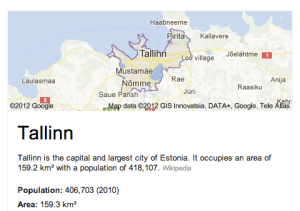
TALLINN Map

Last night, I gave this talk to Google Developer Group Tallinn about the new APIs that we have today in HTML5 and CSS3. It was (another) great hangout where you can ‘touch’ people that are quite far from your location and speak with them about mutual interest.

Some of the topics that I covered during the talk where: Continue reading

Standard
Chrome

The New Chromebook And New DevTools Tips

Let’s start with some cool features you should use in Chrome DevTools:

  • Device emulation – You can set a new User Agent so your web app will think you are now access it from a mobile phone/tablet etc’. This is a great feature that used to be something you needed to use a Chrome extension in order to have.
  • Dimension overriding – This is very cool because it let developers debug mobile web apps on different devices and operating systems via the Settings Menu. You can emulate the exact device metrics of many devices (e.g. iPad/iPhone, Galaxy Nexus/Tablets and even BB) so your media queries will run without any bugs.
  • Touch event emulation to make it easier to debug mobile applications on the desktop. Of course, you can have other simulators (e.g. Android and iOS) but here you have it inside Chrome!
  • If you wish to play with the latest and greatest features that are under ‘experiments’. You should go to: chrome://flags/ and click ‘Enable’ on: ‘Enable Developer Tools experiments’ then in the setting panels of the devtools you will have more granular control on the specific feature you wish to use. For more checkout the official page of chrome developer tools.

You can watch the 10min episode on our GDL-IL page.

As you all know, last week we had the launch of the new Chromebook for everyone. I’m really existed about this new device because it’s a combination of cheaper (249$ on amazon), better (lots of improvements + important security capabilities), faster (well, lighter). Some of the interesting specs are:

  • 11.6’’ screen
  • 0.7 inches / 2.42 pounds
  • 6.5 hours of battery (I had it running for more then 8h – but maybe, it because I was working mostly with email/docs and cloud 9 and not watching movies).
  • Boots up in less than 10 seconds
  • 100 GB of Google Drive free for 2 years – Yep, 100G.

You can test the water with it on several locations in the US (e.g Best Buy) and ‘feel’ it. I can say that in the past months I’ve worked with a very close model and it was a great device. If you ‘live’ in the cloud and do not need photoshop (like 99% of the internet users) it might be a device you want to checkout. As web developers, if you are using a cloud IDE (e.g. like one from this list) It might be very good option.

The Chromebook for everyone

Compare the new device to his ‘older’ brother

I had an urge to do the same video but then I’m notice this one… so here you go. It’s cover the major differences in terms of the hardware. As for the OS and the new features in Chrome… It’s the same (of course).

Standard
Chrome, HTML5, webdev

HTML5 Training Day (Mountain View) – Summary

Well, in the past month I was busy organizing this HTML5 Training Day for business web developers. You may want to stop and ask:
What Is HTML5 Training Day? So, our main goal is to have an open conversation with business web developers and to provide them with tools and knowledge to implement HTML5 features into their web apps. In this one day event, world-class experts talk about tools, tips and best practices in web development with focus on business.

It was a lot of fun and last week, we had in Google more then 24 companies that came to learn about the latest and greatest in the open web technologies.

We started the day with a short presentation that I gave on ‘The State of ChromeOS’. It’s amazing to see how fast is the pace and I suspect we are going to have a great 2012. After that (and two more cups of coffee) we got Pete LaPege (an excellent speaker, if I may) talking about: “HTML5 and new breed of web application” which aim to cover what defines a great Web App and show you how you can use HTML5 to create a new breed of web application that will delight and amaze your users.

Another cup of java and another web ninja: Mr. Eric Bidelman gave great talk with lots of demo on the ‘bleeding edge features in Chrome and the open web platform“.
and some HTML5 offline features. 

For the developers who wish to do ‘mobile first’ – we had a surprise from the snow country. Mr. Boris Smus (that build web stuff that make you – wow! for real) talking about A mobile web app technology stack. Here in his own words: “…Learn what it takes to build modern mobile web apps. We will start with the ideas of “adaptive apps” and “offline first”. Next, we’ll dive into some of the technologies, including MVC frameworks, templating engines, CSS frameworks, laying out views and multi-touch input. Finally, we’ll close off with mobile-specific tips and sweet demos.”

After Boris we had the pleasure to host David Kaneda (for the few that don’t know, David Kaneda is a creative web technologist. He created jQTouch, a jQuery plugin for mobile web development, and Outpost, the original iPhone app for Basecamp.) David gave another great talk on “Abstracting CSS for Complex Theming Systems.”

In the afternoon, Mr. Seth Ladd (The Michael Jordan of Dart) spoke about Dart and how it is a comprehensive effort to help app developers build complex, full featured, high fidelity apps for the modern web. He gave some nice short demos that showed the language, libraries, and editor of Dart.

Last but not least, Mr. Christos Apartoglou (The Chrome Web Store Chief) spoke about  Success stories in CWS. He talked about some bold success stories and showed what makes apps in the Chrome Web Store successful.

You can see the format of the day with the full descriptions of the talks over the public schedule that we kept for that day. It was a good tool to have a back channel (using the chat feature on the document) and to allow everyone to keep updated with the last minute changes. I hope to have some videos from that day public… I will post them here and on my G+ page.

See you all in our next Training day.

Standard
Chrome, HTML5

Google Developers Days (Tel Aviv & Berlin) And One CloudCon

It was a busy week. Busy but with lots of fun. It’s so great to meet wonderful developers that push the web forward and know (and love) their profession. Last sunday, we had Google Developers Day in Tel Aviv (or Airport city if you want to be accurate) – it was well organized event with more then 1400 developers. In the keynote we had three demos:

  • Android – Ice cream sandwich new capabilities (maps, nfc, HD and other features. To dive deeper, go check Romain Guy’s blog).
  • Chrome/HTML5 amazing new features – I did the demos and I hope to post a list next week.
  • G+ – the new hangout APIs with a robot that eat falafel and drink beers.
Here you can check some coverage:
 The CloudCon was also impressive in terms of the audience (mainly, CIO/CTO dudes) – they liked the story of HTML5 and ChromeOS. I got some good questions on new features: offline, notifications, threads and even on web audio. It could be great to have the new Chromebooks in Israel, it seems that the market really want them. The one argument (or selling point if you want to push here) that conviense IT people is that the TCO (=Total cost of ownership) is 60%-70% cheaper. Yes – these are the numbers… so if your organization can work with web apps (and Citrix for the apps that you don’t want to move to the web) it might be a perfect solution for you.

I hope to get some photos soon (from our dear wonderful photographer) – so I’ll update this post with fresh photos of some great looking people.

Tomorrow we are going to rock Berlin – so keep up with us using G+ with #GDD11 tag  or this blog next week. Btw, for Berlin GDD you might want to search after #GDDDE

Be strong.

This slideshow requires JavaScript.

In case you want to follow the slides from my Talk in CloudCon – The ‘love’ story of HTML5 & ChromeOS.

From Google Developers Day in Berlin here are the talks:

Standard
Chrome

ChromeOS In VirtualBox – Test Drive It

In a lot of cases you wish to develop to the new Chromebook but don’t have the hardware or just want to be more productive while working on your 8-core linux box… In these cases, there is a good option to run the latest ChromeOS inside Virtualbox (or VMware if you have it). A quick reminder, Chromium OS (which is the open source version of ChromeOS) is a project that aims to build an operating system that provides a fast, simple and more secure computing experience for people who spend most of their time on the web. In our tutorial here we will use Chromium OS images.


The steps to follow

  1. Download VirtualBox.
  2. You can build your own OS if you wish, just go to: chromium-os and read the details.
    However, there is an easy way – just download an image of Chromium OS – I have one for you here or just type http://bit.ly/crOS-16.
    And this guy is creating lots of fresh images of Chromium OS every day. So if you want the real ‘development’ (=alpha) version of it – check it out.
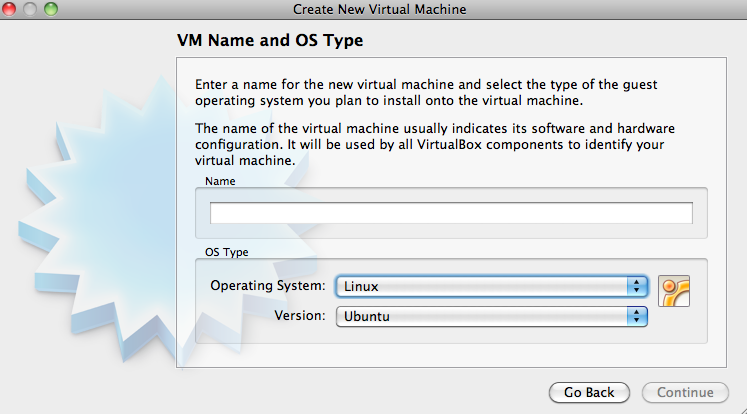
  3. Open the VirtualBox and click on ‘New’ button (upper left corner) – You will get this:

Choose Linux and Ubuntu and click ‘Continue’.

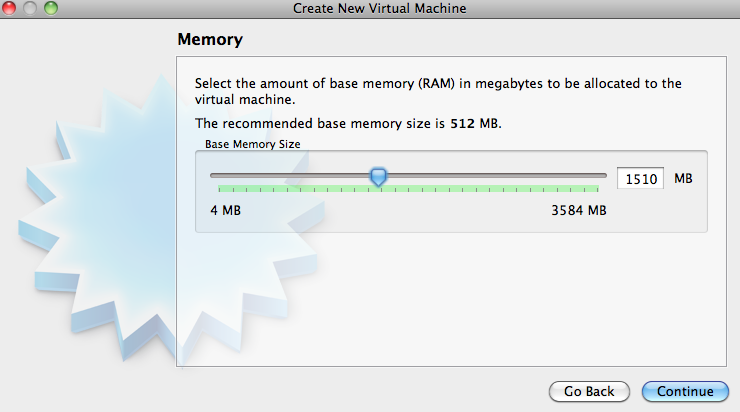
Next you need to set the memory – make sure to set an amount that you can devote to VirtualBox without killing your machine. Something around 1500MB should work. If you have more, even better.

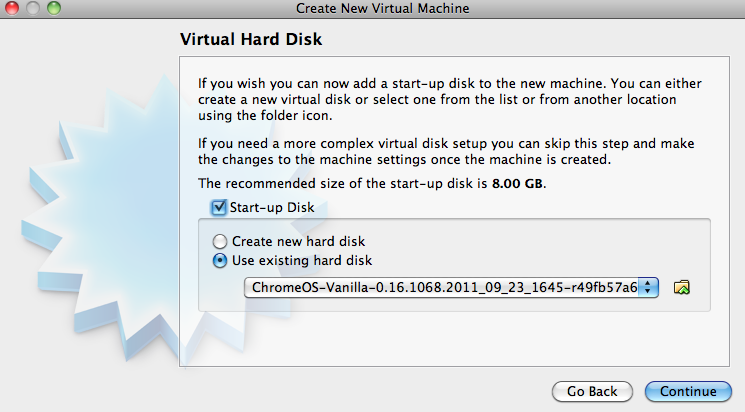
The last part of this wizard is to choose the image file. Click on the radiobox and point to the place you save the image file of ChromeOS.

Next dialog will show you a summary of all the details and after you will click ‘Create’ you are good to go!

Tips

  • Make sure to open ‘Setting’ of your new virtual machine and under ‘Processor’ click the PAE checkbox. If you won’t do that, you will get the ‘black screen of death’ and the machine won’t start.
  • If you getting errors while loading – sometimes it’s due to lack of memory. Try to close some applications and start the virtual box again.
  • Make sure you have something like 100mb of memory to the ‘video memory’ under the display section in the settings.


3 Minutes Video Tutorial

Standard
Chrome, life

So What Developer Advocate Do?

Coding, Blogging, Public Speaking And Dealing With Partners

This slideshow requires JavaScript.

Some Coding

Some Blogging

Public Speaking

And Of Course – Business Development

Here are all the things any Developer Advocate do on a daily/weekly bases:

and thanks to @chanezon for the ideas.

Standard