Blink? Well, it’s a new rendering engine for Chromium with a big mission statement: “To improve the open web through technical innovation and good citizenship”
Why is Chrome spawning a new browser engine?
There are two main reasons:
The main reason is that Chromium uses a different multi-process architecture than other WebKit-based browsers. So, over the years, supporting multiple architectures has led to increasing complexity for both the WebKit and Chromium communities, slowing down the collective pace of innovation.
In addition, this gives an opportunity to do open-ended investigations into other performance improvement strategies. We want web applications to be as fast as possible. So for example, we want to make as many of the browser’s duties run in parallel (think iframes!), so we can keep the main thread free for your application code. We’ve already made significant progress here, for example by reducing the impact JavaScript and layout has on page scrolling, and making it so an increasing number of CSS animations can run at 60fps even while JavaScript is doing some heavy-lifting.
In our GDL-IL today, I’ve talked about a fun project I did in the past. It’s a single web page application that let you manage an event. We covered some of the basic components we used in order to built this site and then we jumped into the app script code and showed how to work with the online IDE that let you write, run and debug your server side code. The site gives you basic functions like: Continue reading →
At the beginning of the year, I’ve worked with a big organization that wanted to avoid the automatic suggestions Chrome is making in the omnibox (=the top field in Chrome, where you type searches and see the url).
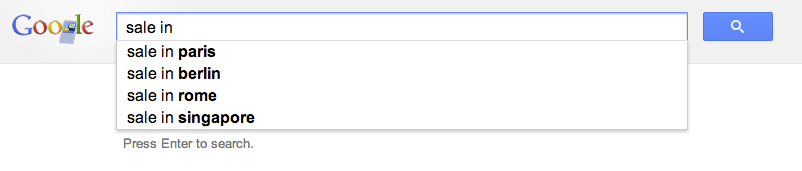
Their main requirement was the need to allow employees to type a word and get the internal site that they are use to see. For example, the user will type ‘sale’ and Chrome will redirect them to the internal portal of sales. If you won’t modify Chrome it will run a google search on ‘sale’ and the results will be something like:
The good news is that with this little extension you will be able to control the redirect of the users to the right internal location. Let’s jump into code.
This is the code of our manifest file that describe the extension
This file contains hidden or bidirectional Unicode text that may be interpreted or compiled differently than what appears below. To review, open the file in an editor that reveals hidden Unicode characters. Learn more about bidirectional Unicode characters
Important to notice is that we setting the keyword ‘get’ in order to activate this extension. You can choose something shorter if you like. Another aspect is the “manifest_version”: 2 which making sure we are compatible with the latest spec.
This is the code of our background page
This file contains hidden or bidirectional Unicode text that may be interpreted or compiled differently than what appears below. To review, open the file in an editor that reveals hidden Unicode characters. Learn more about bidirectional Unicode characters
Here we will listen to the events of omnibox.onInputChanged and omnibox.onInputEntered in order to execute our logic.
Another point you might want to consider is to go to:
chrome://settings/ -> Advanced -> and then to disable these options:
Use a web service to help resolve navigation errors
Use a prediction service to help complete searches and URLs typed in the address bar
Predict network actions to improve page load performance
It doesn’t matter if you are working in a startup of few people or a big organization with 2.2M employees (e.g. Walmart). In both cases, you probably have internal network and internal systems that your users will love to access with few keywords like: CRM, ERP, Sale, Marketing, QA etc’.
This is the talk I did in Google Developers Live Israel. It’s a weekly show that we have every WED at 14:00 (Israel time). You are most welcome to hangout with us in the future and ask questions or comments on anything that is related to startups, technology and (of course) Chrome/HTML5.
In the past 18 years I’ve started six companies (the last cool one is HighGearMedia). In this talk, I shared some of the best practices that I learned the hard way. There are few aspects that I did my best to covered, from technology to design to following your dreams with the best tools you can allow yourself in a certain point in time. In the slides, there is a section that is devoted to Campus TLV and what is the role (as I see it) of a mentor that works with startups on a daily bases. If you are going to visit the Campus in the future, please don’t be a stranger.
There are many more aspects for building a new company. I guess, one of the most critical success factor is finding the right partners and share the load of the work. It’s one of those ‘easy to say hard to do’ things but this is part of the fun.
Last week I had the pleasure to give this talk in Multi Screen-X event we had in Campus TLV. Mobile web apps are built using web technologies: HTML5, Javascript and CSS. The main advantage is that you write your application once (e.g. one source code) and deploy it on every platform: Android, Chromebook, Chromebox, Chrome and ya… even iPhone and iPad. Why it’s important today?
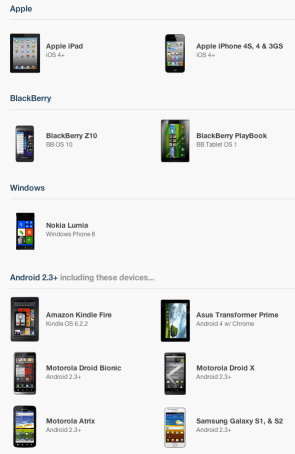
Well… as we know, the web is a huge platform and the one common application in any platform is the browser. One look at this set of devices (which is just the tip of the iceberg) will tell the story:
This post is a short one… It’s contain the same talk I gave last week but, this time it’s in hebrew. So for the millions of front-end developers that wish to hear this in hebrew. This is the ‘one time only’ you can enjoy it.
Btw, this week we had a very cool event in Campus TLV on ‘Multi Screen-X’ world. So tomorrow, we are going to air the first talk from these two packed days.
Today in Google Developers Live Israel I’ve spoke about Google Cloud Endpoints and new HTML5 APIs. Before we started I’ve mention that hot news from yesterday about G+ sing-in and I suggest you to check it out.
Today we published the second episode of GDL-IL Women Tech-makers with Yael Karov (Founder and CEO of Ginger Software). Gingre is a service built from Karov’s 20+ years of experience in the field of natural language processing and machine learning that helps users improve their online English language communication. Here the discussion was with Michal Segalov and Dana Gabel (Software Engineer in Google), about Yael’s experiance in commercial launch of innovative products to market.
Last week, I had the pleasure to present at DevConTLV for the 3rd time. It a great conferance that bring to Tel Aviv some rock-stars from companies like: Github, CouchDB, Amazon and many others. The location (Ozen Bar) is a cool place where you can hear live music during the nights and drink good coffee during the mornings. So it is a natural location to such an event. Ahh… and yep, the opening of the day was done with a live rock band! (just like JSConf). Continue reading →

 Blink? Well, it’s a new rendering engine for Chromium with a big mission statement: “To improve the open web through technical innovation and good citizenship”