Chrome, JavaScript, webdev

Yahoo Finance API With NodeJS

nodejs logoIn the past I’ve wrote this post on the different options you can use with Yahoo Finance API. It is time (4 years later!) to a followup post on how to gain more data but this time with NodeJS.
The first idea was to be able to gain information by using different parameters and downloading csv files from Yahoo finance. Something like this GET request will do the magic:

http://finance.yahoo.com/d/quotes.csv?s=NFLX&f=snd1l1yr and from there you can work with the data.

However, there are cases, where you wish to have information that is not part of this set of arguments. Here are two quick examples for such cases: Continue reading

Standard
Chrome, HTML5, JavaScript

WebRTC Updates

webrtc logoIn this week show on Google Developers live Israel we hosted Sam Dutton in order to hear what’s new in the land of WebRTC. What? Well, Web Real-Time Communication (WebRTC) is a collection of standards, protocols, and JavaScript APIs that enables peer-to-peer audio, video, and data sharing between browsers. We covered (with demos) the three primary APIs:

  • MediaStream: acquisition of audio and video streams
  • RTCPeerConnection: communication of audio and video data
  • RTCDataChannel: communication of arbitrary application data

It was a fun 20min talk with some very impressive demos. Here are few demos that show the power of getUserMedia API: Continue reading

Standard
Chrome, HTML5, JavaScript, webdev

Install Ubuntu On Your Chromebook

chromebook 5

Chromebook For Developers And Hackers

If you are a Linux hacker and/or a developer with a new Chromebook, Chromebox, Pixel or an old laptop with ChromeOS… You might want to have the ability to have a dual-boot option that will let you enjoy the power of your ChromeOS but on the same time be able to boot your laptop with Linux and enjoy C, C++, Java and the fun technologies. It might be hard on other platforms to ‘hack’ them, but since the chromium project is open-source, I guess, they wanted to be hackable by design (e.g. you have a keyboard shortcuts in Pixel that let you enter this mode). Here are the few steps you need to follow in order to enjoy hacking ChromeOS. Continue reading

Standard
Chrome, HTML5, JavaScript

Chrome & Google Cloud Quick Update (GDL-IL)

Google APIsSome of the topic we touch during the show today:

Standard
HTML5, JavaScript

Google Cloud Platform – App Engine and Beyond

Screen Shot 2013-07-11 at 2.43.33 PMFew minutes ago we finish a great event in Campus TLV. We had the pleasure to have Dr Peter Magnusson (Director of Engineering for App Engine at Google) and Greg DeMichillie (Director Product Management, Cloud Platform at Google). For the ones, that do not know what is GAE: Google App Engine is a complete development stack that uses familiar technologies to build and host applications on the same infrastructure used at Google. It is used by some of the world most successful and demanding global applications such as SnapChat and Khan Academy. We also cover Google Compute Engine which allows everyone to Run large-scale computing workloads on Linux virtual machines hosted on Google’s infrastructure. I’ve spoke about Google Cloud Endpoint and you can watch the full talk on my project’s site.

Ido talking in the campus on cloud

This is the raw recording form the event of all three talks. I hope to have an edited version soon…

app_engine-256

Psst… For the next Cloud meetup – Please sign for IGTCloud group.

Standard
HTML5, JavaScript, webdev

Big Query Power With JavaScript

Big Query and App script logoThis week on Google developers live Israel we wanted to show the power of Big Query. What is Big Query? Well, in todays world when everyone like to use the term “big data” you need to have the capabilities to querying massive datasets. This can be time consuming and expensive without the right knowledge, hardware and infrastructure. Google BigQuery solves this problem by enabling super-fast, SQL-like queries against append-only tables, using the processing power of Google’s infrastructure. In order to get started quickly and ‘test the water’ there is a powerful online tool that let you query pre-existing datasets like: wikipedia, Github etc’. If you like to type in command line, there is also a command line tool. Before you start your first project you should signup for BigQuery (yes! it’s open now for all). You should log in to the Google APIs Console and make sure you set a new project and allow Big Query API on it. You should also, enable billing if you have not done so in the past. Lastly, head to bigquery.cloud.google.com and click on one of the public datasets that are on the left sidebar. Continue reading

Standard
HTML5, JavaScript, php, webdev

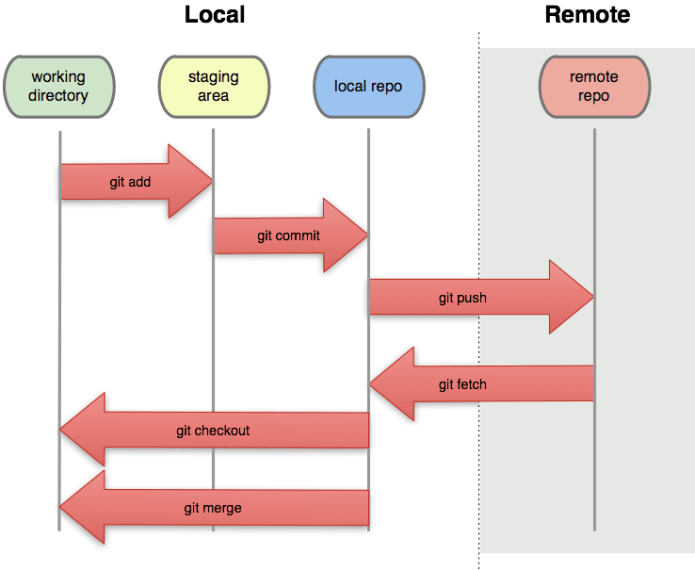
Git 101 – Useful Commands

Github link cat A few commands I found myself using daily… Well, it might be a good idea to share it with others and see what can be done better. If you like to get out of the command line, I found Source Tree to be a powerful free application that give you many options to see the code, changes and flow. You might want to check it out. Another good option is the GitHub official client app. Ok, let’s jump into the list of git commands. Continue reading

Standard
Chrome, JavaScript

Monte Carlo Simulation On Compute Engine/App Script

App script on Ido's project place

This week in Google Developer Live Israel, we show you how to work with Google App script to run Monte Carlo simulations and get the results in an excellent informative way inside Google spreadsheets. We took it further and explained how to run these scripts on your instance machine inside Compute Engine with nodeJS.

This is a powerful option because the ability to ‘try’ quickly on App Script and then take the code to ‘production’ (=more efficient way) on Compute engine gives you more productivity.

So what are we doing?

First, let’s touch on the definition. This problem-solving technique approximates the probability of specific outcomes by running multiple trial runs, called simulations, using random input variables. The remarkable aspect is that we are steering the scenarios by using randomness.The randomness helps us ‘try’ each future strategy in a way that includes our probability per variable. This allows us to fine-tune our trial runs to answer a question with several variables. It will help us find the best way to spend time with our salesperson.

 Monte Carlo Simulations Steps

1. Define a model with a domain of possible inputs.

2. Generate input values randomly, sampling from a probability distribution over the domain.

3. Perform a deterministic computation on the inputs.

4. Aggregate the results. Continue reading

Standard
webdev

Compute Engine In 5min

Screen Shot 2013-07-11 at 2.43.33 PMThis week, we showed in GDL-IL (Google developer live Israel) how to work with google compute engine. Google Compute Engine offers scalable and flexible virtual machine computing capabilities in the cloud. You can solve large scale processing and analytic problems on Google’s computing, storage, and networking infrastructure. It’s also great option to ‘play’ with a server (web service) in the cloud and scale it efficiently. It’s *open for all* and it got some powerful features like: Continue reading

Standard
Business, life

Startups Tips

SFO bride to startupsThis week in Google Developers Live Israel I’ve spoke about a topic I’m passion for long time – Startups and entrepreneurship. It’s always thrilling to create a new ‘thing’. It might be a new service, a whole new product or a company that is disrupting a segment in the market. As the founder, it force you, to think and take many decisions along the way. There is a certain risk/reward ratio to any new venture. In most of the cases, it will have an emotional aspect (subjective risk) and a more mesurable aspect that we can quantify. Here are 20 minutes that try to cover some of the main lessons I’ve learn in the past 20 years. Continue reading

Standard