JavaScript, webdev

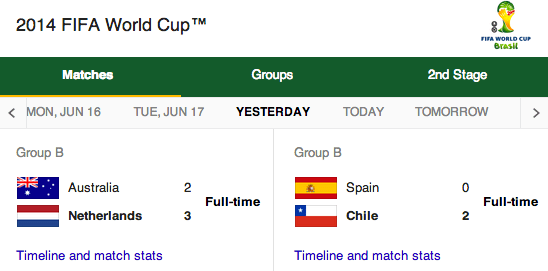
2014 World Cup Matches And Results

brazil 2014 world cupThe world cup is the biggest sporting event on the planet. During the last world cup in 2010, 3.2 billion people watched at least one of the games. As I know, many groups are going to ‘make it interesting’ by placing bets on the results, I thought it would be good to have all the data on a spreadsheet. Google sheets are ideal for that as they offer a great ability to share, comment and ‘play’ with the data. You can see the demo spreadsheet: http://goo.gl/ZjdfqE and fork the code from: https://github.com/greenido/WorldCup

For now, we are fetching the info from these end points: Continue reading →

Standard
cloud, webdev

What’s New On Google Cloud Platform

This year at #DevConTLV the main theme was around cloud and databases. In my talk I did my best to emphasis, that in the past 15 years, Google has been building out the world’s fastest, most powerful, highest quality cloud infrastructure on the planet and it is opening it so external developers could enjoy it. There are many services like: App Engine, BigQuery and VMs on Compute engine that all come with the same idea. You (=the developer) should focus on what you good at and not by reinventing the wheel again (and again) by trying to find the secret in memcache optimizations. It’s my 4th year in this event and I can say that it is (without doubt) one of the best developer conferences in Tel Aviv. So if you are around next time, please try to join us. It’s great fun to talk with so many talented developers and the talks that I’ve been to, where very good and informative. Continue reading →

Standard
Chrome, HTML5, JavaScript, mobile, webdev

HTML5 & CSS3 Tools

I’ve meet with a very cool startup over the weekend. It was interesting to listen and learn from them what is ‘cool’ in their technology world. However, I got the feeling that they are missing some of the new capabilities that the web platform has to offer. I’ve pointed them to some known resources like: html5rock.com , MDN site etc’. But it seems better to try and get a list of tools or pointers that any developer could browse and pick from. So here is an alpha version of the list. It’s split to subjects like: design phase, testing phase etc’ just to keep it a bit more useful.

Continue reading →

Standard
Chrome, HTML5, JavaScript, mobile, webdev

HTML5 On Mobile

Chrome love HTML5This week we are hosting a lot of developers at Campus TLV. The goal of these talks is (mainly) to harness developers with knowledge and tools they can use today in their current jobs. We lucky to host developers from few government’s organizations. In their case, there are many special regulations that need to be accommodate, so we wish to give them practical tips/tools they can use in order to build open RESTFul APIs and modern web apps. It’s no secret that there is a lot of interesting data that only the government produce.
I hope that movements like codeforamerica.org will flourish around the world quickly.

Continue reading →

Standard
cloud

Spark Cluster on Google Compute Engine

gce+sparkWhat is Spark and Why?

Apache Spark is an open source cluster computing system that aims to make data analytics fast — both fast to run and fast to write. To run programs faster, Spark offers a general execution model that can optimize arbitrary operator graphs, and supports in-memory computing, which lets it query data faster than disk-based engines like Hadoop. In the past, I’ve wrote an intro on how to install Spark on GCE and since then, I wanted to do a follow up on the topic but with more real world example of installing a cluster. Luckily to me, a reader of the blog did the work! So after I got his approval, I wanted to share with you his script. Continue reading →

Standard
Chrome, JavaScript

Monitor Your Site With Apps Script

Network alertIn this short tutorial we will see how to built an application that can be used as a (simple) Nagios but, without the need to set up a server and maintain a lot of code. It’s not a replacement to a ‘full’ monitoring systems that give you rich set of abilities but more ‘an idea’ to show you the power of Google cloud with Apps script. The main three components of our system will be:

  1. Google Spreadsheet – We will use two sheets. One to allow us to set configuration data like: urls to monitor, email to get notifications etc’. The other will be our ‘log’. We will write to it all the alerts so we could analyze them later.
  2. Google Form – This will be a quick and easy way to acknowledge that we are aware for the situation and we wish to mute the emails.
  3. Apps Script – All the logic for the checks, alerts and everything in between will be done with a short script with one trigger.

For the first two components, we will use a regular google sheet that looks similar to this: Continue reading →

Standard
cloud

How To Set A Server To Server VPN on Google Compute Engine

There are many cases where you wish to migrate data from one location to another. In most cases, you will wish to do it over a secure channel. In this tutorial we will see what are the main steps in order to set a VPN (in this case: StrongSwan) on Google Compute Engine so you will have a server to server VPN solution between your on own server(s) located in the basement and Compute Engine.
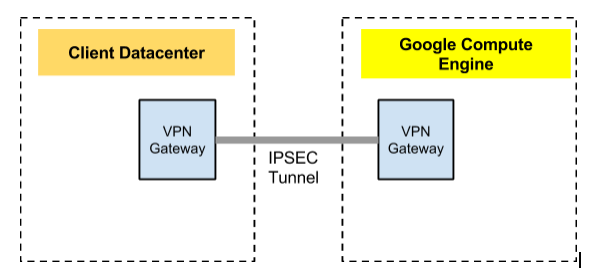
In this tutorial we will setup a VPN connection from your own datacenter to Compute Engine. First, let’s look at the big picture. We wish to have one gateway in our datacenter and another on Compute Engine. These gateways, will be responsible to connect and secure our channel so we could transfer our data over it in a secure way.

High Level Network diagram

VPN on GCE network macro view

Main steps

Continue reading →

Standard
Chrome, HTML5, JavaScript, mobile, webdev

Chrome And HTML5 Updates

There are some very interesting technologies that are now available in Chrome. In this post I will try to cover some of them.

We know that Google started the Chrome project on the three ideas of speed, simplicity, and security. It’s still focusing on these important aspects while keep moving forward (fast) on implementation of many other HTML5 features. You can find Chrome on mobile, desktop, Chromebook and Chromecast. Let’s see what are the new, improved features we got these days as developers in Chrome platform:

Focus areas Chrome is moving forward

Mobile and Open Web Platform

We’re investing a lot of time to make sure mobile web experiences improve and that they are easier to develop!

  1. Build amazing mobile web apps
  2. WebGL, Web Audio, WebRTC, Web Speech and many more APIs that give you ‘native’ capabilities inside your browser.
  3. Vibration
  4. Device Motion
  5. WebRTC code lab (link) to check the new world of media (video/audio) in Chrome without plugins.

Continue reading →

Standard
Chrome, cloud, webdev

What’s New In Google Developers World

Here are my slides from a talk I gave last week on what’s new and available for you as a developer in Google’s world. This talk gives a high level overview on the main APIs. If you wish to dive deeper on some of them, you will find many links in the slides.

Continue reading →

Standard
cloud

Big Query Basics

Big QueryIn today talk, I’ve covered one of the coolest tools in the “big data” world – Big Query. What is BigQuery? Well, querying massive datasets can be time consuming and expensive without the right hardware and infrastructure. BigQuery solves this problem by enabling super-fast, SQL-like queries, using the processing power of Google’s infrastructure. If you wish to play with a cool a BQ demo, just click on the picture on the left.

When to use it?

There are few bold use cases in the analytic landscape that Big Query is the right tool for the job:

  • It’s a great option when your MapReduce based analysis (=Hadoop system) can be slow for ad-hoc queries.
  • If you don’t wish to manage large data centers and tuning Hadoop all day long.
  • It seems that analytics tools should be services at 2014, no? Continue reading →
Standard