cloud, HTML5, JavaScript, mobile, php

Google Cloud Platform Update

Google cloud platform updateYesterday we had a very cool event at Google’s offices. There were many mobile and web developers that came to hear what is new with Google cloud technologies (among other thing). I’ve used this set of slides because I knew they will be useful to many more developers that miss the event. That is the reason, I’ve used ‘a lot’ of words on each slide.

The event was recorded and I will update this post with the video soon. Have a great 2014! Continue reading

Standard
Chrome, HTML5, JavaScript, mobile, webdev

HTML5 APIs – Hangout With O’Reilly

Web Workers BookToday I did a hangout on air with O’Reilly. It was a good opportunity to dive into some of the aspects of modern web application and check what are the main things we wish to think about when we design, build and ship our apps. Modern web apps are rich, interactive applications.

I tried to cover the following:

  • Defining the modern web app
  • Designing a modern web app
  • HTML5 Power tools/APIs
  • Tips & best practices on DevTools and Google Cloud Endpoints.

The slides 

My book on Web Workers.

And you can watch the video recording of the talk:

Standard
Chrome, HTML5, JavaScript, mobile, php, webdev

HTML5 APIs On Google Developers Live Israel

html5-cakeThis week we spoke about “Modern Web Applications Utilizing HTML5 APIs“.
Some of the things we covered:

  • Defining the modern web app
  • Designing a web app with a thought on all devices out there.
  • HTML5 Power tools/APIs
  • Google cloud endpoints and why it’s a great option to built your next powerful API.

Continue reading

Standard
Chrome, HTML5, JavaScript, mobile, webdev

Google I/O 2013 – Mobile, Web and Cloud – The Triple Crown of Modern Applications

app_engine-256Can we had a better title for our talk? I’m not sure… But the description was along the lines of “…Ready to rock the world with your next application? Odds are you are thinking about mobile, web and the cloud.” So far… so good.

In this session we talked about building a modern mobile web application that takes advantage of the Google Cloud Platform. We touch on the powerful combination of the “mobile web AND the cloud” and in the process we tried to show the power of Google cloud endpoints and modern HTML5 apis. We built a fun little mobile web app “Pictureque” that give you the options to take photos (even on airplanes) and then share them with the world. Continue reading

Standard
Chrome, HTML5, JavaScript, mobile, webdev

Mobile Web Apps On Google Developers Live Israel

Screen Shot 2013-03-13 at 2.56.08 PMThis is the talk I did in Google Developers Live Israel. It’s a weekly show that we have every WED at 14:00 (Israel time). You are most welcome to hangout with us in the future and ask questions or comments on anything that is related to startups, technology and (of course) Chrome/HTML5.

For more information about the talk you can read in the last post on mobile web apps.

Standard
Chrome, HTML5, JavaScript, mobile

Mobile Web Apps

mobile devicesLast week I had the pleasure to give this talk in Multi Screen-X event we had in Campus TLV. Mobile web apps are built using web technologies: HTML5, Javascript and CSS. The main advantage is that you write your application once (e.g. one source code) and deploy it on every platform: Android, Chromebook, Chromebox, Chrome and ya… even iPhone and iPad. Why it’s important today?
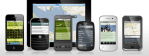
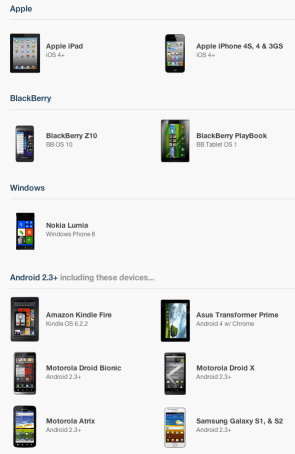
Well… as we know, the web is a huge platform and the one common application in any platform is the browser. One look at this set of devices (which is just the tip of the  iceberg) will tell the story:

Screen Shot 2013-03-10 at 7.30.37 PM

On mobile devices the browsers’ current state, in terms of HTML5 support is (even) better then on desktops. You can see it per API in CanIUse.com or mobilehtml5.org Continue reading

Standard
Chrome, HTML5, JavaScript, mobile, webdev

Building Better Mobile Web Apps

When we thinking on web apps and specially mobile web apps, we wish to make them smooth a responsive as possiable. The main problem is latency/network and luckily we have enough APIs in HTML5 to make sure we can achieve this goal. A good recent example is fastbook (yep… just like facebook but working FAST with HTML5). Here I’ll summaries some of the main points you wish to pay attention when you building your next amazing mobile web app. Start with ‘offline first’ (after all, you are on the right path with ‘mobile first’ already).

Coding

Offline First

  • You should store all the main assets of your application. There are several APIs you can use:
    • AppCache – for the main index.html page and all your JS, CSS code. You could also use it for images and other static data.
    • Filesystem – You have an option to work with files: text and binary data. This is a great option for cases where you have a lot of images/mp3/videos etc’. In order to manage the work with files there is a great library – filer.js
    • Storing state/data:
Standard
Chrome, HTML5, JavaScript, mobile, webdev

How To Use IndexedDB – Simple(st) Example

In the past few months, I’ve saw many developers that use  local storage for ‘big data’ on the client side. Local storage is a powerful API that let developer save key-value data on the browser. However, it’s got some limitation like: synchronize operation that make it less efficient when it’s heavily used. Moreover, it should replace simple cases (e.g. saving the user state) and not in scenarios where you wish to save lots of data and then have the ability to ‘slide and dice’ it base on your needs with effiency. For that, we used to have WebSQL (which as you know is deprecated from 2010) and the new cool kid in town – IndexedDB. Here I will try to give you a short example that will run nicly both on IE10, Firefox (that match the spec) and Chrome (which need to tune a bit the setVersion update to call onupgrade). IE10 will support IndexedDB as well – so it’s great news to web developers in terms of ‘wild’ support for this important API in browsers. I wish we will see soon Safari (specially, on the mobile) match Chrome for android and give us the ability to leverage indexedDB both on Android and iOS.

Ok, as Linus said: “talking is cheap, show me some code”… Let’s go over the example code. In this example we will save todos to keep things simple. Classic, no? In the end of the post, I will also give two other examples of a ‘todo app’ the use indexedDB, WebSQL and jQueryMobile.

Continue reading

Standard
mobile

Top Android Apps You Want On Your Phone

What are the ‘must have’ apps you would install on a new Android device?

I’m sure you all got to this spot when a good friend and/or brother, sister, mom, dad or “dear” neighbor is coming to you (=the “guru”) with their new smartphone with the request: “Make it useful for me” or “Put some games and apps for the kids”. Well, after few (OK, maybe just 17) times I got this request, I decided to document a list of great apps that I’ll install in such a case. It is similar to a post I’ve wrote in the past about ‘Great Web Apps For Your Chromebook‘. The list is a combination of powerful apps that help people (who are not necessarily technical) in their daily tasks.

Here is my little list:

  • Google+ – Well, even if your friend doesn’t use this powerful social network. I would install this app because – on top of many other great features like: local, hangout, messenger and more – it will back up all her photos to the cloud!

  • Waze social GPS – This navigation app bring the ‘wisdom of the crowds’ into your car. It’s very powerful to direct you on the shortest path based on traffic in real time.

  • Gmail – Well… How can we have a list without THE email tool? This is going to be the app the will consume most of your friend’s time.

  • Skype  / Viber / Google Talk – you can call and message for free. I know lots of friends that use them when you are abroad. It’s useful to find a good wi-fi connection so the quality of the call with be good.

  • WhatsApp Messenger – one of the best messaging apps (think on sms but much better and for free). It’s working on many different devices so you can be sure most of your friends can enjoy it.

  • Chrome – Get the the security, speed and simplicity of Chrome to your mobile device. All your links, open tabs, passwords will sync like magic. Plus, you will enjoy many wonderful web apps that will work very fast.

  • Evernote – Organize your life and take notes using your mobile. This app is a powerful tool to keep your notes/recipes/photos/todo lists etc in the cloud. It’s also synced notes across devices so you can reach them from anywhere. Btw, their tablet version is gorgeous.

  • Flipboard / Google Currents / Pulse News – All are great apps to read your favorite magazines, blogs, newspapers etc.

  • Google Drive /  Dropbox – access all your docs, photos, videos, files from your mobile device.

  • Instagram – A good app to improve your native camera pictures and share your photos with the world.

  • TripIt Travel Organizer – This is a great app for anyone that travel. It will give you a great way to stay on top of things like: flight schedule changes, hotel reservations and car rentals.

  • Facebook / Twitter – so you could keep in touch with the rest of the ‘social’ world. btw, both of these app got a very nice mobile web app as well. There are also options to have these type of apps as widgets so you could be more productive on certain functions of the app.

  • Foursquare – explore a new city with this powerful app. Ohh… yes, you can ‘check-in’ and share your location with friends but even if you don’t part of the ‘social animals’ you will find this app very useful. Another option to check quickly where to go and what to eat is Yelp.

  • GroupMe / Google+Messanger – both will give you a great way to have group chats and organize friends/team quickly.

  • VLC – Be able to watch any type of video on your Android. Another option to stream video is with Dropbox app – yep, it let you do that as well.

And some extra fun one

UTILS/TOOLS

  • Barcode Scanner – To be able to scan some barcodes like all the cool kids on the block.
  • Flashlight HD LED – When there is no other option
  • Google Translate – Think on a case where you want to order a good wine in france and you can’t say it.
  • Any.DO To Do List – Great to do list app. It also got a nice chrome extension that keep your tasks sync and fresh.
  • Wheres My Droid – for anyone that lost his phone more than once or twice. This one is a life saver. It will let you find it even if the phone is in silent mode.
  • AVG Antivirus – After all it’s better to be safe then sorry, no?
  • Key Ring Reward Cards – Keep all your loyalty/reward cards in one place.

Reading / Education

  • Kindle – Read book, pdf and anything else. I found that I’m using this app quite a lot on my phone (and not only on my tablet).
  • Google Reader – To keep up with your world of interest. This is a great rss reader.
  • TED – Ideas that worth your time. If you have 20min of free time, this might be the perfect solution to put them into good use.

Sport / Outdoor / Health / Fitness

Anything for bikers, runners, athletes and hikers.

  • My Tracks – Record and share your GPS tracks with friends.
  • MapMyRUN GPS Running – You can have MapMyRide verison as well in case you are mostly on your bike.
  • Strava Cycling – Analyze your performance and see how you stack up against friends and locals
  • StopWatch & Timer – In so many cases you wish to time something…

Last but not least, some apps for the dudes in Israel

We can’t finish without the #1 mobile game of all time (this time for Curiosity)

Angry Birds Space

 Drive safely and if you have some more (great) suggestion – please share them…

Here are the top apps in the Israeli Android Play Store (Aug 2012)

Standard
Chrome, HTML5, JavaScript, mobile, webdev

HTML5 Modern Web App and Google Cloud Endpoints (Part 2 Of 3)

Pre-reqs

  1. Google Plugin for Eclipse
  2. Google API JavaScript client library
  3. Sign up for Cloud Endpoints

User Experiences demands are pushing modern web apps to a more distributed architecture.  A pattern many developers have used is using a MVC framework on the client and communicate to the server with REST. Google App Engine’s easy to build, easy to manage environment makes it ideal for REST APIs for Web backends.  At Google IO 2012, we made it much easier to build REST APIs on App Engine with Cloud Endpoints.

Cloud Endpoints enables you to build REST and RPC APIs in App Engine.  It leverages the same infrastructure  Google uses for its own API and as such, you get strongly typed clients for Android, and IOS as well as a lightweight client for JavaScript which we will be walking through in this presentation.

In getting ready for IO, Ido and I thought we’d build a modern web application using Cloud Endpoints.  We decided on a topic that would be relevant to both App Engine and the general web developer community, something we both have some interest in and something generally useful…. a Beer rating and review web application.

Try it out yourself at:  http://birra-io2012.appspot.com/

Continue reading

Standard