
 In our GDL-IL today, I’ve talked about a fun project I did in the past. It’s a single web page application that let you manage an event. We covered some of the basic components we used in order to built this site and then we jumped into the app script code and showed how to work with the online IDE that let you write, run and debug your server side code. The site gives you basic functions like: Continue reading
Category Archives: HTML5
Chrome Extension For Enterprise Internal Usage
 At the beginning of the year, I’ve worked with a big organization that wanted to avoid the automatic suggestions Chrome is making in the omnibox (=the top field in Chrome, where you type searches and see the url).
Their main requirement was the need to allow employees to type a word and get the internal site that they are use to see. For example, the user will type ‘sale’ and Chrome will redirect them to the internal portal of sales. If you won’t modify Chrome it will run a google search on ‘sale’ and the results will be something like:
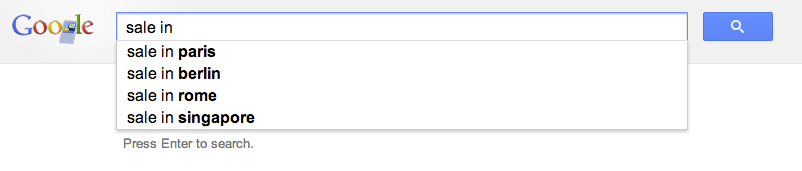
The good news is that with this little extension you will be able to control the redirect of the users to the right internal location. Let’s jump into code.
This is the code of our manifest file that describe the extension
This file contains hidden or bidirectional Unicode text that may be interpreted or compiled differently than what appears below. To review, open the file in an editor that reveals hidden Unicode characters.
Learn more about bidirectional Unicode characters
| { | |
| "name": "Omnibox customization example", | |
| "description" : "To use, type 'get' plus a search term into the Omnibox.", | |
| "version": "1.1", | |
| "background": { | |
| "scripts": ["background.js"] | |
| }, | |
| "omnibox": { "keyword" : "get" }, | |
| "manifest_version": 2 | |
| } |
Important to notice is that we setting the keyword ‘get’ in order to activate this extension. You can choose something shorter if you like. Another aspect is the “manifest_version”: 2 which making sure we are compatible with the latest spec.
This is the code of our background page
This file contains hidden or bidirectional Unicode text that may be interpreted or compiled differently than what appears below. To review, open the file in an editor that reveals hidden Unicode characters.
Learn more about bidirectional Unicode characters
| // each time the user updates the text in the omnibox this event | |
| // is fired and we will use it to suggest search terms for | |
| // our internal users. | |
| chrome.omnibox.onInputChanged.addListener( | |
| function(text, suggest) { | |
| suggest([ | |
| {content: "CRM" , description: " fetch the internal CRM"}, | |
| {content: "ERP" , description: " fetch the internal ERP"}, | |
| {content: "sales", description: " fetch the lastest sales report"} | |
| ]); | |
| }); | |
| // This event is fired with the user accepts the input in the omnibox. | |
| chrome.omnibox.onInputEntered.addListener( | |
| function(text) { | |
| if (text.indexOf("/") < 1) { | |
| text += "/"; | |
| } | |
| if (text.indexOf("http") < 0) { | |
| text = "http://our-internal-portal/" + text; | |
| } | |
| alert('We are taking you to: "' + text + '"'); | |
| navigate(text); | |
| }); | |
| function navigate(url) { | |
| chrome.tabs.getSelected(null, function(tab) { | |
| chrome.tabs.update(tab.id, {url: url}); | |
| }); | |
| } |
Here we will listen to the events of omnibox.onInputChanged and omnibox.onInputEntered in order to execute our logic.
Another point you might want to consider is to go to:
chrome://settings/ -> Advanced -> and then to disable these options:
- Use a web service to help resolve navigation errors
- Use a prediction service to help complete searches and URLs typed in the address bar
- Predict network actions to improve page load performance
It doesn’t matter if you are working in a startup of few people or a big organization with 2.2M employees (e.g. Walmart). In both cases, you probably have internal network and internal systems that your users will love to access with few keywords like: CRM, ERP, Sale, Marketing, QA etc’.
Happy coding & Happy Passover.
Mobile Web Apps On Google Developers Live Israel
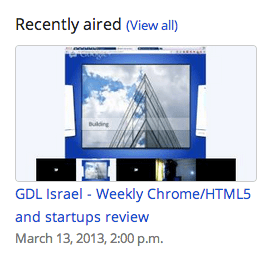 This is the talk I did in Google Developers Live Israel. It’s a weekly show that we have every WED at 14:00 (Israel time). You are most welcome to hangout with us in the future and ask questions or comments on anything that is related to startups, technology and (of course) Chrome/HTML5.
For more information about the talk you can read in the last post on mobile web apps.
Mobile Web Apps
 Last week I had the pleasure to give this talk in Multi Screen-X event we had in Campus TLV. Mobile web apps are built using web technologies: HTML5, Javascript and CSS. The main advantage is that you write your application once (e.g. one source code) and deploy it on every platform: Android, Chromebook, Chromebox, Chrome and ya… even iPhone and iPad. Why it’s important today?
Well… as we know, the web is a huge platform and the one common application in any platform is the browser. One look at this set of devices (which is just the tip of the iceberg) will tell the story:
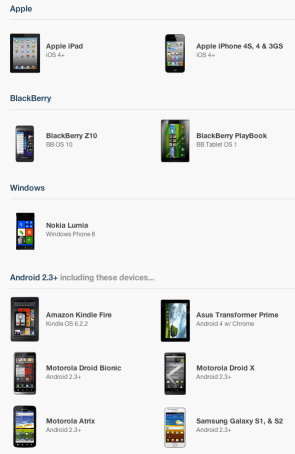
On mobile devices the browsers’ current state, in terms of HTML5 support is (even) better then on desktops. You can see it per API in CanIUse.com or mobilehtml5.org Continue reading
Google Cloud Endpoints And HTML5
 Today in Google Developers Live Israel I’ve spoke about Google Cloud Endpoints and new HTML5 APIs. Before we started I’ve mention that hot news from yesterday about G+ sing-in and I suggest you to check it out.
DevConTLV Summary
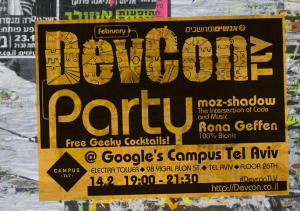 Last week, I had the pleasure to present at DevConTLV for the 3rd time. It a great conferance that bring to Tel Aviv some rock-stars from companies like: Github, CouchDB, Amazon and many others. The location (Ozen Bar) is a cool place where you can hear live music during the nights and drink good coffee during the mornings. So it is a natural location to such an event. Ahh… and yep, the opening of the day was done with a live rock band! (just like JSConf). Continue reading
Web Components Talk At HTML5-IL Meetup
 Last week I had the pleasure to take part in the first HTML5-IL meetup. If you are a front-end developer that live in Israel you should try and come to this group events. Lots of great developers, designers and others that share the same passion for the web. Great stuff. Unfortunately I didn’t have more then 30min for this new, hot, complicated topic. So I hope to have more time to cover some of the aspects during the next meetup. From the four main aspects we touched only on the first two: Continue reading
HTML5 APIs At Google Developer Group Haifa (Hebrew)
 It was the first meeting of GDG Haifa at the technion. I gave the first talk about HTML5 (new) APIs that front-end developers should leverage. It was a good kick-off event and it seems that this group will produce many more quality events. You can check the demos and the slide at my project site.
Enjoy.
Web Components On Google Developers Live Israel (Part 2)
 Today, I covered web components a bit deeper then the last episode. Since it’s a new, hot, complicated and fun topic it should get more time, right? There are four main pieces that provide this technology. We touched only the first two. We spoke about templates (define a piece of markup that are inert but can be activated for use later). Think on a new object you are using out of your class definition. Then, we spoke about decorators – which apply templates to let CSS affect rich visual and behavioral changes to documents. Both ‘Custom elements‘ and ‘Shadow DOM’ will be on the next episode. Continue reading
GDL IL – HTML5 Game (In Hebrew)
 This week in Google Developers Live Israel, we talked with Mor from zloof.co.il about his new HTML5 game that is ‘conquering’ new gamers in Israel. There are many demos that show us the power of the web and its readiness for gamers. We covered some of the aspects that might interest developers who wish to build their first HTML5 game. We spoke about IDEs (sublime text 2, eclipse, web storm, netbean), tools, Model-View frameworks and learn a bit from Mor’s experience. Continue reading
 Ido Green