Chrome, HTML5, JavaScript, webdev

Tutorial: Getting Started With Google Chrome Extensions

Chrome extensions are very powerful way to make Chrome (even) better. They give you (=the developer) a lot of power to extend the functionality of the browser and gain more productivity and power in daily tasks. In this tutorial we will learn how to create a basic extension that give you the power to open all the special information pages that Chrome offers. For the ones that wish to see code of a more complicated extension that does some networking and notification – You might want to have a look at the work of my friend Mr. Smus on ‘Stackoverflow notifier‘. Ok, let’s start to role.

Getting started with your first extension

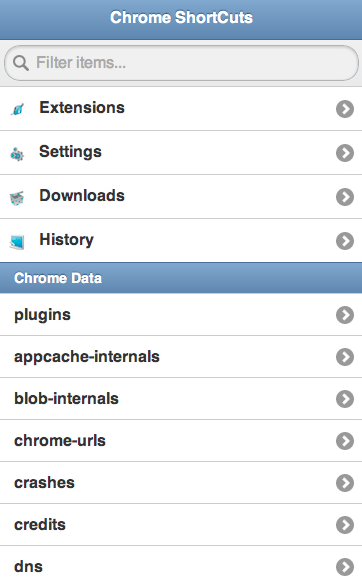
We will take for example the case of opening some Chrome internal pages. I’ve wrote this extension more then a year ago because I wanted ‘one-click’ from many interesting internal pages that chrome give developers that want to have a look at some internal parts. For example:

Browser Action or Page Action

We could choose that the user will see our extension all the time with a little button that will be place on the right side of the browser or to have our activation icon popup inside the address bar (the omni box) only when the user get to the page that our extension is working on. In our example we want the user to be able to activate the extension all the time so we will go with browser action.

The first thing we need to write is a short manifest file that describe our extension. You can see we declaring some trivial fields like: name, version, icon and more important ‘permissions’. This will give the user a warning dialog during the installation process to warn about the permissions that our extension will have. It’s good practice to use as little as possible since it will improve the confidence users will feel – thus, you will have more installations. Another good tip is to invest the time and effort to use great icons/graphics. It will also improve the user experience.

manifest.json
{
  "name": "Chrome Short Cuts",
  "version": "0.1",
  "description": "Show short cuts and tips on Chrome",
  "icons": { 
	"48": "app-icon-48.png"
   },
  "background_page": "background.html",
  "permissions": [
    "contextMenus"
  ],
  "browser_action": {
    "default_title": "Display short cuts and tips",
    "default_icon": "toolbar-icon20.png",
    "popup": "popup.html"
  }
}

After we have our manifest file we need to code (fun time) the logic/data/ui of our extension. Here is our simple code of popup.html:

<!doctype html>
<html>
<head>
<meta name="author" content="Ido Green">
<!-- move it to another file -->
<style>
html {
width: 350px;
height: 600px !important;
}
</style>
<link rel="stylesheet" href="http://code.jquery.com/mobile/1.0a4/jquery.mobile-1.0a4.min.css&quot; />
<script src="http://ajax.googleapis.com/ajax/libs/jquery/1.6.1/jquery.min.js"></script&gt;
<script src="http://code.jquery.com/mobile/1.0a4/jquery.mobile-1.0a4.min.js"></script&gt;
<script>
// start the party
$(document).ready(function() {
$("#ext").click(function() {
chrome.tabs.create({url: "chrome://extensions/"});
});
$("#down").click(function() {
chrome.tabs.create({url: "chrome://downloads/"});
});
$("#set").click(function() {
chrome.tabs.create({url: "chrome://settings/"});
});
});
</script>
</head>
<body>
<div data-role="page" id="home" data-theme="a">
<div data-role="header" data-theme="b" >
<h1>Chrome ShortCuts</h1>
</div>
<div data-role="content">
<ul data-role="listview" data-theme="d" data-filter="true">
<li>
<a href="#" id='ext' data-icon="gear">
<img src="ext.png" class="ui-li-icon"/>
Extensions
</a>
</li>
<li>
<a href="#" id='set'>
<img src="setting.png" class="ui-li-icon"/>
Settings
</a>
</li>
<li>
<a href="#" id='down'>
<img src="down.png" class="ui-li-icon"/>
Downloads
</a>
</li>
</ul>
</div>
</div>
</body>
</html>

After we wrote some code, it’s time to upload the extension to our chrome and test it. You can do it by going to: chrome://chrome/extensions/ and click on the button ‘load unpack extension’. You can see it below:

Once you click on the button you need to navigate to the directory that contain the manifest file and your html/js/css files. Once you click on ‘select’ the new extension will be added to the list of extensions and you should see its button on the toolbar (right side of it). You will continue to work and improve your functionality… and once you are happy with the results it’s time to publish your work to the Chrome Web Store. I’ve wrote about this process in the past here: How to get your web app and/or extension into the Chrome Web Store.

Is it simple or what?
Please let me know if you have any thoughts on the process and how we can improve it. Also, if you have good (to great) ideas to extensions – please share them…

Final notes

  • You can set an option page so your users will be able to set their preferences. In our simple case, there is no point.
  • Background pages –  answer a common need to have a single long-running script to manage some task or state in the background. For example: check the page for certain keywords, links, check status of some web service etc’.
  • How to OAuth2.0 from extensions
  • A great source for extension developers is this guide.
Standard
Chrome, HTML5, JavaScript, mobile, webdev

HTML5 Modern Web App and Google Cloud Endpoints (Part 2 Of 3)

Pre-reqs

  1. Google Plugin for Eclipse
  2. Google API JavaScript client library
  3. Sign up for Cloud Endpoints

User Experiences demands are pushing modern web apps to a more distributed architecture.  A pattern many developers have used is using a MVC framework on the client and communicate to the server with REST. Google App Engine’s easy to build, easy to manage environment makes it ideal for REST APIs for Web backends.  At Google IO 2012, we made it much easier to build REST APIs on App Engine with Cloud Endpoints.

Cloud Endpoints enables you to build REST and RPC APIs in App Engine.  It leverages the same infrastructure  Google uses for its own API and as such, you get strongly typed clients for Android, and IOS as well as a lightweight client for JavaScript which we will be walking through in this presentation.

In getting ready for IO, Ido and I thought we’d build a modern web application using Cloud Endpoints.  We decided on a topic that would be relevant to both App Engine and the general web developer community, something we both have some interest in and something generally useful…. a Beer rating and review web application.

Try it out yourself at:  http://birra-io2012.appspot.com/

Continue reading

Standard
Chrome

Google I/O 2012 – Day 3 (ChromeBox Intro)

Google I/O 2012 logo

Here is a short demo I did during that day. You can jump to 12:53min or just watch the other cool demos:

Other sessions I had the time to checkout and take some notes:

ChromeOS – Fireside chat

* Was good hour on what drive the thougths of the people around ChromeOS.
* It seems a lot of building blocks are coming to life (e.g. Google drive, html5 apis etc’)

High Performance HTML5
Steve Souders is a great speaker that live ‘performance’ for many years now.
He touch on some HTML5 features to seek out and which to avoid when it comes to building fast HTML5 web apps. For years we built web apps that far outpaced the capabilities of the browsers they ran in. Just as the browsers were catching up HTML5 came on the scene – video and audio, canvas, SVG, app cache, localStorage, @font-face, and more. Now the browsers are racing to stay ahead of the wave that’s building as developers adopt these new capabilities. Is your HTML5 app going to ride the wave or be dashed on the rocks leaving users stranded?

Google cloud storage

  • It’s a service that let you store your data on google infrastrcute.
  • multiple layers of radundancy – multiple data centers: US/EU.
  • 5T objects can be store – meaning you don’t have to worry… it’s ‘unlimited’ for most usecases

How to Use it?

  1. Go to code.google.com/api
  2. Cloud storage got a RESTful API – that you can test from the terminal (or any language you wish).
  3. A little demo of ‘gsutil’ that let you work with cloud stroage using linux like command line tool.
  4. You can (also) use a web UI storage.cloud.google.com
Standard
Chrome

Google I/O 2012 – Day 2

ido-google-io12bI had my talk on: HTML5 and App Engine: The Epic Tag Team Take on Modern Web Apps at Scale which was focusing on the latest and greatest application patterns and toolset for building cutting edge HTML5 applications that are backed by App Engine. This talk was focusing on an app that spans client and server (beer in our amazing example); We showed few nice features like OAuth2.0 that just works out of the box. In a nutshell, our talk aims to show you how to build a fantastic cloud-based HTML5 application with Goole App Engine. Both Brad Abrams and I will share another post with more details on the topics we covered. If you want to play with the ‘test-page’ and see what we manage to built in 45min go and check my github repository at: https://github.com/greenido/backbone-bira It’s far from being finished (the sync layer will be there in the next few weeks) and the app could get better, so feel free to fork it and improve it.

Google I/O 2012 logo

Some notes (not very polish at this stage – sorry) that I took during the day:

Google Drive – with its new SDK you can do much more for your users. In chromeOS it’s the ‘native’ file system and it will sync everything (that you need) to your local SSD. Modern Web apps are now very powerful and we see a wave of organizations that are now ‘going google’. Leading universities, enterprise and 400M ‘regular’ users are using Gmail (Docs, Cal and other products). We had Gmail offline (which working very nice on my long flights) and from today, Google docs are now working offline and soon both sheets and presentations.

Compute Engine

Let you run huge amounts of servers inside VMs (all linux based). Why it’s good?

  • Scale – It’s scaling to amounts that seems to be unreal. Imagen 7.5B hits per day on Google app engine…
  • Performance – You can count on certain time for performance.
  • Value – it’s much cheaper then other providers.

A demo of 600,000 core running live is very COOL – Lots of developers in the keynote were amazed to see it. The demo was to show a use case of helping human genom company run calculations in seconds and not minutes. This specific example, took 10min on 1000 cores and in the demo you saw new connections made in seconds (1-2 seconds instead of 10min on an infrastructure that would cost thousands of dollars.

ChromeOS

The new Chromebox (and Chromebook) are a powerful devices. The Chromebox is a desktop that in a lot of cases will make people happier. For people that spend the vast majority of their time on the web it’s a perfect desktop computing machine. It will support your 30″ monitor (or any smaller one) and with the security (no more viruses or malware), speed (V8 is still the fastest JavaScript engine in the world) and simplicity of chrome – you will enjoy it.

Games

USB, game-pad and audio API are now allowing us to have amazing games on the web.

HTML5 demo on Cirque du Soleil – using WebRTC to get the user image and let her control the experiance. Very cool CSS3 transitions and amazing graphics. Chrome got 310M users… It’s growing fast ‘up and to the right’. In the end of the day, we all get a better web because more developers want to use the new HTML5 features that are there.

I hope to update this very soon with the videos from my talk and the slides.

Standard
Chrome

Google I/O 2012 – Day 1

nexus q front sideI’ve took some notes during this packed day. I apologize if they are not ‘polish’… The main goal is to put them here asap and later (maybe, on my next 26h flight) work on them and make sure the wording is better.

Keynote take aways

  • Android – Nexus 7 looks like a great tablet. It’s in the right size and with many great apps that will shin on it. I hope to check it out soon specially as a reading device.
  • Nexus Q seems like powerful (and beautiful) computer that make music/video more social. The use cases are powerful and the ability to stream google music with a push of a button in your friends place – cool!
  • Google+ got event – finally we have a powerful mobile app that let you and your friends share photos together before/during/after events. I know several startups that are trying to solve this challenge and it’s going to be interesting to see what will happend in this space of geo-local-photo sharing apps.
  • Glass – Jumping from airplanes, bikes and some snapling on Moscone. What can I say? I want the roll Sergay is having these days… This video tell the story:

Web component Talk

  • Shadow Dom – encapsulate stuff in the DOM.
    You can follow on it using Chrome DevTools (go to setting and click on ‘show Shadow Dom’) in the example of a video tag you will see all the ‘shadows’ that are behind the sense (e.g. some divs, buttons etc’)
    It’s important to rememeber that for every DOM element we can have Shadow DOM rendered instead. We have here a rendering time structure which can help developer write more efficient web apps that runs faster and smoother.
  • Custom element – meaningful tas to extend DOM objects.
    Use the new HTML5 < element >
  • Templates – clonable DOM for easy authoring

In Parctice we try to ‘tell’ the browser what we mean. The declarative renaissance with web component will let developer to channel their intent to the web browser. It is giving developer CSS variables to custom components and define an api that other developers can leverage. It will let the community a way to share semantics and overtime we will see HTML envlolve due to popular use cases (e.g. x-poll tag).
Another important point is that declerative tags will run faster because the browser ‘understand’ them nativly.

Google Drive API

  • On ChromeOS you have today a strong integration with web applications like: Lucid Charts and Aviray. Both apps, are doing great job in their UI to use the user massel memory and make her productive asap. On the backend, they use google drive api to save your work.
  • You should use the google JS library and load the picker (in their drive example) and use it. It’s very easy and nice api to use.
  • Security – level of access (or scope). These level of access were very board… (scery) but now they have a new api (per file). Once you approve it (using OAuth2.0) the app will be able to access certain files.

Other great talks that I’ll fill in the details later are:

The Web Can Do That!?

The web is changing so quickly that it’s hard to keep up with what’s new in the platform. HTML5’s new capabilities allow developers to build a whole new suite of applications – things that were once impossible to do, are now a reality.

This session cover some of the bleeding edge of HTML5:

  1. media capture
  2. HTML5 file APIs
  3. Advanced usage of web sockets
  4. Media streaming.
  5. Device input
  6. CSS3 & multimedia.
  7. Modern CSS design.

Better Web App Development Through Tooling

Building a solid webapp is a challenge for all developers, but a plethora of tools have emerged recently to assist you. From starting boilerplates, to performance tuning and build tools, you’ll get a full overview of the tooling ecosystem. In this session, you’ll learn which mature and valuable open source projects can save you time as well as get answers to common questions in building a webapp.

Standard
Chrome, webdev

Google Cloud Platform: Technical Overview (Hebrew)

google think cloud

During last may we had a big event in Tel Aviv. It’s was brand as ‘Think Cloud’ and our talk took place in a bigger event that was ‘google week’. You can watch below an overview I gave on Google cloud platforms and new APIs (It’s in hebrew… but soon we will have this talk in english as well). We covered new (cloud) features that are now being offered to developers. Some of the most interesting ones are:

  • App Engine – Powerful, scalable application development and execution environment.
  • Cloud Storage – Store, access, and manage your data.
  • Big Query – Analyze terabytes of data in seconds.
  • Cloud SQL –Familiar relational database, with
    cloud benefits.
  • Prediction API – Understand and leverage your data for business insight. This is one of the most interesting APIs that give you an option to have powerful AI in your products.
In the talk you can see demos of using the big query in order to get results from 12.5G of data (= all wikipedia) and in our case it took less then 7sec. I hope you will enjoy it…

Btw, one of the most popular question I got in this event was “Why do I need Google platform?”. There are few answers, and in most of the cases it’s depend on your startup (and product) but the important common aspect are:
* Cost Savings – Yes, you will save money by using the cloud platforms.
* Improve Business Focus – You won’t need to handle administrative tasks on your servers. You could ‘just’ focus on what you do best and thus make your application better.
* Powerful Infrastructure – You can leverage the massive, scalable computing power that google is giving you. In most of the cases, it’s for free up to a limit.

Standard
Chrome, HTML5, JavaScript, mobile, php, webdev

Modern Web Apps at Scale With Google App Engine (Part 1 Out Of 3)

modern web apps exampleThere is no secret that today any developer that wish to built the next G+Path, Instagram etc’ must think on two major aspects:

  • Server Side / Cloud Service that she is going to use in order to create the API. Here we must answer some important questions like:
          1. What will I do if I get a huge spike in traffic?
          2. Will I need to manage it? Do I have to do it?
          3. How will I communicate with different clients?
          4. Which technology to use in order to store: data, state etc’
  • Client side technology
    • Web technologies: HTML5, CSS3
    • Mobile native app: Android, iOS and Windows.
In this post I’ll be focusing on the client side (and later this summer I’ll have another few posts on the server side) and what we should use in order to build a modern web application.

Modern Web App

It’s not an easy definition since web technology is running very fast. Nevertheless, we can find certain features across successful web apps:

  • Self Contained & Functional– They all have one specific goal and they do their best to provide the users the functionality to get to her goal. Few examples:
    • New York Times – Consume news.
    • Hipmunk – Find a flight that is the ‘perfect’ for your needs.
    • Gojee – Find the recipe you would taste and say WOW after it.
  • “Offline first” – You will want your web app to work offline. It’s an important feature that will let your users be productive on places like: planes, subways and on spots like: Starbucks when you don’t have (always) good connection. Another very important benefit will be the improve in performance. Since the app will work locally (first) and then sync the state/data the users will get responsiveness that are far better from an app that need to ‘wait’ for network on every action that the user does.
  • Client Side Architecture – Since we are moving big parts of our ‘logic’ to the client we need to think about methods that will keep our code readable and maintainable. I guess this is the main reason why we see so many MVC Frameworks. The only advice I can give here is to try few of the popular ones and see how they approach the separation between the data and the UI. If you have some time go over The Top 10 Javascript MVC Frameworks Reviewed. Then, after you try ‘some’ you will be able to pick the one that fit the bill in the best way. For the busy developer (I know… most of us don’t have too much free time 🙂 – Go and play with these three MVC (some will say it should be MV* because it’s not really MVC more MVVM, MVP):
ember.jsEmber.js – Don’t waste time making trivial choices angular.js Angular.js -Lets you extend HTML vocabulary for your application backbone.jsBackbone.js – gives structure to web applications by providing models with binding, collections and views
  • Device Aware – We all know that mobile is going ‘up and right’. So when you design your web app you should think on progressive enhancement and how it will fit  to different screen sizes. Good examples to look at are: Gmail, Flipboard and Twitter. If you want to go deeper on this interesting subject there is a webcast on ‘mobile web apps’ I did with Oreilly three weeks ago. You can go over the slides as well.

Challenges and Solutions

Challenge: What to do first (mobile app, web app, both). Focus is the most important thing for a startup so what should we do?
Solution: Built on the server a RESTful API that allow you to consume it from any platform. The way to work with an API is similar (more or less) to all the platforms although in the web we have some interesting new tools that we can use. If you are working with Google APIs here is a new API Explorer that is very useful to browse the capabilities of each API and to try it live.
Challenge: How to make the web app functional with clear goal?
Solution: Invest time and effort in your UX (and later the UI). Some taking it a step further and say that you should focus only on great UX and all the rest will follow. Who said apple?
Challenge: How should I work with RESTful APIs (in our case – google ones)
Solution: The first excellent tool will be Google JavaScript Client Library  Why it’s so powerful?
  1. It save us the trouble to reinvent the wheel and built simple functionality like: CRUD operations, list, order, search etc’. It’s all baked in it.
  2. It provide us some powerful new features:
    1. RPC Batch
    2. CORS
    3. Authentication out of the box
    4. Version control
    5. Super Simple
Challenge: How to make my application ‘offline first’?
Solution: With HTML5 we have few APIs that let us create web apps that will work great when there is no connection. The first step is to pretend that there’s no internet connection. It will force you to implement a sync layer that works only when online. So you will give the users the ability to add/edit/remove data and when the connection is online your app logic will do the syncing with the server. In order to have our app offline we should use two important features:
  1. Storing (static) assets: we can use AppCache. It’s our ability to save locally our html, js, css files and all the images, sound files etc’.
  2. Storing data: localStorage, IndexedDB, File API. This is a hot (and large) topic. I would suggest to read deeper on when and where to use each over at html5rock.com

webIntent

Challenge: There are so many web services I would love to hook into my app – How can I do it without reinventing the wheel each time? In other words, I want to give my users the ability to edit photos, share on twitter, g+ and Linkedin (just to name few).
Solution: WebIntent! If you are familiar with the intent system that is flourishing in Android you know what I’m talking about. We now have a powerful solution for the web. Web Intents is a framework for client-side service discovery and inter-application communication. The code you need to add to your app is as simple as:

var sharingDetails = "Check out my....";
var intent = new Intent(
            "http://webintents.org/share",
            "text/uri-list",
             beerDetails);
window.navigator.startActivity(intent);

The best part is that it will work on most browsers with JavaScript shim and in Chrome (19+) it’s built into the browser natively!

Google Chrome FrameChallenge: What can I do on old browsers that do not support HMTL5 very well?
Solution: Google Chrome Frame is an open source plug-in that seamlessly brings Google Chrome’s open web technologies and speedy JavaScript engine to IE. You can add it to your web app with one line of meta tag: <meta http-equiv=”X-UA-Compatible” content=”chrome=1″> or configure the server to send this http header: X-UA-Compatible: chrome=1 in both scenarios your users will enjoy the wonderful world of chrome (v8, HTML5, CSS3, WebGL etc’) inside their IE. Important fact to remember is that your users do not need admin rights (on their windows PC) in order to install it.

I hope this gave you some points to think about during the planning and designing phase of your next web app. For startups and developers that have an app in production, I would suggest to check what are the building blocks that will make sense to implement first (e.g. web intent, clean the client code by refactoring it to an MVC framework etc’).
This is the first post in a series of posts, I hope to cover Google App Engine in the next one and then combine the two worlds in the last post that will be more of a ‘cookbook’ to best practices of leveraging Google App Engine and HTML5.
Standard
Chrome

SSH In Chrome and ChromeOS

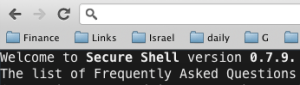
This is a very cool (new) extension that let you work with SSH inside your browser. It’s name is Secure Shell and it is an xterm-compatible terminal emulator and stand-alone ssh client for Chrome. It uses Native-Client to connect directly to ssh servers without the need for external proxies. I used it for few days and it’s working great. It’s useful on Chromebook (and ChromeOS) as a nice way to have access to a box that let you compile your C++/Java code. Also, as I’ve heard from few good people on stackoverflow, the need for Emcas (and/or) Vim on ChromeOS can be achieved via this nice extension.

ssh in Chrome

Standard
Chrome, HTML5, JavaScript, webdev

Web Workers And Big Data – A Real World Example

Web Workers in the 19th centery

I had an interesting conversation on G+ with developers around web workers and the need to a ‘real world’ example that use ‘big chunk’ of data. In this example we will dive into this senario. No more, ‘hello world’ and calculation of some nice number (Pi, e etc’). In the code we will take an array of 33.55 millions numbers (~=32MB) make some calculation on each and everyone of them and return the new data to our main page/app. We will use  transferable objects because they are a new powerful option to ‘move’ (not copy) big arrays in and out the worker. Since the support for transferable objects is done with: webkitPostMessage() (so far). We will use Chrome as the browser for these examples.

This is the main page of our example. In the code snippert below you can see the test function that let us choose the method of delivery.


// The entry point for our comparing. 
function test(useIt) {
  // useIt: true  - use transferrable objects
  //        false - COPY function for sending the data. 
  var useTransferrable = useIt;
  setupArray(); // create the 32M array with numbers

  if (useTransferrable ) {
    console.log ("## Using Transferrable object method on size: " +
                 uInt8View.length);
    // This is the syntax to send by using trans-obj.
    worker.postMessage(uInt8View.buffer, [uInt8View.buffer]);
  } else {
    console.log ("## Using old COPY method on size: " + 
                 uInt8View.length);
    // Simple send msg that copy the data to the worker
    worker.postMessage({'copy': 'true', 
                      'ourArray': uInt8View.buffer});
  }
}

and here is the worker that is doing the hard work on 32M of numbers. You can think on better ways to do ‘hard work’… Specially if you are in the world of WebGL and you have big matrix under your arms.


  // Here we are 'computing' something important on the data. 
  // In our case - just play with % if you have new hardware
  // try: Math.sqrt( uInt8View[i] * Math.random() * 10000);
  for (var i=0; i < dataLength; i++ ) {
    uInt8View[i] = uInt8View[i] % 2;
  }
  
  if (useTransferrable) {
    self.postMessage(uInt8View.buffer, [uInt8View.buffer]);
  } else {
    self.postMessage(e.data.ourArray);
  }

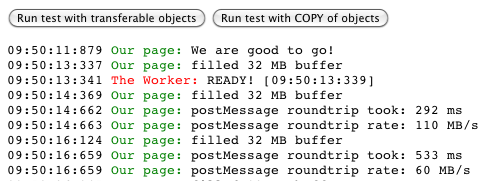
The results are clear (as the sun over the beach in Maui). It was much faster to work with transferrable objects.

web workers - compare options to move data in and out
With transferrable objects it took us 292ms while with copy it was 533ms.
Last but note least, you can find more examples and deep coverage on web workers in my book on web workers. Psst… if you can’t sleep, it might help you on that front as well.
Web Workers - The book

Standard
Chrome, JavaScript, webdev

Web Intents – The Next Wave Of Web Apps

New tool set for web developersWhat?

Web Intents is a framework for client-side service discovery and inter-application communication.

Why and when?

As a web developer you can think on many cases where you’re building a web app and you want to allow users to share pictures (or edit or any other operation). You have few options:

  • Write that functionality yourself, but it will require a huge amount of work and likely won’t be nearly as good as other existing photo web apps.
  • Force a hard-code integration with a collection of existing photo editing web apps, but that can lead to a cluttered interface and requires manual intervention later to integrate with new photo editing apps that may emerge. Worse, it forces your chosen integrations upon your end users.

One of the greatest strengths of the web is that the ease of linking allows innovative new apps to succeed without asking anyone else’s permission–but up until now that hasn’t applied to integrations between web apps. Web Intents is an emerging W3C specification inspired by Android’s Intents system that aims to solve the problems of communications.

How does it work?

  1. Service registers its intention to handle an action for the user.
  2. App requests to start an action (share, edit, pick, view etc’).
  3. User selects which service to handle the action.

Here as some slides that explain the main concepts from a pervious talk I gave. For the ones that like short informative videos – Paul Kinlan (=the godfather of web intents!) intreduce you to the powerful world of web intent in 3 minutes.

In case you are wondering what can you do with this good stuff on other browsers the answer is that there is a limited shims exist, but I recommend feature detection to support browsers that don’t have Web Intents support.

Standard