Chrome, HTML5, JavaScript, webdev

IndexedDB Changes – SetVersion Is Out

Well, things are moving fast… We have now a new version for handling updating schema in IndexedDB. As you can see both MDN (mozilla) and Chrome/Chromium are aligned with the new way.

Here is a short example that show you the new way to work with upgrades to your schema:


<html>
<head>
<script>
var indexedDB = window.indexedDB || window.webkitIndexedDB
|| window.mozIndexedDB || window.msIndexedDB;
var request = indexedDB.open("testUpgrade",1);
var customerData=[
{tel:"540-343-3334", name:"Monk", age:35, email:"mock@example.com"},
{tel:"650-450-5555", name:"Jack", age:32, email:"jack-2@example.com"}
];
request.onerror = function(e){
console.log("Oppss… we got into problems and errors. e:" + e);
};
request.onupgradeneeded = function(event) {
console.log("UPGRADE our nice example DB") ;
var objectStore = db.createObjectStore("customers",{keyPath:"tel"});
objectStore.createIndex("name","name",{unique:false});
objectStore.createIndex("email","email",{unique:true});
for(var i in customerData){
objectStore.add(customerData[i]);
}
};
request.onsuccess = function(e) {
console.log("life is good with indexedDB e:" + e) ;
};
</script>
</head>
</html>

The full example I have on github that show the differences between WebSQL and indexedDB still uses the setVersion syntax. However, in Firefox 10 (and in Chrome 21) you should change your code to work with the new API. Good luck!

=====

[Update Sep 2012]

In case you wish to see a code that will work fine both on Chrome (that still need to update according to the spec on onupgrade) and Firefox you can check this example of jQuery mobile and indexedDB mobile app:


<!DOCTYPE html>
<html>
<head>
<meta charset="utf-8">
<meta name="viewport" content="width=device-width, initial-scale=1">
<meta name="description" content="Short example on using indexedDB with jquery mobile – last updated: May 2012">
<meta name="author" content="Ido Green">
<title>IndexedDB with JQM</title>
<link rel="stylesheet" href="http://code.jquery.com/mobile/1.1.1/jquery.mobile-1.1.1.min.css&quot; />
<script src="http://code.jquery.com/jquery-1.7.1.min.js"></script&gt;
<script src="http://code.jquery.com/mobile/1.1.1/jquery.mobile-1.1.1.min.js"></script&gt;
<script>
var dbName = "jqm-todo";
var dbVersion = 1.0;
var todoDB = {};
var indexedDB = window.indexedDB || window.webkitIndexedDB ||
window.mozIndexedDB;
if ('webkitIndexedDB' in window) {
window.IDBTransaction = window.webkitIDBTransaction;
window.IDBKeyRange = window.webkitIDBKeyRange;
}
todoDB.indexedDB = {};
todoDB.indexedDB.db = null;
$(document).bind('pageinit', function() {
console.log("– lets start the party –");
todoDB.indexedDB.open();
$("#addItem").click(function() {
addTodo();
});
});
todoDB.indexedDB.onerror = function(e) {
console.log(e);
};
todoDB.indexedDB.open = function() {
var request = indexedDB.open(dbName, dbVersion);
request.onsuccess = function(e) {
console.log ("success our DB: " + dbName + " is open and ready for work");
todoDB.indexedDB.db = e.target.result;
var db = todoDB.indexedDB.db;
if (db.setVersion) {
console.log("in old setVersion: "+ db.setVersion);
if (db.version != dbVersion) {
var req = db.setVersion(dbVersion);
req.onsuccess = function () {
if(db.objectStoreNames.contains("todo")) {
db.deleteObjectStore("todo");
}
var store = db.createObjectStore("todo", {keyPath: "timeStamp"});
var trans = req.result;
trans.oncomplete = function(e) {
console.log("== oncomplete transaction ==");
todoDB.indexedDB.getAllTodoItems();
}
};
}
else {
todoDB.indexedDB.getAllTodoItems();
}
}
else {
todoDB.indexedDB.getAllTodoItems();
}
}
request.onupgradeneeded = function(e) {
console.log ("Going to upgrade our DB");
todoDB.indexedDB.db = e.target.result;
var db = todoDB.indexedDB.db;
if(db.objectStoreNames.contains("todo")) {
db.deleteObjectStore("todo");
}
var store = db.createObjectStore("todo",
{keyPath: "timeStamp"});
todoDB.indexedDB.getAllTodoItems();
}
request.onfailure = todoDB.indexedDB.onerror;
request.onerror = function(e) {
console.error("Well… How should I put it? We have some issues with our DB! Err:"+e);
}
};
todoDB.indexedDB.addTodo = function(todoText) {
var db = todoDB.indexedDB.db;
var trans = db.transaction(['todo'], "readwrite");
var store = trans.objectStore("todo");
var data = {
"text": todoText,
"timeStamp": new Date().getTime()
};
var request = store.put(data);
request.onsuccess = function(e) {
todoDB.indexedDB.getAllTodoItems();
};
request.onerror = function(e) {
console.error("Error Adding an item: ", e);
};
};
todoDB.indexedDB.deleteTodo = function(id) {
var db = todoDB.indexedDB.db;
var trans = db.transaction(["todo"], "readwrite");
var store = trans.objectStore("todo");
var request = store.delete(id);
request.onsuccess = function(e) {
todoDB.indexedDB.getAllTodoItems();
};
request.onerror = function(e) {
console.error("Error deleteing: ", e);
};
};
todoDB.indexedDB.getAllTodoItems = function() {
var todos = document.getElementById("todoItems");
todos.innerHTML = "";
var db = todoDB.indexedDB.db;
var trans = db.transaction(["todo"], "readwrite");
var store = trans.objectStore("todo");
// Get everything in the store;
var keyRange = IDBKeyRange.lowerBound(0);
var cursorRequest = store.openCursor(keyRange);
cursorRequest.onsuccess = function(e) {
var result = e.target.result;
if(!!result == false)
return;
renderTodo(result.value);
result.continue();
};
cursorRequest.onerror = todoDB.indexedDB.onerror;
};
function renderTodo(row) {
var todos = document.getElementById("todoItems");
var li = document.createElement("li");
var a = document.createElement("a");
var t = document.createTextNode(row.text);
a.addEventListener("click", function() {
todoDB.indexedDB.deleteTodo(row.timeStamp);
}, false);
// some fun with jquery mobile data attributes
a.setAttribute("href", "#");
a.setAttribute("data-iconpos", "notext");
a.setAttribute("data-role", "button");
a.setAttribute("data-icon", "delete");
a.setAttribute("data-inline", "true");
li.appendChild(a);
li.appendChild(t);
todos.appendChild(li)
// And lets create the new il item with its markup
$("#todoItems").trigger('create');
}
// Add an item only if we have more then zero letters
function addTodo() {
var todo = document.getElementById("todo");
if (todo.value.length > 0) {
todoDB.indexedDB.addTodo(todo.value);
todo.value = "";
}
}
// use it in case you wish to work on specific 'set' of data
function showAll() {
document.getElementById("ourList").innerHTML = "" ;
var request = window.indexedDB.open(dbName);
request.onsuccess = function(event) {
// Enumerate the entire object store.
var db = todoDB.indexedDB.db;
var trans = db.transaction(["todo"], IDBTransaction.READ_ONLY);
var request = trans.objectStore("todo").openCursor();
var ul = document.createElement("ul");
request.onsuccess = function(event) {
var cursor = request.result || event.result;
// If cursor is null then we've completed the enumeration.
if (!cursor) {
document.getElementById("ourList").appendChild(ul);
return;
}
var li = document.createElement("li");
li.textContent = "key: " + cursor.key + " => Todo text: " + cursor.value.text;
ul.appendChild(li);
cursor.continue();
}
}
}
</script>
</head>
<body>
<div data-role="page">
<div data-role="header">
<h1>IndexedDB with JQM</h1>
</div>
<!– /header –>
<div data-role="content">
<p>
This is a short example of inexedDB with jQueryMobile on a todo list app. Please open Chrome DevTools and/or FireBug in order to see all the log message and understand what is the process.
</p>
<p>
<input type="text" id="todo" name="todo" placeholder="What do you need to do?" />
<input type="submit" value="Add Todo Item" id="addItem" />
</p>
<ul id="todoItems" data-role="listview" data-inset="true" data-filter="true"></ul>
</div>
<!– /content –>
<div data-role="footer">
<p>
<ul>
<li>
<a href="https://greenido.wordpress.com">Ido's blog</a>
</li>
<li>
<a href="http://www.w3.org/TR/IndexedDB/">IndexedDB spec on w3c</a>
</li>
<li>
<a href="https://github.com/greenido/WebSQL-to-IndexedDB-example">WebSQL to IndexedDB example on github</a>
</li>
</ul>
</p>
</div> <!– /footer –>
</div> <!– /page –>
</body>
</html>


Standard
Chrome, HTML5, webdev

New USB API & Bluetooth API In Chrome/ChromeOS

It seems that we are going to have some powerful new APIs on ChromeOS and Chrome in the future. From looking at chromium site last month I’ve saw two new interesting proposal to new APIs that will make Chrome (even) better. The ability to ‘talk’ with hardware and external devices is very important and until today the way to do it (from a web app) was by using network. So there was no (real good) option to communicate with hardware and external accessories that do not support network (e.g Wi-Fi). These two new APIs are going to allow web developers with more power to build amazing apps that communicate with external devices. Think, smart watches, GPSs, robots, Lego cars (my kids will love it!) etc’.

USB API

The USB API aims to provide access to fundamental low-level USB operations from within the context of an extension. Some use cases that might come to mind: GPS, Watch, mobile phone or any other devices which require third-party drivers to work. One of the use cases for this API would be to provide the ability for a Chrome extension to function as a device driver and allow previously new devices to be used – is it cool or what? just think on the ‘old’ days where if you needed to talk with your specific hardware you were locked to write you native application for windows, mac and linux (and more if your users are there). In the new world, you will be able to write it once and run it everywhere… (where have we heard this sentence before? back in the 90s? Some technology that start with J?) One big question is if/when we could see this API being part of the web platform. I don’t really know. However, I do hope it will.

The APIs functions:

  • Locates an instance of the device specified by its vendor and product identifier - chrome.experimental.usb.findDevice(
    integer context,
    integer vendorId,
    integer productId,
    function callback)
  • Performs a USB bulk transfer to the specified device - chrome.experimental.usb.bulkTransfer(integer device,
    string direction,
    integer endpoint,
    string data,
    function callback) 
  • Close a USB device handle - chrome.experimental.usb.closeDevice(integer device,
    undefined callback)
  • Performs a USB control transfer to the specified device - chrome.experimental.usb.controlTransfer(integer device,
    string direction,
    string recipient,
    string type,
    integer request,
    integer value,
    integer index,
    string data,
    function callback)
  • Creates a USB context by which devices may be found - chrome.experimental.usb.createContext(function callback)
  • Disposes of a context that is no longer needed. It is not necessary that this call be made at all, unless you want to explicitly free the resources associated with a context - chrome.experimental.usb.destroyContext(integer context)
  • Performs a USB interrupt transfer to the specified device - chrome.experimental.usb.interruptTransfer(integer device,
    string direction,
    integer endpoint,
    string data,
    function callback)

* This API proposal was on March 7th, 2012. For more details check this proposal. After all we are dealing here with an open source project.

Bluetooth API

A bluetooth API that is on par with the Android and iOS APIs. Version 1 will support basic RFCOMM communication. Profile support will be left for a future version. As for the most common use cases we can think on anything that you are doing today on your mobile device (e.g. headset, stream video/audio etc’). One important aspects to pay attention (just like on mobile devices) will be to see how intensive the bluetooth API is in terms of making your battery drain.

The APIs functions:

  • Accept incoming bluetooth connections by advertising as a service - chrome.experimental.bluetooth.acceptConnections(string uuid,
    string service_name,
    string service_description,
    function callback)
  • Connect to a service on a bluetooth device - chrome.experimental.bluetooth.connect(BluetoothDevice device,
    string uuid,
    function callback)
  • Close the bluetooth connection specified by socket - chrome.experimental.bluetooth.disconnect(BluetoothSocket socket, function callback)
  • Get the bluetooth address of the system - chrome.experimental.bluetooth.getBluetoothAddress(function callback)
  • Request a list of bluetooth devices that support service - chrome.experimental.bluetooth.getDevicesWithService(string service_uuid,
    function callback)
  • Get the local Out of Band Pairing data - chrome.experimental.bluetooth.getOutOfBandPairingData(function callback)
  • Check if this extension has access to bluetooth - chrome.experimental.bluetooth.isBluetoothCapable(function callback)
  • Check if the bluetooth adapter has power - chrome.experimental.bluetooth.isBluetoothPowered(function callback)
  • Read data from a bluetooth connection - chrome.experimental.bluetooth.read(BluetoothSocket socket,
    function callback)
  • Set the Out of Band Pairing data for the bluetooth device at bluetooth_address - chrome.experimental.bluetooth.setOutOfBandPairingData(string bluetooth_address, array of ArrayBuffer data,function callback)
  • Write data to a bluetooth connection - chrome.experimental.bluetooth.write(BluetoothSocket socket, ArrayBuffer data, function callback)
  • Fired when the availability of bluetooth on the system changes - chrome.experimental.bluetooth.onBluetoothAvailabilityChange.addListener(function(boolean available) {...your code...});
  • Fired when the powered state of bluetooth on the system changes - chrome.experimental.bluetooth.onBluetoothPoweredChange.addListener(function(boolean powered) {...your code...});

* This API proposal was on March 7th, 2012. More details can be found in the original proposal.

I know few startups that are waiting for these APIs that they would love to built interesting apps to use them. It’s going to be very interesting to see what new smart-watches, GPSs, Mobile devices etc’ will do with these APIs. Be strong & happy.

Standard
Chrome, webdev

Dart Crawler Example

In the Dart hackathon I got few questions about applications on the server. The best way was to try and give the hackers a code sample… It’s by definition a very simple code but I’m sure that you can take it to the next level without any problem.


#import('dart:io');
#import('dart:uri');
#import('dart:json');
// Dart Hackathon TLV 2012
//
// A simple example to fetch RSS/JSON feed and parse it on the server side
// This is a good start for a crawler that fetch info and parse it.
//
// Author: Ido Green | greenido.wordpress.com
// Date: 28/4/2012
//
class Crawler {
String _urlToFetch = "http://feeds.feedburner.com/html5rocks&quot;;
String _dataFileName = "webPageData.json";
HttpClient _client;
var rssItems;
//Ctor.
Crawler() {
_client = new HttpClient();
}
// Fetch the page and save the data locally
// in a file so we could process it later
fetchWebPage() {
// Get all the updates of h5r
Uri pipeUrl = new Uri.fromString(_urlToFetch);
// open a GET connection to fetch this data
var conn = _client.getUrl(pipeUrl);
conn.onRequest = (HttpClientRequest request) {
request.outputStream.close();
};
conn.onResponse = (HttpClientResponse response) {
print("status code:" + response.statusCode);
var output = new File(_dataFileName).openOutputStream();
response.inputStream.pipe(output);
// In case you want to print the data to your console:
// response.inputStream.pipe(stdout);
};
}
// Read a file and return its content.
readFile() {
File file = new File(_dataFileName);
if (!file.existsSync()) {
print ("Err: Could not find: " + _dataFileName);
return;
}
InputStream file_stream = file.openInputStream();
StringInputStream lines = new StringInputStream(file_stream);
String data = "";
lines.onLine = () {
String line;
while ((line = lines.readLine()) != null) {
//print ("== "+line);
data += line;
}
};
lines.onClosed = () {
print ("Got to the end of: "+_dataFileName);
print ("This is our file content:\n" + data);
parsePage(data);
};
}
//
// Basic (real basic) parsing
//
parsePage(data) {
// cut the intersting part of the feed
int start = data.indexOf("<title>");
int end = data.lastIndexOf("</channel>");
var feed = data.substring(start, end);
// put the items in an array
rssItems = feed.split("<title>");
for (var item in rssItems) {
print("\n** Item: " +item);
}
}
} // End of class
//
// Start the party
//
void main() {
Crawler crawler = new Crawler();
crawler.fetchWebPage();
crawler.readFile();
}

this example could be consider version 0.01 of a real crawler. You do need to add to the real first version features like:

  • Discovery – Be able to get links from the current page and jump into them. This is much harder then it sounds, as you want to make sure it won’t continue forever.
  • Parsing – parse the information on the page. Try to gain the meta data and add it to the ‘real’ content (which is based on your goals from the crawler).
  • Analyze – Meaning, normalize the information of the page and put it in a storage (DB, file, a cloud solution etc’).
  • Logging &Monitoring – As this server side process will run while you are sleeping… It’s best to have some good ‘watch-dog’ on it. The start will be with some simple logging and analyzing of the logs. The second step will be to use a tool to monitor the action.

Key lessons:

  • There is a real need to libraries that will make the parsing better. xPath, DOM to Map (or Array) etc’.
  • The debugging in the editor could improved… and as a first step you might want to use a logging library that will give you a lot of information for each step.
  • The editor making the development phase very nice with warnings on (almost) every issue that you might do. I found it very productive to be back in the good hands of ‘IDE’.
  • I guess that in the near future we will see some good examples that use Dart VM on the server – It’s going to be interesting to profile their performance and see where do we stand vis a vis other modern languages like: Scala.
Standard
Chrome, HTML5, webdev

What Is ChromeOS? In a 5 Minutes Lighting Talk

What is Chrome OS? Well, ChromeOS (and the new Chromebooks) are built and optimized for the web, where users are already spend most of their computing time. Here is a lighting talk I gave in the Java Posse roundup 2012. If you know nothing about Chromebook, ChromeOS and the Chromium Projects – It might be worth your five minutes.  This presentation is built on top of impress.js and you can checkout the code on github.com/greenido/chromeOS-5min

The new chromebooks

You can also checkout the summary of the other talks I gave in that amazing conference.

Standard
Chrome, webdev

Dart Instagram Web App

One (of the many) good things that happend during the Dart hackathon 2012 in Tel Aviv was the ability to hack with friends. There were a lot of interesting project and I had a bit of time to hack this simple web app that show a combination of few tools. The main goal was to investigate and see how we can work with web services in Dart while giving the user a cool UI. First, I’ve looked at how my JavaScript code should look in Dart. Then, it was easy to bake the functionality into the code that fetch images from Instagram. When you have a case where you need to fetch some unstructured data from the web you might want to consider using yahoo pipes (and/or the new version YQL). In our case, I saw that the work on web.stagram is in the area of what I’ll need in terms of data but (like so many other web site) they don’t have any JSON feed I can work with. The option to parse feeds (RSS/Atom) in JavaScript is painful so here y! pipes come to the rescue. This pipe will take the page of ‘photo of the day’ and will give you back a JSON output of all the information you will want to see in a feed from that page. From here the basic code to fetch the JSON and to build the HTML is looking like that:


// init values on the page
  startThePage() {
    String baseurl = "http://pipes.yahoo.com/pipes/pipe.run?_id=8a481ba9ce15f5efa8ac6b894b45eeac&rand=3334&_render=json";
    XMLHttpRequest request = new XMLHttpRequest();
    request.open("GET", baseurl, true);
    request.on.load.add((e) {
      _divCar.hidden = false;
      
      var response = JSON.parse(request.responseText);
      var imgs = response['value']['items'];
      for (final img in imgs) {
        writeCarousel(img);
      }
    });
    request.send();
  }

Other tools/frameworks I’ve used in this mini-project:

  • Dart – I must say that the new language is very easy to pick up. If you are Java programer a lot of things will look (very) familiar (to good and bed). But, even if you spend you last several years hacking on JavaScript – you will feel at home after the first few hours.
  • Twitter bootstrap – These days, it’s one of the best options to have a quality responsive layout with a lot of other CSS goodies.
  • Y! pipes – Instead of taking the time build an RSS to JSON web service (which might be a cool idea for another hackathon) I’ve used pipes that give you not only that but also a fast cache version of the information so you won’t put any load on the servers of your source.
  • The unoffical web.stagram API – In our case, it was the best way to get the ‘photo of the day’ from Instagram.
Overall, it’s very simple code, yet, it’s giving us some views of what can be done with Dart. I would love to put some more time into this project in order to have a nice web app (and not just simple web site as it’s current state).
Standard
Chrome, webdev

Dart Hackathon TLV Summary

Web Workers in the 19th centeryLast Friday and Saturday we hosted a Dart Hackathon in Tel Aviv. When you have a group of people


OK… When hackers, geeks, coders, ninjas and software engineers are coming to spend their weekend hacking on the bleeding edge of technology you know good things will come live. I thought we will have some cool demos in the end but the level of the projects we saw was very impressive. From a generic library of Types to new math game that is doing some clever things with inheritance, canvas and other goodies both on the server side and the client.

Few teams that I would like to mention here:

  • DJ web app – A cool web app that let you ‘play’ the DJ part.
  • Volfied like game, only much better – https://github.com/yanivoliver/DartVolfied
  • GraphMVC – A modular framework for graph (vertices/edges) data structures https://github.com/habeanf/dartgraph
  • Implement the Novem game in dart – It’s a new math game that doesn’t exist on the web (nor on mobile) so they are keeping the source for now. We might have some parts without the algo in Github in the next few days.

All the information about the teams with their ideas and links to their Github repositories

dart

Few hackers came to me during the event with questions about Dart server side. Here is a basic example to server side crawler: https://gist.github.com/2517000 it took me less then ten minutes to write it and I’m sure you can take it from here to the next level. I’ve also had a bit of time (not too much) to work on a web app. It is a simple way to watch cool photos from Instagram on your browser.

The code is in Github under DartInsta and this project uses several technologies:

  • Dart – of course… all the main logic of the web app is written in Dart.
  • Twitter bootstrap – yes, let’s have some good responsive layout without to invest too much effort.
  • Y! pipes for the feeds – who said you can’t enjoy JSON from any web site on the web?
  • Instagram (or the unofficial web.stagram API) – After all, we do need some photos and it’s better to have some real good ones.

Old style dartSome thoughts for the future:

    • Dart is a cool pre alpha technology that (I hope) going to help us build solid web apps without the need to be a ‘guru’. It’s still very (very) early so there are many things that we could improve over time.
    • The community (web developers, Java developers etc’) should try and see what are the libraries the will give the most ‘bang for the buck’. Since it’s so early in the life cycle it will be great to have some libraries that moving everyone forward and not something like the case with jQuery slideshows (= too many not so ‘great’ ones).
    • We should do more events like this but not on weekends so people that can’t drive on Shabbas could join us.
    • Dart is very easy for Java developers. It’s not the case with ‘hard core’ JS ninjas.
    • In case you are going to organize a hackathon here are few great tips.

(*) For hebrew speakers, here is a great explanation that was recorded two days after the event.

Standard
Chrome, HTML5, JavaScript, webdev

Dart Hackathon In Tel Aviv

In the last weekend of April there we are going to have a Dart Global Happy Hour around the world. Luckily, we will have Tel Aviv on the map as well. Fitst, for the ones that still think we are speaking here about

Well, we are not talking about dart game in the irish pub. Although it’s good fun…

So… what is Dart?

Dart is structured web programming for the entire modern web. Like a good draught, Dart is fresh yet familiar, with unique touches that help create a delightful new experience for aficionados of software development. Dart delivers a smooth pour of a new language, libraries, virtual machine, and compilation to modern JavaScript. Dart will make web development crisp and refreshing again.

So in order to gain more feedback (and have fun hacking) we are going to have a #Dart hackathon in the last weekend of April. The keynote will be giving by +Gilad Bracha and we will have other Dart experts, helping during the hackathon. The event is going to take place at the Hub in Tel Aviv so if you wish to attend you better register asap at hackathon-israel.eventbrite.com/ and for the schedule and more details on the event: http://goo.gl/iFccu

We ask all the participants to bring their own laptops and power cords. Please make sure to have Java, Dart SDK and the Dart Editor on your laptop before the hackathon. Here is a good page that will guide you on the process: http://www.dartlang.org/docs/getting-started/editor/. The hub will provide WiFi and we will make sure there is enough food/drinks. If you wish to ‘test the water’ before the event – dartlang.org is an excellent resource to test the language and get a feel to the power of the APIs.

  • Disclaimer: Dart is “technology preview” (not yet even alpha). This hackathon is for experienced developers.
Standard
Business, Chrome, webdev

Great Web App Session

At the last day (for me) in the Javaposse roundup 2012 we started (like any good day) with camp 4 coffee. Then, after you can speak (more or less) we sat to talk on what does we mean when we say: “Modern web app” or as Joel N. said: “Don’t use the word modern because it will become obsolete before you know it”. When we try to define a great web app here are some common aspects we found:

  • Self Contained
  • Functional
  • Immersive
  • Interactive
  • Works Offline
  • Device Aware
  • App Styled Navigation
  • Client Side Architecture
Few important things we can learn from Amazon web kindle app:
  • Does it cost more to support browser X than it generates?
  • Is the browser older than the mayo in your fridge?
  • Is an exorcist required to debug the app’s behavior?

The lesson is to be explicit about the browsers you support (just like Amazon). One of THE success stories about mobile web apps if the Financial times app. You might want to check the slides in order to get the full details of their success story.

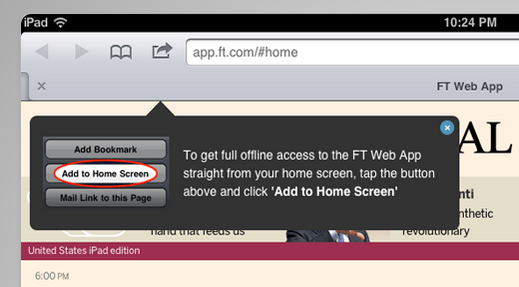
Btw, in you can have this new script to help you popup the message for users to add your web app to their home screen. It will make the engejment of your app better and the user will be able to ‘treat’ your web app as any other app.
==

Here are my slides from the lighting talk on Great Web Apps that I gave later this day.

Standard
Chrome, HTML5, JavaScript, webdev

Google App Script Session

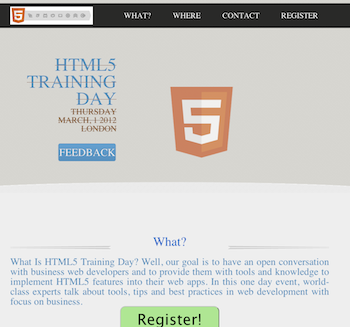
On the second day of the JPR12 we had a good coding dojo (which is a meeting where a bunch of coders get together to work on a programming challenge) during the afternoon activities on Google App Script. The idea was to create a simple, yet functional, system to organize an event. The event could be a training day, hackathon, birthday party, running race, etc’. We started with a template site I’ve created that is built on top of twitter bootstrap-responsive and modernizr (but of course).

The site gives you basic functions like:

  • What  – What is the event goal/mission or why should I come.
  • Where – Information on the venue and where to park. We use some nice custom google map in order to follow the rule: “one picture is worth 10,000 words”.
  • Contact – Who is running the event and ways to get in touch.
  • Registration – Using Google forms and app script, as our backend, we will have a system to keep track on the registration process.
In the system backend code we got:
  • Set up the maximum number of people that could participate in this event.
  • Send a confirmation email.
  • Send a waiting-list email to the ones that are filling the registration form after the maximum number of participate is being reach.
  • Send a reminder email (a week and/or a day) before the event.
  • Lastly, after the event, send an email with a link to a feedback form. We want to be able to improve…
The two interesting parts of this system are:
  1. Simple one page app that will render nicely on phones, tablets and desktops.
  2. Backend that let us run the communication with the participates and keep tracks on the registration process.
Ready to see some (simple) code?
Here is the part that we use in #2:


//
// Call this when you want to send the call 
// for Feedback email AFTER the event is done
//
function sendFeedbackEmail() {
  // Get our main spread sheet into ss obj.
  var ss = SpreadsheetApp.getActiveSpreadsheet();

  // Fetch the sheet with the list of emails
  var dataSheet = ss.getSheetByName("Registration");

  // Fetch the range the contain our information for the email
  var dataRange = dataSheet.getRange(2, 2, 
      dataSheet.getMaxRows() - 1, 
      NUM_FORM_QUESTIONS + 1);

  // First row of data to process
  var startRow  = 2;  

  // Get the email template (you may use html template here)
  var templateSheet = ss.getSheetByName("Email Templates");
  var emailTemplate = templateSheet.getRange("A5").getValue();
  
  // Create one JavaScript object per row of data.
  objects = getRowsData(dataSheet, dataRange);

  // For every row object, create a personalized email from a template and send
  // it to the appropriate person.
  for (var i = 0; i < objects.length; ++i) {

    // Get a row object
    var rowData = objects[i];

    // Only contact people who are 'yes' status
    if (rowData.status == YES) {  

      // Generate a personalized email.
      // Given a template string, replace markers (for instance ${"First Name"}) with
      // the corresponding value in a row object (for instance rowData.firstName).
      var emailText = fillInTemplateFromObject(emailTemplate, rowData);
      var emailSubject = dataSheet.getRange("P2").getValue() + " Reminder";
      
      MailApp.sendEmail(rowData.emailAddress, emailSubject, emailText);
      
      // Make sure the cell is updated right away in case the script is interrupted
      SpreadsheetApp.flush();
    }
  } 
}


Here is the full code for the event site: https://github.com/greenido/events-site-template please feel free to fork, pull and do something cool with it. For more details on the new options and capabilities in Google App Script: https://developers.google.com/apps-script/templates

Standard
Business, Chrome, life, webdev

Tools That Make You More Productive

Java posse roundupDuring the first day of Java posse roundup 2012 I’ve took some notes from all the interesting session I’ve been in. The first day was a great start to the conference with two session that were very interesting with lots of good stuff to start and checkout. Here are some of the notes I’ve took from the session about “Tools that make you more productive”.

The first suggestion was (surprise – surprise) Whiteboards with some good tips like:

  • Big boards for work in meetings
  • Small portable boards that people can take back to their desks
  • Pictures of boards for later reference/distribution – good mobile apps for that are:
    • CamScanner+ phone-based scanning to PDF, etc.
    • Camera+ with its text mode filter.

My favorite editor Sumblime Text was next in line. There are many great tips and ways to make you efficiant using it. I will try to post on that later this week. You can start by using ctrl-p for smart search and improve your knowledge of short-cuts.

Productivity tools:

  • Workfloy.com – good for plan/todo anything that need list/sharing and a nice web app.
  • join.me – Hassle free screen sharing.
  • Evernote/SpringPad  – Everything you want to remember on every device you use.
  • Plain-text – good for note-taking, searching
  • SimpleNote
  • Lightscribe pen – It’s not a pure online tool (but it can be uploaded). It’s a good solution for people that like pens but want to be able to have their drawing/writing digitize for future search.

ToDo:

  • Any.do
  • “do it tomorrow” – for Android
  • Pomodoro technique – Tomatoes.com web-site for pomodoro

For the (web/Java) developers among us:

  • Standing desk
  • large monitor (or even 2-3 of them).
  • best mouse, keyboard, monitor you can buy. On every tool that you use daily you want to buy the best.
  • SSD (or hybrid HDD/SS)

How to handle interruptions:

  • Turn off all distractions: facebook, twitter, IM, IRC etc’
  • Work at home
  • Headphones
  • Go in early – the few hours without people around in the morning are your 1-2 productive hours of the day.

email considerations:

  • Establish policy/reputation of NOT responding rapidly/frequently to emails – unless it is something urgent and then the other team members know to IM you or just call.
  • Use email header/subject to distinguish FYI, ACTION REQUIRED, URGENT then you can use priority box in gmail (or filters) to make sure you get to the most important stuff first.
  • Boomerang for gMail – It is a good extension that let you set the time of sending so people will get the emails at the start of their work day and not in 23:45 at night.
  • Separate user account on workstation that has no email access
  • Use email search for trouble-shooting hints, etc.

Software (Java) development:

  • JRebel – with and without GWT.
  • Play framework – It was great to have a session in the zero day with James ward on play with Java and Scala. Very cool stuff under the hood of Play.
  • Write more tests – focus on the parts that you don’t want to do.
  • Pair programming (in disciplined doses)

Team communication:

  • hipchat.com
  • Yammer
  • Campfire and it’s ‘brother’ Propane apps.
  • Google hangouts (with screen sharing) is powerful tool for meetings.
  • Skype.

General hints:

  • Environmental hooks (e.g. SBT)
  • Python scripting
  • Command-? on Mac to drive menu from keyboard
  • Avoid the mouse; use keyboard shortcuts
  • Mylyn with Eclipse
  • Time tracking per task
  • Reviewing “painful things” per iteration
  • Track time spent on interruptions

If you have more, please let me know in the comments or g+

As for the lighting talks, I was able to hack a little site: jpr12ns.appspot.com (It’s JPR12 and NS for ‘no snow’) to hold all my talks since we had only two nights for the lighting talks so I got some talks ready for next year.

Standard