webdev

What Is The Right Cloud For You?

In the past few years we saw lots of ‘clouds’ coming up to life. Some of the known and powerful ones like:

  • Amazon S3 – Amazon S3 is storage for the Internet. It is designed to make web-scale computing easier for developers. Amazon S3 provides a simple web services interface that can be used to store and retrieve any amount of data, at any time, from anywhere on the web. It gives any developer access to the same highly scalable, reliable, secure, fast, inexpensive infrastructure that Amazon uses to run its own global network of web sites. The service aims to maximize benefits of scale and to pass those benefits on to developers.

  • Rackspace Cloud – They offering servers, files and load balancers. It’s similar to amazon and you get some nice features ‘for free’ – like the ability to take images of your current machine and start new ones from this image.
  • Amazon EC2 – Amazon Elastic Compute Cloud (Amazon EC2) is a web service that provides resizable compute capacity in the cloud. It is designed to make web-scale computing easier for developers. Amazon EC2’s simple web service interface allows you to obtain and configure capacity with minimal friction. It provides you with complete control of your computing resources and lets you run on Amazon’s proven computing environment. Amazon EC2 reduces the time required to obtain and boot new server instances to minutes, allowing you to quickly scale capacity, both up and down, as your computing requirements change. Amazon EC2 changes the economics of computing by allowing you to pay only for capacity that you actually use. Amazon EC2 provides developers the tools to build failure resilient applications and isolate themselves from common failure scenarios.
  • Amazon Cloud front – Amazon CloudFront is a web service for content delivery. It a ‘pure man’ solution for other CDN. It integrates with other Amazon Web Services to give developers and businesses an easy way to distribute content to end users with low latency, high data transfer speeds, and no commitments.

  • Microsoft Azure – Offering the .NET developers a ground play with all microsoft technologies. If you live inside microsoft stack (MSSQL, .NET etc’) – I guess this is the place you want to research first thing. However, since other cloud solution also give you MS environments, it’s not the only solution. So take the time and do a good research on the different offerings.

  • Google App Engine – Google App Engine enables you to build and host web apps on the same systems that power Google applications. App Engine offers fast development and deployment; simple administration, with no need to worry about hardware, patches or backups; and effortless scalability.

BTW, they are many many more… I know. I’ve put in the bottom of the post ‘just’ the ones that Amazon offering so you could get the picture of ‘how many’ different types of cloud we have today at 2011 just from one (big) vendor.
There are very different in their ‘view of the world’ and like in anything in life, you need to define your own goals before you going to choose a solution.
Standard
Business

Startups Best Practices In 5 Min

How we can do things cheaper, faster, better?

This is a short lighting talk I gave in JPR 2011.

Standard
Chrome, life

So What Developer Advocate Do?

Coding, Blogging, Public Speaking And Dealing With Partners

This slideshow requires JavaScript.

Some Coding

Some Blogging

Public Speaking

And Of Course – Business Development

Here are all the things any Developer Advocate do on a daily/weekly bases:

and thanks to @chanezon for the ideas.

Standard
HTML5, JavaScript, webdev

How To Use IndexedDB – Code And Example

IndexedDB is an evolving web standard for the storage of significant amounts of structured data in the browser and for high performance searches on this data using indexes. IndexedDB leaves room for a third-party JavaScript library to straddle the underlying primitives with a BTree API, and I look forward to seeing initiatives like BrowserCouch built on top of IndexedDB. Intrepid web developers can even build a SQL API on top of IndexedDB.

I’ve work today to create this example in order to push it to MDC IndexDB page later… I found few things that didn’t work on Firefox 4 (but since we have Firefox 5 from last night) – I’ve just put them in the comments. Also, Chrome 12 (and above) works great.
You might want to check that the pages you developing on are served from a server and not a local file, because on firefox it won’t work…

You can go here and see a working example or browse the code below and get a beer.

Here is a code that will show you all the basic features:
To check the code with highlights you might want to check The code of this example on github

Here are some main snippets of code:

// Our local DB
var idb_; 
// Our DB request obj
var idbRequest_;    
//
// just a simple way to show what we are doing on the page
var idbLog_ = document.getElementById('idb-log');
var idResultsWrapper_ = document.getElementById('idb-results-wrapper');

// IndexedDB spec is still evolving - see: http://www.w3.org/TR/IndexedDB/
// various browsers keep it
// behind various flags and implementation varies.
if ('webkitIndexedDB' in window) {
    window.indexedDB = window.webkitIndexedDB;
    window.IDBTransaction = window.webkitIDBTransaction;
} else if ('mozIndexedDB' in window) {
    window.indexedDB = window.mozIndexedDB;
}

// Open our IndexedDB if the browser supports it.
if (window.indexedDB) {
    idbRequest_ = window.indexedDB.open("Test", "Our Amazing test object IndexDB");
    idbRequest_.onerror = idbError_;
    idbRequest_.addEventListener('success', function(e) {
        // FF4 requires e.result. IDBRequest.request isn't set
        // FF5/Chrome works fine.
        idb_ = idbRequest_.result || e.result;
        idbShow_(e);
    }, false);
}

// on errors - show us what is going wrong
function idbError_(e) {
    idbLog_.innerHTML += '

Error: ' + e.message + ' (' + e.code + ')

';
}

// In cases we add/remove objects - show the user what is changing in the DB
function idbShow_(e) {
    if (!idb_.objectStoreNames.contains('myObjectStore')) {
        idbLog_.innerHTML = "

Object store not yet created.

";
        return;
    }

    var msgBoard = [];
    // Ready is default - make sure NOT to pass empty array in the first param as it use to be something like: []
    var transaction = idb_.transaction(idb_.objectStoreNames, IDBTransaction.READ_ONLY);
    // Get all results.
    var request = transaction.objectStore("myObjectStore").openCursor();
    //
    //
    // This callback will continue to be called until we have no more results.
    request.onsuccess = function(e) {
        // FF4 requires e.result. IDBRequest.request isn't set
        // FF5/Chrome works fine.
        var cursor = request.result || e.result;
        if (!cursor) {
  idResultsWrapper_.innerHTML = '

    ' + msgBoard.join('') + '

';
  return;
        }
        msgBoard.push('

  • ', cursor.key, ' ',
            '=> ', cursor.value, '  ',
            '[Delete]
  • ');
            cursor.continue();
        }
        request.onerror = idbError_;
    }

    // Simple example to show all our records in the DB
    function showAll_() {
        document.getElementById("ourList").innerHTML = "" ;
        var request = window.indexedDB.open("Test",
        "Our Test database");
        request.onsuccess = function(event) {
            // Enumerate the entire object store.
            // request = event.currentTarget.result.objectStoreNames("myObjectStore").openCursor();
            var transaction = idb_.transaction(idb_.objectStoreNames, IDBTransaction.READ_ONLY); // Ready is default.
            var request = transaction.objectStore("myObjectStore").openCursor();
            request.onsuccess = function(event) {
      var cursor = request.result || event.result;
      // If cursor is null then we've completed the enumeration.
      if (!cursor) {
          return;
      }
      var element = document.createElement("div");
      element.textContent = "key: " + cursor.key + "=> Value: " + cursor.value;
      document.getElementById("ourList").appendChild(element);
      cursor.
          continue ();
            };
        };
    }

    —-
    Main Source: The IndexDB Spec on w3.org

    Standard
    HTML5, JavaScript, webdev

    HTML5 On Mobile

    This slideshow requires JavaScript.

    It’s all about reading the map and see what other big gorillas are doing.

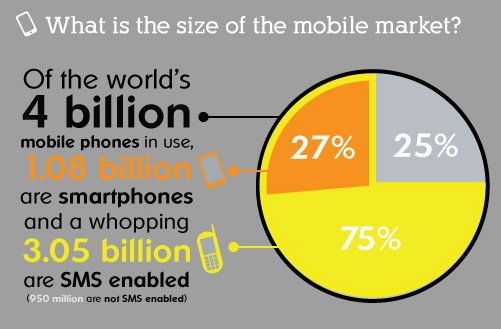
    In the past few months, we saw that ‘web gorillas’ like Netflix, Facebook, Microsoft and others are putting their money on HTML5 for mobile. If you want to build an application that will run ‘everywhere’ – HTML5 is your best friend. Yesterday, jQuery Mobile moved to Beta, which is a great news for web developers. In a nutshell, jQuery Mobile is a touch optimized framework for smart phones (iPhone, Android, Palm, Windows phones and even Blackberry) & tablets (iPad, Android and others). It gives out of the box a unified user interface system across all popular mobile device platforms, built on jQuery and jQuery UI foundation. Since ‘Touch’ is the major way to interact with mobile web apps, here is a short summary of ‘the touch state of the union’:

    What browsers are out there? well, you can use compatibility sites like: caniuse.com and PKK – quirksmode.org. In short, apple pushing their mobile Safari and just after them we have android browser. Opera mobile browser is also huge and you will want to check your app there as well. All these browsers should work with touch events web standard. Here are the main parts of the standard:
    • Core: touchstart touchmove touchend
    • Not: touchenter touchleave touchcancel
    • Touch lists: touches targetTouches changedTouches
    • Touch: target identifier x y

    Some pro tips for mobile web developers:

      • Set a fixed viewport so when the user is double clicking we won’t have the zoom gesture. Here is the meta tag you need in the top of your page. However, I would recommend to leave the ability to zoom… it’s important feature that a lot of users want to have. In order to let them have it – remove: “user-scalable=no” from the tag.

    <meta name="viewport"
    content="width=device-width, height=device-height,
    initial-scale=1.0, user-scalable=no">

      • If you need a custom hold & press event, override the default one

    mySelector {
    -webkit-touch-callout: none;
    }

      • Hide the address bar. It will give your app a nice touch of ‘native’. Pss… jquery mobile is doing it for you by default.

    setTimeout(function () {
    window.scrollTo(0, 1);
    }, 1000);


    Other good sources:
    Touch Gesture ref. guide and a great presentation my friend Boris created.
    Standard
    Chrome, webdev

    Great Web Apps

    This slideshow requires JavaScript.

    It’s hard task to try and describe what is a great web application. but just like the old phrase that was famously used by United States Supreme Court Justice Potter Stewart to describe his threshold test for pornography in Jacobellis v. Ohio (1964) – “I know it when I see it”
    So I took the freedom to put a quick list of some apps that IMHO are ‘good to great’.
    First are the productivity/utility apps (you might call them even business apps):
    • Gmail
    • Docs and/or Zoho – let you have access to your files from everywhere plus the option to have version control and muti editing.
    • Picnik – Image editor that works great with Picasa, Flickr and others.
    • Aviary image editor with ‘fancy’ features for designers (and developers that think they are designers).
    • Todo.ly – Todo list with lots of features and great user interface.
    • box.net – save your files in the cloud. Similar to dropbox.
    • Mint – is the free and easy way to manage your finances online and see all your accounts in one place ― safely and securely.
    • Slide Rocket – defines the new way to create stunning presentations that deliver lasting impressions and measurable results.

    Socail

    Travel
    • Hipmunk – Sort of kayak but with great UI.
    • TripIt – Travel organizer.

    On the ‘taking notes’ section we have three nice apps:

    If you have other apps you think are worthy – please let me know…
    For more resources on HOW to build a great web app:
    Standard
    Chrome

    How To Detect If It Is A ChromeBook?

    I’ve been developing some extensions and web apps that need to use the new Chromebook file API. But on the other hand, I don’t want to see the sad faces of all the users that will install this extension just to see that it’s not working for them on their Chrome browser. The quick and easy solution is to do something like this:

    var ua = window.navigator.userAgent;
    // Then check if the UA is something like: Mozilla/5.0 (X11; CrOS i686 0.12.433) AppleWebKit/534.30 (KHTML, like Gecko) Chrome/12.0.742.77 Safari/534.30

    Now, if you got back in the user agent some string like: CrOS you are on ChromeOS device.
    Btw, you can even tell the version of the chrome in the end of this string. So you can save a call to ‘about:version’ page. It’s useful because it won’t force you to add permissions to the extension. I found that some developers are using permissions that are making users uncomfortable… As always, think of you when you asking the user to approve some permissions.

    While I was working on that, I developed this little chrome extension that give you all the shortcuts/utils in one click.

    Be strong and let me know if it’s not working for you.

    Standard
    Chrome, HTML5, webdev

    How To Use The New ChromeBook File API


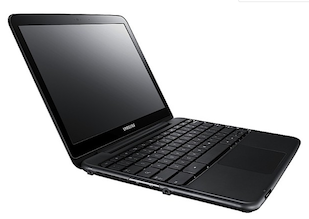
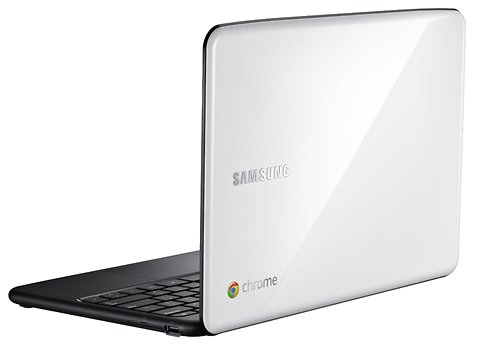
    Next week, on June 15, we are going to see a new animal in town. It’s a laptop that works perfectly for the web. It got one of the best/fast browsers out there and its security model is baked really deep. One of the cool things in ChromeOS is that it gives developers a new API to play with. I worked with it in the past few weeks and I must say, it’s great (=Simple and powerful).
    Let’s see how we can use this powerful API to upload files from USB and/or our ChromeBook.

    The ChromeOS (=ChromeBook) file browser comes up when the user either presses Ctrl+M or connects an external storage device, such as an SD card, USB key, external drive, or digital camera. Besides showing the files on external devices, the file browser can also display files that the user has previously saved to the system.
    When the user selects one or more files, the file browser adds buttons representing the valid handlers for those files. For example, in the following screenshot, selecting a file with a “.jpg” suffix results in an “Upload to Picasa” button that the user can click. Few things to keep in mind:

    • You should declare the “fileBrowserHandler” permission in the extension manifest
    • You should use the “file_browser_handlers” field to register the extension as a handler of at least one file type.
    • Last but not least, you should also provide a 16×16 icon to be displayed on the button. For example let’s take Flickr:
    
    {
      "name": "Flickr Uploader",
      ...
      "file_browser_handlers": [
        {
          "id": "upload",
          "default_title": "Save to Flickr", // What the button will display
          "file_filters": [
            "filesystem:*.jpg",
            "filesystem:*.jpeg",
            "filesystem:*.png"
          ]
        }
      ],
      "permissions" : [
        "fileBrowserHandler"
      ],
      "icons": { "16": "icon16.png",
                 "48": "icon48.png",
                "128": "icon128.png" }
    }
     

    To use this API, you must implement a function that handles the onExecute event of chrome.fileBrowserHandler. Your function will be called whenever the user clicks the button that represents your file browser handler. In your function, use the HTML5 FileSystem API to get access to the file contents.
    Here is our Flickr example inside the background.html:

    
    chrome.fileBrowserHandler.onExecute.addListener(function(id, details) {
      if (id == 'upload') {
        var fileEntries = details.entries;
        for (var i = 0, entry; entry = fileEntries[i]; ++i) {
          entry.file(function(file) {
            // send file somewhere
          });
        }
      }
    });
    

    Your event handler is passed two arguments:
    id – The “id” value from the manifest file. If your extension implements multiple handlers, you can check the id value to see which handler has been triggered.
    details – An object describing the event. You can get the file or files that the user has selected from the entries field of this object, which is an array of FileSystem Entry objects.

    Is that easy or what? Please let me know if you have any comments/questions.

    Here is another little javascript code that will do the work if you want to let the user to choose a file from your extension popup.html file:

    
    ...
    uploadFile: function(file) {
                var pro1 = document.querySelector('#pro1');
                var progressBar =  pro1.querySelector('progress');
                var formData = new FormData();
                formData.append('file', file);
    
                var xhr = new XMLHttpRequest();
                xhr.open('POST', this.uploadServer, true);
    
                xhr.onload = function(e) {
                    if (this.status == 200) {
                        console.log(this.response);
                        alert("The image is safe in Flickr " + this.response);
                    }
                };
    
                xhr.onerror = function(e) {
                    console.log(this, this.status, this.responseText, 
    			    this.getAllResponseHeaders())
                };
    
                xhr.send(formData);
            }
    ...
    

    Resources

    Want to learn more on Chrome Extensions? Here is a great starting point

    Standard
    Chrome, HTML5

    HTML5 – Some Great Presentation To Keep You In The Loop


    HTML5 is a rich development platform that let developers (and companies) target more users on different browsers, devices and tools. Here are few links I’ve collected in the past week. It’s more a short list of great presentations (mostly from Google I/O 2011) and some code sample to give you a hint of the power.

    • HTML5 Intro – learn what is all about. From Geo to Canvans, here are some short examples:
       
      //
      // Get the user location 
      //
      if (navigator.geolocation) {
        navigator.geolocation.watchPosition(function(position) {
          var latLng = new google.maps.LatLng(
              position.coords.latitude, position.coords.longitude);
          var marker = new google.maps.Marker({position: latLng, map: map});
          map.setCenter(latLng);
        }, errorHandler);
      }
      
      //
      // paint some stuff
      //
      var canvasContext = document.getElementById("canvas").getContext("2d");
      canvasContext.fillRect(250, 25, 150, 100);
      canvasContext.beginPath();
      canvasContext.arc(450, 110, 100, Math.PI * 1/2, Math.PI * 3/2);
      canvasContext.lineWidth = 15;
      canvasContext.lineCap = 'round';
      canvasContext.strokeStyle = 'rgba(255, 127, 0, 0.5)';
      canvasContext.stroke
      
      //
      // Use some really nice fonts on your site
      //
      @font-face {
        font-family: 'LeagueGothic';
        src: url(LeagueGothic.otf);
      }
      @font-face {
        font-family: 'Droid Sans';
        src: url(Droid_Sans.ttf);
      
      //
      // Notify your user - just like on other devices
      //
      function showNotification(pic, title, text) {
        if (hasNotificationPermission()) {
          var notificationWindow = window.webkitNotifications
            .createNotification(pic, title, text);
          
          notificationWindow.show();
          
          // close notification automatically after a timeout    
          setTimeout(function(popup) { 
            popup.cancel();
          }, notificationWindowTimeout, notificationWindow);
        }
      }


    • HTML5 Games  and of course the Bad Aliens game that we’ve built during this presentation.
    • HTML5 WOW and How – you got here some very nice code snippiest of Files, Graphics (CSS3, WebGL) and Audio/Video stuff.
    • High level view on the chrome web store, upload process and the new file API.
    Last but not least, if you wish to keep track on all the rapid changes and improvements that is going on in the ‘Chrome arena’ – feel free to use this pipe in your apps/reader
    Standard
    life

    Two Performances – One (Crazy) Song

    The source

    Ninet, with a little help of Red Band


    Ninet is amazing.

    Standard