

The rise of large language models (LLMs) has been one of the most transformative developments in software engineering in decades. Tools like GPT4.1, Gemini 2.5 Pro, Claude Opus 4, and various AI-powered code editors such as Cursor (or CoPilot) promise to change the way we build software.
But as these tools evolve and mature, the real question isn’t if we should use LLMs—it’s how.
There’s an emerging split in philosophy between two approaches: full automation through AI agents and IDE integrations, or human-led development using LLMs as intelligent partners.
Based on real-world experiences and a critical review of LLM-based coding tools, the most effective path today is clear:
LLMs are best used as powerful amplifiers of developer productivity—not as autonomous builders.
Let’s break down why.
1. LLMs Are Best as Thought Partners, Not Solo Coders
Modern frontier models like Gemini 2.5 Pro and Claude Opus can digest thousands of lines of code in seconds, detect bugs before they reach production, and brainstorm architectural alternatives that even seasoned engineers might miss.
When used in a “pair-programming” mode, these models can:
- Catch bugs early: LLMs can review logic, check for edge cases, and suggest improvements. One developer recounted how Gemini helped eliminate bugs in Redis’s Vector Sets feature before users ever saw them.
- Explore complex design spaces: With proper prompting, LLMs can mix human intuition with encyclopedic knowledge, surfacing novel and even elegant solutions. But they also need human oversight to avoid the “local minima” of naïve ideas.
- Accelerate prototyping and throwaway experiments: Want to quickly test whether a vectorized version of your algorithm is faster? Have the LLM scaffold the test code and save hours of tinkering.
However, this human+LLM symbiosis hinges on one condition: clear, detailed communication.
Developers must provide extensive context, goal definitions, known pitfalls, and style guidelines.
It’s not about giving orders—it’s about building shared understanding. You must keep yourself in the “loop” and understand what is going on with the code. Like a senior engineers who keep doing deep reviews into the codebase on a certain product.
2. Why “Coding Agents” and Integrated IDEs Fall Short (for now)
Tools like Cursor have gained attention for embedding LLMs directly into the development environment. In theory, this is seamless: you highlight some code, hit a keyboard shortcut, and your assistant writes or rewrites the logic.
But in practice, real-world usage reveals the limitations.
In The Pragmatic Engineer’s in-depth review of Cursor (based on this research: “Measuring the Impact of Early-2025 AI on Experienced Open-Source Developer Productivity” ) ,
a surprising conclusion emerged: developers were often slower and less effective using it.
Why?
- Partial context windows: LLMs don’t see the full codebase. Cursor and similar tools try to guess which files and functions to load into context, but that guess is often wrong. Developers lose trust in the tool after it misses a key dependency or fails to grasp subtle architectural choices.
- Over-reliance and under-learning: Developers using Cursor often skipped thinking through problems themselves. While that seems efficient at first, it led to brittle solutions and lower comprehension of the resulting code—especially harmful for long-term maintenance or debugging.
- False confidence from autocomplete: Code suggestions look syntactically correct and can even pass simple tests. But they may introduce subtle logical bugs or performance issues that slip through unnoticed—until it’s too late.
In short, while AI-embedded IDEs may boost convenience, they often reduce cognitive engagement and code quality.
The productivity promise of automation can easily become a liability. There are many cases where developers keep trying again and again to ‘make’ the LLM come up with the right solution, and it keeps falling short.
3. Retain Control to Maximize Output
So what works best in July 2025?
Go manual—but amplified by your favorite LLM.
Here’s the high-leverage pattern adopted by many high-performing engineers today:
- Use Cursor/CoPilot or web-based interfaces for LLMs: You want to control what the model sees, review every output, and guide the conversation based on real-time feedback. Don’t run blind with ‘agent’ mode, as it will consume a lot of your time with one ‘wrong’ turn.
- Copy/paste large chunks of relevant code into the prompt – Yes, it’s tedious. However, it ensures the model understands the full picture, resulting in higher-quality outputs. In Cursor, you can set the ‘context’, which is better/faster, and it is important to do it right. Think that each time, the LLM will get ‘all’ the text from the files, and its memory is limited – So you wish to make sure it’s the files/directories you really care about.
- Be explicit about what you want – That’s good advice for life in general. Define goals, style, invariants, performance tradeoffs, and known pitfalls. Treat the LLM like a junior developer with a PhD —brilliant, but inexperienced in your project’s domain.
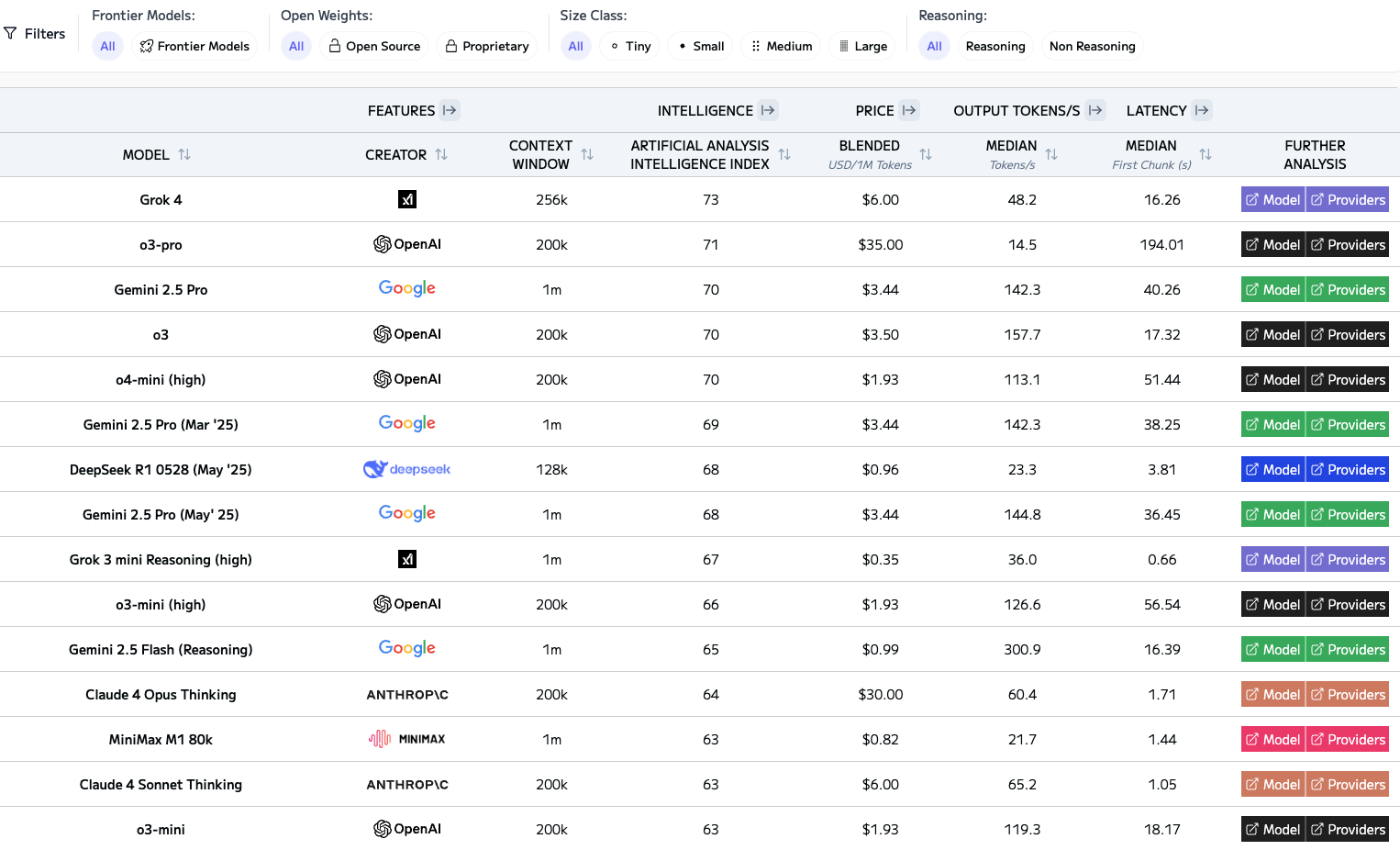
- Use the best tools – Not all LLMs are created equal. Gemini 2.5 Pro excels at bug hunting and semantic reasoning. Claude Opus 4 can write clean, idiomatic code. GPT is getting better from version to version. Use all. Let them challenge each other—and you. Psst… check Grok (from time to time). See the ranking table at the end of the post.
- Treat LLMs as teachers too – LLMs can help you level up. Curious how a hash table works under the hood? Want to explore zero-copy serialization in Rust? They’ll not only explain, but walk you through examples. If you bring curiosity and a bit of skepticism, you’ll learn faster than from many tutorials.
4. Don’t Let LLMs Make You Lazy (Or Cynical)
There are two pitfalls developers must avoid in the age of AI:
- The automation trap: Hoping an agent or integrated IDE will “just do it” can lead to bloated, fragile, misunderstood codebases. Worse, it erodes your own understanding and growth.
- The rejection reflex: On the flip side, some developers resist LLMs entirely—out of fear, pride, or bad early experiences. But that avoidance builds a skill gap. Working with LLMs is its own craft. The sooner you build it, the more effective you’ll be in this new era.
Conclusion: Craft Over Hype
The future of software development will surely include autonomous AI agents that can build and maintain large systems with minimal human input.
But we’re not there yet.
Today, the best developers are embracing a hybrid approach: using LLMs to amplify their speed, creativity, and accuracy—while retaining full control over architecture, quality, and intent. They avoid the hype of “AI will replace developers,” and also the denial of “AI is a toy.” Instead, they treat LLMs as collaborative tools in a new kind of craft.
The result?
Faster iteration, deeper learning, fewer bugs—and better software.
So yes: use the LLM.
But use it well. Prompt with purpose. Stay in the loop.
And always, always own your code.
Be strong and have a great weekend.
Discover more from Ido Green
Subscribe to get the latest posts sent to your email.
 Ido Green
A good comprehensive overview about collaboration with LLM and how to use it. thanks