cloud, JavaScript

Big Query And Google Spreadsheet Integration

big queryThere are many options to extend the powerful spreadsheets that Google offers. One of the cool, new ways to leverage its power is by using a spreadsheet as your ‘front-end’ to a big data processing power (=Big Query). In our world, there is a need to get results as fast as possible and since our data sources grow fast. It’s nice to have a tool that let us ‘see’ (and share) results quickly and easily.

What is BigQuery?

Google BigQuery is a web service that lets you do interactive analysis of massive datasets. When we saying massive we are talking here on billions of rows (or more). It is a scalable and easy to use tool that gives developers and businesses an easy way into powerful data analytics on demand.

As for Google Docs and their powerful sharing capabilities – I guess we don’t need to elaborate here. So, let’s see what are the steps that will let us get data from BigQuery into our Google spreadsheet.

Integrate BigQuery To Google Spreadsheet Continue reading

Standard
Chrome, JavaScript, webdev

Install NodeJS On Compute Engine

NodeJS

In the past, I’ve showed how to run a NodeJS application in Compute Engine. It’s a good case where you wish to test ideas with App Script but when you move them to ‘production’ – NodeJS is the answer. After the Google Developer Live show we had at the end of August, I got few questions on how to install NodeJS inside Compute Engine instance.

Here are the (easy) steps I did before the show in order to save us time: Continue reading

Standard
HTML5, JavaScript, webdev

Big Query Power With JavaScript

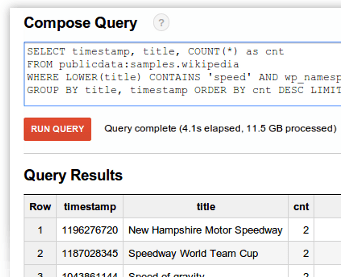
Big Query and App script logoThis week on Google developers live Israel we wanted to show the power of Big Query. What is Big Query? Well, in todays world when everyone like to use the term “big data” you need to have the capabilities to querying massive datasets. This can be time consuming and expensive without the right knowledge, hardware and infrastructure. Google BigQuery solves this problem by enabling super-fast, SQL-like queries against append-only tables, using the processing power of Google’s infrastructure. In order to get started quickly and ‘test the water’ there is a powerful online tool that let you query pre-existing datasets like: wikipedia, Github etc’. If you like to type in command line, there is also a command line tool. Before you start your first project you should signup for BigQuery (yes! it’s open now for all). You should log in to the Google APIs Console and make sure you set a new project and allow Big Query API on it. You should also, enable billing if you have not done so in the past. Lastly, head to bigquery.cloud.google.com and click on one of the public datasets that are on the left sidebar. Continue reading

Standard
webdev

Compute Engine In 5min

Screen Shot 2013-07-11 at 2.43.33 PMThis week, we showed in GDL-IL (Google developer live Israel) how to work with google compute engine. Google Compute Engine offers scalable and flexible virtual machine computing capabilities in the cloud. You can solve large scale processing and analytic problems on Google’s computing, storage, and networking infrastructure. It’s also great option to ‘play’ with a server (web service) in the cloud and scale it efficiently. It’s *open for all* and it got some powerful features like: Continue reading

Standard
Chrome, HTML5, JavaScript, webdev

Google I/O 2013 – Mobile Web App Demo

Standard
Chrome

Google Cloud Endpoints And HTML5 In Hebrew

This post is a short one… It’s contain the same talk I gave last week but, this time it’s in hebrew. So for the millions of front-end developers that wish to hear this in hebrew. This is the ‘one time only’ you can enjoy it.

Btw, this week we had a very cool event in Campus TLV on ‘Multi Screen-X’ world. So tomorrow, we are going to air the first talk from these two packed days.

Screen Shot 2013-03-06 at 3.15.05 PMPlease join us.

Standard
Chrome, HTML5

DevCon TLV 2012

In a nutshell, DevCon TLV was a great event! It’s getting better and bigger every year. There were lots of developers, friends and rock bands (a bit early in the morning – but great way to wake up quickly). This year all the talks were limited to 25min (with 5min of questions) where after lunch people had the options to choose ‘agile’ track as well. I’ve got to listen to some great talks and I hope we could see all of them online soon. This year my talk in DevCon TLV was “Big Data and HTML5“. This slides cover some of the main points of Google cloud products: Google Cloud Endpoints and Big Query. I wanted to give developers the option to see how they can combine modern web apps with cloud technologies that give a lot of power. The first product we covered is still in ‘trusted tester’ mode and it give the developer the option to build an API (in Google App Engine supported technologies: Java, Python and Go) that will work in minutes with all the scale of Google app engine. You can read more deeply about Google Cloud Endpoint and HTML5 or just have a look at this talk:

(*) This time the talk is in hebrew…  I hope that soon I’ll have another version of it in english.

Standard
Chrome, HTML5, JavaScript, mobile, webdev

HTML5 Modern Web App and Google Cloud Endpoints (Part 2 Of 3)

Pre-reqs

  1. Google Plugin for Eclipse
  2. Google API JavaScript client library
  3. Sign up for Cloud Endpoints

User Experiences demands are pushing modern web apps to a more distributed architecture.  A pattern many developers have used is using a MVC framework on the client and communicate to the server with REST. Google App Engine’s easy to build, easy to manage environment makes it ideal for REST APIs for Web backends.  At Google IO 2012, we made it much easier to build REST APIs on App Engine with Cloud Endpoints.

Cloud Endpoints enables you to build REST and RPC APIs in App Engine.  It leverages the same infrastructure  Google uses for its own API and as such, you get strongly typed clients for Android, and IOS as well as a lightweight client for JavaScript which we will be walking through in this presentation.

In getting ready for IO, Ido and I thought we’d build a modern web application using Cloud Endpoints.  We decided on a topic that would be relevant to both App Engine and the general web developer community, something we both have some interest in and something generally useful…. a Beer rating and review web application.

Try it out yourself at:  http://birra-io2012.appspot.com/

Continue reading

Standard
Chrome, webdev

Google Cloud Platform: Technical Overview (Hebrew)

google think cloud

During last may we had a big event in Tel Aviv. It’s was brand as ‘Think Cloud’ and our talk took place in a bigger event that was ‘google week’. You can watch below an overview I gave on Google cloud platforms and new APIs (It’s in hebrew… but soon we will have this talk in english as well). We covered new (cloud) features that are now being offered to developers. Some of the most interesting ones are:

  • App Engine – Powerful, scalable application development and execution environment.
  • Cloud Storage – Store, access, and manage your data.
  • Big Query – Analyze terabytes of data in seconds.
  • Cloud SQL –Familiar relational database, with
    cloud benefits.
  • Prediction API – Understand and leverage your data for business insight. This is one of the most interesting APIs that give you an option to have powerful AI in your products.
In the talk you can see demos of using the big query in order to get results from 12.5G of data (= all wikipedia) and in our case it took less then 7sec. I hope you will enjoy it…

Btw, one of the most popular question I got in this event was “Why do I need Google platform?”. There are few answers, and in most of the cases it’s depend on your startup (and product) but the important common aspect are:
* Cost Savings – Yes, you will save money by using the cloud platforms.
* Improve Business Focus – You won’t need to handle administrative tasks on your servers. You could ‘just’ focus on what you do best and thus make your application better.
* Powerful Infrastructure – You can leverage the massive, scalable computing power that google is giving you. In most of the cases, it’s for free up to a limit.

Standard
webdev

What Is The Right Cloud For You?

In the past few years we saw lots of ‘clouds’ coming up to life. Some of the known and powerful ones like:

  • Amazon S3 – Amazon S3 is storage for the Internet. It is designed to make web-scale computing easier for developers. Amazon S3 provides a simple web services interface that can be used to store and retrieve any amount of data, at any time, from anywhere on the web. It gives any developer access to the same highly scalable, reliable, secure, fast, inexpensive infrastructure that Amazon uses to run its own global network of web sites. The service aims to maximize benefits of scale and to pass those benefits on to developers.
  • Rackspace Cloud – They offering servers, files and load balancers. It’s similar to amazon and you get some nice features ‘for free’ – like the ability to take images of your current machine and start new ones from this image.
  • Amazon EC2 – Amazon Elastic Compute Cloud (Amazon EC2) is a web service that provides resizable compute capacity in the cloud. It is designed to make web-scale computing easier for developers. Amazon EC2’s simple web service interface allows you to obtain and configure capacity with minimal friction. It provides you with complete control of your computing resources and lets you run on Amazon’s proven computing environment. Amazon EC2 reduces the time required to obtain and boot new server instances to minutes, allowing you to quickly scale capacity, both up and down, as your computing requirements change. Amazon EC2 changes the economics of computing by allowing you to pay only for capacity that you actually use. Amazon EC2 provides developers the tools to build failure resilient applications and isolate themselves from common failure scenarios.
  • Amazon Cloud front – Amazon CloudFront is a web service for content delivery. It a ‘pure man’ solution for other CDN. It integrates with other Amazon Web Services to give developers and businesses an easy way to distribute content to end users with low latency, high data transfer speeds, and no commitments.
  • Microsoft Azure – Offering the .NET developers a ground play with all microsoft technologies. If you live inside microsoft stack (MSSQL, .NET etc’) – I guess this is the place you want to research first thing. However, since other cloud solution also give you MS environments, it’s not the only solution. So take the time and do a good research on the different offerings.
  • Google App Engine – Google App Engine enables you to build and host web apps on the same systems that power Google applications. App Engine offers fast development and deployment; simple administration, with no need to worry about hardware, patches or backups; and effortless scalability.
BTW, they are many many more… I know. I’ve put in the bottom of the post ‘just’ the ones that Amazon offering so you could get the picture of ‘how many’ different types of cloud we have today at 2011 just from one (big) vendor.
There are very different in their ‘view of the world’ and like in anything in life, you need to define your own goals before you going to choose a solution.
Standard