Chrome, HTML5, JavaScript, mobile, webdev

HTML5 APIs – Hangout With O’Reilly

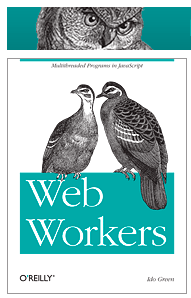
Web Workers BookToday I did a hangout on air with O’Reilly. It was a good opportunity to dive into some of the aspects of modern web application and check what are the main things we wish to think about when we design, build and ship our apps. Modern web apps are rich, interactive applications.

I tried to cover the following:

  • Defining the modern web app
  • Designing a modern web app
  • HTML5 Power tools/APIs
  • Tips & best practices on DevTools and Google Cloud Endpoints.

The slides 

My book on Web Workers.

And you can watch the video recording of the talk:

Standard
Chrome, HTML5, JavaScript, webdev

GDL-IL On Bootstrap Chrome Extensions

GDL-IL on ExtensionsThis week we spoke with Alex Wolkov from extensionizr.com fame on Chrome extensions and how/when/why you should use them. During these 30min we covered these main points:

  • What is it an extension? If you wish to add functionality to the web app/sites you like? Well, this is the way to do it while using your front-end knowledge (HTML, JS, CSS) to add features to web app/sites that you are working with.
  • What about compatibility with other browsers? Crossrider.com (another startup from Israel) provide you wish this functionalty. We showed them in this GDL-IL Extension show
  • What are the best tools? Continue reading
Standard
Chrome, HTML5, JavaScript

Chrome Extensions Updated Features

In this Google Developer Live episode I covered some of the new elements you wish to pay attention when you are starting to develop your Google Chrome Extension. If you don’t know what is an extension and why it’s great way to improve Chrome, try this true 101 tutorial first. As you (might) know, there is a new version for the manifest file that include few improvements. The first basic change is to add this simple declaration:

manifest_version: 2

This is a mandatory and if you have a current extension in the Chrome web store I suggest you update it to include it. The second bold change in the manifest file is the ability to make it more secure. For this we have to define what is our extension’s Contact Security Policy. In the demo case that I’ve showed, it will look like that: Continue reading

Standard
Chrome, HTML5, JavaScript, webdev

GDL-IL on Chrome Extensions And Backbone.js In The Real World

Today I’ve spoke on GDL-IL (=Google Developer Live Israel) with Ron Reiter on his work at Any.Do and how he leverage backbone.js to create this useful chrome extension. The main points we covered during our talk:

  • Chrome Extensions– How you start developing them and why you will want to do it.
    • Extensions are small software programs that can modify and enhance Chrome. The best part is that you write them using web technologies such as HTML5, JavaScript, and CSS. Here is the code for the example extension I’ve wrote as ‘short cuts’ to Chrome internal pages.
  • Ron gave us a short description on backbone.js and what are the main components in this MV* framework. You can learn more at: http://documentcloud.github.com/backbone/
  • We talked about Any.do extension and Ron gave a nice overview of the code he used for the sync layer.
  • Few tips for extensions developers:
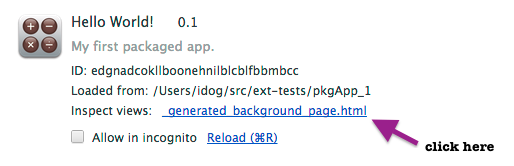
    • How to inspect an extension: open the popup and right click inside of it. It will give you the option to open chrome devtools (with the ‘inspect element menu item). In cases, where you don’t have a popup – you can always use chrome://extensions and click on ‘inspect background page’.
    • If you have some logic you wish to test without the extension (or not inside it) you can always run QUnit (or any other unit test framework) on a page that will be a proxy to your popup’s index.html file.

Enjoy and feel free to join us every week on WED 14:00 Israel time at https://developers.google.com/live/


Standard
Chrome, HTML5, webdev

Google Developers Live IL And Shana Tova!

shana tovaToday we lunch GDL IL. What is it? Google developer live is GDL and IL is our famous short for Israel. It is going to be a weekly show on WED 14:00 (so mark your calanders please). We are going to talk about the latest and greats news in technology. From Android to HTML5 and back to Cloud, Google APIs and anything that is interesting for developers. As ‘startup nation’ we will hosts some of the cool, interesting/amazing startups that will tell their story and will share some of their real life experience. For the first show that is focus around Chrome extensions, I had a pleasure to interview Tal from Equire (a CRM Chrome extension that integrates with Gmail and making your life better). We talked about the life of a web developer that choose to build a product in Chrome (extension and/or App). Since Tal is working from The Hub we covered what is unique about this ‘working space’ and how to be productive in such an environment. One of the key questions I’ve asked was something like: “What are the top 5 things to keep in mind when we are coming to build a chrome extension?” Tal answered:

  • Don’t rush to do the same things you always do when first building an app, think about the new architecture, understand it, it’s a different mindset, it’s not just a regular web app. The major difference is the limited ‘screen’ you have and some strong APIs – so use it smartly.
  • LocalStorage… give you a lot of power to save state/data of users.
  • Metrics – measure everything so you could improve over time and give more insight to your users.
  • APIs – There are many APIs that are available only inside Chrome so learn them and use them!
  • Very challenging UX issue – not a blank canvas like a web app. You have an option to give notifications and be ‘infront of your users’ but there is a delicate balance to strike to make sure you don’t get uninstalled.

There are many more things we covered… Some of these are covered in this post “Six Strategies for building great extensions“. However, if you want all the good stuff, you will need to watch it until the end when our next week guest will show up 😉

We finish the episode with 3 things/tools that Tal recommend.

  • Mixpanel – An analytic tool that answer any question you have about your code/users. You should start early and get a feel for it. The nice part is that you do not need any backend.
  • CoffeeScript – take a week, learn it, it will give you back 3 months of your year.
  • Backbone – especially for chrome extensions. It was a simple for Tal to start and be productive with it.

Until next time… Enjoy and Shana Tova!

Standard
Business, Chrome, HTML5, JavaScript, webdev

HTML5 Training Day (Tel Aviv)

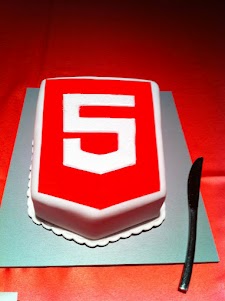
Lets start from the end… It was a great experiance to meet wonerful, smart (web) developers both in London and Tel Aviv. We had 80+ developers in the London event and 130+ developers in Tel Aviv. Like any good event – we started with a good cup of HTML5 coffee and some special HTML5 cake.

After the coffee and some food we got to the ‘talking’ part which went very well. In London we had the pleasure to have Alex Russell who spoke about Chrome Frame (link to his great presentation is in the bottom of this post). In Tel Aviv day we had two external experts: Nimrod Luria and Ron Reiter. Nimrod gave a talk about HTML5 security issues and how to use the best parctices in order to avoid them. Few examples where:

  •  Hacking Facebook with HTML5 using Cross-Origin Resource Sharing.
  • Web sockets (open ports that listen to in bound connections)
  • Good old ‘data cleaning’ and data validation.
  • Client side injections to local databases.
  • XSS by using encoding and new formats that are supported.

Ron gave a talk about backbone.js and how to leverage some frameworks and tools in order to build moden mobile web apps.

Here are the talks (with their slides) from both days:

Time Session Title Description
10:00-11:00 HTML5 and new breed of web application Web developers have nearly perfected their skill at building great web sites, but everything is shifting towards building apps.  We’ll take a look at what defines a great Web App and show you how you can use HTML5 to create a new breed of web application that will delight and amaze your users. Ido Green
11:00-11:55 Platform, Storage, Prediction, Translation and more Google Cloud Platform latest and greatest Barak Regev
13:00-14:00 mobile web app HTML5 stack A -For modern mobile browsers Learn what it takes to build modern mobile web apps. We will start with the ideas of “adaptive apps” and “offline first”. Next, we’ll dive into some of the technologies, including MVC frameworks, templating engines, CSS frameworks, laying out views and multi-touch input. Finally, we’ll close off with mobile-specific tips and sweet demos Ido Green
14:00-14:50 HTML5 threats and attack vectors + some attacks demo +
Countermeasures
Security for business web apps – best practices and tips for the real world. Nimrod Luria
Q.rity – Quality Security Solutions Ltd.
A short coffee break to make sure everybody is awake…
15:10-15:35  Chrome Dev Tools Tips and best practices to work with Chrome Dev Tools. Ido Green
15:35-16:30 HTML5 mobile web apps Backbone.js and other tools with real world examples Ron Reiter

More sources from the talks and questions:

and for the ones that wish to try ChromeOS: https://greenido.wordpress.com/2012/01/09/install-chromiumos-on-your-old-laptop/ and https://greenido.wordpress.com/chrome/

Or the Ubuntu guys that want to have Canary.

Standard
Chrome, HTML5

New Video Channel on Chrome OS And HTML5

After speaking in seven different events (during the past two months), I’ve decided to start a YouTube channel that will focus on ChromeOS, Chromebook and (of course) HTML5.
The channel will get its own page on this blog.
and as first step, I’ll put there a series of videos (5min each) that will cover subjects around the eco system of Chrome. The first three videos are:

Other videos like This Week In Google on ChromeOS will also be there.

There are some very interesting conversations going on G+ http://plus.ly/greenido feel free to put your voice there.

Standard
JavaScript, webdev

Create Your Own Chrome Extension To Any Web Page

It’s now very clear that Chrome Browser got huge adoption (I guess the current numbers of active users is around 100M). In case you didn’t know, Google got now an App store to chrome. They basically, take what Apple showed the world in terms of building an Eco system (apps that you, as developer, can monetize on their platform) and trying to do the same with chrome as platform. It’s very smart idea and soon when we will see the chrome OS on tablets – this will be the way to manage your apps. The main APIs that you might want to use are: Browser actions and Page actions.

Browser Actions – you should use browser actions to put icons in the main Google Chrome toolbar. It’s for actions you wish to add to the browser (not specific page). Here are the main tips in order to use it right:

  • Do use browser actions for features that make sense on most pages.
  • Do use big, colorful icons that make the most of the 19×19-pixel space. Browser action icons should seem a little bigger and heavier than page action icons.
  • Do use alpha transparency to add soft edges to your icon. Because many people use themes, your icon should look nice on a variety of background colors.
  • Don’t use browser actions for features that make sense for only a few pages. Use page actions instead.

Page Actions – Page actions represent actions that can be taken on the current page, but that aren’t applicable to all pages. For example: translate content on the page, create something from photos in the page etc’. Here are some samples for both type of extensions.

Now, if you are on a site that you think will make sense to put in an extension (due to it’s nice features)… it’s very easy to do it.
All you need are two main files:

  1. manifest.json – this file is the description of the extension. Some meta info…
  2. Create a simple deals.html page (in our case it’s all about good deals for cars) that will include the web page you wish to have as an iframe.

Here are the 2 files that show you how to take HGM mobile app and put it in chrome:

manifest.json

{
"name": "Great Deals on New Cars",
"version": "0.2",
"description": "Great the best prices on your new car",
"icons": { "128": "app_icon.png" },
"browser_action": {
"default_title": "Great Deals on New Cars",
"default_icon": "deals.png",
"popup": "deals.html"
},
"permissions": [   "http://www.thecarconnection.com/*" ]
}

deals.html


<!DOCTYPE html>
<html>
<head>
<title>Deals</title>
<meta name="author" content="Ido Green">
</head>
<body>
<iframe src="http://beta.thecarconnection.com/conduit/deals" width="510px" height="700px" border="0px" scrolling="no">
</body>
</html>

After you saved these 2 files in one directory, just go to Chrome and click on ‘Windows’ -> ‘Extensions’. In that page you click on ‘Load unpack extension…’ and point to your directory.
Done.
You should get now a new button and if you click on it you should get something like this:
another easy option is to go and download this extension.

Happy Friday/coding.

Standard