Business, Chrome, life, webdev

Tools That Make You More Productive

Java posse roundupDuring the first day of Java posse roundup 2012 I’ve took some notes from all the interesting session I’ve been in. The first day was a great start to the conference with two session that were very interesting with lots of good stuff to start and checkout. Here are some of the notes I’ve took from the session about “Tools that make you more productive”.

The first suggestion was (surprise – surprise) Whiteboards with some good tips like:

  • Big boards for work in meetings
  • Small portable boards that people can take back to their desks
  • Pictures of boards for later reference/distribution – good mobile apps for that are:
    • CamScanner+ phone-based scanning to PDF, etc.
    • Camera+ with its text mode filter.

My favorite editor Sumblime Text was next in line. There are many great tips and ways to make you efficiant using it. I will try to post on that later this week. You can start by using ctrl-p for smart search and improve your knowledge of short-cuts.

Productivity tools:

  • Workfloy.com – good for plan/todo anything that need list/sharing and a nice web app.
  • join.me – Hassle free screen sharing.
  • Evernote/SpringPad  – Everything you want to remember on every device you use.
  • Plain-text – good for note-taking, searching
  • SimpleNote
  • Lightscribe pen – It’s not a pure online tool (but it can be uploaded). It’s a good solution for people that like pens but want to be able to have their drawing/writing digitize for future search.

ToDo:

  • Any.do
  • “do it tomorrow” – for Android
  • Pomodoro technique – Tomatoes.com web-site for pomodoro

For the (web/Java) developers among us:

  • Standing desk
  • large monitor (or even 2-3 of them).
  • best mouse, keyboard, monitor you can buy. On every tool that you use daily you want to buy the best.
  • SSD (or hybrid HDD/SS)

How to handle interruptions:

  • Turn off all distractions: facebook, twitter, IM, IRC etc’
  • Work at home
  • Headphones
  • Go in early – the few hours without people around in the morning are your 1-2 productive hours of the day.

email considerations:

  • Establish policy/reputation of NOT responding rapidly/frequently to emails – unless it is something urgent and then the other team members know to IM you or just call.
  • Use email header/subject to distinguish FYI, ACTION REQUIRED, URGENT then you can use priority box in gmail (or filters) to make sure you get to the most important stuff first.
  • Boomerang for gMail – It is a good extension that let you set the time of sending so people will get the emails at the start of their work day and not in 23:45 at night.
  • Separate user account on workstation that has no email access
  • Use email search for trouble-shooting hints, etc.

Software (Java) development:

  • JRebel – with and without GWT.
  • Play framework – It was great to have a session in the zero day with James ward on play with Java and Scala. Very cool stuff under the hood of Play.
  • Write more tests – focus on the parts that you don’t want to do.
  • Pair programming (in disciplined doses)

Team communication:

  • hipchat.com
  • Yammer
  • Campfire and it’s ‘brother’ Propane apps.
  • Google hangouts (with screen sharing) is powerful tool for meetings.
  • Skype.

General hints:

  • Environmental hooks (e.g. SBT)
  • Python scripting
  • Command-? on Mac to drive menu from keyboard
  • Avoid the mouse; use keyboard shortcuts
  • Mylyn with Eclipse
  • Time tracking per task
  • Reviewing “painful things” per iteration
  • Track time spent on interruptions

If you have more, please let me know in the comments or g+

As for the lighting talks, I was able to hack a little site: jpr12ns.appspot.com (It’s JPR12 and NS for ‘no snow’) to hold all my talks since we had only two nights for the lighting talks so I got some talks ready for next year.

Standard
HTML5, JavaScript, mobile, webdev

We Must Be ‘On’ Mobile

the mobile webWhat does it means? It’s not an easy short answer. We see a big wave of developers/startups and (even) big organizations, all claim they are ‘on’ mobile. It seems that in the past 12-18 months, mobile replace social as the must have word in any presentation for a new venture. Yet, so few are really doing it right. By ‘right’ I mean having a successful mobile application that works across multiple devices and leverage the capabilities of strong devices while let other devices still be functional and useful. On slide 10 you could see why

  'High expectations' + 'Harsh reality' === failure

Below is a short presentation that shows how to execute a mobile web project successfully with a cross-disciplinary team. I like that fact that they include a set of helpful tools and practices to get you started and help educate your coworkers and clients at the same time.

Main topics:

  • Selling the mobile-first philosophy and strategy. For example: apps.ft.com
  • Overcoming people’s tendency to think anything made for mobile needs to be a native app.
  • How to create future-friendly mobile web experiences.
Standard
Chrome, HTML5, JavaScript, webdev

The Web Platform Cutting Edge

There are many ways to keep yourself updated with the latest improvements in Chrome and the web platform. One option is to follow Chrome Developers On G+ and another is to open ChromeStatus.com and see what is cooking in canary and going to make its way to stable soon. Another is to sit and see some screen-casts. Videos are great option but it’s rare to find such a great quality like +Alex Komoroske (from Chrome) created. The  screen-casts below shows some of his favorite capabilities of the cutting edge of the web platform. The total time of all the three is around 15min so take the time and enjoy it.

Building on foundations


This video goes over how the web platform has been fixing various historical shortcomings and building upon its core strengths, like:

  • Complicated graphical effects
  • Composability
  • Advanced text layout.

Earning from other platforms


In this video he reviews how the web platform offers new capabilities inspired by successes on other platforms with things like:

  • Push notifications
  • Payment APIs
  • Web intents.

The edge (Watch not to fall!)


In this video he demonstrates some of the new tricks: webcam access, powerful audio APIs, and complicated 3D graphics.

If you’re interested in learning more about the technology behind any of the demos, check out the Meet the Web Platform companion guide (http://www.chromium.org/developers/meet-the-web-platform-companion) or the Chromium blog (http://blog.chromium.org/2012/03/meet-web-platform-again-for-first-time.html)


Standard
Chrome, mobile, webdev

Mobile Web App Stack (Hebrew)

Here is short talk I gave in DevCon 2012. I’ve spoke about four topics:

  • The State of the mobile web
  • Design philosophy
  • How to build mobile web app
  • Tips and some knowledge from my (short) experience.
If you think about this situation:

You realize that there is no choice to stand on the side and not create a ‘mobile first’ approach to your business/organization. In a world where mobile devices are going to pass desktop users and keep the ‘up and to the right’ line even steeper there is no option not to be there. It’s going hand in hand with ‘offline first’ approach and the (huge) amount of JS MVC frameworks that let us create modern web apps. We wish to provide users with great web apps and offline is one critical factor.

Some of the main tips to be more productive when you develop your web apps are:

  • Try full tech stack like: thorax.js
  • When you aim to iOS its Safari console can be used for logging (Settings -> Safari -> Developer)
  • Simulate touch events on desktop with MagicTouch.js OR try the new feature we have in Chrome DevTools (only on Canary for now). You can simulate touch event.touch events in chrome dev tool
  • Remote debugging hack with jsconsole.com or if you have Chrome on Android you can do remote debugging

Feel free to browse the slides of my talk. When you see a dot in the bottom left corner – just click on N and you will get some more information on the current slide.

Standard
Business, Chrome, HTML5, JavaScript, webdev

HTML5 Training Day (Tel Aviv)

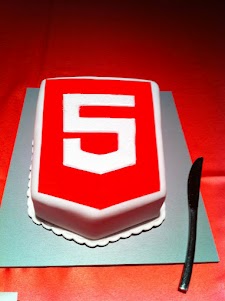
Lets start from the end… It was a great experiance to meet wonerful, smart (web) developers both in London and Tel Aviv. We had 80+ developers in the London event and 130+ developers in Tel Aviv. Like any good event – we started with a good cup of HTML5 coffee and some special HTML5 cake.

After the coffee and some food we got to the ‘talking’ part which went very well. In London we had the pleasure to have Alex Russell who spoke about Chrome Frame (link to his great presentation is in the bottom of this post). In Tel Aviv day we had two external experts: Nimrod Luria and Ron Reiter. Nimrod gave a talk about HTML5 security issues and how to use the best parctices in order to avoid them. Few examples where:

  •  Hacking Facebook with HTML5 using Cross-Origin Resource Sharing.
  • Web sockets (open ports that listen to in bound connections)
  • Good old ‘data cleaning’ and data validation.
  • Client side injections to local databases.
  • XSS by using encoding and new formats that are supported.

Ron gave a talk about backbone.js and how to leverage some frameworks and tools in order to build moden mobile web apps.

Here are the talks (with their slides) from both days:

Time Session Title Description
10:00-11:00 HTML5 and new breed of web application Web developers have nearly perfected their skill at building great web sites, but everything is shifting towards building apps.  We’ll take a look at what defines a great Web App and show you how you can use HTML5 to create a new breed of web application that will delight and amaze your users. Ido Green
11:00-11:55 Platform, Storage, Prediction, Translation and more Google Cloud Platform latest and greatest Barak Regev
13:00-14:00 mobile web app HTML5 stack A -For modern mobile browsers Learn what it takes to build modern mobile web apps. We will start with the ideas of “adaptive apps” and “offline first”. Next, we’ll dive into some of the technologies, including MVC frameworks, templating engines, CSS frameworks, laying out views and multi-touch input. Finally, we’ll close off with mobile-specific tips and sweet demos Ido Green
14:00-14:50 HTML5 threats and attack vectors + some attacks demo +
Countermeasures
Security for business web apps – best practices and tips for the real world. Nimrod Luria
Q.rity – Quality Security Solutions Ltd.
A short coffee break to make sure everybody is awake…
15:10-15:35  Chrome Dev Tools Tips and best practices to work with Chrome Dev Tools. Ido Green
15:35-16:30 HTML5 mobile web apps Backbone.js and other tools with real world examples Ron Reiter

More sources from the talks and questions:

and for the ones that wish to try ChromeOS: https://greenido.wordpress.com/2012/01/09/install-chromiumos-on-your-old-laptop/ and https://greenido.wordpress.com/chrome/

Or the Ubuntu guys that want to have Canary.

Standard
life

People Around The World

Another one in the ‘series’ of fun and happiness… Some real nice shoots in this video. From the fastest climb on Mt. Eiger (BTW, the Eiger (3970 m (13025 ft)) is a mountain in Switzerland.) to some amazing base jumping. Not to forget some days in the snow that only the true lucky ones are getting the chance to experience.

Standard
Business, life

How To Be Better At What You Do?

Shawn Achor is spreading few ideas in this excellent TED talk. I like the debate on what to do on Friday night… He got some good real-life jokes in it. There are other thoughts that come to mind once you see these 12min. Some of the facts that he mention are very true. You see it time and time again. People are living in a dream but don’t appreciate it, nor realize HOW good their life are. There is always another mountain/project/challenge that they wish to achieve in order to be happy.


If you combine Mr. Achor with some of the thoughts from Dan Gilbert and “Why are we happy?” It seems clear that we do have some sort of “psychological immune system” and if we will know to control it better – life will be more productive and pleasant.

BTW, I don’t agree with Mr. Gilbert findings, but unlike him I can’t proof it. I guess it’s time for me to change ‘Be strong’ to something like: ‘Be strong and happy’.

Standard
Chrome, HTML5, webdev

Google Chrome For Android

Google Chrome is now available in Beta on Android devices with Android 4.0 (Ice Cream Sandwich). This is a huge deal for the mobile web. I’m sure we are going to see some amazing changes in the near future. Since the lunch of the iPad the safari was (the!) popular app and this is a good sign that Chrome is going to rock it on Android. To be able to experience the Chrome interface, but on a mobile devices – so cool. Moreover, under the hood, Chrome for Android includes key support for HTML5 and other open web technologies, which means you can share code across the desktop and mobile platforms. Last but not least, as a developer you want to be able to be productive as possible – so yep, you can now, take advantage of the complete set of Chrome’s powerful Developer Tools through an easy hookup with a desktop system.

A nice explanation

For developers, here is the list of key features in this initial beta release:

  • You now got remote debugging! check ‘how to do it‘
  • Solid position: fixed support. Yep, you can now have your menu, navigation buttons in the same place without any hacks.
  • IndexedDB support for storing data – It’s time to save data on the client and make you app work offline. You can also use the HTML5 FileSystem support for assets
  • Smooth scrolling of pages and elements
  • Hardware accelerated CSS transforms/transitions, canvas
  • Web Socket support
  • Web workers.

Resources:

  • Get Chrome on Android Market (Currently available in: United States, Canada, United Kingdom, France, Germany, Spain, Australia, Japan, Korea, Mexico, Argentina, Brazil).
  • FAQ – It contains some answers to things you wish to ask… Check it out.
  • http://code.google.com/chrome/mobile/
  • The Official post from Chrome Blog
  • Found a bug? Please help us by reporting it here at crbug.com
  • Pss… The new Chrome for Android including AppCache, localStorage, WebSQL, the File APIs (File, FileList, FileReader, Blob), and IndexedDB. All these technologies enables your web app to access data offline. In addition to the IndexedDB interfaces, data can be accessed offline through use of the localStorage API.
Standard
Chrome, HTML5

How To Get Your Web App Into The Chrome Web Store

It use to be very easy to upload your web app to the Chrome web store. This short and simple tutorial showed you the main steps. However, things are now (even) simpler. All you need to do it to open Appmator web app. This online tool will help you put your web app into the Chrome Web Store in minutes (less then 10 in most of the cases and that include making coffee in the last 3 minutes).

Here are the main steps you should follow:

  1. Go to Appmator web app.
  2. Add you web app url to the main line. We’ll it’s the only line there – so you can’t go wrong.
  3. Add some amazing graphics. Seriously, your icons and images should be really good. It makes all the difference in the world to have assets that show the user how attractive your web app is looking. You can check at the bottom of the post for some examples on the small image graphics and at the top on some larger image. A good example of a web app that take this point is Gojee.
  4. Download the zip file.
  5. Go to the Chrome developer dashboard section and upload your web app. An important tip is to make sure the detailed description includes the terms your users are likely to search for. You might want to check out listings for similar apps to get ideas for how you should present your app.
  6. Go have a drink.

Btw, if you already have a web app (or extension) in the Chrome Web Store – you might want to take a look at this good tutorial that my friend Sam Dutton wrote on ‘how to update your assets’.

Standard
Chrome, HTML5, JavaScript, webdev

Web Development – Some ‘Good To Great’ Tools

I’ve started to create a list of some great online tools that will help you (and me) in the next project. Some of the tools are helping to achive a certain effect (=gradients) while others are more a ‘hello world’ examples to hack around it in order to understand a new HTML5 API (e.g. HTML5 File API) and then harness it to your next web app. You might say it’s not a tool and you might be right. I guess it is more a list of resources that might help you get better at what you do.

If you got some other good sources please let me know… Here is the list:

Browser capability

Before you start your project you need to check what is the set of features and which browser will support them. There are few sites that will give you good answers. The lastest one is: html5please.us and other good sources are caniuse.com which include mobile browsers as well and mobilehtml5.org that is all about capability for mobile browsers.

JavaScript MVC frameworks

There is a new kid on the block – Thorax I like that fact that it is an opinionated backbone application framework. It is a combination of several tools:

Another framework that is worth the time to look into is: emberjs and Trello tech stack that is coming from the great dudes of ‘Fog Creek’.

If you wish to check what other options you have today – I would go to this site and check some of the most popular MVC framework that are out there.

Work and share javascript online

I also found myself using Simple JSON viewer in cases you wish to find out a specific parameter in a large JSON object.

Playing with CSS3

Libraries for Fonts

  • Google Web Fonts API – Google Web Fonts makes web fonts quick and easy to use for everyone, including professional designers and developers. We believe that there should not be any barriers to making great websites.
  • TypeKit – Simple, bulletproof, standards compliant, accessible, and totally legal fonts for the web.

Offline Libraries & Frameworks

  • ManifestR – a bookmarklet for creating an AppCache manifest file.
  • LawnChair – a library that provides a lightweight, adaptive, simple and elegant persistence solution.
For Mac Web Developers

    • LiveReload monitors changes in the file system. As soon as you save a file, it is preprocessed as needed, and the browser is refreshed. When you change a CSS file or an image, the browser is updated instantly without reloading the page.
    • CodeKit automatically compiles Less, Sass, Stylus & CoffeeScript files. It effortlessly combines, minifies and error-checks Javascript. It even optimizes images, auto-reloads your browser and lets you use the same files across many projects.

Mobile web development – Some good reads

It is far from being a full list – just a beach-head to start have a source for some tools that will make you more productive.

Standard