A short discussion with the team that built the first SubDroid that sink in Sedot Yam!
Some good topics on Android, Hackathons and design aspects for successful GeekCon project.
As always, if you have 20-25min on WED at 14:00 Israel time… mark your calendars and join us live on GDL-IL!
Here is my talk from last week with Nicolas Garnier (Developer Advocate for Google Drive) on the new aspects of Drive. You can have a short intro to drive and then dive into:
What are the key features developers should be aware of when working with Drive APIs. For example: all the Drive SDKs you can use with your favorite technology (e.g. Java, Php, Python etc’).
Show some new apps that are doing good job in integrating into Drive. We spoke about best practices and OAuth2.0
Learn what is next for drive in the near future…
Psst…
If you want to see more GDL-IL episodes, feel free to ‘Add our show‘ to your calendar. It’s going to take 15-25min of your time every WED at 14:00 Israel time (IST)
In a nutshell, DevCon TLV was a great event! It’s getting better and bigger every year. There were lots of developers, friends and rock bands (a bit early in the morning – but great way to wake up quickly). This year all the talks were limited to 25min (with 5min of questions) where after lunch people had the options to choose ‘agile’ track as well. I’ve got to listen to some great talks and I hope we could see all of them online soon. This year my talk in DevCon TLV was “Big Data and HTML5“. This slides cover some of the main points of Google cloud products: Google Cloud Endpoints and Big Query. I wanted to give developers the option to see how they can combine modern web apps with cloud technologies that give a lot of power. The first product we covered is still in ‘trusted tester’ mode and it give the developer the option to build an API (in Google App Engine supported technologies: Java, Python and Go) that will work in minutes with all the scale of Google app engine. You can read more deeply about Google Cloud Endpoint and HTML5 or just have a look at this talk:
(*) This time the talk is in hebrew… I hope that soon I’ll have another version of it in english.
Today we lunch GDL IL. What is it? Google developer live is GDL and IL is our famous short for Israel. It is going to be a weekly show on WED 14:00 (so mark your calanders please). We are going to talk about the latest and greats news in technology. From Android to HTML5 and back to Cloud, Google APIs and anything that is interesting for developers. As ‘startup nation’ we will hosts some of the cool, interesting/amazing startups that will tell their story and will share some of their real life experience. For the first show that is focus around Chrome extensions, I had a pleasure to interview Tal from Equire (a CRM Chrome extension that integrates with Gmail and making your life better). We talked about the life of a web developer that choose to build a product in Chrome (extension and/or App). Since Tal is working from The Hub we covered what is unique about this ‘working space’ and how to be productive in such an environment. One of the key questions I’ve asked was something like: “What are the top 5 things to keep in mind when we are coming to build a chrome extension?” Tal answered:
Don’t rush to do the same things you always do when first building an app, think about the new architecture, understand it, it’s a different mindset, it’s not just a regular web app. The major difference is the limited ‘screen’ you have and some strong APIs – so use it smartly.
LocalStorage… give you a lot of power to save state/data of users.
Metrics – measure everything so you could improve over time and give more insight to your users.
APIs – There are many APIs that are available only inside Chrome so learn them and use them!
Very challenging UX issue – not a blank canvas like a web app. You have an option to give notifications and be ‘infront of your users’ but there is a delicate balance to strike to make sure you don’t get uninstalled.
There are many more things we covered… Some of these are covered in this post “Six Strategies for building great extensions“. However, if you want all the good stuff, you will need to watch it until the end when our next week guest will show up 😉
We finish the episode with 3 things/tools that Tal recommend.
Mixpanel – An analytic tool that answer any question you have about your code/users. You should start early and get a feel for it. The nice part is that you do not need any backend.
CoffeeScript – take a week, learn it, it will give you back 3 months of your year.
Backbone – especially for chrome extensions. It was a simple for Tal to start and be productive with it.
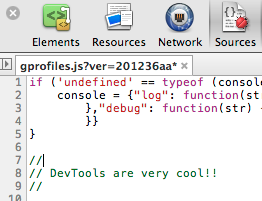
We had a very productive ‘Google Drive and Android’ Hackathon and during this event, I got lots of questions from web developers on Chrome DevTools. So here is a great reason to sit down and talk (in hebrew this time) on the special features we have today in DevTools that could help you as a web developer to be more productive and smile more. You can go over the slides while you watch (or after it) on devtools-11.appspot.com It was a talk I gave in Google developer day in Berlin last year. However, the main points that I covered in the screen-cast are from the current DevTools that you have today (Sep 2012) in Chrome Canary.
Few of the main features you might want to master:
Click on the ? and see how you can be productive with the keyboard. Here is a list of keyboards command
On the right-bottom corner you can see the ‘setting’ button. Once you click on it – you can have some nice options like: choose other user agent and get their screen resolutions, mimic touch events etc’.
The Network tab will let you record sessions and the cool part is that you can start a recording and then move between few pages (or in a web app – click and move between states). Once you are done with the recording you can take the data by right click and choosing ‘Save to HAR’ then you can share this data and use tools like this in order to analysis your web app in order to tune it and import its performance.
The Audit tab let you have a quick and deep analysis of ‘what can be improved’. Think of ‘page speed’ / YSlow but inside your DevTools.
The Profiles tab let you dive deep into the CPU utilization, memory (to see where it’s leaking) and what is going on with the CSS selectors.
The console is also a powerful feature that give you options to work with a set of shortcuts like: $0 – for the current selected element etc’. The full list of these shortcuts could be nice to save.
As the academic year is starting, let’s have a closer look at what apps can make the life of students and teachers better. There are few sections in Chrome web store that will show us the current inventory: Academic apps, Academic resources and Tools for Teachers. From looking around of them you can see some nice example like: LucidChart For EDU, Planetarium, GeoGebra and many more. It’s depend on your kids age and level but you might find good options in the chrome web store from starting to read apps and up to full ‘office’ apps for collage.
If I was in school today, I guess khanacademy.org would take a lot of my time. It’s got the perfect combination of quality content (in ‘eatable’ sizes of 10min each) and a set of exercise that could show me if I really understood a certain topic. Their new Computer Science section is extremely powerful. It will help students to start play with CS and have fun while doing so. The feedback that you get while programming there is something that will make students productive quickly. Another cool web app that will teach you a new language quickly (while you are helping a novel goal of translating the web) is duolingo.com If you want to learn few words before your next trip, it’s very useful. Last but not least, you might want to try lumosity.com which should improve brain health and its performance.
Btw, this is one of the best talks around our education system and what needs to change.
Well, the summer is over (thanks god!) and the kids are back to school. It’s a great opportunity to check out what’s new in ChromeOS kingdom (e.g. Chromebook, Chromebox and other hardware you might have this powerful OS on).
First, let’s dive to the $2M… After the big success of first Pwnium competition it was clear there is going to be 2nd one. So get ready with your hacking fu because Pwnium 2 is coming. It will be held on Oct 10th, 2012 at the Hack In The Box in Kuala Lumpur, Malaysia. This time, they will be sponsoring up to $2 million worth of rewards. Where the highest one is $60,000! In order to gain it you will need to find “Full Chrome exploit”. It means you are working on Chrome (in Win7) and you gain local OS user account persistence using only bugs in Chrome itself. It’s amazing to see how creative hackers can be and even more the speed that the developers of Chromium will fix and ship it. For more details check out this blog post on Chromium blog.
Second, few cool extensions to control… extensions (read this sentence again if you wish).
Extension Automation – It makes life easy when it comes to control and manage the scope that your extensions are running. Think on a case, where you wish the Google+ extension to work only on G+ pages.
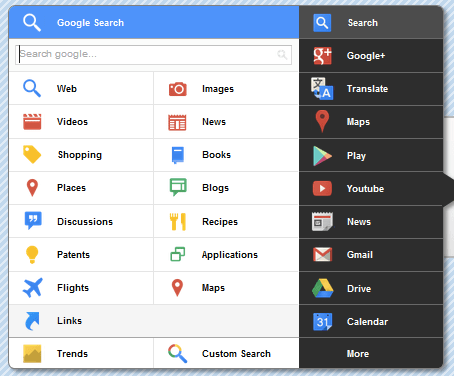
Black Menu – One ‘little’ black menu to access all (=most) of Google services. I didn’t play with it yet, but some of my friends did, and it seems to work for them quite nicely.
Send to Kindle – It’s similar to other extensions like ‘read it later’ that let you send/save stuff for later read. However, this is the option to read it on your kindle (which means, you can use your phone, tablet and Chromebook with Cloud Reader in order to read interesting posts/articles).
Last but not least, there are lots of good new features we will soon have in ChromeOS (and Chrome) the main ones are around the new packaged apps. In last I/O there were serval talks on the topic and with the latest version of Chrome Canary, you can build, load, debug and test your apps without command-line flags, although you may need to enable experimental APIs in some cases. This is very cool option, because it opens the door for web developers to build ‘native’ (=desktop) apps with the technologies they master (=JS, HTML, CSS). On ChromeOS these apps will feel at home because they got all the APIs they need.
What are the ‘must have’ apps you would install on a new Android device?
I’m sure you all got to this spot when a good friend and/or brother, sister, mom, dad or “dear” neighbor is coming to you (=the “guru”) with their new smartphone with the request: “Make it useful for me” or “Put some games and apps for the kids”. Well, after few (OK, maybe just 17) times I got this request, I decided to document a list of great apps that I’ll install in such a case. It is similar to a post I’ve wrote in the past about ‘Great Web Apps For Your Chromebook‘. The list is a combination of powerful apps that help people (who are not necessarily technical) in their daily tasks.
Here is my little list:
Google+ – Well, even if your friend doesn’t use this powerful social network. I would install this app because – on top of many other great features like: local, hangout, messenger and more – it will back up all her photos to the cloud!
Waze social GPS – This navigation app bring the ‘wisdom of the crowds’ into your car. It’s very powerful to direct you on the shortest path based on traffic in real time.
Gmail – Well… How can we have a list without THE email tool? This is going to be the app the will consume most of your friend’s time.
Skype / Viber / Google Talk – you can call and message for free. I know lots of friends that use them when you are abroad. It’s useful to find a good wi-fi connection so the quality of the call with be good.
WhatsApp Messenger – one of the best messaging apps (think on sms but much better and for free). It’s working on many different devices so you can be sure most of your friends can enjoy it.
Chrome – Get the the security, speed and simplicity of Chrome to your mobile device. All your links, open tabs, passwords will sync like magic. Plus, you will enjoy many wonderful web apps that will work very fast.
Evernote – Organize your life and take notes using your mobile. This app is a powerful tool to keep your notes/recipes/photos/todo lists etc in the cloud. It’s also synced notes across devices so you can reach them from anywhere. Btw, their tablet version is gorgeous.
Google Drive / Dropbox – access all your docs, photos, videos, files from your mobile device.
Instagram – A good app to improve your native camera pictures and share your photos with the world.
TripIt Travel Organizer – This is a great app for anyone that travel. It will give you a great way to stay on top of things like: flight schedule changes, hotel reservations and car rentals.
Facebook / Twitter – so you could keep in touch with the rest of the ‘social’ world. btw, both of these app got a very nice mobile web app as well. There are also options to have these type of apps as widgets so you could be more productive on certain functions of the app.
Foursquare – explore a new city with this powerful app. Ohh… yes, you can ‘check-in’ and share your location with friends but even if you don’t part of the ‘social animals’ you will find this app very useful. Another option to check quickly where to go and what to eat is Yelp.
GroupMe / Google+Messanger – both will give you a great way to have group chats and organize friends/team quickly.
VLC – Be able to watch any type of video on your Android. Another option to stream video is with Dropbox app – yep, it let you do that as well.
And some extra fun one
UTILS/TOOLS
Barcode Scanner – To be able to scan some barcodes like all the cool kids on the block.
Google Translate – Think on a case where you want to order a good wine in france and you can’t say it.
Any.DO To Do List – Great to do list app. It also got a nice chrome extension that keep your tasks sync and fresh.
Wheres My Droid – for anyone that lost his phone more than once or twice. This one is a life saver. It will let you find it even if the phone is in silent mode.
AVG Antivirus – After all it’s better to be safe then sorry, no?
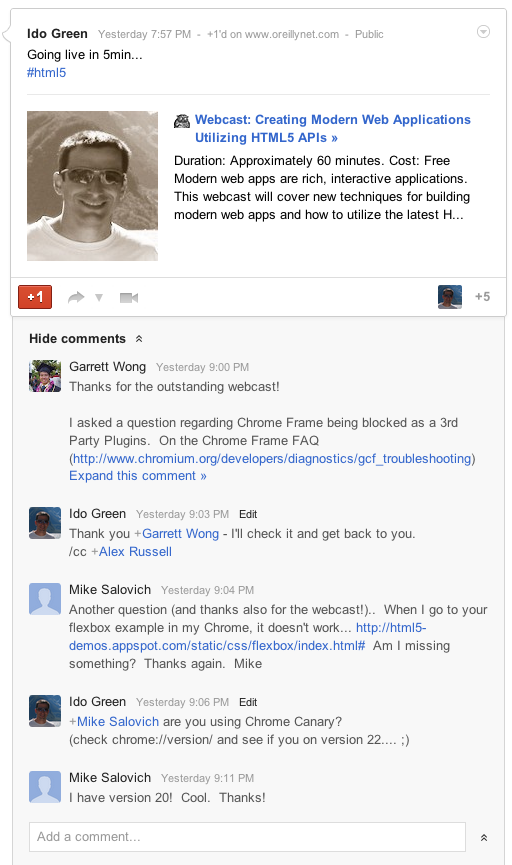
Yesterday I had the pleasure to do another webcast with O’rielly. This time the subject was “Modern web apps & HTML5 New APIs“. The webcast covered new (and old) techniques for building modern web apps and how to utilize the latest HTML5 APIs to create a new class of web apps that will delight and amaze your users. Some of the main topics were:
The latest and greatest application patterns and toolset: MV* frameworks, offline first and Chrome Frame.
Some cool tips on Chrome DevTools – On few slides I’ve open this powerful tool in order to show its power.
APIs for building cutting edge HTML5 applications: WebGL, Device APIs, CSS3 layouts and many more…
Since the first days of Chrome extensions it was clear that they are very powerful way to extend your browser and make it do stuff you care about. However, while it was good, we knew that it can get better… and this is why we have in dev channel the ‘Event Pages’. Let’s start by defining what are those pages:
Background pages – give your extensions the ability to have a single long-running script to manage some task(s) in the background. This can be a certain state of your app or long pulling of information that you wish to show the user (e.g. amount of unread emails).
Event pages – are very similar to background pages, with one important difference: event pages are loaded only when they are needed. When the event page is not actively doing something, it is unloaded, freeing memory and other system resources. Please remember this feature is currently only in dev mode.
It seems that with Event Pages our Chrome will be able to reduce the memory foot print that is used by some idle extensions. It’s an important evolution from the state of background pages that run all the time. An event page only runs when it is handling events. Once an event page becomes idle, it is unloaded, freeing memory until the next time it’s needed. To help event pages support some important use cases, we’re also have new APIs.
The alarms API allows an extension to wake itself up at set times, to support features like: cron jobs type of activity, periodically syncing, anything you wish to do over time in specific timing.
chrome.runtimenew events let extensions know when they have been installed, or when their event page is being unloaded. It is also giving the developer an option to have a ‘last error’ handler.
chrome.declarativeWebRequest – A declarative version of the webRequest API lets extensions do network interception without the need for a background page at all. It also works much faster than the chrome.webRequest API because you can register rules that are evaluated in the browser rather than the JavaScript engine which reduces roundtrip latencies and allows for very high efficiency.
There is a good source for more information on Chrome Extensions in Chromium blog
There are so many option to use the new event pages with the bluetooth API…
Btw, @rem did it again with a new (amazing) version of JSbin – Go check it out and see how great logos ‘steal’ the show… Why I’ve added it here? because it’s a powerful online tool that let you test your app/extension and share your code before you upload it to Chrome web store. I’ve used both jsbin and jsfiddle in order to get feedback on some short code.

 In a nutshell, DevCon TLV was a great event! It’s getting better and bigger every year. There were lots of developers, friends and rock bands (a bit early in the morning – but great way to wake up quickly). This year