Chrome, JavaScript, mobile, webdev

The Latest From The Web

google-chrome-logoA lot of new interesting APIs that are pushing the web platform forward introduced with Chrome 43 (now in Stable). Let see the ones that are going to impact a lot of users.

  • The Fetch API now allows developers to directly operate on and incrementally release the bytes of streamed network responses, in contrast to the equivalent XMLHttpRequest functionality that requires developers keep the entire in-progress stream response in memory.
  • The Cache Storage API, previously only available in service workers, now provides developers full imperative control over their caching in the page context. This is huge! It will enable users to have better (=faster) experience in places where the connections are not good.
  • Autofill and Autocomplete – People hate filling out web forms, especially on mobile devices, learn how to help them complete it up to 30% faster. (And yes! I wrote it).

Continue reading

Standard
Business, webdev

3 Principals To Increase Revenue In Games

1. Focus on the users that love to play

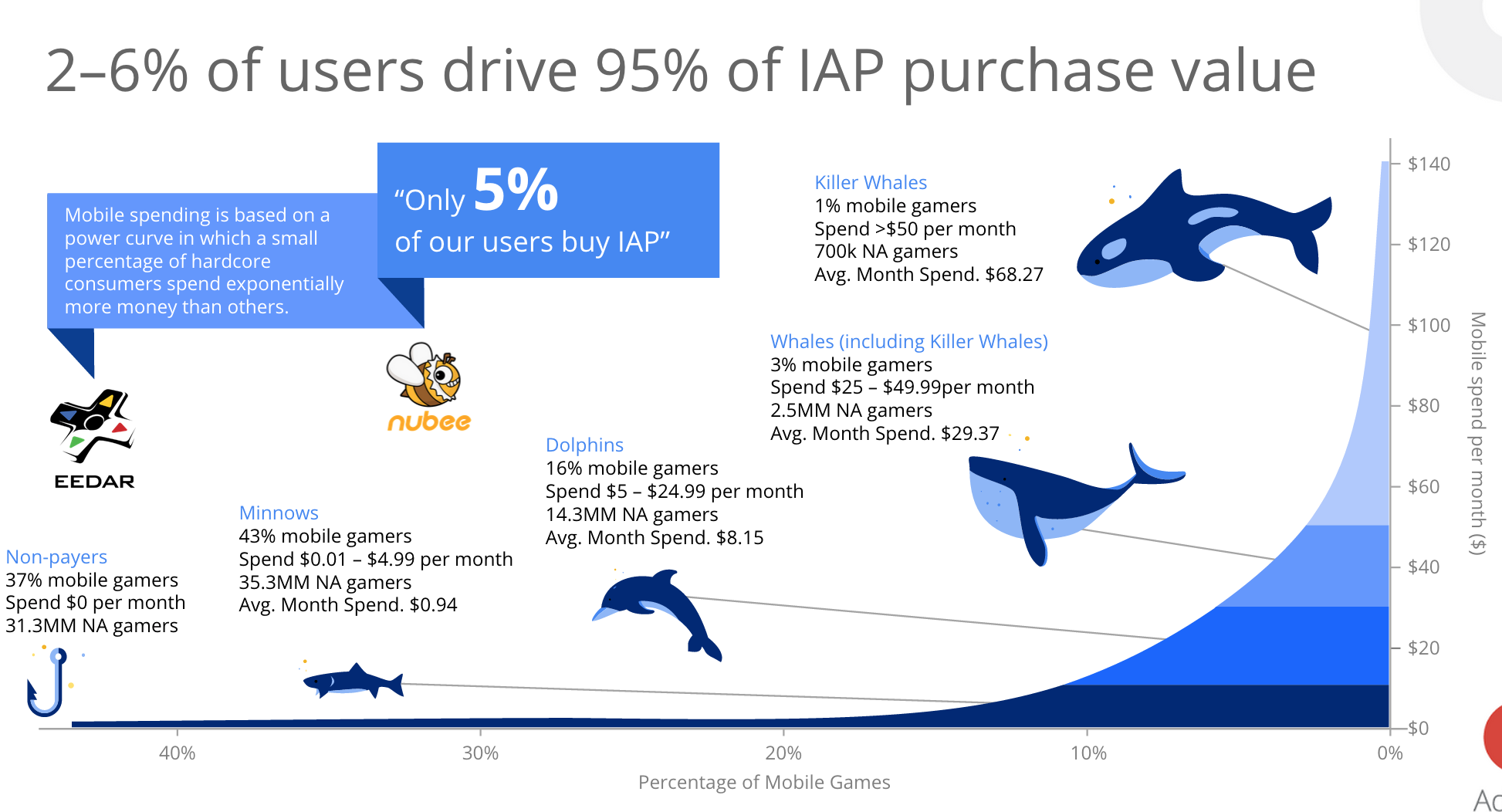
You wish to promote certain items (e.g. gems, levels, arms etc’) at the right situation for the ‘heavy gamers’. It is these gamers that spend the big bucks, just have one look at the graph below to appreciate it. The challenge is to identify these players and to find the right situations. Check your analytic tools to find out segments of users that are out of the normal distribution curve. In the graph below you can see an illustration for what we wish. Focus on the all the Whales.

game-users-whales 2015-05-29 12.33.04 Continue reading

Standard
Chrome, JavaScript

What’s New On The Web And Chrome

In tslack-logohe last post about powerful new APIs we talked about Service Worker, notifications, push and more. This week we got some other news, videos, slides and a new slack channel for web developers that you should take part in.

New Stuff Around The Web

  • Google Tone is an experimental Chrome extension for sharing the URL of the current tab with other computers by using audio!
    Yes, it does not use Bluetooth, NFC or WiFi: it only sends audio waves. “Google Tone turns on your computer’s microphone (while the extension is on) and uses your computer’s speakers to exchange URLs with nearby computers connected to the Internet.”
  • Can web apps be as smooth and slick as native? YES!
    Paul Lewis made a web app to show how. The app uses all the latest goodies, including Service Workers, ES6 Classes and Fat Arrow functions, and Promises.
    Check out his blog post here for all the details!
  • The best (new) show in town about best practice tools.
  • Another new location we maintaining to hold all the news around web development: https://developers.google.com/web/updates/ and if you like medium we got a new channel there as well.
  • Polymer 0.9 library is released!
    The 0.9 release is very similar to 0.8, with many of the “experimental” 0.8 features now officially supported.
    Full release notes for 0.9, including the breaking changes from 0.8, are available on the Polymer site.
  • Two new videos from talks that Paul Lewis and Jake Archibald gave last week:

Continue reading

Standard
Chrome, webdev

Mobile Sites Improvements – Push Your PageSpeed Score Up

In the past, I wrote about ways to improve your mobile website.
In this short post, we will focus on one tool that could help you move the needle. PageSpeed Insights is a free tool for developers to check how their site performs out in the wild. It also got a good API so you could use it during your build process.

Here are the current results I see on my projects’ site: Continue reading

Standard
Chrome, webdev

Chrome’s Market Share And Service Worker

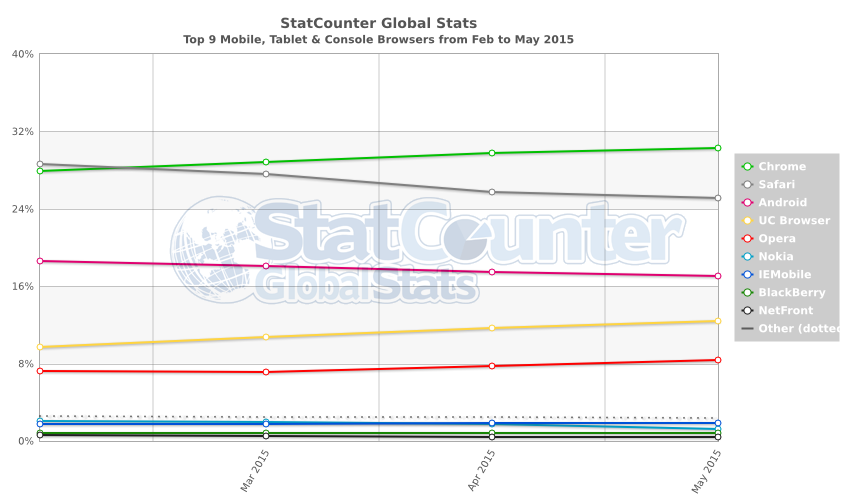
According to Stat Counter in the past 3 months Chrome made a progress in market share. It’s now got ~31% world wide. But if we dive a bit deeper into the chart below we can see that the situation on mobile is even better.

StatCounter-browser-ww-monthly-201502-201505

Take into consideration that Chrome + Android + UC Browser + Opera is ~70% of the market it’s a great news for web developers in terms of APIs. I hope to see soon the power of Service Worker and Push notifications in many more browsers. It’s the start of a new wave of web apps that look and feel similar to native apps. Continue reading

Standard
Chrome, mobile

Google Now On Chromebook

Screenshot 2015-04-24 14.50.35

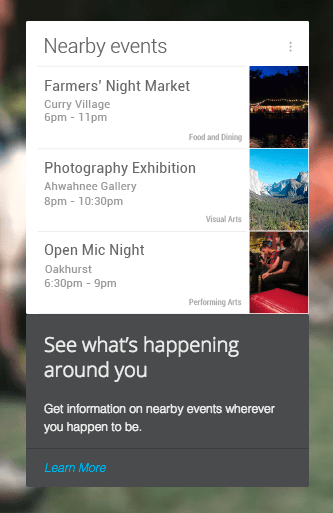
“Google Now” got a powerful goal: The right information at the right time.
From knowing the weather before you go for a run, to planning the best route to avoid traffic, or even checking your favorite team’s score while they are playing, get the information you want, when you need it. You can look at it as a new phase in Search. You are getting the answers before you had the chance to ask the questions. If you use Android or iPhone – Good chances that you saw it in action. However, if you got a Chromebook, here is how you can manage it and sync between your phone and your laptop. Yesterday, Google has announced that they’re expanding Now with support for 70 new apps, including Spotify, Feedly, Runkeeper, OpenTable etc’.

How Google Now is working in Chrome? Continue reading

Standard
Chrome, HTML5, JavaScript, webdev

Chrome And The Web App Revolution

chrome 3dQuick update from the world of Chrome. The new version in stable (chrome://version = 42 just like the answer to the universe) brings some interesting and powerful features that give web developers more options to create amazing experiences.

google-chrome-logo

Chrome 42 (stable)

We are getting to a world where web developer could create web apps that act just like ‘native apps’ without any bridges (e.g. Cordova). The main enablers APIs are already in this version. Check out what you can do today with Service Worker and the options it’s giving you to cache, work offline and push notifications in the background. Here is an example I wrote that uses service worker to cache & offline. I think we are going to see some very interesting implications. There are many options for the “physical mobile web” and these powerful APIs. Continue reading

Standard
Business, webdev

Pick the Right Tool #StartupTips

Which tool to choose?

What is the best tool to do X?

Over the years, I’ve learn that if you are using the right tools and really master them – You become 10x better at what you do. This post is a short list of tools that entrepreneurs, developers, designers and ‘startups people’ might find useful. It base on my personal experience, so (of crouse) there are many other good options out there. The best advice is to try few tools and see what is working for you.

Cloud Platforms

It doesn’t matter if you are building for the web or for mobile platforms (Android, iOS). In the end of the day, you will need a ‘server side’ and hopefully it will be on an infrastructure you can trust for: performance, scale, redundancy, security, easy of usage etc’. I’ve used the first three cloud providers in the list. I really like the power of App Engine. Although, you will need to work in the ‘app engine way’ and not your own. If you need certain capabilities that app engine is not supporting, I suggest trying one of the IAAS options.

  • Google App Engine – I recommend this option because it gives you great ways to focus on your product and not administrative server tasks. Another good option is Google’s infrastructure as a service in the name of Compute Engine that will give you the freedom to have a clean server to work with.
  • Rackspace – Got nice sets of options for hosting and deployments. I’ve used them in my last startup (HighGearMedia) and they had a good value proposition.
  • Amazon Web Services – The current leader of cloud computing.
  • Microsoft Azure – If you like MS technology stack.
  • Pivotal – Cloud Foundry is the result of an industry efforts to build an open platform as a service.
  • Heroku – Supports Ruby, Node.js, Python, Java, and PHP so you can use the languages you know.

In the diagram below you can gain a good view of all the options on Google Cloud Platform. Continue reading

Standard
Chrome, JavaScript, mobile, webdev

Physical Web On Mobile

Physical Web is the new approach to unleash the core superpower of the web: interaction on demand.
People should be able to walk up to any smart device, think on classic cases like: a vending machine, an art item, a poster, a toy, a bus stop, a rental car – and not have to download an app first. They should be able to just tap and interact with them.

forest in the morning

The Physical Web is not shipping yet nor is it a Google product. This is an early-stage experimental project and we’re developing it out in the open as we do all things related to the web. This should only be of interest to developers looking to test out this feature and provide feedback. The Physical Web is an effort to extend the core superpower of the web – the URL – to everyday physical objects. The user experience of smart objects should be much like links in a web browser: i.e., just tap and use. At its base, the Physical Web is a discovery service: a smart object broadcasts relevant URLs that any nearby device can receive.
This simple capability can unlock exciting new ways to interact with the Web. Continue reading

Standard
Business, Chrome, JavaScript, webdev

In-App Payments On The Web

payment-with-penThere are many examples of applications that are free but let you add features with in-app payments. Think of a game that is free to play, but offers additional levels or virtual goods for a certain price (a low one in most cases). It’s very common to see applications that are free at the ‘trial period’ and later gives premium users the option to buy a specific level that match their needs. It’s a good practice to give users your product or service without any barriers (e.g credit card information). If they find it useful, they will pay for it with a smile.

Few examples

  • A designing web app that give the options to buy more projects (or more shapes, tools, features).
  • A Customer Relationship Management (CRM) application, that offer certain capabilities for a price.
    The basic options to collect and manage your contacts will be free, but if you wish to send emails they will charge you.
  • A game that let you advances more quickly if you buy certain improvements. For example a ‘magic’ power that give you the ability to pass a difficult stage (e.g. the mighty eagle in Angry Birds).the mighty eagle from angry birds

Continue reading

Standard