Android, Chrome, mobile

Mobile Trends During 2015

Quick stats that shows why it’s a “mobile world”.
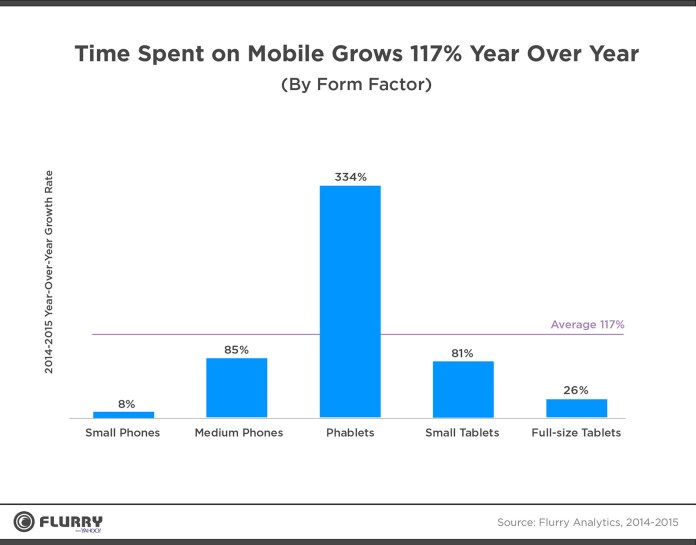
Time spend on mobile grows 117% year over year. One quick look at the image below will show that we have a new form factor that is taking all others in terms of growth.

mobile-grow-117


Phablets are rocking

Phablets have become the unstoppable media consumption device. What a proof? Check the quarterly form factor distribution forecast (below).
Amazing. In the next 6 quarters, we might be in a place where phablets are 60% of all mobile devices.
Continue reading

Standard
Chrome, JavaScript, webdev

Chrome 47 Updates And Web News

  • google-chrome-logoInput Device Capabilities: Chrome 47 has a new feature that makes it easier to understand the how users interact with your site: InputDeviceCapabilities! DOM input events are an abstraction above low-level input events, loosely tied to physical device input (e.g., click events can be fired by a mouse, touchscreen, or keyboard). However, there is a problem: there is no simple method to obtain the details of the physical device responsible for an event. In addition, certain types of input can generate further “fake” DOM input events for compatibility reasons. One such fake DOM event happens when a user taps a touch screen (such as on a mobile phone); it not only fires touch events but, for compatibility reasons, mouse events as well. The new InputDeviceCapabilities API provides details about the underlying sources of input events this come to helps with problems when supporting both mouse and touch input. Read More: developers.google.com/web/updates/2015/10/inputdevicecapabilities
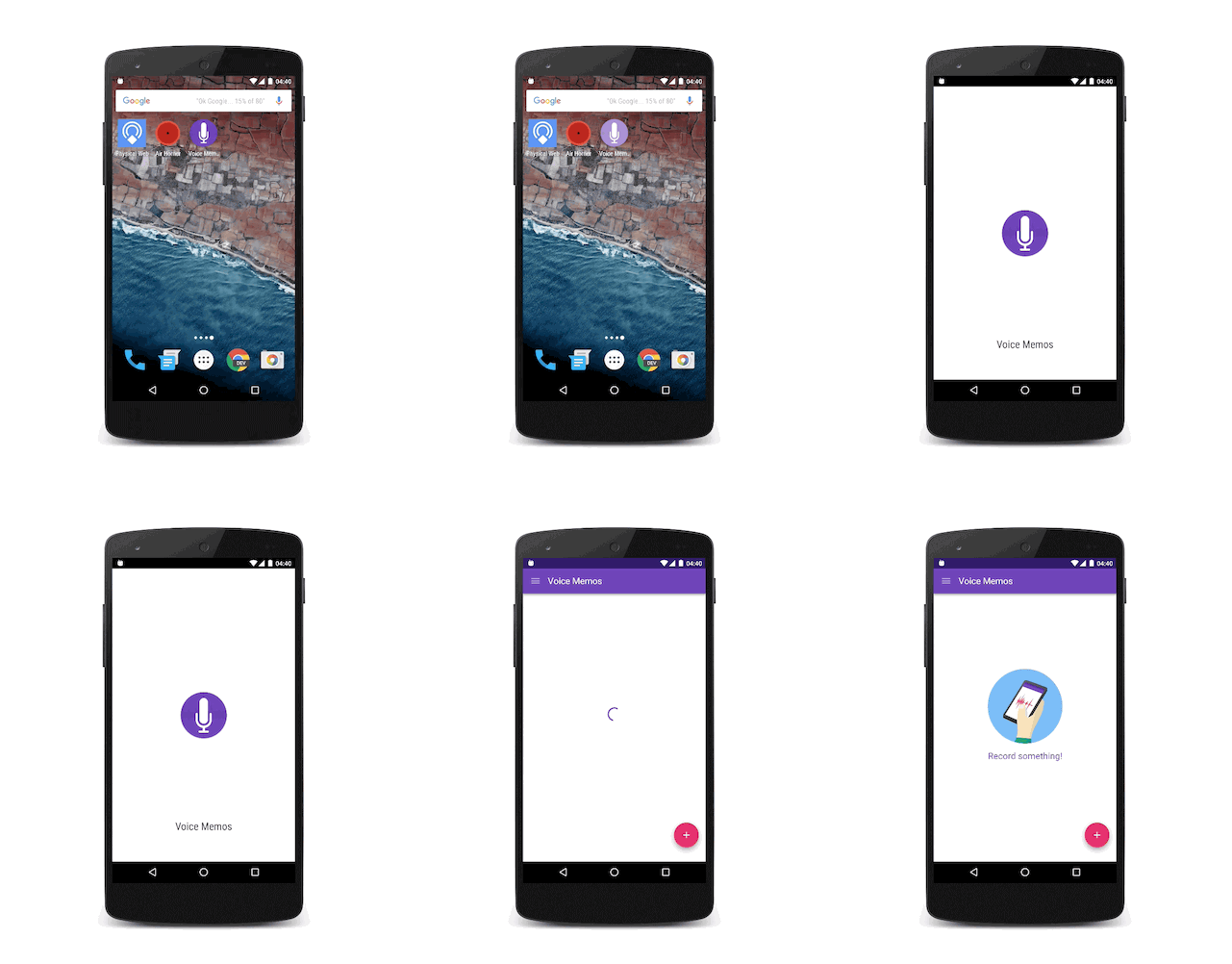
  • Adding a Splash screen for installed web apps – Over the past year we saw an effort in the Chrome team to let developers build sites and apps that feel like they are installed on the user’s system. The home screen launch process on Android is a great first step. In Chrome 46 on Android, we got the background_color that removes any delay and paints the screen with a solid color until the browser is ready to paint something from the web page. This was a good addition, yet it still didn’t look fully like an app. Now in Chrome 47 on Android, Beta these days as of October 2015, we are introducing the concept of a “splash screen”. Have a look:

Continue reading

Standard
Chrome, JavaScript, webdev

Chrome 46 Updates

google-chrome-logo

Performance

Service Worker

Continue reading

Standard
Chrome, HTML5, mobile, webdev

Enable Users To Call From Your Web Site

TelephoneOn mobile devices, there is 99.65% chance that they have a calling capabilities.
It’s true that modern mobile browsers will automatically detect phone numbers and convert them to links, it’s a good idea to do this directly in your HTML code. It’s a great way to allow users to call your business with one click and the way to do it is with this simple tel: scheme:

Amazing coffee Service
<a href="tel:+972-3-123-3344">+
972-3-123-3344</a>

The result will look like:

A calling from site examples

Click to Call

You can click on it in order to see the code in action. Continue reading

Standard
Chrome, JavaScript, mobile, webdev

Make Your Site Faster

We know that users prefer websites and applications that work fast. There is a lot of evidence that link performance to revenue. Let’s see what are main parts of the user experience that relate to the perception of ‘speed’ and how we can improve it.

RAIL performance model

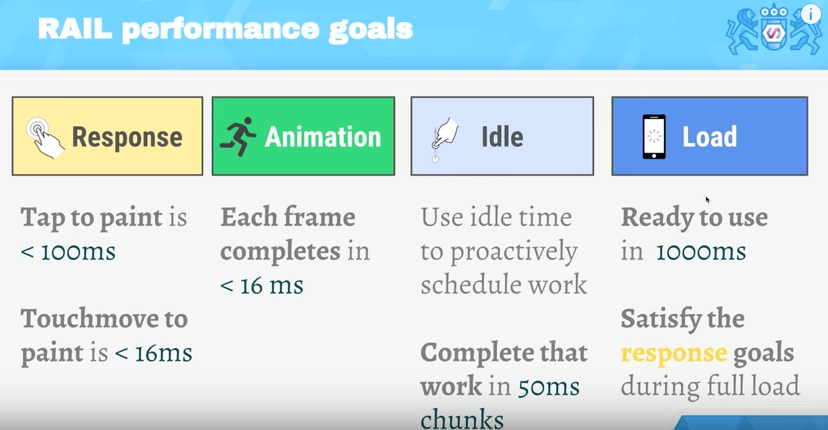
RAIL is a user-centric performance model. Every web app has these four distinct aspects to its life cycle, and performance fits into them in very different ways. You can see in the image below the 4 main aspects and what are the time limits to each stage.

The RAIL model for performance

The TL;DR

  • Focus on the user – the end goal isn’t to make your site perform fast on any specific device, it’s to ultimately make users happy.
  • Respond to users immediately  acknowledge user input in under 100ms – In mobile always use touch events and not click events (yep, click events still got this 300ms delay on mobile browsers)
  • Render each frame in under 16ms and aim for consistency. Users notice “jank” because in most cases it will ‘jump’ to their eyes.
  • Keep users engaged – deliver interactive content in under 1000ms.

Continue reading

Standard
webdev

Markdown Cheatsheet 101

I’ve been using markdown quite a lot both for the book I wrote and for other projects. It’s a great format and the best part (IMHO) is that you can learn most of it in 10min. Here is a list of the main ‘building blocks’ you will want to use:

Headers

# H1
## H2
### H3
#### H4
##### H5
###### H6

Links

To create links just follow this pattern:

[google.com](https://www.google.com)

Images

For images, you can just add ! before the ‘link’ element we’ve just saw above.


![alt text](https://bla-bla-example.com/icon48.png "Title For Image") 

Emphasis

Continue reading

Standard
HTML5, JavaScript, php, webdev

Sublime Text 2/3 – Packages And Shortcuts

subl-icon-512

I always start with the one package that allow to stay in sublime and improve it quickly: packagecontrol.io

Next on the line is the option to make our editor a bit more friendly with: SublimeCodeIntel It’s A full-featured code intelligence and smart autocomplete engine for Sublime Text. Few of the technologies that are supported:
JavaScript, SCSS, Python, HTML, Ruby, Python3, XML, HTML5, Perl, CSS, Node.js, Tcl, TemplateToolkit and (of course) PHP.
From here there are many options.
Few the I’ve found useful:

  • Git
  • Emmet
  • Terminal
  • ColorPicker
  • SublimeREPL
  • LiveReload – Make your life easier with this live reload ability. It will save you a lot of clicks on the ‘reload’ button (or cmd+r).
  • MarkdownPreview – I love markdown and this one is making me more productive with it.
  • JSLint – If you are writing some javascript, this one is a must.
  • DocBlockr – Create a new documentation block with a quick click. And yes, it will extract that function’s parameter information and pre-fill it in your documentation block. nice, no?
  • Soda Theme – just to keep up with the cool kids on the block.

Continue reading

Standard
Chrome, HTML5, JavaScript, mobile, webdev

Make Your Web Forms More Efficient

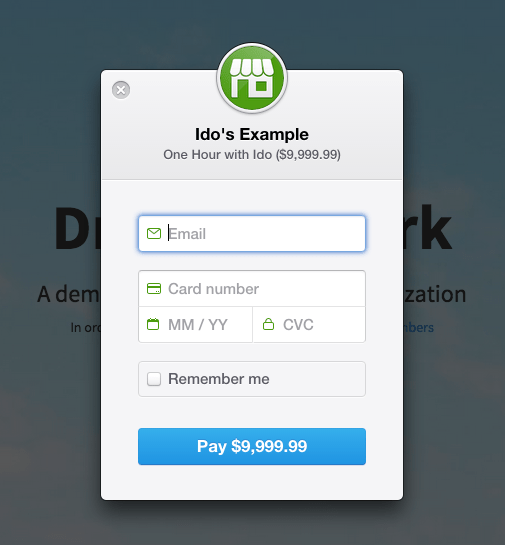
Ido's payment formForms are the main ‘entry barrier’ to anything meaningful on the web. It might be a registration form, sign-up form or a shopping cart. In all of them, you wish to do the best in order to delight your users and lower the friction.
In the slides below, we will cover the best practices so your forms will rock.

Continue reading

Standard
Chrome, JavaScript

Chrome 44 New Features

google-chrome-logoChrome 44 is now in stable channel and there are many updates and improvements:

And there are a lots of other improvements and security fixes.

What is hot and new on the web?

Continue reading

Standard
Chrome, webdev

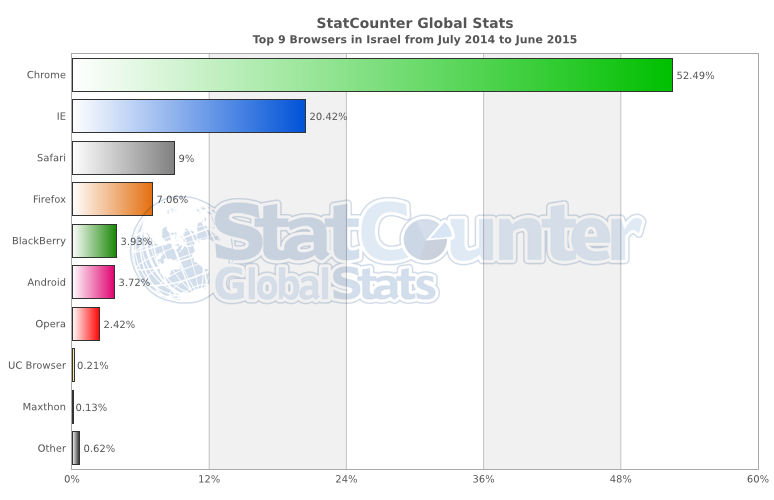
Chrome Adoption In Israel (Summer 2015)

Since the start of the year, the Chrome adoption is moving in one direction. Very impressive considering the mobile trends.

StatCounter-browser-IL-monthly-201407-201506-bar

Continue reading

Standard