JavaScript, webdev

HTML5, CSS3 And Some Tips

First good 28min are on few smart techniques to improve the performance of your web app. Paul Irish (from jQuery fame and now with Google chrome team) describes:

  • CSS re-flows and how to avoid them – single re-flow is better because the browser won’t need to repaint all the elements. Batch the DOM changes before any re-flow-triggering actions is one of the good ways to do it. you can learn a lot from using http://www.browserscope.org/
  • Hardware accelerated CSS – psss… add css property to your element: translate4d(0,0,0) or translateZ(0) and the browser will do hardware accelerated.
  • Animation optimization
  • Web workers – move computation out of the UI thread. Without web workers you can’t… but lucky it’s 2011 and you have them (here and there). I’ve put a simple example in the end of this post. I saw it long time ago (a week?) on Mozilla site – on how to use web workers.
  • Benchmarking and build scripts.
  • Last but not least, try about:flags in chrome… lots of good stuff under the hood.

BTW, his (last?) project html5 boilerplate is great for any developer that want to write efficient web sites/apps that will score more then 90 on page spped and will get an A on y!slow. This project is an ANT ‘build script’ that harness you with:

  1. Cross-browser compatible – IE6 and others IE specific classes for maximum cross-browser control.
  2. HTML5 ready. Use the new tags with certainty.
  3. Optimal caching and compression rules for grade-A performance
  4. Best practice site configuration defaults
  5. Mobile browser optimizations
  6. Progressive enhancement with graceful degredation
  7. A full, hooked up test suite is waiting for you.
  8. iOS, Android, Opera Mobile-adaptable markup and CSS skeleton.

Simple example on web workers
var results = [];

function resultReceiver(event) {
results.push(parseInt(event.data));
if (results.length == 2) {
postMessage(results[0] + results[1]);
}
}

function errorReceiver(event) {
throw event.data;
}

onmessage = function(event) {
var n = parseInt(event.data);

if (n == 0 || n == 1) {
postMessage(n);
return;
}

for (var i = 1; i <= 2; i++) {
var worker = new Worker(“fibonacci.js”);
worker.onmessage = resultReceiver;
worker.onerror = errorReceiver;
worker.postMessage(n – i);
}
};


Standard
life, php

Rank Your Book Collection

books
I love books. It is due to my parents, that put in me from the age of 4 or 5 this passion to the written word. It might be (also), my literature teacher from high school, that took the only subject I really didn’t like (yep… I enjoyed math, physics and computers but hated literature) and made his course a pure adventure full of joy. I remember lots of moments when you finish a book but keep thinking on the subjects/point of views/heroes years and years after the 4th time you reading it. In a way, my kindle is a wonderful device but I still really like to hold a ‘real’ book.

Last weekend, I’ve decided to ‘sort’ my mobile (=kindle) books. Since I’ve had them (all 1,073) on one big folder, I wrote this little script that build a list of their names and then use amazon to get their rating. From here, the path to a spreadsheet with the data is very short. Now, I know what are the best ones, by harnessing the ‘wisdom of the crowds’.
Happy reading!

Here is the code (or if you like a better version try it on github)


/**
 * Description: read a list of books (from a collection on your hard drive)
 * and use amazon review to rank them. This is helpful if you have lots of books.
 * It's good to put the best one on your kindle for the next vacation/conf etc'.
 *
 * @author Ido Green
 * @date 4/24/2011
 * @see https://greenido.wordpress.com/
 * http://amazon.com 
 * http://gskinner.com/RegExr/ - to handle regex IF you want to get ranking from the html
 * 
 */
class scanAmazon {

    private $books = array();
    private $newRankList = array();

    /**
     * Ctor
     * @param type $dir - the path to your directory of books
     */
    function __construct($dir) {
        $this->buildList($dir);
    }

    /**
     * Run on all the books and get the rating, then, save them to a CSV file.
     */
    public function run() {
        $this->getRating();
        $this->saveToFile("booksRanking.csv", implode("\n", $this->newRankList));
    }

    /**
     * build a list of books' name from the file names
     * @param type $dir - the path to your directory of books
     */
    private function buildList($dir) {
        if ($handle = opendir($dir)) {
            while (false !== ($file = readdir($handle))) {
                //echo "$file\n";
                $name = substr($file, 0, strlen($file) - 5);
                if (strlen($name) > 2) {
                    array_push($this->books, $name);
                }
            }
            closedir($handle);
            sort($this->books);
        }
    }

    
    /**
     * Get the rating of the books
     * we are looking for this pattern: Rated 4.7 out of 5.0
     * 1. Use google results:  http://www.google.com/search?sourceid=chrome&ie=UTF-8&q=site%3Aamazon.com+BOOK-NAME
     * 2. Use amazon directly: http://www.amazon.com/s/ref=nb_sb_noss?url=search-alias%3Dstripbooks&field-keywords=BOOK-NAME
     */
    private function getRating() {
        echo "Working on " . count($this->books) . " books\n";
        $i = 1;
        foreach ($this->books as $book) {  
            $searchUrl = 'http://www.amazon.com/s/ref=nb_sb_noss?url=search-alias%3Dstripbooks&field-keywords=' . urlencode($book);
           // this is the pattern "alt="4.3 out of 5 stars"
            $resPage = file_get_contents($searchUrl);
            $matches = array();
            $ind2 = strpos($resPage, "out of 5 stars");
            $ind1 = $ind2 - 4;//strripos($resPage, '"',$ind2);
            
            //google: $ind1 = strpos($resPage, "Rated") + 5;
            //google: $ind2 = strpos($resPage, "out of", $ind1);
            if ($ind2 > $ind1 && ($ind2-$ind1) newRankList, $rank . "," . str_replace(",", " ", $book) . ",".
                        $searchUrl);
                echo "{$i}) {$book} - Ranking: {$rank} out of 5.0\n";
            }
            else {
                echo "{$i} ERR - {$book} got no rating url: {$searchUrl}\n";
            }
            $i++;
            sleep(5); // let not overload amazon server :)
            // $found = preg_match('/Rated (\d\.\d) out of 5.0/gi', $resPage, $matches);
            //if ($found && count($matches) > 0) { $rank = $matches[0]; }
        }
    }

    /**
     * simple saver of data/string to file
     * @param  $fileName
     * @param  $data
     * @return  false when we could not save the data
     */
    function saveToFile($fileName, $data) {
        try {
            $fh = fopen($fileName, 'w');
            fwrite($fh, $data);
            fclose($fh);
        } catch (Exception $exc) {
            error_log("Err: Could not write to file: {$fileName
                    } Trace:" . $exc->getTraceAsString());
            return false;
        }
        return true;
    }

}

// start the party
$scanner = new scanAmazon("PATH TO YOUR BOOKS");
$scanner->run();


Standard
webdev

Git 101 – Quick Start Guide

Here is a set of commands I found using… There might be a lot of other useful commands.

Setting up a Git project

If you want to work with an existing project, clone it:

$ git clone <url> - for example: git clone https://greenido@github.com/greenido/html5-boilerplate.git

If you do not have an existing git project, create one:

$ cd project/
$ git init          # initializes the repository
$ git add .         # add those 'unknown' files
$ git commit        # commit all changes, edit changelog entry
$ git rm --cached <file>... # ridiculously complicated command to undo, in case you forgot .gitignore

Git will look for a file named .gitignore in the root of your repository which contains a set of shell patterns to ignore in file paths.

Branching and merging

$ git checkout -b linux-work        # create a new branch named "linux-work"
$ <make changes>
$ git commit -a
$ git checkout master               # go back to master branch
$ git merge linux-work              # merge changesets from linux-work (Git >= 1.5)
$ git pull . linux-work             # merge changesets from linux-work (all Git versions)

Importing patches

$ git apply < ../p/foo.patch
$ git commit -a

Exporting a patch

$ <make changes>
$ git commit -a -m "commit message"
$ git format-patch HEAD^  # creates 0001-commit-message.txt
                          # (HEAD^ means every patch since one revision before the
                          # tip of the branch, also known as HEAD)

Network support

# clone from the primary Git repo
$ git clone git@github.com:greenido/html5-boilerplate.git
$ cd git

# pushing changes to a remote repo with SSH
$ git push user@github.com:my-repository.git/

# fetch changes to a remote branch into a local branch
$ git fetch user@example.com:my-repository.git/ remote-branch:local-branch

# merge changes from a remote machine
bar$ git pull git://foo/repo.git/ branch

# Serve repository via git protocol
$ cd /my/repository/
$ touch .git/git-daemon-export-ok
$ git daemon  # now others can fetch from git://your.machine/my/repository/.git/

# Set up a bare (= without working directory) repository (e.g. on a webserver)
$ mkdir my-repo.git
$ cd my-repo.git
$ git --bare init
$ chmod a+x hooks/post-update # this is needed for HTTP transport
                                      # you need to populate this repository via push

Inspecting revisions

# inspect history visually
$ gitk       # this opens a Tk window, and shows you how the revisions are connected

# inspect history
$ git log    # this pipes a log of the current branch into your PAGER
$ git log -p # ditto, but append a patch after each commit message

# inspect a specific commit
$ git show HEAD    # show commit info, diffstat and patch
                      # of the tip of the current branch

Referring to revisions

# by name
$ git log v1.0.0   # show history leading up to tag "v1.0.0"
$ git log master   # show history of branch "master"

# relative to a name
$ git show master^   # show parent to last revision of master
$ git show master~2  # show grand parent to tip of master
$ git show master~3  # show great grand parent to tip of master (you get the idea)

# by output of "git describe"
$ git show v1.4.4-g730996f  # you get this string by calling "git describe"

# by hash (internally, all objects are identified by a hash)
$ git show f665776185ad074b236c00751d666da7d1977dbe
$ git show f665776   # a unique prefix is sufficient

# tag a revision
$ git tag v1.0.0                      # make current HEAD known as "v1.0.0"
$ git tag interesting v1.4.4-g730996f # tag a specific revision (not HEAD)

Comparing revisions

# diff between two branches
$ git diff origin..master            # pipes a diff into PAGER
$ git diff origin..master > my.patch # pipes a diff into my.patch

# get diffstat of uncommitted work
$ git diff --stat HEAD

Last But Not…

I recommend this quick good GIT course. Feel free to check around: https://github.com/greenido

Other Resources

* Simple and contain most of the basic commands you need: http://rogerdudler.github.io/git-guide/
* A ‘Game’ that will teach you Git: http://pcottle.github.io/learnGitBranching/

Standard
JavaScript, webdev

What Car Should I Buy? (Leveraging Hunch API and High Gear Media API)

Last weekend, when the kids were sleeping, I had a bit of time to try out Hunch API. I must say, it’s very cool/powerful API with good documentation. It goes without saying, that I wanted to check what will be a good use-case to our High Gear Media API. After checking around general stuff, I came up with this simple mobile app (ya – it’s work great on iPhone, Android, BB and even Palm). The application is asking you to type your twitter account and base on this account it gives you personalized, recommendations for cars that fit you best. It combine the power of Hunch with the vast automotive content of High Gear Media.

For best results, you should sign in to hunch with your twitter account and answer some questions. Then, once hunch built your taste graph this application will show your very ‘accurate’ results.

If you have an Adriod phone – you can install this application from this link: http://www.appsgeyser.com/getwidget/Cars+For+Me

You might want to try some other famous twitter accounts and see what is their best cars.

Drive safely and stay thirsty.

Standard
Business, webdev

The All New TheCarConnection (Looks Great On iPad2)

We’ve  launched TheCarConnection.com today (after 3 weeks of beta testing for selective users). It was after few months of thinking, listening, designing and building a completely new set of make-model pages that we believe bring you the best automotive experience you can find on the web.We made sure it will be optimize to tablets (e.g. iPad or if you like the iPad2) and all the leading browsers.

Unlike all the other ‘car sites’ – we are bring you all the information from around the web into one place. This way, it’s not only our editors opinion that you get (and might like or not) – but also a wide range of other leading sources/editors and opinions. It is a great tool to get all the best information on each car in one (very nice) place. Your savvy editors not only driving the cars but doing the extra mile and doing the ‘leg work’ for you by bring you the ‘bottom line’ review with all the thoughts about this specific car.

For example, if you are into the new F-150, you can get our ‘Ford F150 2011 executive summary review‘ or read more deeply on all the different aspects of this new model. Want to check out what Edmund/Kbb/Cars are thinking? no worries – just go to our ‘web buzz’ and get all the reviews (more then 300), Q&A (more then 2000!) and tweets.

Here are some examples of the new car reviews:

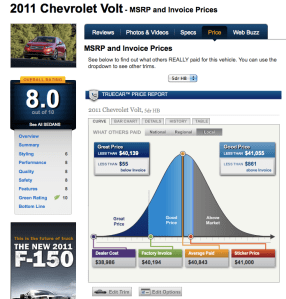
If you want to know what is the a good price or even great price for the new Volt. You have it in our very cool graphs.

It’s a great tool to use and come prepare for your visit in the dealership 😉

For all the ones that want to buy a used car – we have more then 4,500,000 used car listings, so you could find something in the right area,color,look and feel.

Last but not least, if you got a question or you want to share your knowledge. Check out the new ‘stack-overflow’ for cars. As always, comments are most welcome! Feel free to use our official TCC twitter.

Standard
Business, webdev

Google is changing its algorithem for better?

Today we saw that google changed its algo to ‘remove’ content farms like demand media and others. After reading their post I must say that I’m 100% with them on: “…We can’t make a major improvement without affecting rankings for many sites. It has to be that some sites will go up and some will go down. Google depends on the high-quality content created by wonderful websites around the world, and we do have a responsibility to encourage a healthy web ecosystem. Therefore, it is important for high-quality sites to be rewarded, and that’s exactly what this change does.”

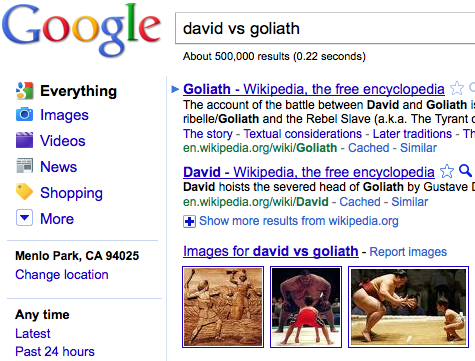
Is great as long as it won’t kill start ups (like ours!) that trying to bring the web a new quality content. I’m sure that the last change did great to brands and big companies but as we know, in the web, you want to encourage the ‘David’ and not (only) the ‘Goliath’.

We’ll see…

Standard
JavaScript, webdev

Create Your Own Chrome Extension To Any Web Page

It’s now very clear that Chrome Browser got huge adoption (I guess the current numbers of active users is around 100M). In case you didn’t know, Google got now an App store to chrome. They basically, take what Apple showed the world in terms of building an Eco system (apps that you, as developer, can monetize on their platform) and trying to do the same with chrome as platform. It’s very smart idea and soon when we will see the chrome OS on tablets – this will be the way to manage your apps. The main APIs that you might want to use are: Browser actions and Page actions.

Browser Actions – you should use browser actions to put icons in the main Google Chrome toolbar. It’s for actions you wish to add to the browser (not specific page). Here are the main tips in order to use it right:

  • Do use browser actions for features that make sense on most pages.
  • Do use big, colorful icons that make the most of the 19×19-pixel space. Browser action icons should seem a little bigger and heavier than page action icons.
  • Do use alpha transparency to add soft edges to your icon. Because many people use themes, your icon should look nice on a variety of background colors.
  • Don’t use browser actions for features that make sense for only a few pages. Use page actions instead.

Page Actions – Page actions represent actions that can be taken on the current page, but that aren’t applicable to all pages. For example: translate content on the page, create something from photos in the page etc’. Here are some samples for both type of extensions.

Now, if you are on a site that you think will make sense to put in an extension (due to it’s nice features)… it’s very easy to do it.
All you need are two main files:

  1. manifest.json – this file is the description of the extension. Some meta info…
  2. Create a simple deals.html page (in our case it’s all about good deals for cars) that will include the web page you wish to have as an iframe.

Here are the 2 files that show you how to take HGM mobile app and put it in chrome:

manifest.json

{
"name": "Great Deals on New Cars",
"version": "0.2",
"description": "Great the best prices on your new car",
"icons": { "128": "app_icon.png" },
"browser_action": {
"default_title": "Great Deals on New Cars",
"default_icon": "deals.png",
"popup": "deals.html"
},
"permissions": [   "http://www.thecarconnection.com/*" ]
}

deals.html


<!DOCTYPE html>
<html>
<head>
<title>Deals</title>
<meta name="author" content="Ido Green">
</head>
<body>
<iframe src="http://beta.thecarconnection.com/conduit/deals" width="510px" height="700px" border="0px" scrolling="no">
</body>
</html>

After you saved these 2 files in one directory, just go to Chrome and click on ‘Windows’ -> ‘Extensions’. In that page you click on ‘Load unpack extension…’ and point to your directory.
Done.
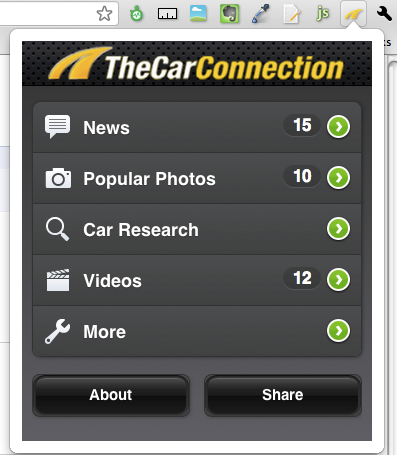
You should get now a new button and if you click on it you should get something like this:

another easy option is to go and download this extension.

Happy Friday/coding.

Standard
Business, life, webdev

The Three Keys to Facebook’s Success (?)

keys to successI must tell you it sounds logic now…

But like anything else in life – you can find explanations in retrospective easily. Why MySpace is ‘gone’ and facebook is the hottest place?

Lots of reasons that lots of ‘smart’ people will give you long explanations. I guess there is amount of randomness that drove things but people (specially, when they are lucky) doesn’t want to attribute it to the random nature of things. After all, there are so brilliant that it must be something they did. On the other hand, if you fail, then it’s randomness/luck or anything else that take the blame from them.
After thing long intro, here you go for 3min on the three things that were ‘keys’ to Facebook success:

As you can tell, I don’t buy it.

Standard
Design, webdev

A List Of Great Free (Developers) Books

Let me start with MindView Inc – Bruce wrote, may be, the best books you can find on Java and C++ and they are free on the web.

Meta-List

Language Agnostic:

Android:

Bash

C/C++

Django

Git

HTML

Java

JavaScript

Linux

Maven

Mercurial

NoSQL

Objective-C

Perl

PHP

PostgreSQL

Python

Ruby

Scala

Subversion

SQL (Implementation agnostic)

Standard
JavaScript, webdev

New Features In High Gear Media API

Here is some improvements we have put in our API to make it (even) better to developers.
After How To Work With High Gear Media RSS Feed In (less then) 4 Minutes
and How To Deal With High Gear Media API Using XPath

Here are some new parameters that will make your (=the developer) life happier and healthier.
We have a new ways to output the data or in other words more control on the output format.

Format

the feed format, can be JSON or XML.

Examples:
1. http://feeds.highgearmedia.com/?format=xml is the same as http://feeds.highgearmedia.com , because xml is the default value.
2. http://feeds.highgearmedia.com/?format=json <– This is the better way to work with our feeds, specially, if you are hacking some new cool web2.0 mash up.

Other API parameters

Sites

You have full control on the sites that you wish to fetch information from. Here is a list of all the sites.

Examples
1. http://feeds.highgearmedia.com <– All HighGearMedia content
2. http://feeds.highgearmedia.com/?sites=thecarconnection <– get feeds from thecarconnection.com
2. http://feeds.highgearmedia.com/?sites=familycarguide,motorauthority

tags

Comma separated list of tag names to filter the content by.

Examples
http://feeds.highgearmedia.com/?tags=los-angeles-auto-show
http://feeds.highgearmedia.com/?tags=good

image-size

Size code for images in the feed (t/s/m/l/h)

  • t – thumbnail (default). Unless you are building some new iPad app, this is the best way to have it.
  • s – small
  • m – medium – on iPad or Chrome you might want to use this size or even ‘large’.
  • l – large
  • h – huge

Examples
1. http://feeds.highgearmedia.com/?image-size=t is the same as http://feeds.highgearmedia.com, because ‘t’ is the default value
2. http://feeds.highgearmedia.com/?image-size=m

Car

name of the car :_(optional)_(optional)

Examples
1. http://feeds.highgearmedia.com/?car=Honda_Civic_2003 (__)
2. http://feeds.highgearmedia.com/?car=Honda_Civic (_)
3. http://feeds.highgearmedia.com/?car=Honda ()

How NOT to do it:
http://feeds.highgearmedia.com/?car=Honda_2003 _

Type

type of content items, can be reviews/blog/all (default is ‘all’).

Examples
1. http://feeds.highgearmedia.com/?type=reviews
2. http://feeds.highgearmedia.com/?type=blog
3. http://feeds.highgearmedia.com/?type=all is the same as http://feeds.highgearmedia.com, because ‘all’ is the default value.

Please let me know if you wish to see more/other options.

Happy new 2011

Happy new year!!

Standard