Chrome, HTML5

ChromeOS on MacBook Air

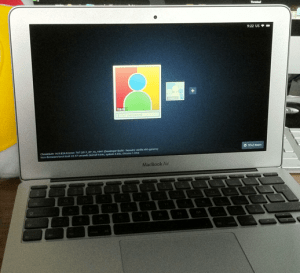
I’ve notice this nice little hack that one kid did few days ago… It’s very cool to see this great new operating system on a great hardware. Another huge advantage is the ability to get an image of chromeOS on your USB and/or a version that will run in VMware. This type of effort will give lots of developers a better way to test their chromeOS Apps/Extensions.

On useful use-case for it, will be to use the vmware image when you are building an extension that leverage chromeOS APIs like the file browser. This is the only way to test your code, beside installing it on a real chromeOS device like the chromebook.

I’m sure that in the near future, we will see chromeOS on popular tablets (Android and iOS ones).

Happy times.

Standard
Chrome, HTML5

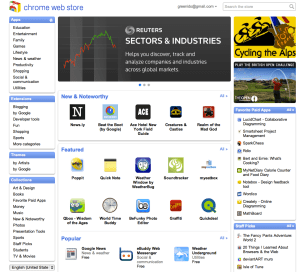
ChromeOS Intro And Some Tips On Chrome Web Store

Here are two slides that I’ve created for a talk I gave yesterday at The Junction meetup.

Enjoy… and if you have comments/feedback – please let me know.

Standard
Chrome, webdev

ChromeBook – Tips And Tricks

Customize It

  • First enable the sync option so you will get your passwords, bookmarks (and in the future) themes everywhere. You can do it from chrome://settings/personal and click on Sync.
  • Enable Tap to click – Go to: chrome://settings/system. Then click on the checkbox to set ‘tab as click’ – done.
  • Extension that give you shortcuts to all the ‘flags’ and settings – I’ve wrote it because I wanted to have all the shortcuts in one place… it’s very productive to have them in one click.
  • SSH client – Ctrl+Alt+t
  • Open an ssh connection to the given host Y as user X.
  • The parameter is optional and defaults to 22.
  • Log out – Ctrl+Shift+q
  • Lock screen – Ctrl+Alt+l (=L)
  • Shortcut keys
  • Press F8, then press Ctrl, Shift, Alt (once a key), press F8 again to exit

Better Browsing

  • Create a tab – Ctrl+T or click the ‘+’ on top of the window.
  • Create a new window – Ctrl+n
  • Create a new incognito window – Ctrl+Shift+n
  • Refresh current tab – Ctrl+r
  • The (one and only) File Manager – Ctrl+m  (On chromebook you got almost 16G of SSD).
  • Switch between different windows – Alt+Tab or press F12 and then use arrow key
  • Change Channel To Beta or Dev Version – Only if you are geeky enough to live on the bleeding edge, visit chrome://settings/about and click on “more info” to change channel.

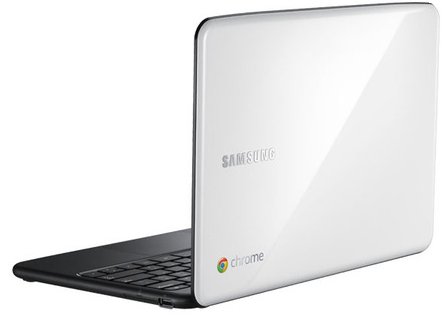
For the ones that don’t know what is chromebook

Standard
Chrome, HTML5

How To Publish Your Web App To Chrome Web Store

If you wish to develop an application (or should I say, a web app) or may be, you have a web app and you just didn’t think about the Chrome store as a distribution channel… Here are few places you might want to read. You will not believe how fast and easy is to put your web app in the store. The first place to check will be the ‘Chrom Web Store – Getting started Guide‘. The second place you will want to check is the option to have Hosted Apps. If you in the arena of ‘Angry birds’ – check out the new option to have Packaged Apps. Last but not least, it is always important to have an amazing ‘first impression’ on your users (and girls/boys in pubs) – so check out the best practices on your web app’s banners/images.

* Tip – a useful read is the ‘Debugging‘  it will introduces you to using Google Chrome’s built-in Developer Tools to interactively debug you web app (and/or your extension).

Standard
HTML5, JavaScript, webdev

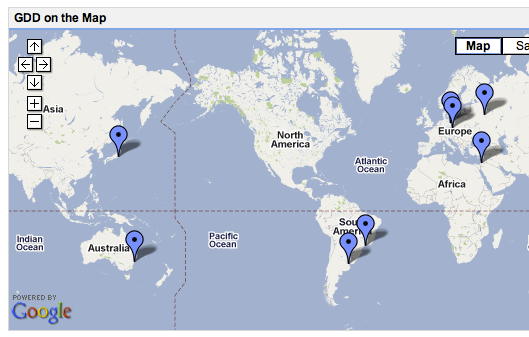
Open Call for Google Developer Day In The Theaters Near You

It’s going to be a hot summer all around block (=world). If you are a (really good) developer… this is a great opportunity to show the world what magic you can do. It’s all about APIs and how you master their usage with some ‘salt & paper’ that you bring from home. This year’s Open Call challenges will focus on the Android ADK and HTML5 platforms. No matter which challenge you choose, your submission must reflect the regional culture of the GDD that you will be attending, be this through music, creative imagery, lighting or colors… go with your heart.

Important Questions & Answers

    • Who is eligible to participate in Open Call? Submissions will be showcased at their respective GDD event, so you must be able to physically attend the event. In most cases, this will mean that a German developer will submit an Open Call for GDD Berlin–however, if a developer from France plans to attend in Berlin, they are also welcome to send in a submission. While not a requirement, all of the challenges will require in-depth knowledge of developer tools and Google products, so we suggest that you have proficiency in those a
    • My country is not represented at GDD. Can I submit an Open Call anyways?All Open Call submissions must be relevant to the local markets where hosting GDDs.
  • What dates will the challenges run and which products are participating? What is the timeline for the challenges?The Android ADK Open Call will
    be announn Monday, July 18 at 9:00 A.M. PDT
    The HTML5 Open Call will be announced on Monday, August 1 at 9:00 A.M. PDT
Few resources to keep you moving forward are: html5 demos, the great HTML5 Docs on MDN and of course our very own HTML5 Rocks

Here is the official site for GDD and remember to have fun. 


Standard
Chrome, HTML5, JavaScript, php, webdev

Web Developers And The Chromebook

Lots of developers that are looking at the Chromebook think for the first time: “what tool do I (=the developer) have on the chromebook that will let me write code?” There are many options of cloud IDEs and we see more and more a good integration between them and other cloud services: Google Drive, dropbox, github etc’.

[updated May 2013]

  • Neutron Drive seems like a good option with a close integration with Google drive and lots of languages its support.
  • ShiftEdit – which give you many options to develop in your language: PHP, Ruby, HTML, CSS and JavaScript and then by using (S)FTP you can save your work to  Dropbox or Google Drive.
  • Codenvy -Codenvy is a cloud IDE enables you to code, build, debug in the cloud, and deploy to your PaaS of choice. I’ve play with it and it got a nice collaboratively options. It’s support JavaScript, Java, Node.JS, Android, Spring, PHP, Ruby and Python. The environment let you do ‘pair programing’ with its screen shared capabilities.
  • Cloud9, an IDE for JavaScript, Python, PHP, and Ruby. Cloud9 uses the HTML5 FileSystem capability and AppCache to sync files, so you can even code offline. It got some really nice features that I find myself using a lot: github integration, chat, the ability to work and do reviews on your code without any pain of ‘new/other’ tools.
  • Kodingen is an Online Development Environment including Code Editor, Cloud Hosting, Database Administration, Collaboration (not yet in beta), Web based access to file-system and it sounds good. I haven’t play with it (yet) – but I’ve heard some friends that like it.
  • Codey – Easy to use code editor for HTML, PHP, CSS, JS. They are in Chrome web store.
  • Akshell – Server-side JavaScript development and hosting platform. They got some git integration built in their IDE.
  • eXo Cloud IDE – Full IDE that support: HTML/CSS/JS and PHP/JAVA/RUBY. The nice part of it is that it will let you develop in Java,PHP,JS and other technologies and to push your code to production on several cloud providers.
  • PHPAnywhere is a web based free Integrated Development Environment or IDE for the PHP, HTML and CSS, in other words it is an application that gives developers all the code editing capabilities they need to develop web sites and applications online.
  • On the other side of the scale – editpad.org give you a simple option to write in your browser and then save it. It’s a cool way to do stuff if you ‘just’ want to write something quickly without all the ‘IDE’ features flying around.
For just a quick demo or this new coding experiments, check out JSFiddle that will let you run your HTML/CSS and JS quickly and then share it on the fly with friends. In that region, you might want to see: JSLINT.com and JSHIT.com for your js coding and the fresh new ‘sister’ CSSLINT.net
Another option that is becoming more and more ‘like’ an IDE is the powerful Chrome DevTools.

Other JavaScript/CSS sources:

  • MDN Docs – One of the best sources for javascript (ref, doc and all the rest).
  • JQAPI – Excellent documentation for jQuery. Take a look at: http://jqapi.com/#p=jQuery.ajax and see its power.
  • Less CSS – LESS extends CSS with dynamic behavior such as variables, mixins, operations and functions. LESS runs on both the client-side (IE 6+, Webkit, Firefox) and server-side, with Node.js.
And for the ones that want a closer look to what the ‘cool kids’ on the block are doing with nodeJS – there is how to node.org and this free book on JavaScript.
Standard
webdev

What Is The Right Cloud For You?

In the past few years we saw lots of ‘clouds’ coming up to life. Some of the known and powerful ones like:

  • Amazon S3 – Amazon S3 is storage for the Internet. It is designed to make web-scale computing easier for developers. Amazon S3 provides a simple web services interface that can be used to store and retrieve any amount of data, at any time, from anywhere on the web. It gives any developer access to the same highly scalable, reliable, secure, fast, inexpensive infrastructure that Amazon uses to run its own global network of web sites. The service aims to maximize benefits of scale and to pass those benefits on to developers.
  • Rackspace Cloud – They offering servers, files and load balancers. It’s similar to amazon and you get some nice features ‘for free’ – like the ability to take images of your current machine and start new ones from this image.
  • Amazon EC2 – Amazon Elastic Compute Cloud (Amazon EC2) is a web service that provides resizable compute capacity in the cloud. It is designed to make web-scale computing easier for developers. Amazon EC2’s simple web service interface allows you to obtain and configure capacity with minimal friction. It provides you with complete control of your computing resources and lets you run on Amazon’s proven computing environment. Amazon EC2 reduces the time required to obtain and boot new server instances to minutes, allowing you to quickly scale capacity, both up and down, as your computing requirements change. Amazon EC2 changes the economics of computing by allowing you to pay only for capacity that you actually use. Amazon EC2 provides developers the tools to build failure resilient applications and isolate themselves from common failure scenarios.
  • Amazon Cloud front – Amazon CloudFront is a web service for content delivery. It a ‘pure man’ solution for other CDN. It integrates with other Amazon Web Services to give developers and businesses an easy way to distribute content to end users with low latency, high data transfer speeds, and no commitments.
  • Microsoft Azure – Offering the .NET developers a ground play with all microsoft technologies. If you live inside microsoft stack (MSSQL, .NET etc’) – I guess this is the place you want to research first thing. However, since other cloud solution also give you MS environments, it’s not the only solution. So take the time and do a good research on the different offerings.
  • Google App Engine – Google App Engine enables you to build and host web apps on the same systems that power Google applications. App Engine offers fast development and deployment; simple administration, with no need to worry about hardware, patches or backups; and effortless scalability.
BTW, they are many many more… I know. I’ve put in the bottom of the post ‘just’ the ones that Amazon offering so you could get the picture of ‘how many’ different types of cloud we have today at 2011 just from one (big) vendor.
There are very different in their ‘view of the world’ and like in anything in life, you need to define your own goals before you going to choose a solution.
Standard
HTML5, JavaScript, webdev

How To Use IndexedDB – Code And Example

IndexedDB is an evolving web standard for the storage of significant amounts of structured data in the browser and for high performance searches on this data using indexes. IndexedDB leaves room for a third-party JavaScript library to straddle the underlying primitives with a BTree API, and I look forward to seeing initiatives like BrowserCouch built on top of IndexedDB. Intrepid web developers can even build a SQL API on top of IndexedDB.

I’ve work today to create this example in order to push it to MDC IndexDB page later… I found few things that didn’t work on Firefox 4 (but since we have Firefox 5 from last night) – I’ve just put them in the comments. Also, Chrome 12 (and above) works great.
You might want to check that the pages you developing on are served from a server and not a local file, because on firefox it won’t work…

You can go here and see a working example or browse the code below and get a beer.

Here is a code that will show you all the basic features:
To check the code with highlights you might want to check The code of this example on github

Here are some main snippets of code:

// Our local DB
var idb_; 
// Our DB request obj
var idbRequest_;    
//
// just a simple way to show what we are doing on the page
var idbLog_ = document.getElementById('idb-log');
var idResultsWrapper_ = document.getElementById('idb-results-wrapper');

// IndexedDB spec is still evolving - see: http://www.w3.org/TR/IndexedDB/
// various browsers keep it
// behind various flags and implementation varies.
if ('webkitIndexedDB' in window) {
    window.indexedDB = window.webkitIndexedDB;
    window.IDBTransaction = window.webkitIDBTransaction;
} else if ('mozIndexedDB' in window) {
    window.indexedDB = window.mozIndexedDB;
}

// Open our IndexedDB if the browser supports it.
if (window.indexedDB) {
    idbRequest_ = window.indexedDB.open("Test", "Our Amazing test object IndexDB");
    idbRequest_.onerror = idbError_;
    idbRequest_.addEventListener('success', function(e) {
        // FF4 requires e.result. IDBRequest.request isn't set
        // FF5/Chrome works fine.
        idb_ = idbRequest_.result || e.result;
        idbShow_(e);
    }, false);
}

// on errors - show us what is going wrong
function idbError_(e) {
    idbLog_.innerHTML += '

Error: ' + e.message + ' (' + e.code + ')

';
}

// In cases we add/remove objects - show the user what is changing in the DB
function idbShow_(e) {
    if (!idb_.objectStoreNames.contains('myObjectStore')) {
        idbLog_.innerHTML = "

Object store not yet created.

";
        return;
    }

    var msgBoard = [];
    // Ready is default - make sure NOT to pass empty array in the first param as it use to be something like: []
    var transaction = idb_.transaction(idb_.objectStoreNames, IDBTransaction.READ_ONLY);
    // Get all results.
    var request = transaction.objectStore("myObjectStore").openCursor();
    //
    //
    // This callback will continue to be called until we have no more results.
    request.onsuccess = function(e) {
        // FF4 requires e.result. IDBRequest.request isn't set
        // FF5/Chrome works fine.
        var cursor = request.result || e.result;
        if (!cursor) {
  idResultsWrapper_.innerHTML = '

    ' + msgBoard.join('') + '

';
  return;
        }
        msgBoard.push('

  • ', cursor.key, ' ',
            '=> ', cursor.value, '  ',
            '[Delete]
  • ');
            cursor.continue();
        }
        request.onerror = idbError_;
    }

    // Simple example to show all our records in the DB
    function showAll_() {
        document.getElementById("ourList").innerHTML = "" ;
        var request = window.indexedDB.open("Test",
        "Our Test database");
        request.onsuccess = function(event) {
            // Enumerate the entire object store.
            // request = event.currentTarget.result.objectStoreNames("myObjectStore").openCursor();
            var transaction = idb_.transaction(idb_.objectStoreNames, IDBTransaction.READ_ONLY); // Ready is default.
            var request = transaction.objectStore("myObjectStore").openCursor();
            request.onsuccess = function(event) {
      var cursor = request.result || event.result;
      // If cursor is null then we've completed the enumeration.
      if (!cursor) {
          return;
      }
      var element = document.createElement("div");
      element.textContent = "key: " + cursor.key + "=> Value: " + cursor.value;
      document.getElementById("ourList").appendChild(element);
      cursor.
          continue ();
            };
        };
    }

    —-
    Main Source: The IndexDB Spec on w3.org

    Standard
    HTML5, JavaScript, webdev

    HTML5 On Mobile

    This slideshow requires JavaScript.

    It’s all about reading the map and see what other big gorillas are doing.

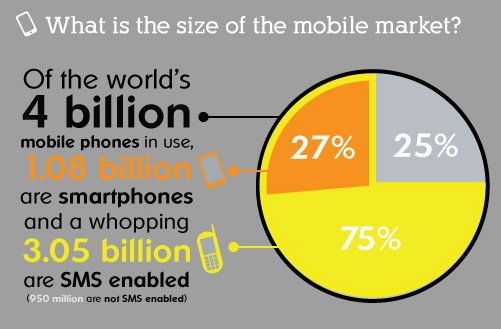
    In the past few months, we saw that ‘web gorillas’ like Netflix, Facebook, Microsoft and others are putting their money on HTML5 for mobile. If you want to build an application that will run ‘everywhere’ – HTML5 is your best friend. Yesterday, jQuery Mobile moved to Beta, which is a great news for web developers. In a nutshell, jQuery Mobile is a touch optimized framework for smart phones (iPhone, Android, Palm, Windows phones and even Blackberry) & tablets (iPad, Android and others). It gives out of the box a unified user interface system across all popular mobile device platforms, built on jQuery and jQuery UI foundation. Since ‘Touch’ is the major way to interact with mobile web apps, here is a short summary of ‘the touch state of the union’:

    What browsers are out there? well, you can use compatibility sites like: caniuse.com and PKK – quirksmode.org. In short, apple pushing their mobile Safari and just after them we have android browser. Opera mobile browser is also huge and you will want to check your app there as well. All these browsers should work with touch events web standard. Here are the main parts of the standard:
    • Core: touchstart touchmove touchend
    • Not: touchenter touchleave touchcancel
    • Touch lists: touches targetTouches changedTouches
    • Touch: target identifier x y

    Some pro tips for mobile web developers:

      • Set a fixed viewport so when the user is double clicking we won’t have the zoom gesture. Here is the meta tag you need in the top of your page. However, I would recommend to leave the ability to zoom… it’s important feature that a lot of users want to have. In order to let them have it – remove: “user-scalable=no” from the tag.

    <meta name="viewport"
    content="width=device-width, height=device-height,
    initial-scale=1.0, user-scalable=no">

      • If you need a custom hold & press event, override the default one

    mySelector {
    -webkit-touch-callout: none;
    }

      • Hide the address bar. It will give your app a nice touch of ‘native’. Pss… jquery mobile is doing it for you by default.

    setTimeout(function () {
    window.scrollTo(0, 1);
    }, 1000);


    Other good sources:
    Touch Gesture ref. guide and a great presentation my friend Boris created.
    Standard
    Chrome, webdev

    Great Web Apps

    This slideshow requires JavaScript.

    It’s hard task to try and describe what is a great web application. but just like the old phrase that was famously used by United States Supreme Court Justice Potter Stewart to describe his threshold test for pornography in Jacobellis v. Ohio (1964) – “I know it when I see it”
    So I took the freedom to put a quick list of some apps that IMHO are ‘good to great’.
    First are the productivity/utility apps (you might call them even business apps):
    • Gmail
    • Docs and/or Zoho – let you have access to your files from everywhere plus the option to have version control and muti editing.
    • Picnik – Image editor that works great with Picasa, Flickr and others.
    • Aviary image editor with ‘fancy’ features for designers (and developers that think they are designers).
    • Todo.ly – Todo list with lots of features and great user interface.
    • box.net – save your files in the cloud. Similar to dropbox.
    • Mint – is the free and easy way to manage your finances online and see all your accounts in one place ― safely and securely.
    • Slide Rocket – defines the new way to create stunning presentations that deliver lasting impressions and measurable results.

    Socail

    Travel
    • Hipmunk – Sort of kayak but with great UI.
    • TripIt – Travel organizer.

    On the ‘taking notes’ section we have three nice apps:

    If you have other apps you think are worthy – please let me know…
    For more resources on HOW to build a great web app:
    Standard