A short discussion with the team that built the first SubDroid that sink in Sedot Yam!
Some good topics on Android, Hackathons and design aspects for successful GeekCon project.
As always, if you have 20-25min on WED at 14:00 Israel time… mark your calendars and join us live on GDL-IL!
Here is my talk from last week with Nicolas Garnier (Developer Advocate for Google Drive) on the new aspects of Drive. You can have a short intro to drive and then dive into:
What are the key features developers should be aware of when working with Drive APIs. For example: all the Drive SDKs you can use with your favorite technology (e.g. Java, Php, Python etc’).
Show some new apps that are doing good job in integrating into Drive. We spoke about best practices and OAuth2.0
Learn what is next for drive in the near future…
Psst…
If you want to see more GDL-IL episodes, feel free to ‘Add our show‘ to your calendar. It’s going to take 15-25min of your time every WED at 14:00 Israel time (IST)
In a nutshell, DevCon TLV was a great event! It’s getting better and bigger every year. There were lots of developers, friends and rock bands (a bit early in the morning – but great way to wake up quickly). This year all the talks were limited to 25min (with 5min of questions) where after lunch people had the options to choose ‘agile’ track as well. I’ve got to listen to some great talks and I hope we could see all of them online soon. This year my talk in DevCon TLV was “Big Data and HTML5“. This slides cover some of the main points of Google cloud products: Google Cloud Endpoints and Big Query. I wanted to give developers the option to see how they can combine modern web apps with cloud technologies that give a lot of power. The first product we covered is still in ‘trusted tester’ mode and it give the developer the option to build an API (in Google App Engine supported technologies: Java, Python and Go) that will work in minutes with all the scale of Google app engine. You can read more deeply about Google Cloud Endpoint and HTML5 or just have a look at this talk:
(*) This time the talk is in hebrew… I hope that soon I’ll have another version of it in english.
Today we lunch GDL IL. What is it? Google developer live is GDL and IL is our famous short for Israel. It is going to be a weekly show on WED 14:00 (so mark your calanders please). We are going to talk about the latest and greats news in technology. From Android to HTML5 and back to Cloud, Google APIs and anything that is interesting for developers. As ‘startup nation’ we will hosts some of the cool, interesting/amazing startups that will tell their story and will share some of their real life experience. For the first show that is focus around Chrome extensions, I had a pleasure to interview Tal from Equire (a CRM Chrome extension that integrates with Gmail and making your life better). We talked about the life of a web developer that choose to build a product in Chrome (extension and/or App). Since Tal is working from The Hub we covered what is unique about this ‘working space’ and how to be productive in such an environment. One of the key questions I’ve asked was something like: “What are the top 5 things to keep in mind when we are coming to build a chrome extension?” Tal answered:
Don’t rush to do the same things you always do when first building an app, think about the new architecture, understand it, it’s a different mindset, it’s not just a regular web app. The major difference is the limited ‘screen’ you have and some strong APIs – so use it smartly.
LocalStorage… give you a lot of power to save state/data of users.
Metrics – measure everything so you could improve over time and give more insight to your users.
APIs – There are many APIs that are available only inside Chrome so learn them and use them!
Very challenging UX issue – not a blank canvas like a web app. You have an option to give notifications and be ‘infront of your users’ but there is a delicate balance to strike to make sure you don’t get uninstalled.
There are many more things we covered… Some of these are covered in this post “Six Strategies for building great extensions“. However, if you want all the good stuff, you will need to watch it until the end when our next week guest will show up 😉
We finish the episode with 3 things/tools that Tal recommend.
Mixpanel – An analytic tool that answer any question you have about your code/users. You should start early and get a feel for it. The nice part is that you do not need any backend.
CoffeeScript – take a week, learn it, it will give you back 3 months of your year.
Backbone – especially for chrome extensions. It was a simple for Tal to start and be productive with it.
What are the ‘must have’ apps you would install on a new Android device?
I’m sure you all got to this spot when a good friend and/or brother, sister, mom, dad or “dear” neighbor is coming to you (=the “guru”) with their new smartphone with the request: “Make it useful for me” or “Put some games and apps for the kids”. Well, after few (OK, maybe just 17) times I got this request, I decided to document a list of great apps that I’ll install in such a case. It is similar to a post I’ve wrote in the past about ‘Great Web Apps For Your Chromebook‘. The list is a combination of powerful apps that help people (who are not necessarily technical) in their daily tasks.
Here is my little list:
Google+ – Well, even if your friend doesn’t use this powerful social network. I would install this app because – on top of many other great features like: local, hangout, messenger and more – it will back up all her photos to the cloud!
Waze social GPS – This navigation app bring the ‘wisdom of the crowds’ into your car. It’s very powerful to direct you on the shortest path based on traffic in real time.
Gmail – Well… How can we have a list without THE email tool? This is going to be the app the will consume most of your friend’s time.
Skype / Viber / Google Talk – you can call and message for free. I know lots of friends that use them when you are abroad. It’s useful to find a good wi-fi connection so the quality of the call with be good.
WhatsApp Messenger – one of the best messaging apps (think on sms but much better and for free). It’s working on many different devices so you can be sure most of your friends can enjoy it.
Chrome – Get the the security, speed and simplicity of Chrome to your mobile device. All your links, open tabs, passwords will sync like magic. Plus, you will enjoy many wonderful web apps that will work very fast.
Evernote – Organize your life and take notes using your mobile. This app is a powerful tool to keep your notes/recipes/photos/todo lists etc in the cloud. It’s also synced notes across devices so you can reach them from anywhere. Btw, their tablet version is gorgeous.
Google Drive / Dropbox – access all your docs, photos, videos, files from your mobile device.
Instagram – A good app to improve your native camera pictures and share your photos with the world.
TripIt Travel Organizer – This is a great app for anyone that travel. It will give you a great way to stay on top of things like: flight schedule changes, hotel reservations and car rentals.
Facebook / Twitter – so you could keep in touch with the rest of the ‘social’ world. btw, both of these app got a very nice mobile web app as well. There are also options to have these type of apps as widgets so you could be more productive on certain functions of the app.
Foursquare – explore a new city with this powerful app. Ohh… yes, you can ‘check-in’ and share your location with friends but even if you don’t part of the ‘social animals’ you will find this app very useful. Another option to check quickly where to go and what to eat is Yelp.
GroupMe / Google+Messanger – both will give you a great way to have group chats and organize friends/team quickly.
VLC – Be able to watch any type of video on your Android. Another option to stream video is with Dropbox app – yep, it let you do that as well.
And some extra fun one
UTILS/TOOLS
Barcode Scanner – To be able to scan some barcodes like all the cool kids on the block.
Google Translate – Think on a case where you want to order a good wine in france and you can’t say it.
Any.DO To Do List – Great to do list app. It also got a nice chrome extension that keep your tasks sync and fresh.
Wheres My Droid – for anyone that lost his phone more than once or twice. This one is a life saver. It will let you find it even if the phone is in silent mode.
AVG Antivirus – After all it’s better to be safe then sorry, no?
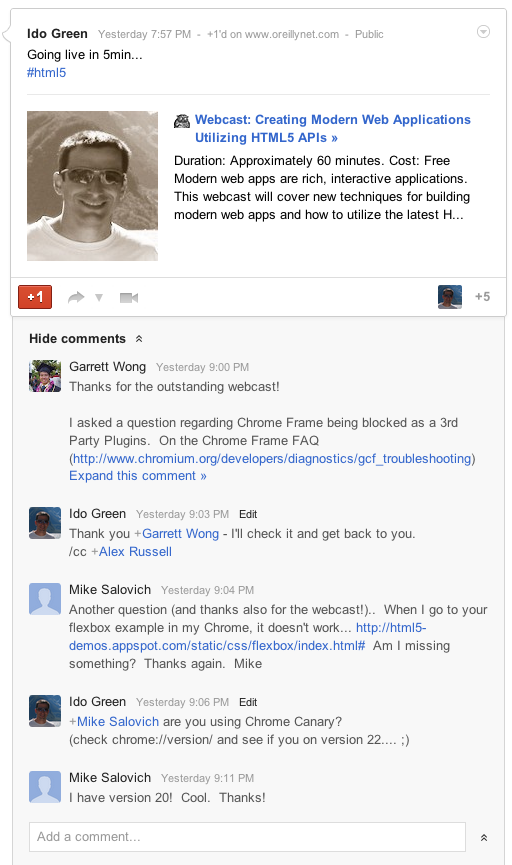
Yesterday I had the pleasure to do another webcast with O’rielly. This time the subject was “Modern web apps & HTML5 New APIs“. The webcast covered new (and old) techniques for building modern web apps and how to utilize the latest HTML5 APIs to create a new class of web apps that will delight and amaze your users. Some of the main topics were:
The latest and greatest application patterns and toolset: MV* frameworks, offline first and Chrome Frame.
Some cool tips on Chrome DevTools – On few slides I’ve open this powerful tool in order to show its power.
APIs for building cutting edge HTML5 applications: WebGL, Device APIs, CSS3 layouts and many more…
Since the first days of Chrome extensions it was clear that they are very powerful way to extend your browser and make it do stuff you care about. However, while it was good, we knew that it can get better… and this is why we have in dev channel the ‘Event Pages’. Let’s start by defining what are those pages:
Background pages – give your extensions the ability to have a single long-running script to manage some task(s) in the background. This can be a certain state of your app or long pulling of information that you wish to show the user (e.g. amount of unread emails).
Event pages – are very similar to background pages, with one important difference: event pages are loaded only when they are needed. When the event page is not actively doing something, it is unloaded, freeing memory and other system resources. Please remember this feature is currently only in dev mode.
It seems that with Event Pages our Chrome will be able to reduce the memory foot print that is used by some idle extensions. It’s an important evolution from the state of background pages that run all the time. An event page only runs when it is handling events. Once an event page becomes idle, it is unloaded, freeing memory until the next time it’s needed. To help event pages support some important use cases, we’re also have new APIs.
The alarms API allows an extension to wake itself up at set times, to support features like: cron jobs type of activity, periodically syncing, anything you wish to do over time in specific timing.
chrome.runtimenew events let extensions know when they have been installed, or when their event page is being unloaded. It is also giving the developer an option to have a ‘last error’ handler.
chrome.declarativeWebRequest – A declarative version of the webRequest API lets extensions do network interception without the need for a background page at all. It also works much faster than the chrome.webRequest API because you can register rules that are evaluated in the browser rather than the JavaScript engine which reduces roundtrip latencies and allows for very high efficiency.
There is a good source for more information on Chrome Extensions in Chromium blog
There are so many option to use the new event pages with the bluetooth API…
Btw, @rem did it again with a new (amazing) version of JSbin – Go check it out and see how great logos ‘steal’ the show… Why I’ve added it here? because it’s a powerful online tool that let you test your app/extension and share your code before you upload it to Chrome web store. I’ve used both jsbin and jsfiddle in order to get feedback on some short code.
Chrome extensions are very powerful way to make Chrome (even) better. They give you (=the developer) a lot of power to extend the functionality of the browser and gain more productivity and power in daily tasks. In this tutorial we will learn how to create a basic extension that give you the power to open all the special information pages that Chrome offers. For the ones that wish to see code of a more complicated extension that does some networking and notification – You might want to have a look at the work of my friend Mr. Smus on ‘Stackoverflow notifier‘. Ok, let’s start to role.
Getting started with your first extension
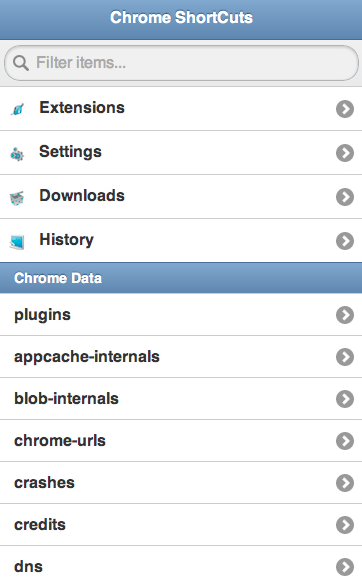
We will take for example the case of opening some Chrome internal pages. I’ve wrote this extension more then a year ago because I wanted ‘one-click’ from many interesting internal pages that chrome give developers that want to have a look at some internal parts. For example:
We could choose that the user will see our extension all the time with a little button that will be place on the right side of the browser or to have our activation icon popup inside the address bar (the omni box) only when the user get to the page that our extension is working on. In our example we want the user to be able to activate the extension all the time so we will go with browser action.
The first thing we need to write is a short manifest file that describe our extension. You can see we declaring some trivial fields like: name, version, icon and more important ‘permissions’. This will give the user a warning dialog during the installation process to warn about the permissions that our extension will have. It’s good practice to use as little as possible since it will improve the confidence users will feel – thus, you will have more installations. Another good tip is to invest the time and effort to use great icons/graphics. It will also improve the user experience.
manifest.json
{
  "name": "Chrome Short Cuts",
  "version": "0.1",
  "description": "Show short cuts and tips on Chrome",
  "icons": {
	"48": "app-icon-48.png"
   },
  "background_page": "background.html",
  "permissions": [
    "contextMenus"
  ],
  "browser_action": {
    "default_title": "Display short cuts and tips",
    "default_icon": "toolbar-icon20.png",
    "popup": "popup.html"
  }
}
After we have our manifest file we need to code (fun time) the logic/data/ui of our extension. Here is our simple code of popup.html:
This file contains hidden or bidirectional Unicode text that may be interpreted or compiled differently than what appears below. To review, open the file in an editor that reveals hidden Unicode characters.
Learn more about bidirectional Unicode characters
After we wrote some code, it’s time to upload the extension to our chrome and test it. You can do it by going to: chrome://chrome/extensions/ and click on the button ‘load unpack extension’. You can see it below:
Once you click on the button you need to navigate to the directory that contain the manifest file and your html/js/css files. Once you click on ‘select’ the new extension will be added to the list of extensions and you should see its button on the toolbar (right side of it). You will continue to work and improve your functionality… and once you are happy with the results it’s time to publish your work to the Chrome Web Store. I’ve wrote about this process in the past here: How to get your web app and/or extension into the Chrome Web Store.
Is it simple or what?
Please let me know if you have any thoughts on the process and how we can improve it. Also, if you have good (to great) ideas to extensions – please share them…
Final notes
You can set an option page so your users will be able to set their preferences. In our simple case, there is no point.
Background pages – answer a common need to have a single long-running script to manage some task or state in the background. For example: check the page for certain keywords, links, check status of some web service etc’.
Brad Abrams and I had a great time doing this session: “HTML5 and App Engine: The Epic Tag Team Take on Modern Web Apps at Scale” at Google I/O 2012. Here is a little walkthrough on ‘how to built it’ from zero to hero in less then 60 minutes.
User Experiences demands are pushing modern web apps to a more distributed architecture. A pattern many developers have used is using a MVC framework on the client and communicate to the server with REST. Google App Engine’s easy to build, easy to manage environment makes it ideal for REST APIs for Web backends. At Google IO 2012, we made it much easier to build REST APIs on App Engine with Cloud Endpoints.
Cloud Endpoints enables you to build REST and RPC APIs in App Engine. It leverages the same infrastructure Google uses for its own API and as such, you get strongly typed clients for Android, and IOS as well as a lightweight client for JavaScript which we will be walking through in this presentation.
In getting ready for IO, Ido and I thought we’d build a modern web application using Cloud Endpoints. We decided on a topic that would be relevant to both App Engine and the general web developer community, something we both have some interest in and something generally useful…. a Beer rating and review web application.
During last may we had a big event in Tel Aviv. It’s was brand as ‘Think Cloud’ and our talk took place in a bigger event that was ‘google week’. You can watch below an overview I gave on Google cloud platforms and new APIs (It’s in hebrew… but soon we will have this talk in english as well). We covered new (cloud) features that are now being offered to developers. Some of the most interesting ones are:
App Engine – Powerful, scalable application development and execution environment.
Cloud Storage – Store, access, and manage your data.
Big Query – Analyze terabytes of data in seconds.
Cloud SQL –Familiar relational database, with
cloud benefits.
Prediction API – Understand and leverage your data for business insight. This is one of the most interesting APIs that give you an option to have powerful AI in your products.
In the talk you can see demos of using the big query in order to get results from 12.5G of data (= all wikipedia) and in our case it took less then 7sec. I hope you will enjoy it…
Btw, one of the most popular question I got in this event was “Why do I need Google platform?”. There are few answers, and in most of the cases it’s depend on your startup (and product) but the important common aspect are:
* Cost Savings – Yes, you will save money by using the cloud platforms.
* Improve Business Focus – You won’t need to handle administrative tasks on your servers. You could ‘just’ focus on what you do best and thus make your application better.
* Powerful Infrastructure – You can leverage the massive, scalable computing power that google is giving you. In most of the cases, it’s for free up to a limit.

 In a nutshell, DevCon TLV was a great event! It’s getting better and bigger every year. There were lots of developers, friends and rock bands (a bit early in the morning – but great way to wake up quickly). This year







 Ido Green