HTML5, JavaScript, webdev

How To Use IndexedDB – Code And Example

IndexedDB is an evolving web standard for the storage of significant amounts of structured data in the browser and for high performance searches on this data using indexes. IndexedDB leaves room for a third-party JavaScript library to straddle the underlying primitives with a BTree API, and I look forward to seeing initiatives like BrowserCouch built on top of IndexedDB. Intrepid web developers can even build a SQL API on top of IndexedDB.

I’ve work today to create this example in order to push it to MDC IndexDB page later… I found few things that didn’t work on Firefox 4 (but since we have Firefox 5 from last night) – I’ve just put them in the comments. Also, Chrome 12 (and above) works great.
You might want to check that the pages you developing on are served from a server and not a local file, because on firefox it won’t work…

You can go here and see a working example or browse the code below and get a beer.

Here is a code that will show you all the basic features:
To check the code with highlights you might want to check The code of this example on github

Here are some main snippets of code:

// Our local DB
var idb_; 
// Our DB request obj
var idbRequest_;    
//
// just a simple way to show what we are doing on the page
var idbLog_ = document.getElementById('idb-log');
var idResultsWrapper_ = document.getElementById('idb-results-wrapper');

// IndexedDB spec is still evolving - see: http://www.w3.org/TR/IndexedDB/
// various browsers keep it
// behind various flags and implementation varies.
if ('webkitIndexedDB' in window) {
    window.indexedDB = window.webkitIndexedDB;
    window.IDBTransaction = window.webkitIDBTransaction;
} else if ('mozIndexedDB' in window) {
    window.indexedDB = window.mozIndexedDB;
}

// Open our IndexedDB if the browser supports it.
if (window.indexedDB) {
    idbRequest_ = window.indexedDB.open("Test", "Our Amazing test object IndexDB");
    idbRequest_.onerror = idbError_;
    idbRequest_.addEventListener('success', function(e) {
        // FF4 requires e.result. IDBRequest.request isn't set
        // FF5/Chrome works fine.
        idb_ = idbRequest_.result || e.result;
        idbShow_(e);
    }, false);
}

// on errors - show us what is going wrong
function idbError_(e) {
    idbLog_.innerHTML += '

Error: ' + e.message + ' (' + e.code + ')

';
}

// In cases we add/remove objects - show the user what is changing in the DB
function idbShow_(e) {
    if (!idb_.objectStoreNames.contains('myObjectStore')) {
        idbLog_.innerHTML = "

Object store not yet created.

";
        return;
    }

    var msgBoard = [];
    // Ready is default - make sure NOT to pass empty array in the first param as it use to be something like: []
    var transaction = idb_.transaction(idb_.objectStoreNames, IDBTransaction.READ_ONLY);
    // Get all results.
    var request = transaction.objectStore("myObjectStore").openCursor();
    //
    //
    // This callback will continue to be called until we have no more results.
    request.onsuccess = function(e) {
        // FF4 requires e.result. IDBRequest.request isn't set
        // FF5/Chrome works fine.
        var cursor = request.result || e.result;
        if (!cursor) {
  idResultsWrapper_.innerHTML = '

    ' + msgBoard.join('') + '

';
  return;
        }
        msgBoard.push('

  • ', cursor.key, ' ',
            '=> ', cursor.value, '  ',
            '[Delete]
  • ');
            cursor.continue();
        }
        request.onerror = idbError_;
    }

    // Simple example to show all our records in the DB
    function showAll_() {
        document.getElementById("ourList").innerHTML = "" ;
        var request = window.indexedDB.open("Test",
        "Our Test database");
        request.onsuccess = function(event) {
            // Enumerate the entire object store.
            // request = event.currentTarget.result.objectStoreNames("myObjectStore").openCursor();
            var transaction = idb_.transaction(idb_.objectStoreNames, IDBTransaction.READ_ONLY); // Ready is default.
            var request = transaction.objectStore("myObjectStore").openCursor();
            request.onsuccess = function(event) {
      var cursor = request.result || event.result;
      // If cursor is null then we've completed the enumeration.
      if (!cursor) {
          return;
      }
      var element = document.createElement("div");
      element.textContent = "key: " + cursor.key + "=> Value: " + cursor.value;
      document.getElementById("ourList").appendChild(element);
      cursor.
          continue ();
            };
        };
    }

    —-
    Main Source: The IndexDB Spec on w3.org

    Standard
    HTML5, JavaScript, webdev

    HTML5 On Mobile

    This slideshow requires JavaScript.

    It’s all about reading the map and see what other big gorillas are doing.

    In the past few months, we saw that ‘web gorillas’ like Netflix, Facebook, Microsoft and others are putting their money on HTML5 for mobile. If you want to build an application that will run ‘everywhere’ – HTML5 is your best friend. Yesterday, jQuery Mobile moved to Beta, which is a great news for web developers. In a nutshell, jQuery Mobile is a touch optimized framework for smart phones (iPhone, Android, Palm, Windows phones and even Blackberry) & tablets (iPad, Android and others). It gives out of the box a unified user interface system across all popular mobile device platforms, built on jQuery and jQuery UI foundation. Since ‘Touch’ is the major way to interact with mobile web apps, here is a short summary of ‘the touch state of the union’:

    What browsers are out there? well, you can use compatibility sites like: caniuse.com and PKK – quirksmode.org. In short, apple pushing their mobile Safari and just after them we have android browser. Opera mobile browser is also huge and you will want to check your app there as well. All these browsers should work with touch events web standard. Here are the main parts of the standard:
    • Core: touchstart touchmove touchend
    • Not: touchenter touchleave touchcancel
    • Touch lists: touches targetTouches changedTouches
    • Touch: target identifier x y

    Some pro tips for mobile web developers:

      • Set a fixed viewport so when the user is double clicking we won’t have the zoom gesture. Here is the meta tag you need in the top of your page. However, I would recommend to leave the ability to zoom… it’s important feature that a lot of users want to have. In order to let them have it – remove: “user-scalable=no” from the tag.

    <meta name="viewport"
    content="width=device-width, height=device-height,
    initial-scale=1.0, user-scalable=no">

      • If you need a custom hold & press event, override the default one

    mySelector {
    -webkit-touch-callout: none;
    }

      • Hide the address bar. It will give your app a nice touch of ‘native’. Pss… jquery mobile is doing it for you by default.

    setTimeout(function () {
    window.scrollTo(0, 1);
    }, 1000);


    Other good sources:
    Touch Gesture ref. guide and a great presentation my friend Boris created.
    Standard
    Chrome, HTML5, JavaScript, webdev

    Chrome Apps, Web Store and The New ChromeOS File API

    Two days ago, I gave a talk at “Silicon Valley Chrome Meetup”. This cool event was sponsored by box.net and I presented a session on Chrome web store upload process and the new chromeOS File API. The goal of this talk was to highlight some of the new ChromeOS file APIs and to give a high level overview on the Chrome web store and the app upload process. One question I got about the store was ‘WHY?’ and for there are three good answers:

    1. Discovery
    2. Distribution
    3. Revenue (95% goes to the developer)

    On top of that, on the revenue side, you get a peace of mind because Google handle the payments for you. Of course, there is an option to handle the payment on your own – if/when you wish to do it.

    Another subject I’ve tried to clear was around ‘A Web App? what is it?’ It’s not easy definition, and you can see lots of examples out there to good/great/awful web apps. So just to give few directions:

    • Goal-orientated
    • Beautiful
    • Rich Experience
    • FAST

    Last but not least, was the new file browser API that let developers write some nice java script code that will enable ChromeBooks’ users to upload their files to the cloud. In Google I/O Chrome keynote you could have seen a nice demo of it that let users upload photos to Picasa.

    I hope that soon other interesting companies will take advantage of this API and we will see them integrating it with their clouds.

    This little JS code will do the file upload for you:

    uploadFile: function(file) {
    var pro1 = document.querySelector('#pro1');
    var progressBar = pro1.querySelector('progress');
    var formData = new FormData();
    formData.append('file', file);
    var xhr = new XMLHttpRequest();
    xhr.open('POST', this.uploadServer, true);

    xhr.onload = function(e) {
    if (this.status == 200) {
    console.log(this.response);
    alert(“The image is safe in Flickr ” + this.response);
    }
    };

    xhr.onerror = function(e) {
    console.log(this, this.status, this.responseText,
    this.getAllResponseHeaders())
    };

    xhr.send(formData);
    },

    and all you need to declare is few lines of JSON of manifest file.

    File API – Manifest Example

    Declare the “fileBrowserHandler” permission in the extension manifest.

    {
    "name": "Upload to flickr",
    ...
    "file_browser_handlers": [
    {
    "id": "upload",
    "default_title": "Save to flickr", // What the button will display
    "file_filters": [
    "filesystem:*.jpg",
    "filesystem:*.jpeg",
    "filesystem:*.png"
    ]
    }
    ],
    "permissions" : [
    "fileBrowserHandler"
    ],
    "icons": { "16": "icon16.png",
    "48": "icon48.png",
    "128": "icon128.png" }
    }

    Standard
    HTML5, JavaScript, webdev

    HTML5 And CSS3 – New Features And Tips #io2011

    I had a good busy day today at the #IObootCamp overall, there were lots of good sessions and it is great to meet so many familiar developers. I didn’t had too much time to put all my notes. But here is a quick list I’ve took from few great sessions. In one hands on session I had the fun to hack this ‘awesome to-do list‘. Is it the best to-do list on the web today, or what? (only on Chrome you will get the ‘awesomeness’). It’s all based on @jeromegn work for a demo of backbone.js

    CSS3 New Features

    • CSS3 patterns – so many option to get very nice background that are pure CSS based.
    • HSL play tool – change and play with HSL (shh… you can get similar stuff in chrome dev tools by clicking on the right side bar (the one that show you the CSS attributes). You can click on the background-color and it will change between the different methods to define it.
    • Web Fonts – No more the 8 old (=boring) fonts that we have in browsers… you can (and should) use in your sites/apps a wide range of fonts.
    • CSS3 Please – let you change/edit the page and see the nice element on the top right corner change in real time. Good tool for beginners. You can get the same ‘feature’ if you use chrome dev tools… (and it’s better because it will record your history of changes both to the CSS and scripts).
    • Transforms sandbox

    Browsers Compatibility

    JS Framework

    • yepnope – It is an asynchronous conditional resource loader that’s super-fast, and allows you to load only the scripts that your users need.
    • MVC (yep in JS) – Backbone supplies structure to JavaScript-heavy applications by providing models with key-value binding and custom events, collections with a rich API of enumerable functions, views with declarative event handling, and connects it all to your existing application over a RESTful JSON interface.

    and let’s not forget the new API discovery tool that Google release today. It’s a good starting point to any project these days.

    Have fun and I hope to have lots of new notes/posts during the up coming week.

    Standard
    JavaScript, webdev

    HTML5, CSS3 And Some Tips

    First good 28min are on few smart techniques to improve the performance of your web app. Paul Irish (from jQuery fame and now with Google chrome team) describes:

    • CSS re-flows and how to avoid them – single re-flow is better because the browser won’t need to repaint all the elements. Batch the DOM changes before any re-flow-triggering actions is one of the good ways to do it. you can learn a lot from using http://www.browserscope.org/
    • Hardware accelerated CSS – psss… add css property to your element: translate4d(0,0,0) or translateZ(0) and the browser will do hardware accelerated.
    • Animation optimization
    • Web workers – move computation out of the UI thread. Without web workers you can’t… but lucky it’s 2011 and you have them (here and there). I’ve put a simple example in the end of this post. I saw it long time ago (a week?) on Mozilla site – on how to use web workers.
    • Benchmarking and build scripts.
    • Last but not least, try about:flags in chrome… lots of good stuff under the hood.

    BTW, his (last?) project html5 boilerplate is great for any developer that want to write efficient web sites/apps that will score more then 90 on page spped and will get an A on y!slow. This project is an ANT ‘build script’ that harness you with:

    1. Cross-browser compatible – IE6 and others IE specific classes for maximum cross-browser control.
    2. HTML5 ready. Use the new tags with certainty.
    3. Optimal caching and compression rules for grade-A performance
    4. Best practice site configuration defaults
    5. Mobile browser optimizations
    6. Progressive enhancement with graceful degredation
    7. A full, hooked up test suite is waiting for you.
    8. iOS, Android, Opera Mobile-adaptable markup and CSS skeleton.

    Simple example on web workers
    var results = [];

    function resultReceiver(event) {
    results.push(parseInt(event.data));
    if (results.length == 2) {
    postMessage(results[0] + results[1]);
    }
    }

    function errorReceiver(event) {
    throw event.data;
    }

    onmessage = function(event) {
    var n = parseInt(event.data);

    if (n == 0 || n == 1) {
    postMessage(n);
    return;
    }

    for (var i = 1; i <= 2; i++) {
    var worker = new Worker(“fibonacci.js”);
    worker.onmessage = resultReceiver;
    worker.onerror = errorReceiver;
    worker.postMessage(n – i);
    }
    };

    Standard
    JavaScript, webdev

    What Car Should I Buy? (Leveraging Hunch API and High Gear Media API)

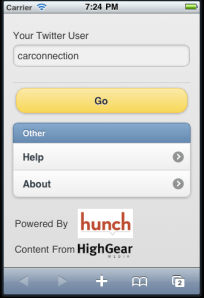
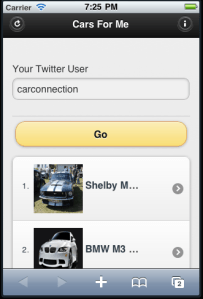
    Last weekend, when the kids were sleeping, I had a bit of time to try out Hunch API. I must say, it’s very cool/powerful API with good documentation. It goes without saying, that I wanted to check what will be a good use-case to our High Gear Media API. After checking around general stuff, I came up with this simple mobile app (ya – it’s work great on iPhone, Android, BB and even Palm). The application is asking you to type your twitter account and base on this account it gives you personalized, recommendations for cars that fit you best. It combine the power of Hunch with the vast automotive content of High Gear Media.

    For best results, you should sign in to hunch with your twitter account and answer some questions. Then, once hunch built your taste graph this application will show your very ‘accurate’ results.

    If you have an Adriod phone – you can install this application from this link: http://www.appsgeyser.com/getwidget/Cars+For+Me

    You might want to try some other famous twitter accounts and see what is their best cars.

    Drive safely and stay thirsty.

    Standard
    JavaScript, webdev

    Create Your Own Chrome Extension To Any Web Page

    It’s now very clear that Chrome Browser got huge adoption (I guess the current numbers of active users is around 100M). In case you didn’t know, Google got now an App store to chrome. They basically, take what Apple showed the world in terms of building an Eco system (apps that you, as developer, can monetize on their platform) and trying to do the same with chrome as platform. It’s very smart idea and soon when we will see the chrome OS on tablets – this will be the way to manage your apps. The main APIs that you might want to use are: Browser actions and Page actions.

    Browser Actions – you should use browser actions to put icons in the main Google Chrome toolbar. It’s for actions you wish to add to the browser (not specific page). Here are the main tips in order to use it right:

    • Do use browser actions for features that make sense on most pages.
    • Do use big, colorful icons that make the most of the 19×19-pixel space. Browser action icons should seem a little bigger and heavier than page action icons.
    • Do use alpha transparency to add soft edges to your icon. Because many people use themes, your icon should look nice on a variety of background colors.
    • Don’t use browser actions for features that make sense for only a few pages. Use page actions instead.

    Page Actions – Page actions represent actions that can be taken on the current page, but that aren’t applicable to all pages. For example: translate content on the page, create something from photos in the page etc’. Here are some samples for both type of extensions.

    Now, if you are on a site that you think will make sense to put in an extension (due to it’s nice features)… it’s very easy to do it.
    All you need are two main files:

    1. manifest.json – this file is the description of the extension. Some meta info…
    2. Create a simple deals.html page (in our case it’s all about good deals for cars) that will include the web page you wish to have as an iframe.

    Here are the 2 files that show you how to take HGM mobile app and put it in chrome:

    manifest.json

    {
    "name": "Great Deals on New Cars",
    "version": "0.2",
    "description": "Great the best prices on your new car",
    "icons": { "128": "app_icon.png" },
    "browser_action": {
    "default_title": "Great Deals on New Cars",
    "default_icon": "deals.png",
    "popup": "deals.html"
    },
    "permissions": [   "http://www.thecarconnection.com/*" ]
    }

    deals.html


    <!DOCTYPE html>
    <html>
    <head>
    <title>Deals</title>
    <meta name="author" content="Ido Green">
    </head>
    <body>
    <iframe src="http://beta.thecarconnection.com/conduit/deals" width="510px" height="700px" border="0px" scrolling="no">
    </body>
    </html>

    After you saved these 2 files in one directory, just go to Chrome and click on ‘Windows’ -> ‘Extensions’. In that page you click on ‘Load unpack extension…’ and point to your directory.
    Done.
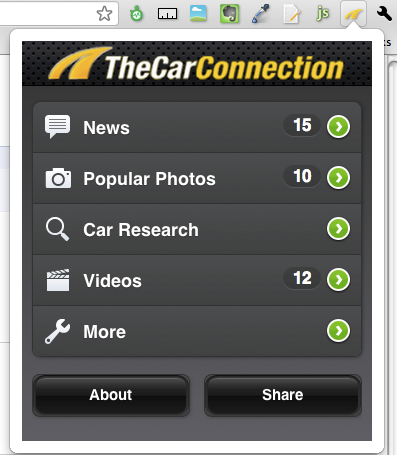
    You should get now a new button and if you click on it you should get something like this:

    another easy option is to go and download this extension.

    Happy Friday/coding.

    Standard
    JavaScript, webdev

    New Features In High Gear Media API

    Here is some improvements we have put in our API to make it (even) better to developers.
    After How To Work With High Gear Media RSS Feed In (less then) 4 Minutes
    and How To Deal With High Gear Media API Using XPath

    Here are some new parameters that will make your (=the developer) life happier and healthier.
    We have a new ways to output the data or in other words more control on the output format.

    Format

    the feed format, can be JSON or XML.

    Examples:
    1. http://feeds.highgearmedia.com/?format=xml is the same as http://feeds.highgearmedia.com , because xml is the default value.
    2. http://feeds.highgearmedia.com/?format=json <– This is the better way to work with our feeds, specially, if you are hacking some new cool web2.0 mash up.

    Other API parameters

    Sites

    You have full control on the sites that you wish to fetch information from. Here is a list of all the sites.

    Examples
    1. http://feeds.highgearmedia.com <– All HighGearMedia content
    2. http://feeds.highgearmedia.com/?sites=thecarconnection <– get feeds from thecarconnection.com
    2. http://feeds.highgearmedia.com/?sites=familycarguide,motorauthority

    tags

    Comma separated list of tag names to filter the content by.

    Examples
    http://feeds.highgearmedia.com/?tags=los-angeles-auto-show
    http://feeds.highgearmedia.com/?tags=good

    image-size

    Size code for images in the feed (t/s/m/l/h)

    • t – thumbnail (default). Unless you are building some new iPad app, this is the best way to have it.
    • s – small
    • m – medium – on iPad or Chrome you might want to use this size or even ‘large’.
    • l – large
    • h – huge

    Examples
    1. http://feeds.highgearmedia.com/?image-size=t is the same as http://feeds.highgearmedia.com, because ‘t’ is the default value
    2. http://feeds.highgearmedia.com/?image-size=m

    Car

    name of the car :_(optional)_(optional)

    Examples
    1. http://feeds.highgearmedia.com/?car=Honda_Civic_2003 (__)
    2. http://feeds.highgearmedia.com/?car=Honda_Civic (_)
    3. http://feeds.highgearmedia.com/?car=Honda ()

    How NOT to do it:
    http://feeds.highgearmedia.com/?car=Honda_2003 _

    Type

    type of content items, can be reviews/blog/all (default is ‘all’).

    Examples
    1. http://feeds.highgearmedia.com/?type=reviews
    2. http://feeds.highgearmedia.com/?type=blog
    3. http://feeds.highgearmedia.com/?type=all is the same as http://feeds.highgearmedia.com, because ‘all’ is the default value.

    Please let me know if you wish to see more/other options.

    Happy new 2011

    Happy new year!!

    Standard
    JavaScript, webdev

    Massive CSS/jQuery Mistakes

    I’ve found these two good and short videos (last week – by mistake) and wanted to share them with other friends/developers. The theme for both of them is ‘common mistakes’ most of us are doing. Both presenters are the top of the top in the area of CSS (Nicole Sullivan) and  jQuery (The one: @jdsharp ). Good stuff…

    The Top 5 Mistakes of Massive CSS

    jQuery mistakes you’re probably making in your project

    Core Concepts Starts at 5:20 Actual “5 Mistakes” content starts at 12:00.

    Last but not least, here is a little (very) useful bookmarklet that let you have jQuery fun inside firebug.

    Standard
    JavaScript, webdev

    25 Good (to Great) jQuery plugin to keep in mind

    Here are few good (and some great) jQuery plug-ins that can boost your next proejct.

    Cookie

    Source:  http://plugins.jquery.com/project/cookie

    Set and get cookies with jQuery.

    Slideshows

    There are lots of them, but this one is good in terms of the set of features.

    http://jquery.malsup.com/cycle/ Slideshow plugin that supports many different types of transition effects.

    Another option (simpler) is jCarousel:

    http://sorgalla.com/jcarousel/ Control a list of items in horizontal or vertical order.

    Date Range Picker

    http://www.filamentgroup.com/lab/date_range_picker_using_jquery_ui_16_and_jquery_ui_css_framework/

    Built on jQuery UI. You might want to use it only if the ‘default’ jQuery UI widget is not enough for you.

    Flip

    Simple & cool animation: http://lab.smashup.it/flip/

    Flip your elements in four directions.

    Flot: Charting

    Source: http://code.google.com/p/flot/

    A pure Javascript plotting library for jQuery. It produces graphical plots of arbitrary datasets on-the-fly client-side.

    Form

    Source: http://jquery.malsup.com/form/

    Allows you to easily and unobtrusively upgrade HTML forms to use AJAX.

    Hotkeys: Keyboard Bindings

    http://code.google.com/p/js-hotkeys/ if you want your web app to be ‘reachable’ using keyboard – this is your plugin: Add and remove handlers for keyboard events anywhere in your code supporting almost any key combination.

    Masked Input

    Selection: http://digitalbush.com/projects/masked-input-plugin/

    Allows a user to more easily enter fixed width input where you would like them to enter the data in a certain format (dates,phone numbers, etc).

    Jcrop

    Source: http://deepliquid.com/content/Jcrop.html

    A quick and easy way to add image cropping functionality to your web application

    jGrowl: Messaging System

    Source: http://stanlemon.net/projects/jgrowl.html

    Unobtrusive messages within the browser, similar to the way that OS X’s Growl Framework works

    jqGrid

    Source: http://www.trirand.com/jqgridwiki/doku.php

    Represent and manipulate tabular data on the web.

    JSON: Utility

    Source: http://code.google.com/p/jquery-json/

    Serializes a javascript object, number, string, or array into JSON (and a few other utilities).

    JS Tree

    Source: http://www.jstree.com/

    jsTree is a javascript based, cross browser tree component.

    UI Layout

    Source: http://layout.jquery-dev.net/

    Create any UI look you want – from simple headers or sidebars, to a complex application with toolbars, menus, help-panels, status bars, sub-forms, etc.

    MarkItUp

    Source: http://markitup.jaysalvat.com/home/

    Allows you to turn any textarea into a markup editor.

    Meta Data

    Source: http://plugins.jquery.com/project/metadata

    Extract metadata from classes, random attributes, child elements and HTML5 data-* attributes.

    Popeye: Inline Gallery

    Source: http://dev.herr-schuessler.de/jquery/popeye/

    An advanced image gallery used to save space when displaying a collection of images and offer your users a nice and elegant way to show a big version of your images without leaving the page flow.

    Quicksand: Animated Filtering

    Source: http://razorjack.net/quicksand/

    Reorder and filter items with a nice shuffling animation.

    scrollTo

    Source: http://flesler.blogspot.com/2007/10/jqueryscrollto.html

    A small, customizable plugin for scrolling elements, or the window itself.

    Spell Check

    Source: http://github.com/brandonaaron/jquery-spellcheck

    Adds spellcheck support to inputs. It uses Google’s spell checking API and requires a server to handle the communication with the API. An example php implementation is provided.

    Star Rating

    Source: http://www.fyneworks.com/jquery/star-rating/

    Creates a non-obstrusive star rating control based on a set of radio input boxes.

    Table Sorter

    Source: http://tablesorter.com/docs/

    Turn standard HTML table with THEAD and TBODY tags into a sortable table without page refreshes.

    Uniform

    Source: http://pixelmatrixdesign.com/uniform/

    Uniform masks your standard form controls with custom themed controls.

    Validate

    Source: http://bassistance.de/jquery-plugins/jquery-plugin-validation/

    Add client-side validation to your forms.

    Standard