Chrome, HTML5, JavaScript, webdev

The Web Platform Cutting Edge

There are many ways to keep yourself updated with the latest improvements in Chrome and the web platform. One option is to follow Chrome Developers On G+ and another is to open ChromeStatus.com and see what is cooking in canary and going to make its way to stable soon. Another is to sit and see some screen-casts. Videos are great option but it’s rare to find such a great quality like +Alex Komoroske (from Chrome) created. The  screen-casts below shows some of his favorite capabilities of the cutting edge of the web platform. The total time of all the three is around 15min so take the time and enjoy it.

Building on foundations


This video goes over how the web platform has been fixing various historical shortcomings and building upon its core strengths, like:

  • Complicated graphical effects
  • Composability
  • Advanced text layout.

Earning from other platforms


In this video he reviews how the web platform offers new capabilities inspired by successes on other platforms with things like:

  • Push notifications
  • Payment APIs
  • Web intents.

The edge (Watch not to fall!)


In this video he demonstrates some of the new tricks: webcam access, powerful audio APIs, and complicated 3D graphics.

If you’re interested in learning more about the technology behind any of the demos, check out the Meet the Web Platform companion guide (http://www.chromium.org/developers/meet-the-web-platform-companion) or the Chromium blog (http://blog.chromium.org/2012/03/meet-web-platform-again-for-first-time.html)


Standard
Business, Chrome, HTML5, JavaScript, webdev

HTML5 Training Day (Tel Aviv)

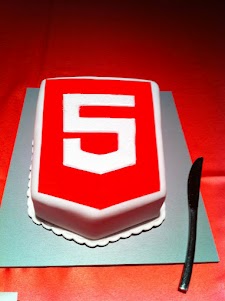
Lets start from the end… It was a great experiance to meet wonerful, smart (web) developers both in London and Tel Aviv. We had 80+ developers in the London event and 130+ developers in Tel Aviv. Like any good event – we started with a good cup of HTML5 coffee and some special HTML5 cake.

After the coffee and some food we got to the ‘talking’ part which went very well. In London we had the pleasure to have Alex Russell who spoke about Chrome Frame (link to his great presentation is in the bottom of this post). In Tel Aviv day we had two external experts: Nimrod Luria and Ron Reiter. Nimrod gave a talk about HTML5 security issues and how to use the best parctices in order to avoid them. Few examples where:

  •  Hacking Facebook with HTML5 using Cross-Origin Resource Sharing.
  • Web sockets (open ports that listen to in bound connections)
  • Good old ‘data cleaning’ and data validation.
  • Client side injections to local databases.
  • XSS by using encoding and new formats that are supported.

Ron gave a talk about backbone.js and how to leverage some frameworks and tools in order to build moden mobile web apps.

Here are the talks (with their slides) from both days:

Time Session Title Description
10:00-11:00 HTML5 and new breed of web application Web developers have nearly perfected their skill at building great web sites, but everything is shifting towards building apps.  We’ll take a look at what defines a great Web App and show you how you can use HTML5 to create a new breed of web application that will delight and amaze your users. Ido Green
11:00-11:55 Platform, Storage, Prediction, Translation and more Google Cloud Platform latest and greatest Barak Regev
13:00-14:00 mobile web app HTML5 stack A -For modern mobile browsers Learn what it takes to build modern mobile web apps. We will start with the ideas of “adaptive apps” and “offline first”. Next, we’ll dive into some of the technologies, including MVC frameworks, templating engines, CSS frameworks, laying out views and multi-touch input. Finally, we’ll close off with mobile-specific tips and sweet demos Ido Green
14:00-14:50 HTML5 threats and attack vectors + some attacks demo +
Countermeasures
Security for business web apps – best practices and tips for the real world. Nimrod Luria
Q.rity – Quality Security Solutions Ltd.
A short coffee break to make sure everybody is awake…
15:10-15:35  Chrome Dev Tools Tips and best practices to work with Chrome Dev Tools. Ido Green
15:35-16:30 HTML5 mobile web apps Backbone.js and other tools with real world examples Ron Reiter

More sources from the talks and questions:

and for the ones that wish to try ChromeOS: https://greenido.wordpress.com/2012/01/09/install-chromiumos-on-your-old-laptop/ and https://greenido.wordpress.com/chrome/

Or the Ubuntu guys that want to have Canary.

Standard
Chrome, HTML5, webdev

Google Chrome For Android

Google Chrome is now available in Beta on Android devices with Android 4.0 (Ice Cream Sandwich). This is a huge deal for the mobile web. I’m sure we are going to see some amazing changes in the near future. Since the lunch of the iPad the safari was (the!) popular app and this is a good sign that Chrome is going to rock it on Android. To be able to experience the Chrome interface, but on a mobile devices – so cool. Moreover, under the hood, Chrome for Android includes key support for HTML5 and other open web technologies, which means you can share code across the desktop and mobile platforms. Last but not least, as a developer you want to be able to be productive as possible – so yep, you can now, take advantage of the complete set of Chrome’s powerful Developer Tools through an easy hookup with a desktop system.
A nice explanation

For developers, here is the list of key features in this initial beta release:

  • You now got remote debugging! check ‘how to do it
  • Solid position: fixed support. Yep, you can now have your menu, navigation buttons in the same place without any hacks.
  • IndexedDB support for storing data – It’s time to save data on the client and make you app work offline. You can also use the HTML5 FileSystem support for assets
  • Smooth scrolling of pages and elements
  • Hardware accelerated CSS transforms/transitions, canvas
  • Web Socket support
  • Web workers.

Resources:

  • Get Chrome on Android Market (Currently available in: United States, Canada, United Kingdom, France, Germany, Spain, Australia, Japan, Korea, Mexico, Argentina, Brazil).
  • FAQ – It contains some answers to things you wish to ask… Check it out.
  • http://code.google.com/chrome/mobile/
  • The Official post from Chrome Blog
  • Found a bug? Please help us by reporting it here at crbug.com
  • Pss… The new Chrome for Android including AppCache, localStorage, WebSQL, the File APIs (File, FileList, FileReader, Blob), and IndexedDB. All these technologies enables your web app to access data offline. In addition to the IndexedDB interfaces, data can be accessed offline through use of the localStorage API.
Standard
Chrome, HTML5

How To Get Your Web App Into The Chrome Web Store

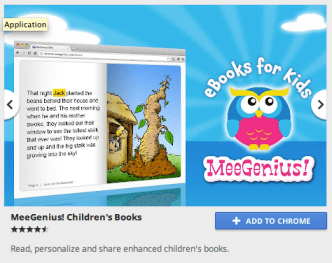
It use to be very easy to upload your web app to the Chrome web store. This short and simple tutorial showed you the main steps. However, things are now (even) simpler. All you need to do it to open Appmator web app. This online tool will help you put your web app into the Chrome Web Store in minutes (less then 10 in most of the cases and that include making coffee in the last 3 minutes).

Here are the main steps you should follow:

  1. Go to Appmator web app.
  2. Add you web app url to the main line. We’ll it’s the only line there – so you can’t go wrong.
  3. Add some amazing graphics. Seriously, your icons and images should be really good. It makes all the difference in the world to have assets that show the user how attractive your web app is looking. You can check at the bottom of the post for some examples on the small image graphics and at the top on some larger image. A good example of a web app that take this point is Gojee.
  4. Download the zip file.
  5. Go to the Chrome developer dashboard section and upload your web app. An important tip is to make sure the detailed description includes the terms your users are likely to search for. You might want to check out listings for similar apps to get ideas for how you should present your app.
  6. Go have a drink.

Btw, if you already have a web app (or extension) in the Chrome Web Store – you might want to take a look at this good tutorial that my friend Sam Dutton wrote on ‘how to update your assets’.

Standard
Chrome, HTML5, JavaScript, webdev

Web Development – Some ‘Good To Great’ Tools

I’ve started to create a list of some great online tools that will help you (and me) in the next project. Some of the tools are helping to achive a certain effect (=gradients) while others are more a ‘hello world’ examples to hack around it in order to understand a new HTML5 API (e.g. HTML5 File API) and then harness it to your next web app. You might say it’s not a tool and you might be right. I guess it is more a list of resources that might help you get better at what you do.

If you got some other good sources please let me know… Here is the list:

Browser capability

Before you start your project you need to check what is the set of features and which browser will support them. There are few sites that will give you good answers. The lastest one is: html5please.us and other good sources are caniuse.com which include mobile browsers as well and mobilehtml5.org that is all about capability for mobile browsers.

JavaScript MVC frameworks

There is a new kid on the block – Thorax I like that fact that it is an opinionated backbone application framework. It is a combination of several tools:

Another framework that is worth the time to look into is: emberjs and Trello tech stack that is coming from the great dudes of ‘Fog Creek’.

If you wish to check what other options you have today – I would go to this site and check some of the most popular MVC framework that are out there.

Work and share javascript online

I also found myself using Simple JSON viewer in cases you wish to find out a specific parameter in a large JSON object.

Playing with CSS3

Libraries for Fonts

  • Google Web Fonts API – Google Web Fonts makes web fonts quick and easy to use for everyone, including professional designers and developers. We believe that there should not be any barriers to making great websites.
  • TypeKit – Simple, bulletproof, standards compliant, accessible, and totally legal fonts for the web.

Offline Libraries & Frameworks

  • ManifestR – a bookmarklet for creating an AppCache manifest file.
  • LawnChair – a library that provides a lightweight, adaptive, simple and elegant persistence solution.
For Mac Web Developers

    • LiveReload monitors changes in the file system. As soon as you save a file, it is preprocessed as needed, and the browser is refreshed. When you change a CSS file or an image, the browser is updated instantly without reloading the page.
    • CodeKit automatically compiles Less, Sass, Stylus & CoffeeScript files. It effortlessly combines, minifies and error-checks Javascript. It even optimizes images, auto-reloads your browser and lets you use the same files across many projects.

Mobile web development – Some good reads

It is far from being a full list – just a beach-head to start have a source for some tools that will make you more productive.

Standard
Chrome, HTML5, webdev

HTML5 Training Day (Mountain View) – Summary

Well, in the past month I was busy organizing this HTML5 Training Day for business web developers. You may want to stop and ask:
What Is HTML5 Training Day? So, our main goal is to have an open conversation with business web developers and to provide them with tools and knowledge to implement HTML5 features into their web apps. In this one day event, world-class experts talk about tools, tips and best practices in web development with focus on business.

It was a lot of fun and last week, we had in Google more then 24 companies that came to learn about the latest and greatest in the open web technologies.

We started the day with a short presentation that I gave on ‘The State of ChromeOS’. It’s amazing to see how fast is the pace and I suspect we are going to have a great 2012. After that (and two more cups of coffee) we got Pete LaPege (an excellent speaker, if I may) talking about: “HTML5 and new breed of web application” which aim to cover what defines a great Web App and show you how you can use HTML5 to create a new breed of web application that will delight and amaze your users.

Another cup of java and another web ninja: Mr. Eric Bidelman gave great talk with lots of demo on the ‘bleeding edge features in Chrome and the open web platform“.
and some HTML5 offline features. 

For the developers who wish to do ‘mobile first’ – we had a surprise from the snow country. Mr. Boris Smus (that build web stuff that make you – wow! for real) talking about A mobile web app technology stack. Here in his own words: “…Learn what it takes to build modern mobile web apps. We will start with the ideas of “adaptive apps” and “offline first”. Next, we’ll dive into some of the technologies, including MVC frameworks, templating engines, CSS frameworks, laying out views and multi-touch input. Finally, we’ll close off with mobile-specific tips and sweet demos.”

After Boris we had the pleasure to host David Kaneda (for the few that don’t know, David Kaneda is a creative web technologist. He created jQTouch, a jQuery plugin for mobile web development, and Outpost, the original iPhone app for Basecamp.) David gave another great talk on “Abstracting CSS for Complex Theming Systems.”

In the afternoon, Mr. Seth Ladd (The Michael Jordan of Dart) spoke about Dart and how it is a comprehensive effort to help app developers build complex, full featured, high fidelity apps for the modern web. He gave some nice short demos that showed the language, libraries, and editor of Dart.

Last but not least, Mr. Christos Apartoglou (The Chrome Web Store Chief) spoke about  Success stories in CWS. He talked about some bold success stories and showed what makes apps in the Chrome Web Store successful.

You can see the format of the day with the full descriptions of the talks over the public schedule that we kept for that day. It was a good tool to have a back channel (using the chat feature on the document) and to allow everyone to keep updated with the last minute changes. I hope to have some videos from that day public… I will post them here and on my G+ page.

See you all in our next Training day.

Standard
Chrome, HTML5, webdev

Mobile Web Performance

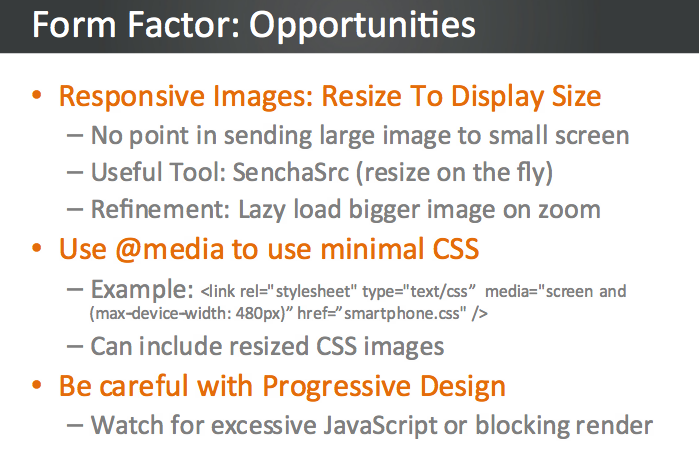
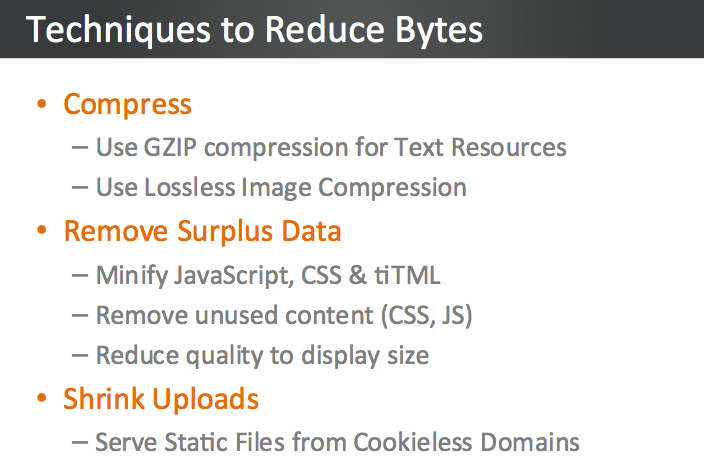
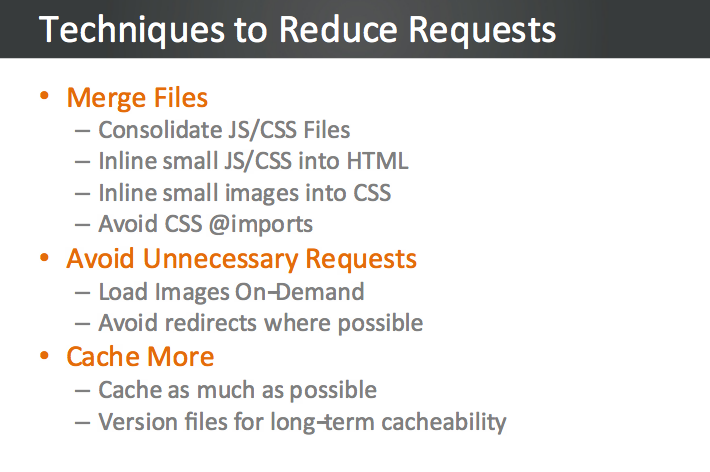
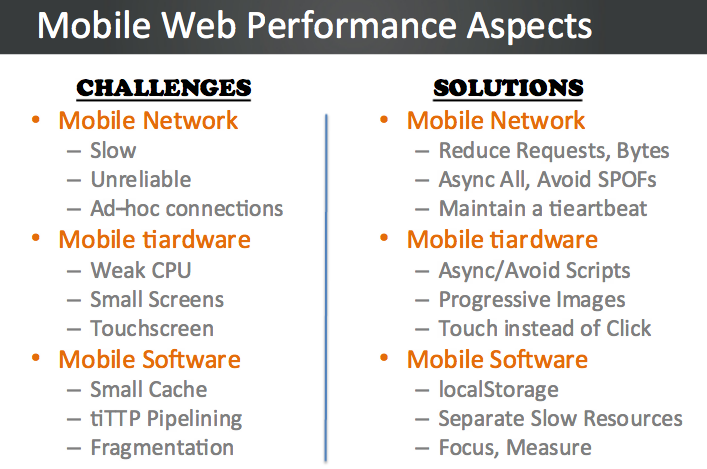
“You can’t manage what you can’t mesure” And it’s not easy to manage or get a clear picture on mobile web browsers. Since this is a very important subject to any web developer and specially those who focus on their ‘mobile first’ plan. I’ve saw this good presentation on this subject and wanted to share with you my main takes. Studies show that Mobile users expect equal or better performance than desktop, where they demand 2s load times. This is a hard requirement to fulfill, give the limitations mobile imposes. Guy Podjarny (the CTO of blaze.io) go over the different aspects of mobile: network, hardware & software. We’ll review the challenges each presents, understand how they affect web performance, and show ways to overcome those challenges. We’ll also show the impact of these optimizations on real world sites, gleaned from manipulating and measuring websites using Blaze technology. We’ll summarize with updates on the recent mobile OS releases, followed by Q&A.

The video of this talk

My notes from the talk

  • You will lose 13% of your users after 2sec! and 25% of your users after 4sec of load time.
  • HTML5 is supported on mobile so use HTML5 localStorage for caching: It’s available on all major mobile platforms. It doesn’t expire and it will survives power cycle. Its size limit is around 5MB so it’s most useful for caching javascript and CSS files (like Bing and google search pages are doing on mobile browsers).
  • Scriptable access enables other optimizations.
  • Use far-future expiry dates
  • You got more then ‘2 connections’ on modern mobile browsers (e.g. Galaxy S got a max of 12 connections) – so use them in parallel as you can.

 Other good tips

The presentation

Happy new year!

Standard
Chrome, HTML5

HTML5, ChromeOS And Chrome Web Store (Video)


Here is a talk I gave in Tel Aviv GTUG. The title of the talk was “Html 5, Chrome OS & Chrome Web Store” and it’s all in Hebrew this time. The event was very cool with two other talks that were very interesting. If you work with Google technologies I would recommend you check out the GTUG (=Google technology user group) near your home town. It’s a great way to meet other strong developers, product managers and anyone that love the open-web.

and our HTML5 dude:

Standard
Chrome, HTML5

HTML5 And Offline – Videos From Google Developer Day 2011

Demos in the keynote


The Chrome HTML5 demos are starting around 40:34…

Bleeding Edge HTML5

The GDD TLV Clip

I hope to get others as well… I’ll update this post with them.

If you wish, the full list of videos from this event is here on youtube.

Standard
Chrome, HTML5, webdev

HTML5 On Mobile Devices (iOS, Android & Windows)

More and more we see mobile devices with stronger browsers that implement a lot of HTML5 APIs. This is other factors are the root cause that mobile development has taken off. Many developers are choosing to go the mobile web route instead of writing the same application repeatedly for each different mobile platform. However, one of the things that you give up by “going web” is the application frameworks that make life easier for developers of native mobile applications. As a result, several web application frameworks are emerging. In this post I will look at some of the best frameworks: jQueryMobile and Sencha Touch. There are some other very good MVC frameworks that are worth look into: SproutCore, Cappuccino and backbone.js but that will be in another story (=post).

Let’s start with one of the most popular JavaScript library – jQueryMobile It’s now in version 1.0 and it’s a powerful HTML5-based user interface system for all popular mobile device platforms. They have a set of UI components that give the developers a lot of power. Its lightweight code is built with progressive enhancement, and has a flexible, easily themeable design. If you are developing apps for business (think components like grids) you might want to take a closer look at Sencha ExtJS and other products. They have a good integration with GWT (if you use it) and overall, they give the developer a lot of power: clean component model, powerful UI widgets etc’. There are some new capabilities that give more native look and feel to your web apps. The first is the Fixed position – Psss… its great for your menu at the top of the screen. I hope will see its adoption on other mobile browsers (and not just the safari 5+). Another cool aspect is the new ‘Path‘ button dynamics all in pure CSS and scroller live demo.

The wave of HTML5

The wave of HTML5 apps is here

Deployment

One of the ‘easy’ parts it the deployment. Once users added your web app as shortcut to their home screen it will be there and updated each time they starting it. You can also, use the Android, iOS stores with a webUI wrapper and tools like AppsGeyser or AppCelerator that will do the work of wrapping for you. I hope that in the future the webUI that we get in iOS/Android will be as good as the webkit we have in the browser on the same platform. Currently, it’s got some limitations. Lastly, in case you wish to check what HTML5 features will work on each device you are targeting: This is a good source: http://mobilehtml5.org/ and for more stats and development tips checkout my last post on html5 on mobile.

Be strong.

Standard