Business, Chrome, life, webdev

Tools That Make You More Productive

Java posse roundupDuring the first day of Java posse roundup 2012 I’ve took some notes from all the interesting session I’ve been in. The first day was a great start to the conference with two session that were very interesting with lots of good stuff to start and checkout. Here are some of the notes I’ve took from the session about “Tools that make you more productive”.

The first suggestion was (surprise – surprise) Whiteboards with some good tips like:

  • Big boards for work in meetings
  • Small portable boards that people can take back to their desks
  • Pictures of boards for later reference/distribution – good mobile apps for that are:
    • CamScanner+ phone-based scanning to PDF, etc.
    • Camera+ with its text mode filter.

My favorite editor Sumblime Text was next in line. There are many great tips and ways to make you efficiant using it. I will try to post on that later this week. You can start by using ctrl-p for smart search and improve your knowledge of short-cuts.

Productivity tools:

  • Workfloy.com – good for plan/todo anything that need list/sharing and a nice web app.
  • join.me – Hassle free screen sharing.
  • Evernote/SpringPad  – Everything you want to remember on every device you use.
  • Plain-text – good for note-taking, searching
  • SimpleNote
  • Lightscribe pen – It’s not a pure online tool (but it can be uploaded). It’s a good solution for people that like pens but want to be able to have their drawing/writing digitize for future search.

ToDo:

  • Any.do
  • “do it tomorrow” – for Android
  • Pomodoro technique – Tomatoes.com web-site for pomodoro

For the (web/Java) developers among us:

  • Standing desk
  • large monitor (or even 2-3 of them).
  • best mouse, keyboard, monitor you can buy. On every tool that you use daily you want to buy the best.
  • SSD (or hybrid HDD/SS)

How to handle interruptions:

  • Turn off all distractions: facebook, twitter, IM, IRC etc’
  • Work at home
  • Headphones
  • Go in early – the few hours without people around in the morning are your 1-2 productive hours of the day.

email considerations:

  • Establish policy/reputation of NOT responding rapidly/frequently to emails – unless it is something urgent and then the other team members know to IM you or just call.
  • Use email header/subject to distinguish FYI, ACTION REQUIRED, URGENT then you can use priority box in gmail (or filters) to make sure you get to the most important stuff first.
  • Boomerang for gMail – It is a good extension that let you set the time of sending so people will get the emails at the start of their work day and not in 23:45 at night.
  • Separate user account on workstation that has no email access
  • Use email search for trouble-shooting hints, etc.

Software (Java) development:

  • JRebel – with and without GWT.
  • Play framework – It was great to have a session in the zero day with James ward on play with Java and Scala. Very cool stuff under the hood of Play.
  • Write more tests – focus on the parts that you don’t want to do.
  • Pair programming (in disciplined doses)

Team communication:

  • hipchat.com
  • Yammer
  • Campfire and it’s ‘brother’ Propane apps.
  • Google hangouts (with screen sharing) is powerful tool for meetings.
  • Skype.

General hints:

  • Environmental hooks (e.g. SBT)
  • Python scripting
  • Command-? on Mac to drive menu from keyboard
  • Avoid the mouse; use keyboard shortcuts
  • Mylyn with Eclipse
  • Time tracking per task
  • Reviewing “painful things” per iteration
  • Track time spent on interruptions

If you have more, please let me know in the comments or g+

As for the lighting talks, I was able to hack a little site: jpr12ns.appspot.com (It’s JPR12 and NS for ‘no snow’) to hold all my talks since we had only two nights for the lighting talks so I got some talks ready for next year.

Standard
life

People Around The World

Another one in the ‘series’ of fun and happiness… Some real nice shoots in this video. From the fastest climb on Mt. Eiger (BTW, the Eiger (3970 m (13025 ft)) is a mountain in Switzerland.) to some amazing base jumping. Not to forget some days in the snow that only the true lucky ones are getting the chance to experience.

Standard
Business, life

How To Be Better At What You Do?

Shawn Achor is spreading few ideas in this excellent TED talk. I like the debate on what to do on Friday night… He got some good real-life jokes in it. There are other thoughts that come to mind once you see these 12min. Some of the facts that he mention are very true. You see it time and time again. People are living in a dream but don’t appreciate it, nor realize HOW good their life are. There is always another mountain/project/challenge that they wish to achieve in order to be happy.


If you combine Mr. Achor with some of the thoughts from Dan Gilbert and “Why are we happy?” It seems clear that we do have some sort of “psychological immune system” and if we will know to control it better – life will be more productive and pleasant.

BTW, I don’t agree with Mr. Gilbert findings, but unlike him I can’t proof it. I guess it’s time for me to change ‘Be strong’ to something like: ‘Be strong and happy’.

Standard
Chrome, Design, life

3D Art, Mobile And A New Tutorial On Web Databases

Why mobile native apps must die

This is a very interesting talk by Scott Jenson. He speaking about the ‘anti phone’ and why  a phone that is based on a browser will be very useful (to say the least). From his talk description: “…Mobile apps are on a clear trajectory for failure. It’s just not possible to have an app for every device in my house, every product I own and every store I enter. Much like Yahoos original hierarchy gave way to Google’s search, applications have to give away to a “just in time” approach to applications. This talk will explain how applications must give way to a more universal approach to application distribution, one based on the mobile web and cloud services. The problem of course, is that the mobile web has both hands tied behind its back. Any mobile app today is locked away behind a browser ghetto: in effect, a sub OS inside a larger mobile OS. This isn’t just an arbitrary technology debate, a just-in-time approach to application functionality can unleash entirely new sets of application, ones which are impossible with native apps. This talk will layout how this problem can be fixed, and what changes need to take place, outside of just HTML5, for it to happen.”

Migrating your WebSQL DB to IndexedDB

Lastly for this post, as WebSQL is deprecated, I recommend web developers to stop using the technology in new projects, as, effectively, the spec will receive no new updates and browser vendors aren’t encouraged to support this technology. The replacement is IndexedDB. As a ‘NoSQL’ database, IndexedDB is very different from relational databases, and it give us lots of power. IndexedDB let us create an Object Store for a type of data and simply persist Javascript Objects to that store. Each Object Store can have a collection of Indexes that make it efficient to query and iterate across. In this tutorial I’ve showed how you can convert the current usage of WebSQL and start leverage IndexedDB.

And let’s finish with some art…

3D Art + Com

Standard
Chrome, life

Great Apps For Your Chromebook

Web-based applications are programs that are designed to be used entirely within the browser. Using apps, you can do anything (well, almost!).

These days, web apps are capable of dynamic functionality that you expect from desktop applications on your computer. If you use services like Gmail or Google Maps, you’re already using apps! Apps have the following advantages over desktop applications:

  • Apps install in seconds, with one click of a button. When you install a web app from the Chrome web store you get some nice new features like: unlimited offline storage, geo information, notifications etc’. So as a web developer, you might want to use this channel to make your users happy (or happier).
  • Apps are always up-to-date. Because apps are hosted on the web where they can be instantly updated, you can be sure you’re always using the latest version of the app that’s available.
  • Apps won’t crash your computer. If one app misbehaves, just close its tab in the browser. Your browser and computer won’t be affected.
Here are three lists with good (to great) web apps to make you (even more) productive.
If you have other suggestions, please let me know.

Apps For Everyday

If you want to… On a Chromebook, you could use…
Save a file Google Docs (which are working great in offline mode since June 2012) or Box or the Generic solution CrOS Save that will give you Dropbox and many other cloud solutions.
Read my email Gmail or other webmail services like: yahoo, hotmail etc’.
You can also try Offline Gmail to be productive on the times you don’t have an internet connection.
Organize my events on a calendar Google Calendar (which work offline!) or 1Calendar
Write a document Google Docs (which work offline!), Scratchpad or Quick Note
Chat with friends and family Google Talk or IMO
Watch a movie, clip, or tv show Netflix or YouTube
Edit a video or movie Stupeflix or YouTube Video Editor
Listen to music Pandora or MOG
Organize and save my music Google Music or mSpot
Edit or create music Aviary Audio Editor or Beatlab
Play a game Angry Birds, WGT Golf Challenge, or explore more games
Edit, organize, and store photos Picasa Uploader, Aviary or Picnik
Draw a picture Sketchpad or Sumo Paint

Apps At School

If you want to… On a Chromebook you could use…
Take notes or write a document Google Docs, Scratchpad or Quick Note
Create a presentation Google Docs, SlideRocket, or 280 Slides
Create a spreadsheet Google Docs or Zoho Sheet
Keep track of things to do Google Tasks or Springpad
Do research for my project Google Books or Academic Earth
Plan for a project Zoho Projects or SmartSheet
Do some calculations Calculator app or Scientific Calculator
Look up word definitions Google Dictionary
Keep track of time Alarm clock app

Apps At Work

If you want to… On a Chromebook you could use…
If your company uses Citrix to host applications and you wish to work on them in remote. Citrix Receiver
Do your tax (hopefully before April) Turbo Tax
Work on your mail while you don’t have connection (e.g. flight, train etc’) Offline Gmail
If you hungry and want to cook something tasty. Gojee
Write a document Google Docs or Zoho Writer
Create a presentation Google Docs, SlideRocket, or 280 Slides
Create a spreadsheet Google Docs or Zoho Sheet
Manage accounts and taxes Wave Accounting or Zoho Books
Organize personal finances Mint or CashBase
Develop or debug code Cloud9 or Koding
or just go deep with my post on the subject
Here is a good intro to ‘what is a web app’?
Standard
life, Sport

Nike Night Run – Tel Aviv 2011

What a great event…

It’s very cool to run with so many others in the streets of Tel Aviv in a perfect weather.

For more photos and information you can check out Shvoong

and the results


Standard
life

How To Live To Be 100+

Good points in this Dan Buettner’s talk from TED 2009
Some pointers on how to make systemic change to cities and food choices to enhance health.

Standard
Chrome, HTML5, life, webdev

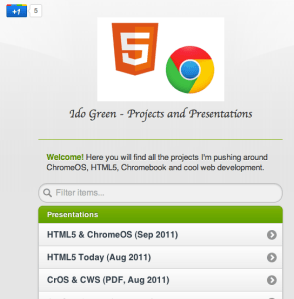
Updated Site For Projects and Presentations On ChromeOS & HTML5

I wanted to update ido-green.appspot.com since the first day of pushing it to the air… Finally, I had the time to put some new jquery-mobile (just went to RC1.0 !)  into work and have this simple location for all the talks, demos and projects. Please feel free to let me know if the colors are not making me look good.

Ido Green on Appsport

Standard
Business, life

How To Bind Business And Web Apps

Let’s start from the end. You need to “Focus On Fascinating Triggers”. Yep, it’s a bit off my main theme… but still great ideas in few slides (21 if you really want to know the number, because the last two slides doesn’t count). I guess that any web developer that wish to gain momentum and lots of users should pay attention and try to push the right buttons in the right segment in the market. Here is a better wording of this idea:

I like the idea of “…If you trigger LUST you will draw others closer…” and “…Trigger mystique and you’ll encourage others to learn more about your message…”

Be strong.

Standard
Business, life

Social Interaction 2011

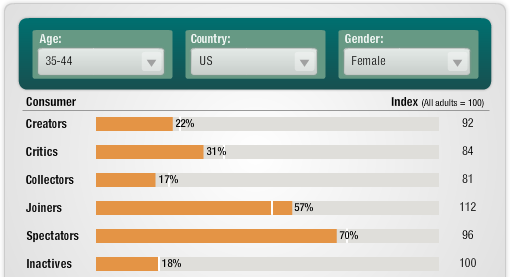
Here is the output of a conversation I had on G+ few days ago… the quality of the comments was so good, that I thought it make sense to put it here. First source that brought to my attention was from Forrester. It’s a very cool tool to let you see how people in certain ages are interacting with social sites.

The other source, is a presentation that give some insight about the % of people that create content for the world to consume.

Here is a short example. You can see what is the break down for the age group of 35-44/USA/Female (you have 2 guess, on why I’ve choose it).

BTW, there is a good post by Mr. Wilson about this subject and how twitter usage is ‘similar’.

Standard