Chrome

Chrome 45 New Features

google-chrome-logoTime flies!
Since my last update on Chrome 44 we had the chance to see the market crash and quite a lot of new features that were baked into Chrome 45.
The main improvements you should take a closer look at:

  • A set of new ES2015 features including:
  • SMIL is deprecated – to learn more please check out the discussion.
  • This (long time) bug is fixed.
  • Web Bluetooth is now available in Chrome OS 45.
    It’s still in Developer Preview and the team is actively looking for developer 
    feedback.

Chrome for Android Media controls
On Android, native apps can show media controls in a system notification when playing audio, making it easy for users to control audio while multitasking. Chrome 45 brings this capability to the web by showing a notification with media controls when audio is playing in web content. The controls will automatically show up when <audio> or <video> tags play audio longer than 5 seconds. It will look like this: Continue reading


Standard
Chrome, HTML5, JavaScript, mobile, webdev

Make Your Web Forms More Efficient

Ido's payment formForms are the main ‘entry barrier’ to anything meaningful on the web. It might be a registration form, sign-up form or a shopping cart. In all of them, you wish to do the best in order to delight your users and lower the friction.
In the slides below, we will cover the best practices so your forms will rock.

Continue reading

Standard
Android, Business, Chrome

App Monetization Course #StartupTips

app-mon-imageIn the past year, I had the pleasure to work with  and the rest of the professional team in Udacity on a course that aim to help developers and entrepreneurs. There is no higher form of user validation than having customers support your product with their wallets. However, the path to a profitable business is not necessarily an easy one. This course blends instruction with real-life examples to help you effectively develop, implement, and measure your monetization strategy, iterating on the model as appropriate. In a nutshell, it will help you make money.

Go try it at: udacity.com/course/app-monetization–ud518

Continue reading

Standard
Chrome, JavaScript

Chrome 44 New Features

google-chrome-logoChrome 44 is now in stable channel and there are many updates and improvements:

And there are a lots of other improvements and security fixes.

What is hot and new on the web?

Continue reading

Standard
Chrome, webdev

Chrome Adoption In Israel (Summer 2015)

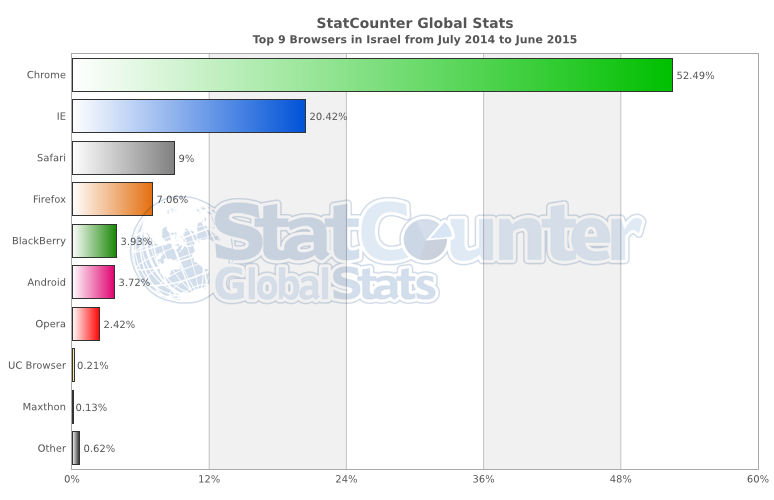
Since the start of the year, the Chrome adoption is moving in one direction. Very impressive considering the mobile trends.

StatCounter-browser-IL-monthly-201407-201506-bar

Continue reading

Standard
Chrome, JavaScript, mobile, webdev

The Latest From The Web

google-chrome-logoA lot of new interesting APIs that are pushing the web platform forward introduced with Chrome 43 (now in Stable). Let see the ones that are going to impact a lot of users.

  • The Fetch API now allows developers to directly operate on and incrementally release the bytes of streamed network responses, in contrast to the equivalent XMLHttpRequest functionality that requires developers keep the entire in-progress stream response in memory.
  • The Cache Storage API, previously only available in service workers, now provides developers full imperative control over their caching in the page context. This is huge! It will enable users to have better (=faster) experience in places where the connections are not good.
  • Autofill and Autocomplete – People hate filling out web forms, especially on mobile devices, learn how to help them complete it up to 30% faster. (And yes! I wrote it).

Continue reading

Standard
Chrome

Web Forms Best Practices

The Tree

Here are some of the rules that will help you build better forms. As we know, it’s a mobile world, so we wish our forms to be responsive and mobile first by nature. Let’s see how to do it right.

Use big font size and provide easily touch buttons

Here it’s simple, when you have doubt, make things bigger and check. In other words, you wish your fonts to look great both on mobile and desktop. For mobile, a rule of at least 16px will be a good start. Why? because it’s big enough in most cases for mobile. Plus,  this minimum size will prevent all iPhones from zooming into the fields. For buttons and touch areas, start with at least a size of 32px for the input field height. This will ensure it’s not too small. However, check it both on mobile (few devices from 4″ to 6″) and on larger screens (=desktop or large tablets). Both Foundation and Bootstrap gives you a default size for such elements that is good for mobile.

Take advantage of Autofill

This will enable your users an easy way to complete forms with pre-populated data.  Look for opportunities to pre-fill information you already know (e.g. Geolocation to fill the zip code), or may anticipated to save the user from having to provide it. For example, pre-populate the shipping address with the last shipping address supplied by the user. See it in action at: greenido.github.io/form-example.html Continue reading

Standard
Chrome, JavaScript

What’s New On The Web And Chrome

In tslack-logohe last post about powerful new APIs we talked about Service Worker, notifications, push and more. This week we got some other news, videos, slides and a new slack channel for web developers that you should take part in.

New Stuff Around The Web

  • Google Tone is an experimental Chrome extension for sharing the URL of the current tab with other computers by using audio!
    Yes, it does not use Bluetooth, NFC or WiFi: it only sends audio waves. “Google Tone turns on your computer’s microphone (while the extension is on) and uses your computer’s speakers to exchange URLs with nearby computers connected to the Internet.”
  • Can web apps be as smooth and slick as native? YES!
    Paul Lewis made a web app to show how. The app uses all the latest goodies, including Service Workers, ES6 Classes and Fat Arrow functions, and Promises.
    Check out his blog post here for all the details!
  • The best (new) show in town about best practice tools.
  • Another new location we maintaining to hold all the news around web development: https://developers.google.com/web/updates/ and if you like medium we got a new channel there as well.
  • Polymer 0.9 library is released!
    The 0.9 release is very similar to 0.8, with many of the “experimental” 0.8 features now officially supported.
    Full release notes for 0.9, including the breaking changes from 0.8, are available on the Polymer site.
  • Two new videos from talks that Paul Lewis and Jake Archibald gave last week:

Continue reading

Standard
Chrome, webdev

Mobile Sites Improvements – Push Your PageSpeed Score Up

In the past, I wrote about ways to improve your mobile website.
In this short post, we will focus on one tool that could help you move the needle. PageSpeed Insights is a free tool for developers to check how their site performs out in the wild. It also got a good API so you could use it during your build process.

Here are the current results I see on my projects’ site: Continue reading

Standard
Chrome, webdev

Chrome’s Market Share And Service Worker

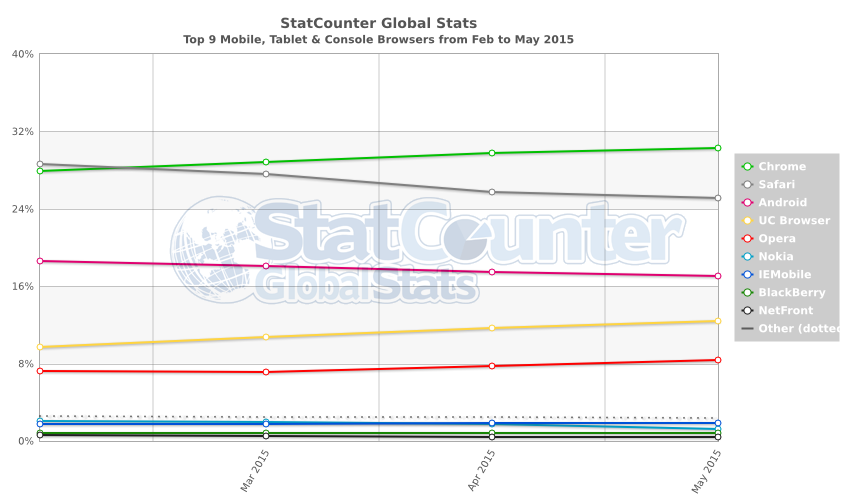
According to Stat Counter in the past 3 months Chrome made a progress in market share. It’s now got ~31% world wide. But if we dive a bit deeper into the chart below we can see that the situation on mobile is even better.

StatCounter-browser-ww-monthly-201502-201505

Take into consideration that Chrome + Android + UC Browser + Opera is ~70% of the market it’s a great news for web developers in terms of APIs. I hope to see soon the power of Service Worker and Push notifications in many more browsers. It’s the start of a new wave of web apps that look and feel similar to native apps. Continue reading

Standard