Chrome, JavaScript

The Little Prince And The Better Parts Of Javascript

The little price“It seems that perfection is attained not when there is nothing more to add, but when there is nothing more to subtract.”

In this (quality talk), Douglas Crockford talks on the better parts of JavaScript. As always, it’s an opinionated talk, so choose what you wish to take from it for your next project. There are many aspects that Douglas touch on, that are very helpful to any technology you are using. I truly like his opening from “The little prince” ‎- Antoine de Saint-Exupéry. Great points on software development and especially JavaScript’s holes you wish to avoid.

Btw, back at 2010 I’ve recommended his book – Times fly.

Standard
Chrome

DLD TLV And Frontend Development (In Hebrew)

Screenshot 2014-09-16 20.25.37Today, I’m going to be at DLD TLV – if you are around…

Please come to say hello.

Continue reading

Standard
Chrome, HTML5, JavaScript, webdev

uptodate.frontendrescue.org just got a hebrew version

fed-uptodate-hebrewI’ve been contributing to this cool project: github.com/frontend-rescue/keep-up-to-date and today it’s live!

If you wish to check what are the best practices for front-end developers (in hebrew) this is your version: http://uptodate.frontendrescue.org/he/

Good luck.

Standard
Chrome, JavaScript, webdev

How To Create A RESTful API

Google APIs with picturesque app

If you wish to read the background on RESTful APIs It’s all started here.  You can look at some good examples for RESTful APIs from Google, Twitter and many others. In this post, I will try to focus on some important aspect that you want to keep in mind when you are building your next RESTful API. Btw, if you are looking on an efficient way to create it – Checkout my talk from last Google I/O. It’s over a year now, but still very relevant.

Main aspects to pay attention

Continue reading

Standard
Chrome, mobile, webdev

A List Of Great Mobile Web Apps

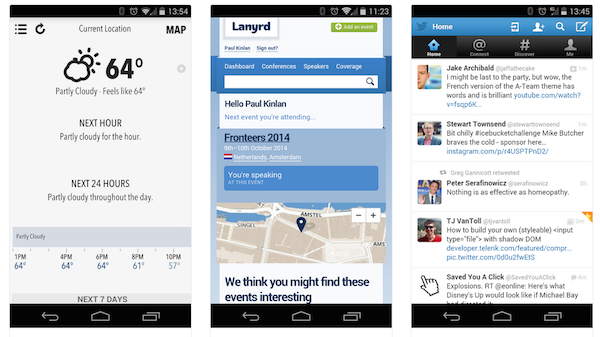
mwa-examples 2014-08-21 14.16.36In the past, I gave few presentations on ‘Modern web apps‘ and each time I tried to show compelling examples.

Here is a new source (mobile web apps ftw) that might help you see what can be done (today) on the mobile web.
Few good examples to checkout:

  1. Weather App
  2. Lanyrd (For your next conferences).
  3. Stanford
  4. Financial Times
  5. Alerts in Israel (hebrew)
  6. Time Tracker (hebrew)
  7. GitHub
  8. Twitter
  9. Gmail

Another good site to get insperation is: mobile-patterns.com
If you have other great suggestions – please use the comments and I’ll add them.

Standard
Chrome

Opera Mini to nurse Microsoft’s feature phones through their dying days

Great news for the mobile web.
As Opera jump on Blink few months ago, it will be great to have this powerful engine on Microsoft phones as well.

David Meyer's avatarGigaom

Opera has inked another deal with Microsoft – after Opera’s full-fat mobile product became the default browser on the Nokia X2 Android handset, Opera Mini will now be the default on Microsoft’s feature phones on the Asha, Series 30+ and Series 40 platforms.

The eagle-eyed among you will have spotted a slightly limiting factor in all this: [company]Microsoft[/company] is killing off almost all of these devices — extremely low-end Series 30+ devices like the newly-launched Nokia 130 may survive a while longer — in a push to take Windows Phone towards the bottom of the market.

But it will be a slow death, over the next year and a half or so, and Opera will be there for their twilight, gently shoving the currently-default Xpress Browser to the side.

“Users will begin to receive notifications on their phone starting October 2014, providing them with information on how to upgrade from…

View original post 97 more words

Standard
cloud

Install A VPN Server On Google Compute Engine

photo_openswanIn this tutorial, we will go over the simple steps to install an IPSec/L2TP VPN server on google compute engine.
Why?
There are many cases that we need to use a secure channel between a local machine (it might be the firewall of our office or just your development laptop) and our cloud infrastructure. The answer (in most cases) is to have a VPN server in our cloud that will be the entry point. Here we are going to look at a client-server solution. If you are looking at a solution that will give you server to server configuration please go to this post: greenido.wordpress.com/2014/04/10/how-to-set-a-vpn-on-google-compute-engine/

First, I’m going to assume you have an account with Google cloud and you already know how to launch an instance on Google Compute Engine. If not, this post could help you do it in less then 5 min.

Continue reading

Standard
JavaScript, webdev

YouTube Analytics Dashboard With Apps Script

player_apisThere are cases where you wish to collect statistics on your youtube videos or channel. There are few options to do it with YouTube API. As the YouTube’s API supports many languages you can choose the one that will work for your environment. In many of these options, you will need to develop a server side that will fetch the data and a front-end to present it and give the users option to query it. If you wish to dive deeper (e.g. specific metric on channel performance and videos statistics), you will need to work with YouTube Analytics API.

In this post, we will see a simple example to create a dashboard that will be updated on a daily basis. Since we wish to save ourselves from building (and maintaining!) a server side and a web app to access it, we will use the power of Google Apps Script (GAS) and Google sheets.

The Dashboard

Here you can find the “Dashboard example sheet”.
Feel free to copy it and work on your own version that is not in ‘read-only’ mode. Continue reading

Standard
webdev

Git 101- Part 2 (A bit More Advance)

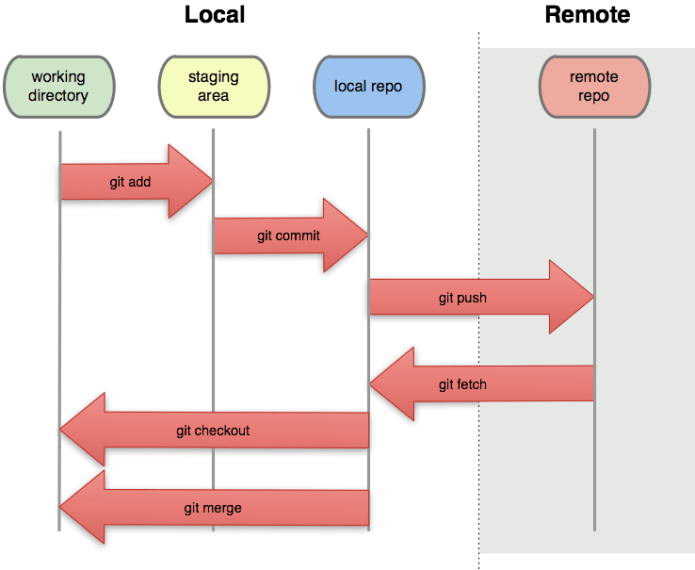
git-local-remoteAfter the first post on Git 101, here is a set of commands you will use after the first 15-20 minutes of working with it. Some are very useful (e.g. stash your work before you can commit it in order to go for a quick coffee when your code is not done) and some are a quite rare (e.g. setting up a git on a remote server). Good luck.

Update & Merge

Creating a branch (and switching to the new branch) in one line

git checkout -b "The new branch name"

  • git pull – to update your local repository to the newest commit. It will fetch and merge remote changes.
  • git merge – to merge another branch into your active branch (e.g. master).
    Remember that in both cases, git tries to auto-merge changes. IF you have conflicts, You are responsible to merge those conflicts manually by editing the files shown by git. After changing, you need to mark them as merged with
    git add
  • Preview changes before merging them
    git diff

Stash

Creating a stash (think of it as a temporary place, like a clipboard to save changes without marking them deep in history) of changes to allow you to switch branches without committing.

Continue reading

Standard
cloud

Upload Data To BigQuery With A Smile

Big QueryWhat is BigQuery?

In our world of ‘Big Data’ it can be time consuming and expensive to query massive datasets without the right infrastructure. Google BigQuery solves this problem by enabling super-fast, SQL-like queries against append-only tables, using the processing power of Google’s infrastructure.

What You need to do?

  1. Move your data into BigQuery – This is what we will do in this post.
  2. Let Google BigQuery handle the hard work.
  3. Query your big data with a smile in this cost/effective way.

How to upload data to Big Query?

There are two main approaches: stream you data or upload it directly from Google cloud storage. Let’s have a look at the steps to leverage Google cloud storage in order to upload data into BigQuery.

The main steps you need to follow:

  1. You will need to prepare your data. In this stage, you need to analyze and think what will be the best format (both JSON and CSV are supported).
  2. In our example, we will show you how to work with CSV files and even better, we will upload them to Google Cloud Storage and later with a BigQuery job we will make sure our data is being pulled automatically into BigQuery.
  3. Run a ‘sanity’ check to see that the new data is in good shape (optional step).

Tips

  • Upload your the data to a project with a good name (The default project names are not too clear in most cases).
  • Consider breaking your data (e.g monthly tables instead of a unique big one) because it will make life easier in the future to update, query and maintain the data source.
  • Have an example dataset with data that reflect the popular cases. This could be great to give developer an option to ‘play’ with the data and see its value.
  • Think on some good and bold example. A few sample queries are crucial to get people started on a dataset.

Continue reading

Standard