Chrome, HTML5, JavaScript, php

Java Posse Podcast Episode On Great Web Apps

In the last Java Posse Roundup (=the best unconference you can attend) we had many very interesting meetings. In this one hour conversation we were talking about modern great web apps and what does it means to different developers. Some of the topics we spoke about where around new JavaScript MV* frameworks (ember, backbone, spine, angular etc’). What we used to do 35 years ago (main frames days!) and what is similar (or not) today. Thanks to @joelneely for correcting me with the title by making a great point on replacing the word ‘modern’ with ‘great’. Some of the topics that were discussed:

Since we had no-snow and free time, we did few ‘rolling’ hackathons in the afternoons. You can browse the coding projects on GitHub JavaPosseRoundup. Checkout, some cool Scala, Android, HTML5 apps that are there. Lastly, I also gave a talk about this topic before the conference at a Google developer meetup. Here are the “Modern Web Apps slides from my talk that contain more good information about the subject.

Standard
Business, Chrome, webdev

Great Web App Session

At the last day (for me) in the Javaposse roundup 2012 we started (like any good day) with camp 4 coffee. Then, after you can speak (more or less) we sat to talk on what does we mean when we say: “Modern web app” or as Joel N. said: “Don’t use the word modern because it will become obsolete before you know it”. When we try to define a great web app here are some common aspects we found:

  • Self Contained
  • Functional
  • Immersive
  • Interactive
  • Works Offline
  • Device Aware
  • App Styled Navigation
  • Client Side Architecture
Few important things we can learn from Amazon web kindle app:
  • Does it cost more to support browser X than it generates?
  • Is the browser older than the mayo in your fridge?
  • Is an exorcist required to debug the app’s behavior?

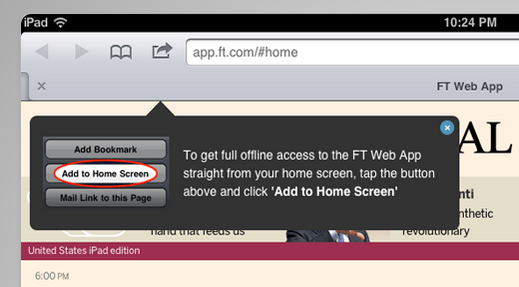
The lesson is to be explicit about the browsers you support (just like Amazon). One of THE success stories about mobile web apps if the Financial times app. You might want to check the slides in order to get the full details of their success story.

Btw, in you can have this new script to help you popup the message for users to add your web app to their home screen. It will make the engejment of your app better and the user will be able to ‘treat’ your web app as any other app.
==

Here are my slides from the lighting talk on Great Web Apps that I gave later this day.

Standard
Chrome, HTML5, JavaScript, webdev

Google App Script Session

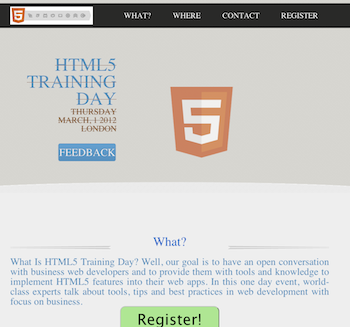
On the second day of the JPR12 we had a good coding dojo (which is a meeting where a bunch of coders get together to work on a programming challenge) during the afternoon activities on Google App Script. The idea was to create a simple, yet functional, system to organize an event. The event could be a training day, hackathon, birthday party, running race, etc’. We started with a template site I’ve created that is built on top of twitter bootstrap-responsive and modernizr (but of course).

The site gives you basic functions like:

  • What  – What is the event goal/mission or why should I come.
  • Where – Information on the venue and where to park. We use some nice custom google map in order to follow the rule: “one picture is worth 10,000 words”.
  • Contact – Who is running the event and ways to get in touch.
  • Registration – Using Google forms and app script, as our backend, we will have a system to keep track on the registration process.
In the system backend code we got:
  • Set up the maximum number of people that could participate in this event.
  • Send a confirmation email.
  • Send a waiting-list email to the ones that are filling the registration form after the maximum number of participate is being reach.
  • Send a reminder email (a week and/or a day) before the event.
  • Lastly, after the event, send an email with a link to a feedback form. We want to be able to improve…
The two interesting parts of this system are:
  1. Simple one page app that will render nicely on phones, tablets and desktops.
  2. Backend that let us run the communication with the participates and keep tracks on the registration process.
Ready to see some (simple) code?
Here is the part that we use in #2:


//
// Call this when you want to send the call 
// for Feedback email AFTER the event is done
//
function sendFeedbackEmail() {
  // Get our main spread sheet into ss obj.
  var ss = SpreadsheetApp.getActiveSpreadsheet();

  // Fetch the sheet with the list of emails
  var dataSheet = ss.getSheetByName("Registration");

  // Fetch the range the contain our information for the email
  var dataRange = dataSheet.getRange(2, 2, 
      dataSheet.getMaxRows() - 1, 
      NUM_FORM_QUESTIONS + 1);

  // First row of data to process
  var startRow  = 2;  

  // Get the email template (you may use html template here)
  var templateSheet = ss.getSheetByName("Email Templates");
  var emailTemplate = templateSheet.getRange("A5").getValue();
  
  // Create one JavaScript object per row of data.
  objects = getRowsData(dataSheet, dataRange);

  // For every row object, create a personalized email from a template and send
  // it to the appropriate person.
  for (var i = 0; i < objects.length; ++i) {

    // Get a row object
    var rowData = objects[i];

    // Only contact people who are 'yes' status
    if (rowData.status == YES) {  

      // Generate a personalized email.
      // Given a template string, replace markers (for instance ${"First Name"}) with
      // the corresponding value in a row object (for instance rowData.firstName).
      var emailText = fillInTemplateFromObject(emailTemplate, rowData);
      var emailSubject = dataSheet.getRange("P2").getValue() + " Reminder";
      
      MailApp.sendEmail(rowData.emailAddress, emailSubject, emailText);
      
      // Make sure the cell is updated right away in case the script is interrupted
      SpreadsheetApp.flush();
    }
  } 
}


Here is the full code for the event site: https://github.com/greenido/events-site-template please feel free to fork, pull and do something cool with it. For more details on the new options and capabilities in Google App Script: https://developers.google.com/apps-script/templates

Standard
Business, Chrome, life, webdev

Tools That Make You More Productive

Java posse roundupDuring the first day of Java posse roundup 2012 I’ve took some notes from all the interesting session I’ve been in. The first day was a great start to the conference with two session that were very interesting with lots of good stuff to start and checkout. Here are some of the notes I’ve took from the session about “Tools that make you more productive”.

The first suggestion was (surprise – surprise) Whiteboards with some good tips like:

  • Big boards for work in meetings
  • Small portable boards that people can take back to their desks
  • Pictures of boards for later reference/distribution – good mobile apps for that are:
    • CamScanner+ phone-based scanning to PDF, etc.
    • Camera+ with its text mode filter.

My favorite editor Sumblime Text was next in line. There are many great tips and ways to make you efficiant using it. I will try to post on that later this week. You can start by using ctrl-p for smart search and improve your knowledge of short-cuts.

Productivity tools:

  • Workfloy.com – good for plan/todo anything that need list/sharing and a nice web app.
  • join.me – Hassle free screen sharing.
  • Evernote/SpringPad  – Everything you want to remember on every device you use.
  • Plain-text – good for note-taking, searching
  • SimpleNote
  • Lightscribe pen – It’s not a pure online tool (but it can be uploaded). It’s a good solution for people that like pens but want to be able to have their drawing/writing digitize for future search.

ToDo:

  • Any.do
  • “do it tomorrow” – for Android
  • Pomodoro technique – Tomatoes.com web-site for pomodoro

For the (web/Java) developers among us:

  • Standing desk
  • large monitor (or even 2-3 of them).
  • best mouse, keyboard, monitor you can buy. On every tool that you use daily you want to buy the best.
  • SSD (or hybrid HDD/SS)

How to handle interruptions:

  • Turn off all distractions: facebook, twitter, IM, IRC etc’
  • Work at home
  • Headphones
  • Go in early – the few hours without people around in the morning are your 1-2 productive hours of the day.

email considerations:

  • Establish policy/reputation of NOT responding rapidly/frequently to emails – unless it is something urgent and then the other team members know to IM you or just call.
  • Use email header/subject to distinguish FYI, ACTION REQUIRED, URGENT then you can use priority box in gmail (or filters) to make sure you get to the most important stuff first.
  • Boomerang for gMail – It is a good extension that let you set the time of sending so people will get the emails at the start of their work day and not in 23:45 at night.
  • Separate user account on workstation that has no email access
  • Use email search for trouble-shooting hints, etc.

Software (Java) development:

  • JRebel – with and without GWT.
  • Play framework – It was great to have a session in the zero day with James ward on play with Java and Scala. Very cool stuff under the hood of Play.
  • Write more tests – focus on the parts that you don’t want to do.
  • Pair programming (in disciplined doses)

Team communication:

  • hipchat.com
  • Yammer
  • Campfire and it’s ‘brother’ Propane apps.
  • Google hangouts (with screen sharing) is powerful tool for meetings.
  • Skype.

General hints:

  • Environmental hooks (e.g. SBT)
  • Python scripting
  • Command-? on Mac to drive menu from keyboard
  • Avoid the mouse; use keyboard shortcuts
  • Mylyn with Eclipse
  • Time tracking per task
  • Reviewing “painful things” per iteration
  • Track time spent on interruptions

If you have more, please let me know in the comments or g+

As for the lighting talks, I was able to hack a little site: jpr12ns.appspot.com (It’s JPR12 and NS for ‘no snow’) to hold all my talks since we had only two nights for the lighting talks so I got some talks ready for next year.

Standard