I had an interesting conversation on G+ with developers around web workers and the need to a ‘real world’ example that use ‘big chunk’ of data. In this example we will dive into this senario. No more, ‘hello world’ and calculation of some nice number (Pi, e etc’). In the code we will take an array of 33.55 millions numbers (~=32MB) make some calculation on each and everyone of them and return the new data to our main page/app. We will use transferable objects because they are a new powerful option to ‘move’ (not copy) big arrays in and out the worker. Since the support for transferable objects is done with: webkitPostMessage() (so far). We will use Chrome as the browser for these examples.
This is the main page of our example. In the code snippert below you can see the test function that let us choose the method of delivery.
// The entry point for our comparing.
function test(useIt) {
  // useIt: true  - use transferrable objects
  //        false - COPY function for sending the data.
  var useTransferrable = useIt;
  setupArray(); // create the 32M array with numbers

  if (useTransferrable ) {
    console.log ("## Using Transferrable object method on size: " +
                 uInt8View.length);
    // This is the syntax to send by using trans-obj.
    worker.postMessage(uInt8View.buffer, [uInt8View.buffer]);
  } else {
    console.log ("## Using old COPY method on size: " +
                 uInt8View.length);
    // Simple send msg that copy the data to the worker
    worker.postMessage({'copy': 'true',
                      'ourArray': uInt8View.buffer});
  }
}
and here is the worker that is doing the hard work on 32M of numbers. You can think on better ways to do ‘hard work’… Specially if you are in the world of WebGL and you have big matrix under your arms.
  // Here we are 'computing' something important on the data.
  // In our case - just play with % if you have new hardware
  // try: Math.sqrt( uInt8View[i] * Math.random() * 10000);
  for (var i=0; i < dataLength; i++ ) {
    uInt8View[i] = uInt8View[i] % 2;
  }

  if (useTransferrable) {
    self.postMessage(uInt8View.buffer, [uInt8View.buffer]);
  } else {
    self.postMessage(e.data.ourArray);
  }
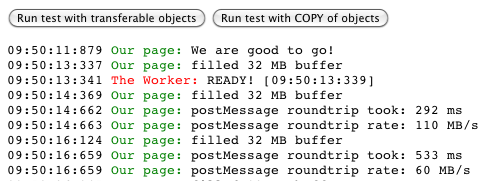
The results are clear (as the sun over the beach in Maui). It was much faster to work with transferrable objects.
With transferrable objects it took us 292ms while with copy it was 533ms.
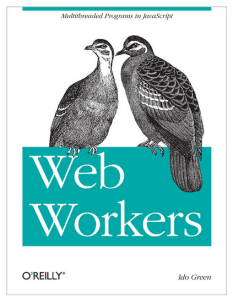
Last but note least, you can find more examples and deep coverage on web workers in my book on web workers. Psst… if you can’t sleep, it might help you on that front as well.
Share only with good friends:

 Today I did a hangout on air with O’Reilly. It was a good opportunity to dive into some of the aspects of modern web application and check what are the main things we wish to think about when we design, build and ship our apps. Modern web apps are rich, interactive applications.
 Web Workers is a good way to improve the performance of your web applications. It’s not a new HTML5 API but for some reason not too many front end developers are using it. This short episode will give you the intro to why and how you can leverage this simple and powerful API to enter the world of multi threads in the browser.