

Most people are still using AI like it’s 2023:
prompt → response → done.
That’s not where things are going.
The real shift is toward agents that run continuously and do work for you. And one of the most interesting ways to get there today is:
OpenClaw + Ollama
Before diving in, quick grounding.
What OpenClaw and Ollama Actually Are
OpenClaw is an open-source agent framework.
It’s not a chatbot—it’s a system that can:
- plan tasks
- call tools (browser, APIs, files)
- maintain memory
- run loops without constant input
Think: a programmable worker, not a Q&A interface.
Ollama is the simplest way to run large language models locally.
It handles:
- downloading models (Llama, Gemma, etc.)
- running them efficiently on your machine
- exposing them via a clean API
Think: Docker for LLMs.
Put them together and you get:
A local, autonomous agent system with zero API costs and full control.
Why This Combo Matters
Cloud-based agents are powerful—but they come with:
- latency
- cost at scale
- privacy concerns
Running locally with Ollama changes the equation:
- near-zero marginal cost (yes – your ClaudeCode and Codex can and will become expensive quickly)
- full data ownership
- tighter feedback loops
And OpenClaw gives you the missing layer:
the logic that turns a model into something that actually does work
The Architecture (Simple Mental Model)
You (Slack / Terminal / Telegram / WhatsApp / Discord) ↓OpenClaw (Agent brain) ↓Tools (browser, code, APIs, files) ↓Model (via Ollama)
Key idea:
The model is just a component.
The agent loop is the product.
Choosing Models
When running agents locally, model choice matters—but not in the way most people think.
You’re optimizing for:
- reliability in tool usage
- reasoning across multiple steps
- latency (because agents loop)
- context length
Practical options in Ollama (as of April 2026)
- Llama 3.x → best all-around baseline
- DeepSeek R1 → strong reasoning for complex workflows
- Qwen / GLM → fast and efficient
- Gemma 4 from Google → lightweight, improving fast and built to be ‘local’ from the ground up.
The take on Gemma
Google’s Gemma is designed for:
- efficiency
- smaller hardware
- stable instruction-following
That makes it a strong fit for:
always-on assistants running locally
But let’s be real:
For heavy multi-step reasoning, it’s not top-tier yet.
Use it where speed and cost matter more than deep thinking.
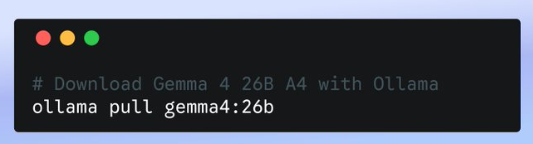
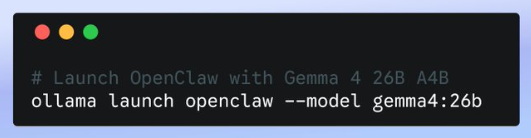
Btw, you can do it with 2 lines in your terminal:
Example 1: A Researcher That Never Sleeps
This is where agents start to feel like leverage.
Goal
Continuously track a topic and produce insights.
Setup
- Model: DeepSeek R1
- Tools: web search, file system, document writer
Prompt
You are a research analyst.Loop:1. Search for new content on "AI agent security"2. Extract key ideas3. Compare with previous findings4. Update a running report5. Highlight novel insights6. Run daily at 7:00am.
What you get
- Ongoing research without re-prompting
- Accumulated knowledge over time
- Actual synthesis—not just summaries
This behaves less like ChatGPT and more like:
a junior analyst that compounds value every day
Example 2: A Personal Assistant That Actually Works
Forget voice assistants. This is operational.
Goal
Run your day-to-day digital workflows in the background.
Setup
- Model: Gemma or Llama (fast + cheap)
- Integrations: email, calendar, notes, Slack
Prompt
You are my executive assistant.Continuously:- Check inbox every 10 minutes- Categorize emails (urgent / waiting / ignore)- Draft replies for urgent items- Update my task list- Prepare a daily summary at 7am
What changes
- You stop triaging your inbox manually
- You get structured summaries instead of noise
- Work gets pre-processed before you even look at it
The key shift:
You don’t interact with it constantly.
It runs and delivers outcomes.
Where People Go Wrong
They obsess over the model
Wrong layer.
Most of the value comes from:
- tool integration
- memory design
- execution loops
Don’t expect local models to match cloud instantly
They won’t.
Hybrid setups (local + fallback) are often the sweet spot.
Don’t ignore security
Agents can:
- read files
- send messages
- execute actions
That’s a real attack surface.
Treat them like software with permissions—not toys.
Start slow and with only read permissions. Take it step by step.
As they say: “with great power comes great responsibility”
The Bottom Line
OpenClaw + Ollama is not just a cheaper way to run AI.
It’s a different paradigm:
local, persistent, programmable agents
- always on
- cost-efficient
- deeply customizable
And we’re still early. It’s just getting started.
If You Try One Thing
Start simple:
ollama launch openclaw
Then build one agent that replaces a real task you do daily. Start with something simple that if it goes wrong there is no damage.
If it saves you time once—you’ll start seeing the value.
Discover more from Ido Green
Subscribe to get the latest posts sent to your email.

