HTML5, JavaScript, php, webdev

Sublime Text 2/3 – Packages And Shortcuts

subl-icon-512

I always start with the one package that allow to stay in sublime and improve it quickly: packagecontrol.io

Next on the line is the option to make our editor a bit more friendly with: SublimeCodeIntel It’s A full-featured code intelligence and smart autocomplete engine for Sublime Text. Few of the technologies that are supported:
JavaScript, SCSS, Python, HTML, Ruby, Python3, XML, HTML5, Perl, CSS, Node.js, Tcl, TemplateToolkit and (of course) PHP.
From here there are many options.
Few the I’ve found useful:

  • Git
  • Emmet
  • Terminal
  • ColorPicker
  • SublimeREPL
  • LiveReload – Make your life easier with this live reload ability. It will save you a lot of clicks on the ‘reload’ button (or cmd+r).
  • MarkdownPreview – I love markdown and this one is making me more productive with it.
  • JSLint – If you are writing some javascript, this one is a must.
  • DocBlockr – Create a new documentation block with a quick click. And yes, it will extract that function’s parameter information and pre-fill it in your documentation block. nice, no?
  • Soda Theme – just to keep up with the cool kids on the block.
Continue reading

Standard
Chrome, HTML5, JavaScript, mobile, webdev

Make Your Web Forms More Efficient

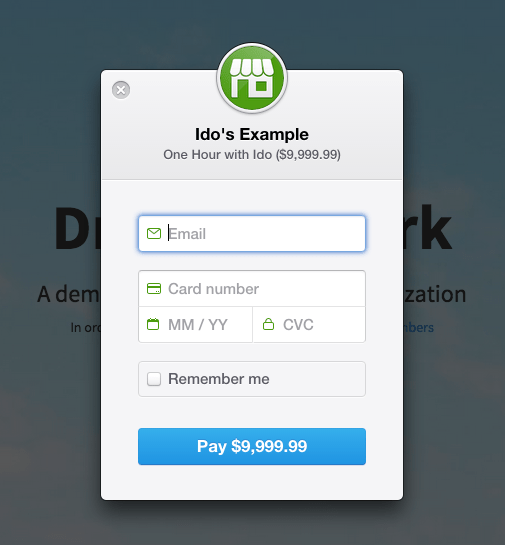
Ido's payment formForms are the main ‘entry barrier’ to anything meaningful on the web. It might be a registration form, sign-up form or a shopping cart. In all of them, you wish to do the best in order to delight your users and lower the friction.
In the slides below, we will cover the best practices so your forms will rock.

Continue reading

Standard
Chrome, JavaScript

Chrome 44 New Features

google-chrome-logoChrome 44 is now in stable channel and there are many updates and improvements:

And there are a lots of other improvements and security fixes.

What is hot and new on the web?

Continue reading

Standard
Chrome, JavaScript, mobile, webdev

The Latest From The Web

google-chrome-logoA lot of new interesting APIs that are pushing the web platform forward introduced with Chrome 43 (now in Stable). Let see the ones that are going to impact a lot of users.

  • The Fetch API now allows developers to directly operate on and incrementally release the bytes of streamed network responses, in contrast to the equivalent XMLHttpRequest functionality that requires developers keep the entire in-progress stream response in memory.
  • The Cache Storage API, previously only available in service workers, now provides developers full imperative control over their caching in the page context. This is huge! It will enable users to have better (=faster) experience in places where the connections are not good.
  • Autofill and Autocomplete – People hate filling out web forms, especially on mobile devices, learn how to help them complete it up to 30% faster. (And yes! I wrote it).

Continue reading

Standard
Chrome

Web Forms Best Practices

The Tree

Here are some of the rules that will help you build better forms. As we know, it’s a mobile world, so we wish our forms to be responsive and mobile first by nature. Let’s see how to do it right.

Use big font size and provide easily touch buttons

Here it’s simple, when you have doubt, make things bigger and check. In other words, you wish your fonts to look great both on mobile and desktop. For mobile, a rule of at least 16px will be a good start. Why? because it’s big enough in most cases for mobile. Plus,  this minimum size will prevent all iPhones from zooming into the fields. For buttons and touch areas, start with at least a size of 32px for the input field height. This will ensure it’s not too small. However, check it both on mobile (few devices from 4″ to 6″) and on larger screens (=desktop or large tablets). Both Foundation and Bootstrap gives you a default size for such elements that is good for mobile.

Take advantage of Autofill

This will enable your users an easy way to complete forms with pre-populated data.  Look for opportunities to pre-fill information you already know (e.g. Geolocation to fill the zip code), or may anticipated to save the user from having to provide it. For example, pre-populate the shipping address with the last shipping address supplied by the user. See it in action at: greenido.github.io/form-example.html Continue reading

Standard
Business, webdev

3 Principals To Increase Revenue In Games

1. Focus on the users that love to play

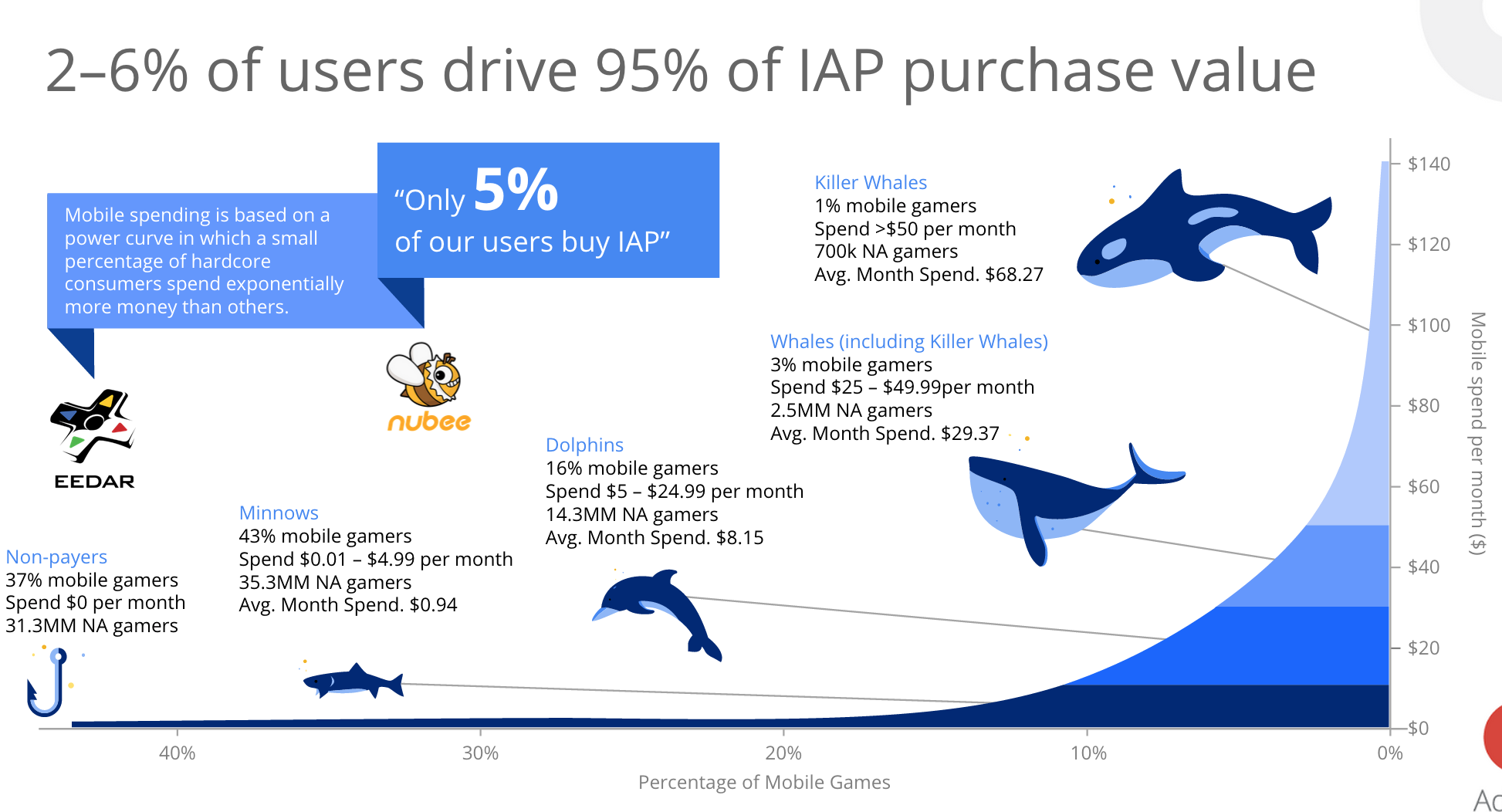
You wish to promote certain items (e.g. gems, levels, arms etc’) at the right situation for the ‘heavy gamers’. It is these gamers that spend the big bucks, just have one look at the graph below to appreciate it. The challenge is to identify these players and to find the right situations. Check your analytic tools to find out segments of users that are out of the normal distribution curve. In the graph below you can see an illustration for what we wish. Focus on the all the Whales.

game-users-whales 2015-05-29 12.33.04 Continue reading

Standard
Chrome, JavaScript

What’s New On The Web And Chrome

In tslack-logohe last post about powerful new APIs we talked about Service Worker, notifications, push and more. This week we got some other news, videos, slides and a new slack channel for web developers that you should take part in.

New Stuff Around The Web

  • Google Tone is an experimental Chrome extension for sharing the URL of the current tab with other computers by using audio!
    Yes, it does not use Bluetooth, NFC or WiFi: it only sends audio waves. “Google Tone turns on your computer’s microphone (while the extension is on) and uses your computer’s speakers to exchange URLs with nearby computers connected to the Internet.”
  • Can web apps be as smooth and slick as native? YES!
    Paul Lewis made a web app to show how. The app uses all the latest goodies, including Service Workers, ES6 Classes and Fat Arrow functions, and Promises.
    Check out his blog post here for all the details!
  • The best (new) show in town about best practice tools.
  • Another new location we maintaining to hold all the news around web development: https://developers.google.com/web/updates/ and if you like medium we got a new channel there as well.
  • Polymer 0.9 library is released!
    The 0.9 release is very similar to 0.8, with many of the “experimental” 0.8 features now officially supported.
    Full release notes for 0.9, including the breaking changes from 0.8, are available on the Polymer site.
  • Two new videos from talks that Paul Lewis and Jake Archibald gave last week:

Continue reading

Standard
Business, Chrome

Auto Complete Attribute Will Improve Your Profit (And Forms)

Hands full (with grapes)

Autofill in Chrome

Chrome has a great new Autofill feature that as a developer you’ll want to add to your websites for Chrome to use. Other browsers are sure to follow too. The first time you fill out a form, Chrome automatically saves the contact information that you enter, like your name, address, phone number, or email address, as an Autofill entry. You can store multiple addresses as separate entries. Moreover, Chrome can save your credit card information, with your explicit permission. When you enter credit card information on a form, Google Chrome asks you at the top of the page whether you’d like to save the information. Click “Save info” if you’d like the credit card to be saved as an Autofill entry.

Later, when you start filling out a form, the Autofill entries that match what you’re typing will appear in a menu. Select an entry to automatically complete the form with information from the entry. Chrome also saves the text you’ve typed in specific form fields. The next time you fill out the same field, text that you’ve typed in the past appears in a menu. Just select the text you want to use from the menu to insert it directly into the field.

In Chrome, you get a full support for the autocomplete attributes . All we need to do is to make sure we are leveraging them. You will improve your checkout process and make your users 6.73 times happier. Since autocomplete is part of the standard (WHATWG HTML) you know that other browsers will support it as well.

The autocomplete attributes can be accompanied with a section name, such as:

  • shipping given-name
  • billing street-address

This is recommended because it will make your form easier to understand and fill. The browser will auto complete different sections separately, and not as a continuous form.
Continue reading

Standard
Chrome, HTML5, JavaScript, webdev

Chrome And The Web App Revolution

chrome 3dQuick update from the world of Chrome. The new version in stable (chrome://version = 42 just like the answer to the universe) brings some interesting and powerful features that give web developers more options to create amazing experiences.

google-chrome-logo

Chrome 42 (stable)

We are getting to a world where web developer could create web apps that act just like ‘native apps’ without any bridges (e.g. Cordova). The main enablers APIs are already in this version. Check out what you can do today with Service Worker and the options it’s giving you to cache, work offline and push notifications in the background. Here is an example I wrote that uses service worker to cache & offline. I think we are going to see some very interesting implications. There are many options for the “physical mobile web” and these powerful APIs. Continue reading

Standard
webdev

A/B Testing With Google Analytics

rakafor-2Once you have a better picture on the current state. It’s time to try and improve it. A good way to do it is by using the option to serve different pages to unique visitors and measure the differences.

Following our e-Commerce site example, there are few options to test:

  • Create few versions of your ‘buy’ page.
  • Change modules on a certain page.
  • Change the landing pages.
  • Change the funnel: number of pages, modules, steps etc’.

Tips

Few guidelines to gain more reliable results:

  • Test a few elements at a time – If you change multiple elements on each page, it can be difficult to figure out which element or combination of elements was responsible for the best results. For example, create multiple pages but change only the main image on each page, and keep the same layout and text to ensure that any difference between the page results is due to the image.
  • Use high-volume pages – The more often that people see a page or complete a goal, the less time it takes to gather data.
  • Make bold changes – Users can miss small changes and you can end up with inconclusive results.
  • Keep testing – With follow-up testing, you can build on the success of your experiment. Did one headline encourage a lot more purchases? If so, test it alongside a product image or an image of a spokesperson.

Continue reading

Standard