Chrome, JavaScript, webdev

Chrome 47 Updates And Web News

  • google-chrome-logoInput Device Capabilities: Chrome 47 has a new feature that makes it easier to understand the how users interact with your site: InputDeviceCapabilities! DOM input events are an abstraction above low-level input events, loosely tied to physical device input (e.g., click events can be fired by a mouse, touchscreen, or keyboard). However, there is a problem: there is no simple method to obtain the details of the physical device responsible for an event. In addition, certain types of input can generate further “fake” DOM input events for compatibility reasons. One such fake DOM event happens when a user taps a touch screen (such as on a mobile phone); it not only fires touch events but, for compatibility reasons, mouse events as well. The new InputDeviceCapabilities API provides details about the underlying sources of input events this come to helps with problems when supporting both mouse and touch input. Read More: developers.google.com/web/updates/2015/10/inputdevicecapabilities
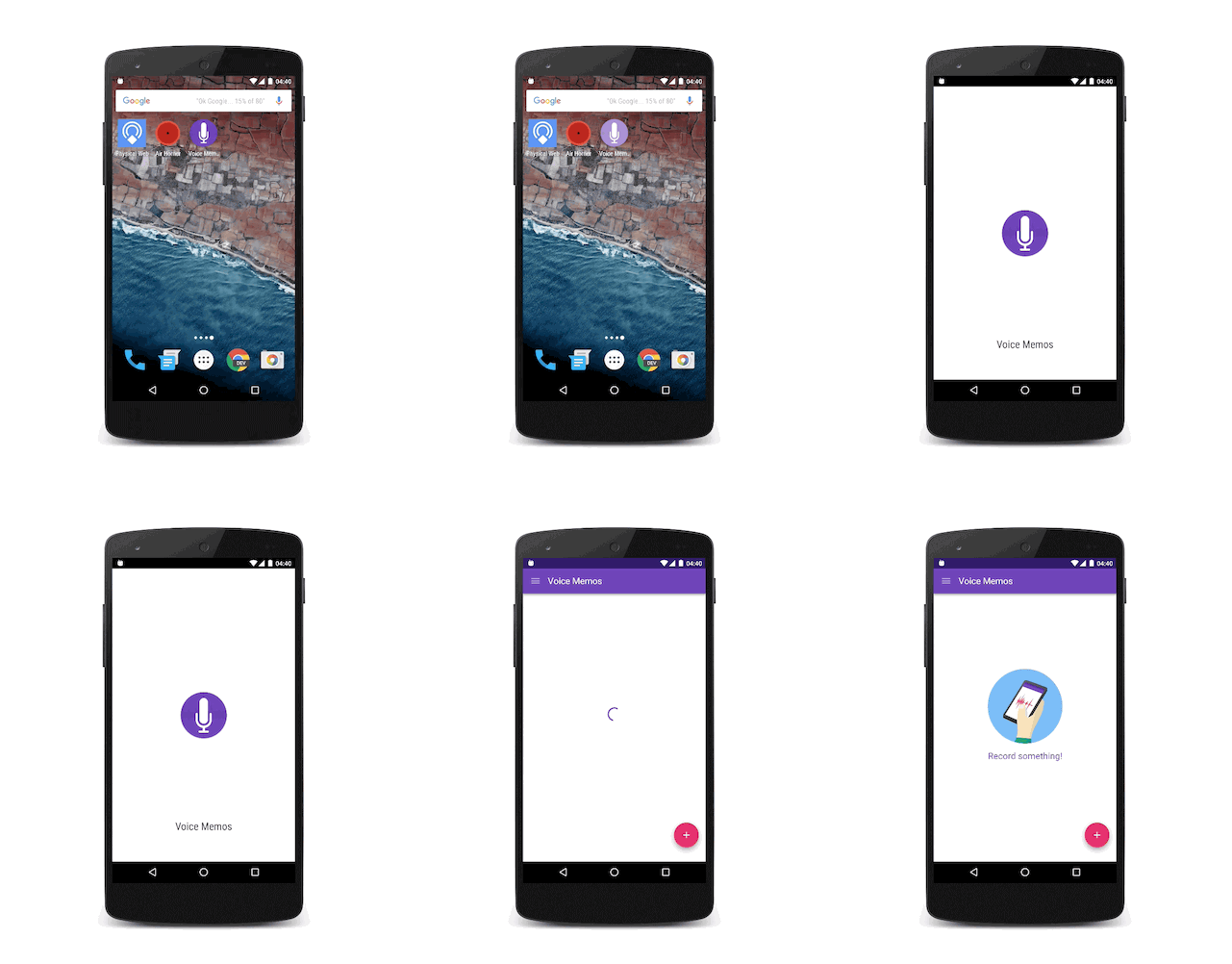
  • Adding a Splash screen for installed web apps – Over the past year we saw an effort in the Chrome team to let developers build sites and apps that feel like they are installed on the user’s system. The home screen launch process on Android is a great first step. In Chrome 46 on Android, we got the background_color that removes any delay and paints the screen with a solid color until the browser is ready to paint something from the web page. This was a good addition, yet it still didn’t look fully like an app. Now in Chrome 47 on Android, Beta these days as of October 2015, we are introducing the concept of a “splash screen”. Have a look:

Continue reading

Standard
Chrome, JavaScript

What’s New On The Web And Chrome

In tslack-logohe last post about powerful new APIs we talked about Service Worker, notifications, push and more. This week we got some other news, videos, slides and a new slack channel for web developers that you should take part in.

New Stuff Around The Web

  • Google Tone is an experimental Chrome extension for sharing the URL of the current tab with other computers by using audio!
    Yes, it does not use Bluetooth, NFC or WiFi: it only sends audio waves. “Google Tone turns on your computer’s microphone (while the extension is on) and uses your computer’s speakers to exchange URLs with nearby computers connected to the Internet.”
  • Can web apps be as smooth and slick as native? YES!
    Paul Lewis made a web app to show how. The app uses all the latest goodies, including Service Workers, ES6 Classes and Fat Arrow functions, and Promises.
    Check out his blog post here for all the details!
  • The best (new) show in town about best practice tools.
  • Another new location we maintaining to hold all the news around web development: https://developers.google.com/web/updates/ and if you like medium we got a new channel there as well.
  • Polymer 0.9 library is released!
    The 0.9 release is very similar to 0.8, with many of the “experimental” 0.8 features now officially supported.
    Full release notes for 0.9, including the breaking changes from 0.8, are available on the Polymer site.
  • Two new videos from talks that Paul Lewis and Jake Archibald gave last week:

Continue reading

Standard
Chrome, HTML5, JavaScript, webdev

Chrome And The Web App Revolution

chrome 3dQuick update from the world of Chrome. The new version in stable (chrome://version = 42 just like the answer to the universe) brings some interesting and powerful features that give web developers more options to create amazing experiences.

google-chrome-logo

Chrome 42 (stable)

We are getting to a world where web developer could create web apps that act just like ‘native apps’ without any bridges (e.g. Cordova). The main enablers APIs are already in this version. Check out what you can do today with Service Worker and the options it’s giving you to cache, work offline and push notifications in the background. Here is an example I wrote that uses service worker to cache & offline. I think we are going to see some very interesting implications. There are many options for the “physical mobile web” and these powerful APIs. Continue reading

Standard
Chrome, HTML5, JavaScript, webdev

Maximizing Your ROI On The Mobile Web

mobile devicesIt’s a mobile world.
The next 4B users are going to use the web only on mobile so we should think on their experience. Moreover, a lot of people are using the mobile web as discovery mechanism and when they land on our site we got the (one) chance to impress. The summary of the slides below will focus on two main aspects: performance and user experience. In the slides you can read on the 25 principles and how to work with them.

  • Performance
    Get content to the user as quickly.
    I think this formula used in Ilya Grigorik’s talk sums this up:

    Perceived performance = f(Expected Performance, 
                               UX, 
                               Actual Performance)
  • User Experience
    Optimize for the mobile device. So start your design from the small screen and move forward to a bigger one.

Here are tools that every web developer should use (or embrace the concepts that these tools promotes): Continue reading

Standard
Chrome

Improving Your Mobile Sites

mobile devicesIt’s not a secret that the world is going mobile at a (crazy) rapid pace. We all seen the statistics about it, and we know that the next 4 billion people will see the web only on mobile. This post will focus on how you can build a mobile site that will be ‘in a good relationship’ with Google (and other search engines out there).

Responsive web design is one answer when it comes to ‘how to serve’. You wish to avoid redirects, sniffing for the mobile browsers agents or managing two versions of your sites.

How we can make our site mobile friendly?
Let’s try to think as developers of a search engine. If you were trying to figure out if a site was mobile friendly just by looking at a site, what would you look for? First, the content on our site must be readable on mobile so it should fit within the screen. Second, we will try to make sure that the site is usable. Continue reading

Standard
Chrome, HTML5, JavaScript, webdev

uptodate.frontendrescue.org just got a hebrew version

fed-uptodate-hebrewI’ve been contributing to this cool project: github.com/frontend-rescue/keep-up-to-date and today it’s live!

If you wish to check what are the best practices for front-end developers (in hebrew) this is your version: http://uptodate.frontendrescue.org/he/

Good luck.

Standard
Chrome, mobile, webdev

A List Of Great Mobile Web Apps

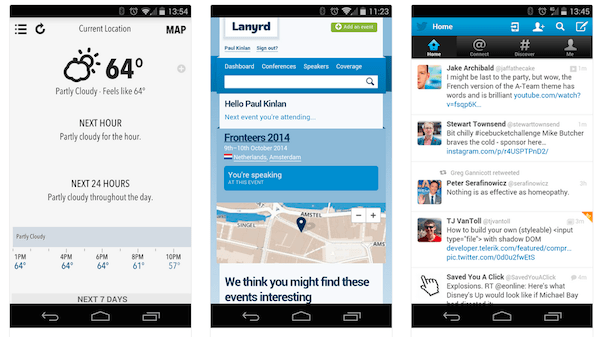
mwa-examples 2014-08-21 14.16.36In the past, I gave few presentations on ‘Modern web apps‘ and each time I tried to show compelling examples.

Here is a new source (mobile web apps ftw) that might help you see what can be done (today) on the mobile web.
Few good examples to checkout:

  1. Weather App
  2. Lanyrd (For your next conferences).
  3. Stanford
  4. Financial Times
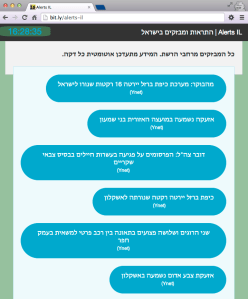
  5. Alerts in Israel (hebrew)
  6. Time Tracker (hebrew)
  7. GitHub
  8. Twitter
  9. Gmail

Another good site to get insperation is: mobile-patterns.com
If you have other great suggestions – please use the comments and I’ll add them.

Standard
Chrome, HTML5, JavaScript, mobile, webdev

Israel’s Alerts – Mobile Web App Example

Alerts IL - mobile web app

If you wish to have a window on the side of your screen and/or leave your mobile device on a page that will show you an updated list of all the alerts (Tzeva Adom and others) – Here is a web app for you. It is based on Foundation CSS framework as it’s ‘mobile first ‘ and got a very powerful grid system.

Code

Check out the Alerts-IL GitHub repo or the Google App Engine version.

If you wish to see the Android app code github.com/greenido/Alerts-IL-Android which is a simple native app that wrap the mobile web app.

Continue reading

Standard
Chrome, HTML5, JavaScript, mobile, webdev

HTML5 In Mobile (Hebrew)

The goal of this talk is to harness front-end developers with relevant knowledge and tools they can use  in their current jobs.

The main points in the TL;DR

Continue reading

Standard
Chrome, HTML5, JavaScript, mobile, webdev

HTML5 & CSS3 Tools

I’ve meet with a very cool startup over the weekend. It was interesting to listen and learn from them what is ‘cool’ in their technology world. However, I got the feeling that they are missing some of the new capabilities that the web platform has to offer. I’ve pointed them to some known resources like: html5rock.com , MDN site etc’. But it seems better to try and get a list of tools or pointers that any developer could browse and pick from. So here is an alpha version of the list. It’s split to subjects like: design phase, testing phase etc’ just to keep it a bit more useful.

Continue reading

Standard