If you wish to read the background on RESTful APIs It’s all started here. You can look at some good examples for RESTful APIs from Google, Twitter and many others. In this post, I will try to focus on some important aspect that you want to keep in mind when you are building your next RESTful API. Btw, if you are looking on an efficient way to create it – Checkout my talk from last Google I/O. It’s over a year now, but still very relevant.
Category Archives: webdev
A List Of Great Mobile Web Apps
In the past, I gave few presentations on ‘Modern web apps‘ and each time I tried to show compelling examples.
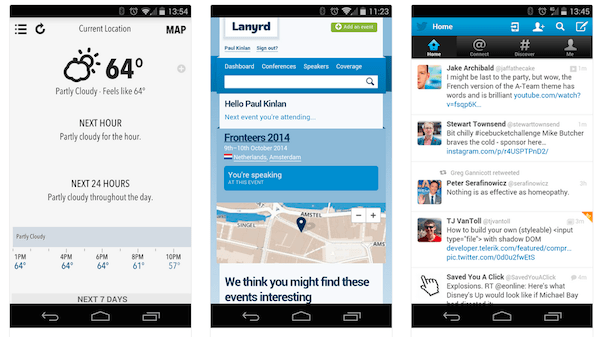
Here is a new source (mobile web apps ftw) that might help you see what can be done (today) on the mobile web.
Few good examples to checkout:
- Weather App
- Lanyrd (For your next conferences).
- Stanford
- Financial Times
- Alerts in Israel (hebrew)
- Time Tracker (hebrew)
- GitHub
- Gmail
Another good site to get insperation is: mobile-patterns.com
If you have other great suggestions – please use the comments and I’ll add them.
YouTube Analytics Dashboard With Apps Script
There are cases where you wish to collect statistics on your youtube videos or channel. There are few options to do it with YouTube API. As the YouTube’s API supports many languages you can choose the one that will work for your environment. In many of these options, you will need to develop a server side that will fetch the data and a front-end to present it and give the users option to query it. If you wish to dive deeper (e.g. specific metric on channel performance and videos statistics), you will need to work with YouTube Analytics API.
In this post, we will see a simple example to create a dashboard that will be updated on a daily basis. Since we wish to save ourselves from building (and maintaining!) a server side and a web app to access it, we will use the power of Google Apps Script (GAS) and Google sheets.
The Dashboard
Here you can find the “Dashboard example sheet”.
Feel free to copy it and work on your own version that is not in ‘read-only’ mode. Continue reading
Git 101- Part 2 (A bit More Advance)
After the first post on Git 101, here is a set of commands you will use after the first 15-20 minutes of working with it. Some are very useful (e.g. stash your work before you can commit it in order to go for a quick coffee when your code is not done) and some are a quite rare (e.g. setting up a git on a remote server). Good luck.
Update & Merge
Creating a branch (and switching to the new branch) in one line
git checkout -b "The new branch name"
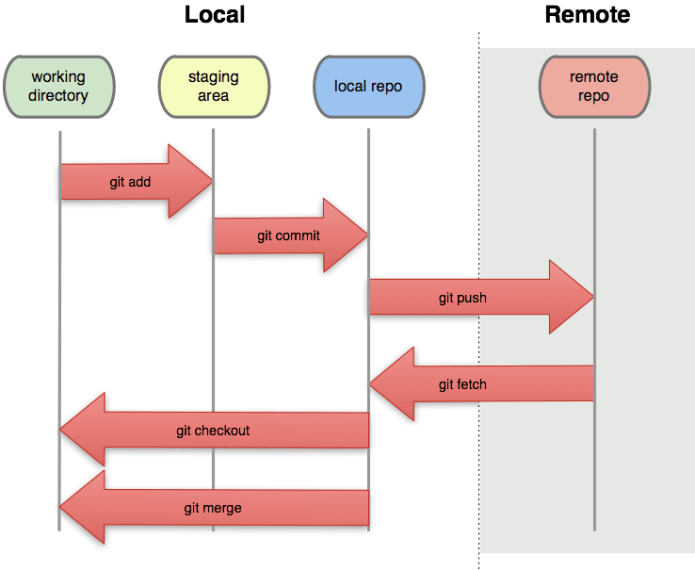
- git pull – to update your local repository to the newest commit. It will fetch and merge remote changes.
- git merge – to merge another branch into your active branch (e.g. master).
Remember that in both cases, git tries to auto-merge changes. IF you have conflicts, You are responsible to merge those conflicts manually by editing the files shown by git. After changing, you need to mark them as merged with
git add - Preview changes before merging them
git diff
Stash
Creating a stash (think of it as a temporary place, like a clipboard to save changes without marking them deep in history) of changes to allow you to switch branches without committing.
Israel’s Alerts – Mobile Web App Example
If you wish to have a window on the side of your screen and/or leave your mobile device on a page that will show you an updated list of all the alerts (Tzeva Adom and others) – Here is a web app for you. It is based on Foundation CSS framework as it’s ‘mobile first ‘ and got a very powerful grid system.
Code
Check out the Alerts-IL GitHub repo or the Google App Engine version.
If you wish to see the Android app code github.com/greenido/Alerts-IL-Android which is a simple native app that wrap the mobile web app.
(Try To) Predict The World Cup With Monte Carlo Simulation
Who will win this world cup? Brazil without Neymar? Lionel Messi? Or are we going to see the Nederland making a big surprise?
If you like coding, statistics and problems that are not trivial… You found the right place. In this post, I will try to show an example to a way for solving this type of questions. For the readers that don’t remember what is Monte Carlo simulation (don’t be shy) – You might want to check a previous post that I wrote last summer and give you an intro to the world of Monte Carlo on Apps script and Google compute engine.
Monte Carlo experiments (simulations) are a broad class of computational algorithms that rely on repeated random sampling to obtain numerical results. In most cases, we will run our simulations many times over in order to obtain the distribution of an unknown probabilistic entity. This tool is often used in physical and mathematical problems and are most useful when it is difficult or impossible to obtain a closed-form expression, or infeasible to apply a deterministic algorithm.
In the real world, we see it being mainly used in three distinct problem classes:
* Optimization.
* Numerical integration.
* Generation of draws from a probability distribution.
OK, there is no time. The game starts in two days.
The Idea
Monte Carlo simulations tend to follow a particular pattern. Here is how we will use this tool: Continue reading
Polymer And Web Components At I/O 2014
This talk cover three main subjects:
- State of the union – What has change in the past 3 years
- Problems solved by web components – When it comes to build complex web applications, there are many ways we can do things better. In this section we will see how/why.
- Thinking in components – What are the implications when you coming to design and build web apps.
== Psst… It’s in raw format – I will polish it after I/O is over ==
State of the union
Once many years ago… We had HTML4 with all its problems. Later, well few years back, HTML5 was the answer for everything. It specifically, tried to show developers what can be done on the web modern platform and moreover APIs browser vendors could add to help developers boost their productivity. In the past 18 months we saw a lot of things like: templates, shadow dom, data binding etc’. It’s been a long journey. Now, we have Polymer. Continue reading
HTML5 In Mobile (Hebrew)
The goal of this talk is to harness front-end developers with relevant knowledge and tools they can use in their current jobs.
The main points in the TL;DR
- Adapt to screen sizes
- Accommodate users on the move
- Speed up input
- Integrate with device features
- Measure performance across all devices
- Look forward to WebRTC, Web Audio and WebGL.
2014 World Cup Matches And Results
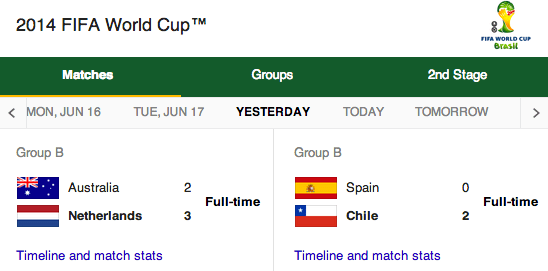
The world cup is the biggest sporting event on the planet. During the last world cup in 2010, 3.2 billion people watched at least one of the games. As I know, many groups are going to ‘make it interesting’ by placing bets on the results, I thought it would be good to have all the data on a spreadsheet. Google sheets are ideal for that as they offer a great ability to share, comment and ‘play’ with the data. You can see the demo spreadsheet: http://goo.gl/ZjdfqE and fork the code from: https://github.com/greenido/WorldCup
For now, we are fetching the info from these end points: Continue reading
What’s New On Google Cloud Platform
This year at #DevConTLV the main theme was around cloud and databases.
In my talk I did my best to emphasis, that in the past 15 years, Google has been building out the world’s fastest, most powerful, highest quality cloud infrastructure on the planet and it is opening it so external developers could enjoy it. There are many services like: App Engine, BigQuery and VMs on Compute engine that all come with the same idea. You (=the developer) should focus on what you good at and not by reinventing the wheel again (and again) by trying to find the secret in memcache optimizations. It’s my 4th year in this event and I can say that it is (without doubt) one of the best developer conferences in Tel Aviv. So if you are around next time, please try to join us. It’s great fun to talk with so many talented developers and the talks that I’ve been to, where very good and informative. Continue reading