Chrome, JavaScript, webdev

Chrome 46 Updates

google-chrome-logo

Performance

Service Worker

Continue reading

Standard
Chrome, JavaScript, mobile, webdev

Make Your Site Faster

We know that users prefer websites and applications that work fast. There is a lot of evidence that link performance to revenue. Let’s see what are main parts of the user experience that relate to the perception of ‘speed’ and how we can improve it.

RAIL performance model

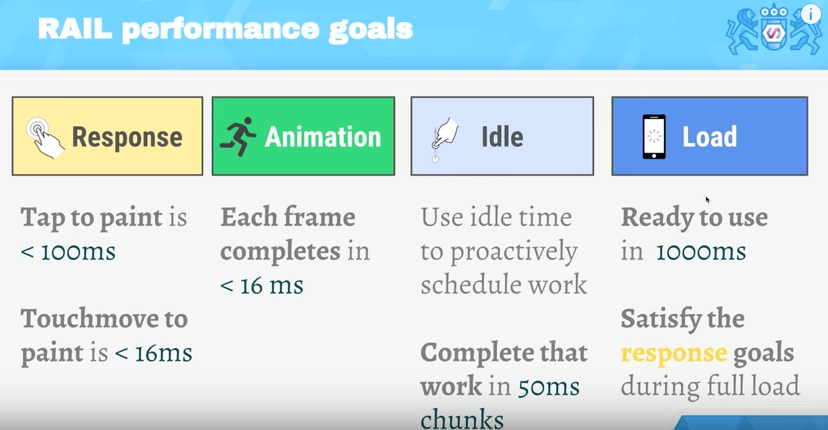
RAIL is a user-centric performance model. Every web app has these four distinct aspects to its life cycle, and performance fits into them in very different ways. You can see in the image below the 4 main aspects and what are the time limits to each stage.

The RAIL model for performance

The TL;DR

  • Focus on the user – the end goal isn’t to make your site perform fast on any specific device, it’s to ultimately make users happy.
  • Respond to users immediately  acknowledge user input in under 100ms – In mobile always use touch events and not click events (yep, click events still got this 300ms delay on mobile browsers)
  • Render each frame in under 16ms and aim for consistency. Users notice “jank” because in most cases it will ‘jump’ to their eyes.
  • Keep users engaged – deliver interactive content in under 1000ms.

Continue reading

Standard
HTML5, JavaScript, php, webdev

Sublime Text 2/3 – Packages And Shortcuts

subl-icon-512

I always start with the one package that allow to stay in sublime and improve it quickly: packagecontrol.io

Next on the line is the option to make our editor a bit more friendly with: SublimeCodeIntel It’s A full-featured code intelligence and smart autocomplete engine for Sublime Text. Few of the technologies that are supported:
JavaScript, SCSS, Python, HTML, Ruby, Python3, XML, HTML5, Perl, CSS, Node.js, Tcl, TemplateToolkit and (of course) PHP.
From here there are many options.
Few the I’ve found useful:

  • Git
  • Emmet
  • Terminal
  • ColorPicker
  • SublimeREPL
  • LiveReload – Make your life easier with this live reload ability. It will save you a lot of clicks on the ‘reload’ button (or cmd+r).
  • MarkdownPreview – I love markdown and this one is making me more productive with it.
  • JSLint – If you are writing some javascript, this one is a must.
  • DocBlockr – Create a new documentation block with a quick click. And yes, it will extract that function’s parameter information and pre-fill it in your documentation block. nice, no?
  • Soda Theme – just to keep up with the cool kids on the block.

Continue reading

Standard
Chrome, HTML5, JavaScript, mobile, webdev

Make Your Web Forms More Efficient

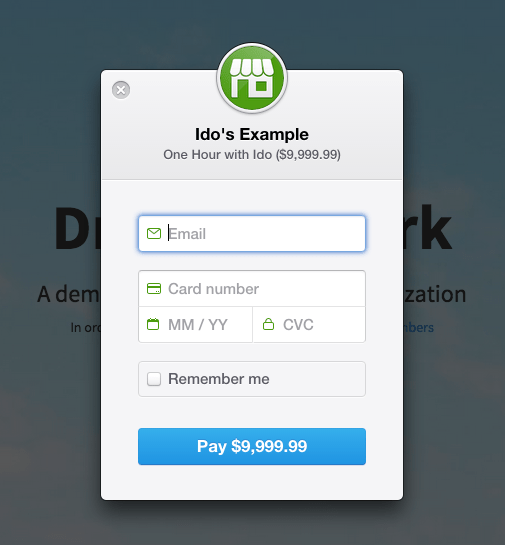
Ido's payment formForms are the main ‘entry barrier’ to anything meaningful on the web. It might be a registration form, sign-up form or a shopping cart. In all of them, you wish to do the best in order to delight your users and lower the friction.
In the slides below, we will cover the best practices so your forms will rock.

Continue reading

Standard
Chrome, JavaScript

Chrome 44 New Features

google-chrome-logoChrome 44 is now in stable channel and there are many updates and improvements:

And there are a lots of other improvements and security fixes.

What is hot and new on the web?

Continue reading

Standard
Chrome, JavaScript, mobile, webdev

The Latest From The Web

google-chrome-logoA lot of new interesting APIs that are pushing the web platform forward introduced with Chrome 43 (now in Stable). Let see the ones that are going to impact a lot of users.

  • The Fetch API now allows developers to directly operate on and incrementally release the bytes of streamed network responses, in contrast to the equivalent XMLHttpRequest functionality that requires developers keep the entire in-progress stream response in memory.
  • The Cache Storage API, previously only available in service workers, now provides developers full imperative control over their caching in the page context. This is huge! It will enable users to have better (=faster) experience in places where the connections are not good.
  • Autofill and Autocomplete – People hate filling out web forms, especially on mobile devices, learn how to help them complete it up to 30% faster. (And yes! I wrote it).

Continue reading

Standard
Chrome, JavaScript

What’s New On The Web And Chrome

In tslack-logohe last post about powerful new APIs we talked about Service Worker, notifications, push and more. This week we got some other news, videos, slides and a new slack channel for web developers that you should take part in.

New Stuff Around The Web

  • Google Tone is an experimental Chrome extension for sharing the URL of the current tab with other computers by using audio!
    Yes, it does not use Bluetooth, NFC or WiFi: it only sends audio waves. “Google Tone turns on your computer’s microphone (while the extension is on) and uses your computer’s speakers to exchange URLs with nearby computers connected to the Internet.”
  • Can web apps be as smooth and slick as native? YES!
    Paul Lewis made a web app to show how. The app uses all the latest goodies, including Service Workers, ES6 Classes and Fat Arrow functions, and Promises.
    Check out his blog post here for all the details!
  • The best (new) show in town about best practice tools.
  • Another new location we maintaining to hold all the news around web development: https://developers.google.com/web/updates/ and if you like medium we got a new channel there as well.
  • Polymer 0.9 library is released!
    The 0.9 release is very similar to 0.8, with many of the “experimental” 0.8 features now officially supported.
    Full release notes for 0.9, including the breaking changes from 0.8, are available on the Polymer site.
  • Two new videos from talks that Paul Lewis and Jake Archibald gave last week:

Continue reading

Standard
Chrome, HTML5, JavaScript, webdev

Chrome And The Web App Revolution

chrome 3dQuick update from the world of Chrome. The new version in stable (chrome://version = 42 just like the answer to the universe) brings some interesting and powerful features that give web developers more options to create amazing experiences.

google-chrome-logo

Chrome 42 (stable)

We are getting to a world where web developer could create web apps that act just like ‘native apps’ without any bridges (e.g. Cordova). The main enablers APIs are already in this version. Check out what you can do today with Service Worker and the options it’s giving you to cache, work offline and push notifications in the background. Here is an example I wrote that uses service worker to cache & offline. I think we are going to see some very interesting implications. There are many options for the “physical mobile web” and these powerful APIs. Continue reading

Standard
Chrome, JavaScript, mobile, webdev

Physical Web On Mobile

Physical Web is the new approach to unleash the core superpower of the web: interaction on demand.
People should be able to walk up to any smart device, think on classic cases like: a vending machine, an art item, a poster, a toy, a bus stop, a rental car – and not have to download an app first. They should be able to just tap and interact with them.

forest in the morning

The Physical Web is not shipping yet nor is it a Google product. This is an early-stage experimental project and we’re developing it out in the open as we do all things related to the web. This should only be of interest to developers looking to test out this feature and provide feedback. The Physical Web is an effort to extend the core superpower of the web – the URL – to everyday physical objects. The user experience of smart objects should be much like links in a web browser: i.e., just tap and use. At its base, the Physical Web is a discovery service: a smart object broadcasts relevant URLs that any nearby device can receive.
This simple capability can unlock exciting new ways to interact with the Web. Continue reading

Standard
Business, Chrome, JavaScript, webdev

In-App Payments On The Web

payment-with-penThere are many examples of applications that are free but let you add features with in-app payments. Think of a game that is free to play, but offers additional levels or virtual goods for a certain price (a low one in most cases). It’s very common to see applications that are free at the ‘trial period’ and later gives premium users the option to buy a specific level that match their needs. It’s a good practice to give users your product or service without any barriers (e.g credit card information). If they find it useful, they will pay for it with a smile.

Few examples

  • A designing web app that give the options to buy more projects (or more shapes, tools, features).
  • A Customer Relationship Management (CRM) application, that offer certain capabilities for a price.
    The basic options to collect and manage your contacts will be free, but if you wish to send emails they will charge you.
  • A game that let you advances more quickly if you buy certain improvements. For example a ‘magic’ power that give you the ability to pass a difficult stage (e.g. the mighty eagle in Angry Birds).the mighty eagle from angry birds

Continue reading

Standard