webdev

Linux Bash – Shortcuts To Boost Your Productivity


Let’s face it… in most of the cases (in the end of the day or night) you will be on a linux shell trying to hack some last minute changes to ‘production’. Ya… you know it’s something you should not do, but life is stronger than anything, no?
Here are few shortcuts to help you finish your day:

Command Editing Shortcuts

  • Ctrl + a – go to the start of the command line.
  • Ctrl + e – go to the end of the command line.
  • Ctrl + k – delete from cursor to the end of the command line – save you lots of time.
  • Ctrl + u – delete from cursor to the start of the command line, I’m not using it, but still a good one.
  • Ctrl + w – delete from cursor to start of word (i.e. delete backward one word)
  • Ctrl + y – paste word or text that was cut using one of the deletion shortcuts (such as the one above) after the cursor
  • Ctrl + xx – move between start of command line and current cursor position (and back again)
  • Alt + b – move backward one word (or go to start of word the cursor is currently on)
  • Alt + f – move forward one word (or go to end of word the cursor is currently on)
  • Alt + d – delete to end of word starting at cursor (whole word if cursor is at the beginning of word)
  • Alt + c – capitalize to end of word starting at cursor (whole word if cursor is at the beginning of word)
  • Alt + u – make uppercase from cursor to end of word
  • Alt + l – make lowercase from cursor to end of word
  • Alt + t – swap current word with previous
  • Ctrl + f – move forward one character
  • Ctrl + b – move backward one character
  • Ctrl + d – delete character under the cursor
  • Ctrl + h – delete character before the cursor
  • Ctrl + t – swap character under cursor with the previous one

Command Recall Shortcuts

  • Ctrl + r – search the history backwards
  • Ctrl + g – escape from history searching mode
  • Ctrl + p – previous command in history (i.e. walk back through the command history)
  • Ctrl + n – next command in history (i.e. walk forward through the command history)
  • Alt + . – use the last word of the previous command

Command Control Shortcuts

  • Ctrl + l – clear the screen
  • Ctrl + s – stops the output to the screen (for long running verbose command)
  • Ctrl + q – allow output to the screen (if previously stopped using command above)
  • Ctrl + c – terminate the command
  • Ctrl + z – suspend/stop the command

Bash Bang (!) Commands

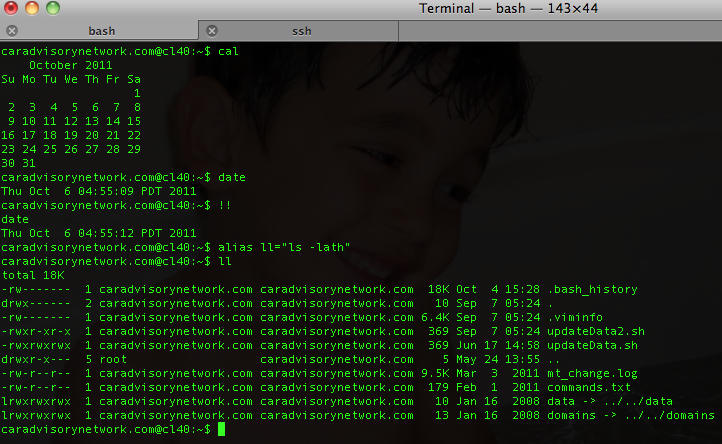
Bash also has some handy features that use the ! (bang) to allow you to do some cool stuff.

  • !! – run last command
  • !blah – run the most recent command that starts with ‘blah’ (e.g. !ls)
  • !blah:p – print out the command that !blah would run (also adds it as the latest command in the command history)
  • !$ – the last word of the previous command (same as Alt + .)
  • !$:p – print out the word that !$ would substitute
  • !* – the previous command except for the last word (e.g. if you type ‘find some_file.txt /‘, then !*would give you ‘find some_file.txt‘)
  • !*:p – print out what !* would substitute
Btw, if you are Eclipse power user and with to have bash inside it:
  • Go to Menu Run/ External Tools / external  Tools
  • Click on Config (or on Mac – Add external tools) then on ‘Program’ (inside the right sidebar) and select ‘new’
  • in the Name field, type Bash
  • In location type /bin/bash
  • In argument type -s -i
  • In the common tab check ‘Allocate Console’ if it’s not
  • Click on Apply
  • Then you just have to click on the External tools icon and select ‘Bash’ – Done.
Standard
Chrome, HTML5, life, webdev

Updated Site For Projects and Presentations On ChromeOS & HTML5

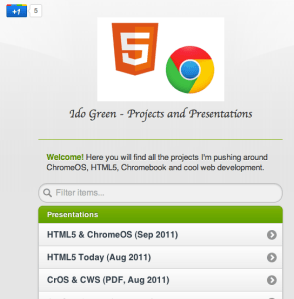
I wanted to update ido-green.appspot.com since the first day of pushing it to the air… Finally, I had the time to put some new jquery-mobile (just went to RC1.0 !)  into work and have this simple location for all the talks, demos and projects. Please feel free to let me know if the colors are not making me look good.

Ido Green on Appsport

Standard
Business, Chrome

Re-Thinking Corporate IT Or How Chromebook Can Help

Few points on companies and their IT department in 2011.

  • In todays world, any CIO/CTO that want to ‘Avoid Getting In the Way’ must think on how to remove her department tag of ‘cost center’ and start pushing to be a business that save money and even produce incomes to the organization. In most of the cases the answer is ‘cloud’. But lets take a closer look what that buzzword means.
  • It’s easy to say and hard to do… However, where there are so many great clouds solutions (SAAS and PAAS) if you are still running you mail servers, your wiki or intranet site on some old hardware, something is not being done right.
  • I was lucky to be the CTO and co-founder of a great startup in the past four years (HighGearMedia) and from day one all the IT infrastructure was in the cloud. It can be Google, Rackspace, Amazon or any other provider you like and trust. The main point is saving money, time and most importantly – focus. You want to keep doing what you excel at and not spending time in supporting people with ’email’ issues or some ‘rare problems with the most important presentation. The money you save in startups is ‘nothing’ compare to the millions (or more) the large company will save.
  • One thing that the new Chromebook is doing great to the CIO and all the IT department is to allow them to mange all the organization Chromebooks from one central point. You can install apps (few clicks and ALL your users got a new chart app), remove apps and put some policy in place (e.g. no Angry birds in the middle of the day). In other words, Administrators can configure and manage Chromebooks and user accounts centrally through the web. Seamless updates directly from Google keep the operating system and software fresh (every 6 weeks you are getting a new version of chrome), eliminating the need to manually patch systems. And since only minimal data is stored on the device, you don’t need to do tedious backups or migrate data when changing hardware.
  • Last May, I’ve listened to Google CIO (Ben Fried) and his team of engineers describe how Google builds on App Engine. If you’re interested in building corp apps that run on Google’s cloud, this team has been doing exactly that. How these teams have been able to respond more quickly to business needs while reducing operational burden? Here are some answers
    If you are in NY later this month you might want to hear what Ben got to say about “Re-thinking IT: Supporting the Business Without Getting In the Way” for the upcoming Web 2.0 conference.
Standard
Chrome, HTML5, webdev

Chrome And Angry Birds

If you haven’t checked Angry Bird on Chrome  – you should 🙂 some nice special levels that are unique to Chrome. Moreover, this web app is working offline amazingly well… so you could use it over a long flight just like you playing on your mobile phone.

This is another (new – new) classic one:

[youtube http://youtu.be/V70ruRzEGOI]

and for the hard-core Angry birds lovers – here is a new AB theme we’ve built to keep you happy on each new tab you open.

Have a great week.

Psss…. you can get the theme that is ‘just right’ for your screen:

  • Resolution 1024×768 –  http://goo.gl/NeeiG (If you are on a Netbook or any other small display – go for it)
  • Resolution 1680×1050 – http://goo.gl/N04uU (Prefect to  Buy MacBook Pro)
  • Resolution 1920×1080 – http://goo.gl/Sa6CQ (Best for your office/home large screen)
Standard
Business, Chrome, HTML5, JavaScript, webdev

HTML5 Live London Conference – Q&A On #html5live

This is a short set of questions and answers that I gave few days ago to the orgenizers of HTML5 Live London.

Q. Tell us a little about what you will be talking about at HTML5 Live

I’ll be talking about some of the new features that HTML5 harness enterprises. From simple and more readable markup up to offline capabilities and how they cut expenses and improve the user experience. The second part of the talk will focus on ChromeOS and its wide support of HTML5 and other APIs.

Q. What will people who attend your talk learn?

People who attend the talk could learn about some of the HTML5 features that are useful in the business world. They will see what are the pitfalls and how to avoid them. Last but not least, we will scan tools and resources that boost productivity.

Q. What will they take away that they can apply right away?

We will give lots of examples that can be implied right away in their current apps. Moreover, some of the tools/resources and tips are low hanging fruits that could be used ‘imidatly’ after the talk.

Q. In your opinion, why should people attend HTML5 Live?

I think any web developer that wish to keep herself with the cutting edge of technology should attend HTML5 Live. IMHO, it’s always a pleasure to meet lots of smart people that are passion about the web, open source and building cool stuff.

Q. Why is HTML5 exciting for web developers? architects?

HTML5 is harnessing architects and web developers with tools to create modern web apps. If we take a step back and try to define a ‘modren web app’ we will see that it’s the sum of ‘The Power Of The Cloud’ + ‘Desktop Richness’. I believe that the future of many desktop applications is going to be in a form of a web app due to all the benefits you gain from a web app (e.g. No installations, always with the latest and greatest version, amazing UI/UX etc’).

As you can see from the tone of the answers, I’m looking forward to this conference and to meet (again) with so many great developers that are pushing the web forward.
Thank you for the opportunity to come and present in this cool event.


Last but not least, registration is still open, and if you use my priority code gree25 when you register you will receive a discount.

I hope to see you there.

Standard
Business, life

How To Bind Business And Web Apps

Let’s start from the end. You need to “Focus On Fascinating Triggers”. Yep, it’s a bit off my main theme… but still great ideas in few slides (21 if you really want to know the number, because the last two slides doesn’t count). I guess that any web developer that wish to gain momentum and lots of users should pay attention and try to push the right buttons in the right segment in the market. Here is a better wording of this idea:

I like the idea of “…If you trigger LUST you will draw others closer…” and “…Trigger mystique and you’ll encourage others to learn more about your message…”

Be strong.

Standard
Business, Chrome

ChromeOS – Productive Apps and Extensions

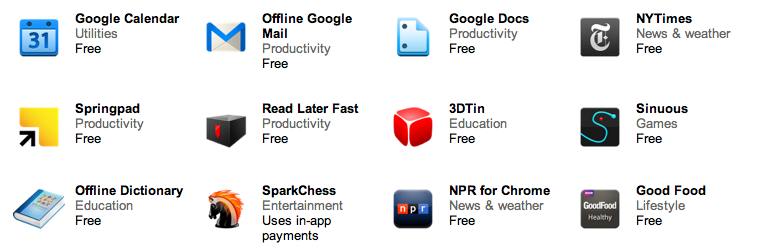
All these web applications contain some very cool features that make them useful even (in the rare event) when you don’t have internet connection. Let’s say, you are 30,000 feet up the air (and not on a Virgin Atlantic plane) or 250 feet under the ground and there is no signal. Here are some apps that will make the business users (very) happy:

  • Citrix – If your company uses Citrix to host applications, you can use Citrix Receiver to check your email, review documents, tune into project dashboards, and approve expenses from your Chromebook.
  • Offline Gmail/Doc/Cal – I’ve blog about gmail offline support when it came out (the end of August) and the rest of the ‘office’ is also bring the Chromebook users the ability to keep working on long flights instead of watching a nice movie.
  • Angry birds – We can’t close a list of business apps without this little game that no office is complete without it. No words are needed here.
  • gojee – if you hungry this app is for you! great photos of beautiful dishes.
  • NYT – yep they got offline capabilities so you can keep reading Tomas Friedman under the sea.
Here is a nice list of other great apps that will work offline on your chromebook  – Be strong!
Standard
Business, life

Social Interaction 2011

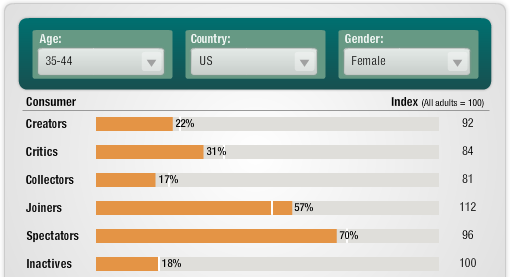
Here is the output of a conversation I had on G+ few days ago… the quality of the comments was so good, that I thought it make sense to put it here. First source that brought to my attention was from Forrester. It’s a very cool tool to let you see how people in certain ages are interacting with social sites.

The other source, is a presentation that give some insight about the % of people that create content for the world to consume.

Here is a short example. You can see what is the break down for the age group of 35-44/USA/Female (you have 2 guess, on why I’ve choose it).

BTW, there is a good post by Mr. Wilson about this subject and how twitter usage is ‘similar’.

Standard
HTML5, JavaScript, life, webdev

Google+ And The New +1 Button

Here is a talk that give you all (=most) the things you wish to know about Google+and its power.

The talk start at 40 minutes and 25 seconds.

Be strong.

Standard
Business, Chrome, HTML5, webdev

HTML5 Live London 2011

What are you doing this October in London?


Well, why not try to hang out with the ‘cool kids’? HTML5Live is going to be there… going to be fun.

My talk HTML5 & ChromeOS – A True Friendship will dive into some of the new features that HTML5 provides today. We’ll explore how ChromeOS is promoting HTML5  and giving more power to developers to create web applications that leverage the full capabilities the ChromeOS + HTML5 friendship offers. Registration is still open, and if you use my priority code gree25 when you register you will receive a discount.

Please let me know you’ll be attending, and come to say ‘Hi’…

Standard