Chrome, JavaScript, webdev

Chrome 47 Updates And Web News

  • google-chrome-logoInput Device Capabilities: Chrome 47 has a new feature that makes it easier to understand the how users interact with your site: InputDeviceCapabilities! DOM input events are an abstraction above low-level input events, loosely tied to physical device input (e.g., click events can be fired by a mouse, touchscreen, or keyboard). However, there is a problem: there is no simple method to obtain the details of the physical device responsible for an event. In addition, certain types of input can generate further “fake” DOM input events for compatibility reasons. One such fake DOM event happens when a user taps a touch screen (such as on a mobile phone); it not only fires touch events but, for compatibility reasons, mouse events as well. The new InputDeviceCapabilities API provides details about the underlying sources of input events this come to helps with problems when supporting both mouse and touch input. Read More: developers.google.com/web/updates/2015/10/inputdevicecapabilities

  • Adding a Splash screen for installed web apps – Over the past year we saw an effort in the Chrome team to let developers build sites and apps that feel like they are installed on the user’s system. The home screen launch process on Android is a great first step. In Chrome 46 on Android, we got the background_color that removes any delay and paints the screen with a solid color until the browser is ready to paint something from the web page. This was a good addition, yet it still didn’t look fully like an app. Now in Chrome 47 on Android, Beta these days as of October 2015, we are introducing the concept of a “splash screen”. Have a look:

Continue reading

Standard
cloud

MacOS Docker Installation problems?

If after a docker installation on your mac you are getting something like:

Get http:///var/run/docker.sock/v1.20/version: dial unix /var/run/docker.sock: no such file or directory.
* Are you trying to connect to a TLS-enabled daemon without TLS?
* Is your docker daemon up and running?

You came to the right place.

If you follow the steps from official tutorial on how to install docker on Mac, you will come to a point where you can’t run docker. It took me a good chunk of time to find the solution so I’ve decided to write this short post on it. I hope it will be fixed soon as for this issue – but for now you will need to follow these 3 steps: Continue reading

Standard
Chrome

Use House Ads To Improve Your Revenue

Ads at work on the beach

As developers and entrepreneurs, we have mountains of data.
Data that could change your business and move it forward. However, there is s
o much data that it’s overwhelming in some cases. Life force you, in some cases, to ignore it. But that’s the wrong path to follow! You wish data that is actionable and moving your revenue forward.

The freemium model was one of the reasons to a huge disruption in the data world. We see it clearly in the gaming market. For game developers, the need to understand users through data is particularly acute. In the past 2 years, we learn that everyone is a gamer: there were 1.78B gamers worldwide as of August [Source] and the number keep moving up. Since we are talking here on free installation, we do need to make money after the users installed our game. It will be good 

Now, because users act differently the foundation of any monetization strategy should be your analytics.
There will be segments in your userbase that will:

  • Pay for In-App Purchases
  • Click on ads
  • Engage with certain types of ads (e.g. full-screen video)

A custom monetization strategy for each user means you are maximizing your revenue. There are few (new) tools in AdMob to help you to do this. It’s call ‘audience aware’ because it will tailored the right solution to the right user at the right time. Continue reading

Standard
Chrome, JavaScript, webdev

Chrome 46 Updates

google-chrome-logo

Performance

Service Worker

Continue reading

Standard
Chrome

Google Search Updates

 Screenshot 2015-09-24 21.00.19

Helping hacked sites reconsider – A successful reconsideration is the last step a hacked website owner will need to go through to let Google know the site is now safe for users. You can see what is the progress in the way Google handle these requests here.

Mobile – As of September 1st, Google updated the Mobile-Friendly Test to indicate that sites should avoid showing app install interstitials that hide a significant amount of content on the transition from the search result page. The Mobile Usability report in Search Console will show webmasters the number of pages across their site that have this issue. If you have a site that is not connected to Search Console, I recommend you to connect it, it’s a great way to keep track on your site’s health and get important messages from Google.
For more read here. Continue reading

Standard
Chrome, HTML5, mobile, webdev

Enable Users To Call From Your Web Site

TelephoneOn mobile devices, there is 99.65% chance that they have a calling capabilities.
It’s true that modern mobile browsers will automatically detect phone numbers and convert them to links, it’s a good idea to do this directly in your HTML code. It’s a great way to allow users to call your business with one click and the way to do it is with this simple tel: scheme:

Amazing coffee Service
<a href="tel:+972-3-123-3344">+
972-3-123-3344</a>

The result will look like:

A calling from site examples

Click to Call

You can click on it in order to see the code in action. Continue reading

Standard
cloud

Add Users to Google Compute Engine / EC2 Instances

KeysIn the past, when I wanted to share a Linux box with other users, it was simply by creating another user and making sure their password are ‘strong’. These days, it’s much safer not to use passwords over ssh but rather keys in order to connect (over ssh) to your machines in the cloud.

Here is the full list of commands you need to do in order to add a user. It’s being tested on Ubuntu so if you are on another OS, please continue with caution.


###################################################################################
#
# Add More Users to Google Compute Engine / EC2 Instances
# Author: Ido Green | @greenido
# Date: 21/SEP/2015
#
###################################################################################
# If you wish to use passwords ignore this flag of –disabled-password
sudo adduser newuser-name –disabled-password
sudo su – newuser-name
mkdir .ssh
chmod 700 .ssh
touch .ssh/authorized_keys
# (!) Important – without these exact file permissions, you will not be able to
# log into this account using SSH.
chmod 600 .ssh/authorized_keys
# Edit the authorized_keys file and paste the public key for your key pair
# into the file. It should like:
# ssh-rsa AAAAB3NzaC1yc2EAAAADAQABAAABAQClKsfkNkuSevGj3eYhCe53pcjqP3maAhDFcvBS7O6V
# Make sure to copy just the key without any spaces before/after it!
vi .ssh/authorized_keys
# Retrieving the Public Key from your private key file
# If you don't have your publich key (just the file of the private key)
# This is what you need to do in order to extract it:
chmod 400 the-new-key.pem
ssh-keygen -y
# When prompted to enter the file in which the key is, specify
# the path to your .pem file. For example:
/path_to_key_pair/the-new-key.pem
# You will get something like:
# ssh-rsa AAAAB3NzaC1yc2EAAAADAQABAAABAQClKsfkNkuSevGj3eYhCe
# 53pcjqP3maAhDFcvBS7O6Vhz2ItxCih+PnDSUaw+WNQn/mZphTk/ab/wB96x
# Make sure to copy it without any spaces before/after
####
#
# Now, hold you finger and try to connect
#
####
ssh -i my_key.pem newuser-name@11.11.11.11
# If things are not going well try:
ssh -v -i my_key.pem newuser-name@11.11.11.11
# You should get the full details why things are not working.
# Another option: tail -f -n 80 /var/log/auth.log on the remote box
# If you wish to remove the user
sudo userdel -r olduser

Misc

Standard
Chrome, JavaScript, mobile, webdev

Make Your Site Faster

We know that users prefer websites and applications that work fast. There is a lot of evidence that link performance to revenue. Let’s see what are main parts of the user experience that relate to the perception of ‘speed’ and how we can improve it.

RAIL performance model

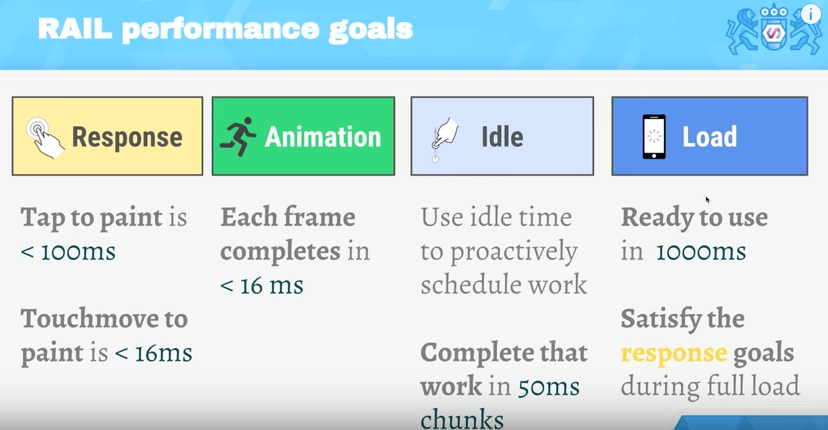
RAIL is a user-centric performance model. Every web app has these four distinct aspects to its life cycle, and performance fits into them in very different ways. You can see in the image below the 4 main aspects and what are the time limits to each stage.

The RAIL model for performance

The TL;DR

  • Focus on the user – the end goal isn’t to make your site perform fast on any specific device, it’s to ultimately make users happy.
  • Respond to users immediately  acknowledge user input in under 100ms – In mobile always use touch events and not click events (yep, click events still got this 300ms delay on mobile browsers)
  • Render each frame in under 16ms and aim for consistency. Users notice “jank” because in most cases it will ‘jump’ to their eyes.
  • Keep users engaged – deliver interactive content in under 1000ms.

Continue reading

Standard
webdev

Markdown Cheatsheet 101

I’ve been using markdown quite a lot both for the book I wrote and for other projects. It’s a great format and the best part (IMHO) is that you can learn most of it in 10min. Here is a list of the main ‘building blocks’ you will want to use:

Headers

# H1
## H2
### H3
#### H4
##### H5
###### H6

Links

To create links just follow this pattern:

[google.com](https://www.google.com)

Images

For images, you can just add ! before the ‘link’ element we’ve just saw above.


![alt text](https://bla-bla-example.com/icon48.png "Title For Image") 

Emphasis

Continue reading

Standard
Business

Monetization Questions For Entrepreneurs #StartupTips

startup office

“The art and science of asking questions is the source of all knowledge” – Thomas Berger

One of the critical times for startup is when it needs to define what will be the path to profitability. It’s a real challenge, and one of the ways to come up with the right plan is to ask the right questions.

A set of questions that could lead you in the right path:

  1. How do you define the relationship between ‘growth’ and monetization for your startup?
    Do we need to focus on one first?
    What is the mark to blend the two?
    Can we do both?
  2. What do you think about ‘starting a business’ and not ‘starting a startup’?
    The main point here is to get out of the ‘la-la land’ of startups that don’t need ‘revenue’ and look at the world of building a profitable business from the get-go.
  3. What other bold/good/recent startup(s) are executing a good monetization plan?
    Can we do something similar? Which parts of their plan we wish to test first?
  4. Are there several platforms that we can leverage in our monetization paths?
    In other words, if we are a startup that is building an application for iOS/Android.
    Can we also create an amazing web experience and enjoy it as another platform for engagement?
  5. How your purchasing process (or billing) is working today?
    What pitfalls other should learn from it?
    How you optimize it?
  6. Where are the gaps (or opportunities) in the current state of your online commerce?
  7. What are the top 3 action items that you can take in order to monetize your work better at this stage?
    This might be a great question to ask every 1-3 months.
    Moreover, you might want to keep A/B testing your actions.
  8. Any interesting trends you see in the market around your startup?
    What are the leaders doing?
    What other direct competitors are doing?
    What are indirect competitors are doing?
  9. Can we improve the usage of our analytics in order to gain more insights for our KPIs?

For more thoughts on the subject (with some tips from experience) – Join 4100+ students and check out my course on Udacity “App Monetization“.

Good luck!

Standard