JavaScript, webdev

What Car Should I Buy? (Leveraging Hunch API and High Gear Media API)

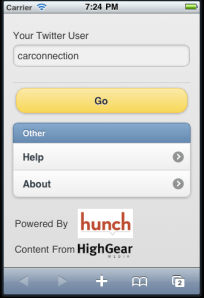
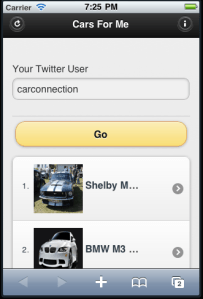
Last weekend, when the kids were sleeping, I had a bit of time to try out Hunch API. I must say, it’s very cool/powerful API with good documentation. It goes without saying, that I wanted to check what will be a good use-case to our High Gear Media API. After checking around general stuff, I came up with this simple mobile app (ya – it’s work great on iPhone, Android, BB and even Palm). The application is asking you to type your twitter account and base on this account it gives you personalized, recommendations for cars that fit you best. It combine the power of Hunch with the vast automotive content of High Gear Media.

For best results, you should sign in to hunch with your twitter account and answer some questions. Then, once hunch built your taste graph this application will show your very ‘accurate’ results.

If you have an Adriod phone – you can install this application from this link: http://www.appsgeyser.com/getwidget/Cars+For+Me

You might want to try some other famous twitter accounts and see what is their best cars.

Drive safely and stay thirsty.

Standard
Business, webdev

The All New TheCarConnection (Looks Great On iPad2)

We’ve  launched TheCarConnection.com today (after 3 weeks of beta testing for selective users). It was after few months of thinking, listening, designing and building a completely new set of make-model pages that we believe bring you the best automotive experience you can find on the web.We made sure it will be optimize to tablets (e.g. iPad or if you like the iPad2) and all the leading browsers.

Unlike all the other ‘car sites’ – we are bring you all the information from around the web into one place. This way, it’s not only our editors opinion that you get (and might like or not) – but also a wide range of other leading sources/editors and opinions. It is a great tool to get all the best information on each car in one (very nice) place. Your savvy editors not only driving the cars but doing the extra mile and doing the ‘leg work’ for you by bring you the ‘bottom line’ review with all the thoughts about this specific car.

For example, if you are into the new F-150, you can get our ‘Ford F150 2011 executive summary review‘ or read more deeply on all the different aspects of this new model. Want to check out what Edmund/Kbb/Cars are thinking? no worries – just go to our ‘web buzz’ and get all the reviews (more then 300), Q&A (more then 2000!) and tweets.

Here are some examples of the new car reviews:

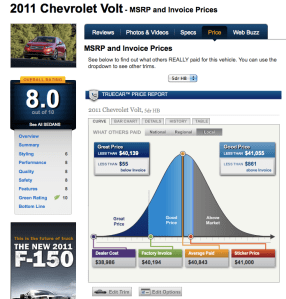
If you want to know what is the a good price or even great price for the new Volt. You have it in our very cool graphs.

It’s a great tool to use and come prepare for your visit in the dealership 😉

For all the ones that want to buy a used car – we have more then 4,500,000 used car listings, so you could find something in the right area,color,look and feel.

Last but not least, if you got a question or you want to share your knowledge. Check out the new ‘stack-overflow’ for cars. As always, comments are most welcome! Feel free to use our official TCC twitter.

Standard
JavaScript, webdev

Create Your Own Chrome Extension To Any Web Page

It’s now very clear that Chrome Browser got huge adoption (I guess the current numbers of active users is around 100M). In case you didn’t know, Google got now an App store to chrome. They basically, take what Apple showed the world in terms of building an Eco system (apps that you, as developer, can monetize on their platform) and trying to do the same with chrome as platform. It’s very smart idea and soon when we will see the chrome OS on tablets – this will be the way to manage your apps. The main APIs that you might want to use are: Browser actions and Page actions.

Browser Actions – you should use browser actions to put icons in the main Google Chrome toolbar. It’s for actions you wish to add to the browser (not specific page). Here are the main tips in order to use it right:

  • Do use browser actions for features that make sense on most pages.
  • Do use big, colorful icons that make the most of the 19×19-pixel space. Browser action icons should seem a little bigger and heavier than page action icons.
  • Do use alpha transparency to add soft edges to your icon. Because many people use themes, your icon should look nice on a variety of background colors.
  • Don’t use browser actions for features that make sense for only a few pages. Use page actions instead.

Page Actions – Page actions represent actions that can be taken on the current page, but that aren’t applicable to all pages. For example: translate content on the page, create something from photos in the page etc’. Here are some samples for both type of extensions.

Now, if you are on a site that you think will make sense to put in an extension (due to it’s nice features)… it’s very easy to do it.
All you need are two main files:

  1. manifest.json – this file is the description of the extension. Some meta info…
  2. Create a simple deals.html page (in our case it’s all about good deals for cars) that will include the web page you wish to have as an iframe.

Here are the 2 files that show you how to take HGM mobile app and put it in chrome:

manifest.json

{
"name": "Great Deals on New Cars",
"version": "0.2",
"description": "Great the best prices on your new car",
"icons": { "128": "app_icon.png" },
"browser_action": {
"default_title": "Great Deals on New Cars",
"default_icon": "deals.png",
"popup": "deals.html"
},
"permissions": [   "http://www.thecarconnection.com/*" ]
}

deals.html


<!DOCTYPE html>
<html>
<head>
<title>Deals</title>
<meta name="author" content="Ido Green">
</head>
<body>
<iframe src="http://beta.thecarconnection.com/conduit/deals" width="510px" height="700px" border="0px" scrolling="no">
</body>
</html>

After you saved these 2 files in one directory, just go to Chrome and click on ‘Windows’ -> ‘Extensions’. In that page you click on ‘Load unpack extension…’ and point to your directory.
Done.
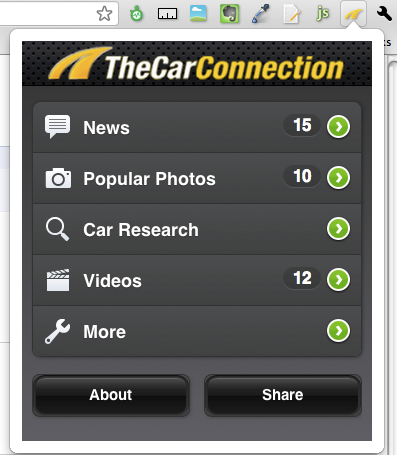
You should get now a new button and if you click on it you should get something like this:
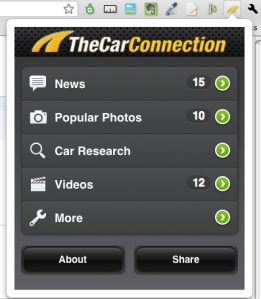
another easy option is to go and download this extension.

Happy Friday/coding.

Standard
JavaScript, webdev

New Features In High Gear Media API

Here is some improvements we have put in our API to make it (even) better to developers.
After How To Work With High Gear Media RSS Feed In (less then) 4 Minutes
and How To Deal With High Gear Media API Using XPath

Here are some new parameters that will make your (=the developer) life happier and healthier.
We have a new ways to output the data or in other words more control on the output format.

Format

the feed format, can be JSON or XML.

Examples:
1. http://feeds.highgearmedia.com/?format=xml is the same as http://feeds.highgearmedia.com , because xml is the default value.
2. http://feeds.highgearmedia.com/?format=json <– This is the better way to work with our feeds, specially, if you are hacking some new cool web2.0 mash up.

Other API parameters

Sites

You have full control on the sites that you wish to fetch information from. Here is a list of all the sites.

Examples
1. http://feeds.highgearmedia.com <– All HighGearMedia content
2. http://feeds.highgearmedia.com/?sites=thecarconnection <– get feeds from thecarconnection.com
2. http://feeds.highgearmedia.com/?sites=familycarguide,motorauthority

tags

Comma separated list of tag names to filter the content by.

Examples
http://feeds.highgearmedia.com/?tags=los-angeles-auto-show
http://feeds.highgearmedia.com/?tags=good

image-size

Size code for images in the feed (t/s/m/l/h)

  • t – thumbnail (default). Unless you are building some new iPad app, this is the best way to have it.
  • s – small
  • m – medium – on iPad or Chrome you might want to use this size or even ‘large’.
  • l – large
  • h – huge

Examples
1. http://feeds.highgearmedia.com/?image-size=t is the same as http://feeds.highgearmedia.com, because ‘t’ is the default value
2. http://feeds.highgearmedia.com/?image-size=m

Car

name of the car :_(optional)_(optional)

Examples
1. http://feeds.highgearmedia.com/?car=Honda_Civic_2003 (__)
2. http://feeds.highgearmedia.com/?car=Honda_Civic (_)
3. http://feeds.highgearmedia.com/?car=Honda ()

How NOT to do it:
http://feeds.highgearmedia.com/?car=Honda_2003 _

Type

type of content items, can be reviews/blog/all (default is ‘all’).

Examples
1. http://feeds.highgearmedia.com/?type=reviews
2. http://feeds.highgearmedia.com/?type=blog
3. http://feeds.highgearmedia.com/?type=all is the same as http://feeds.highgearmedia.com, because ‘all’ is the default value.

Please let me know if you wish to see more/other options.

Happy new 2011

Happy new year!!

Standard
webdev

How To Deal With High Gear Media API Using PHP And XPath

For the serious players in the automotive industry on the net there is a new way to improve their sites. We had this feed for a while, but now with the new improvements and after big players (e.g. yahoo autos) have been happy with it, we wanted to share it with others around the world.

For developers that are not used to work with XML, XPath and other goodies, here is a short sample of code that will show you how easy it is to fetch our full feed. Unlike the previous post about our regular RSS feed, I’ve used here some basic functionality that anyone that used php (5.2+) will have under their belt.

<?php
/**
* @author Ido Green
*
* @since 04/10/2010
*
* @abstract Simple example how to fetch High Gear Media Full API using xPath
*
* @see greenido.wordpress.com
*
* @copyright HighGearMedia INC. 2010
*
*/error_reporting(E_ALL); // Always good to have it in development mode
$feed = new DOMDocument();
$feed->load('http://www.thecarconnection.com/api?uid=YourApiUserKey&cat=bottom-line');
if (isset($feed->documentElement)) {
$xpath = new DOMXPath($feed);
// Lets register TheCarConnection namespace
$xpath->registerNamespace('tcc', 'http://www.thecarconnection.com/rss');
// Now we looping on all the items and for each one we are extracting some data
foreach ($xpath->evaluate('//item') as $entryNode) {
// Simple way to get the title,desc per item
echo "Title: " . $xpath->evaluate('string(title)', $entryNode), "\n";
echo "Description " . $xpath->evaluate('string(description)', $entryNode), "\n";
// and some more interesting capabilities of xPath - we fetching the spec that is under tcc namespace for car details
echo "Make: " . $xpath->evaluate('string(tcc:review[1]/tcc:cardetails[1]/tcc:make[1])', $entryNode), "\n";
echo "Model: " . $xpath->evaluate('string(tcc:review[1]/tcc:cardetails[1]/tcc:make[1])', $entryNode), "\n";
echo "Rating: " . $xpath->evaluate('string(tcc:review[1]/tcc:cardetails[1]/tcc:rating[1])', $entryNode), " Out of 10\n";
echo "============\n";
}
} else {
echo 'Error: Could not fetch the feed';
}


You can also clone this code from github using: git clone git://gist.github.com/865542.git gist-865542

So it’s easy, right? You can load these feed for each site from our network.
For example: http://www.motorauthority.com/api?uid=YourUserKey&cat=reviews
Will give you all the reviews from Motor Authority.
For more specific custom calls you may use these parameters:

  • uid – your user ID
  • cat – you can choose: reviews / bottom-line / tips / blogs
    If you wish to get just the summaries of the bottom-line use: bottomline-summary
  • media – Use 0 for strip html and media=1 to have our HTML format in the call.
  • from/to – Use unix time stamp (e.g. 1206514800 and yes… the ‘from’ need to be lower then the ‘to‘)
  • limit – Up to 100 items. The default is 10.
  • limited-links – When it’s equal 1 we will give you just 5 links per item.
  • version – You will only need it if you wish to get reviews for cars that are older then 2008. Then use: version=0
  • morelinks – Use 1 if you wish to get links from thecarconnection.com or 0 if you don’t want links.

(*) Note that the bold parameters are mandatory.

If you wish to have quality automotive content on your site please feel free to approach High Gear Media
(feedback at HighGearMedia.com) and get a user ID. With more then 1000 new items of content per month, there are something for every car lover girl.

Standard
webdev

How To Work With High Gear Media RSS Feed In (less then) 4 Minutes


For all the girls that asked me time after time ‘How/Who/When/Why?’ and for all the ones that want to have on their blog the best automotive content around the web… This short code example will harness you with a knowledge to fetch High Gear Media customizable feed and have it on your site. The first thing you need to do in order to save yourself some leg work is to install Zend Framework.

Why reinvent the wheel, right?

The good people that work with Zend build for us some nice components that save us lots of work. For example, to parse an Atom (or RSS) feed – you should use their class and in few lines of code, you can be productive and happy.

After the installation, you can copy & paste the code below and you good to go.

<?php
/**
* @author Ido Green
*
* @since 04/01/2010
*
* @abstract Simple example how to fetch High Gear Media API (XML feed).
* You should have Zend Framework (1.9.4 and above).
*
* @see greenido.wordpress.com
*
* @copyright HighGearMedia INC. 2010
*
*/
// Set error reporting to ALL - Always good when you developing new features
error_reporting(E_ALL);
// Lets make sure we can find Zend Framework lib. (You might want to change it base on your local
// environment.
set_include_path(get_include_path() . PATH_SEPARATOR . "../");
// get the feed library
require_once 'Zend/Feed.php';
try {
$rss = Zend_Feed::import('http://feeds.highgearmedia.com/?sites=thecarconnection,greencarreports,allaboutprius');
} catch (Exception $e) {
echo $e->getMessage(); // In case something didn't work - lets see it.
exit (-1);
}
$feedItems = array();
// Loop through the items in the feed
foreach ($rss as $item) {
$itemElements = array(
'title' => $item->title(),
'description' => $item-<description(),
'link' => $item->link(),
'pubDate' => $item->pubDate(),
'author' => $item->author()
);
array_push($feedItems, $itemElements);
}
echo "\nThe HGM feed we got:\n";
// dump all items
var_dump($feedItems);
// In case some other process want to check if we finished correctly.
exit(0);
?>

The feeds can be fully customize according to your interested topics. For example:

Please feel free to share you experience using the comments.

Standard