
[update: 9/12/2015] – I’ve just saw that the Drive team did this:
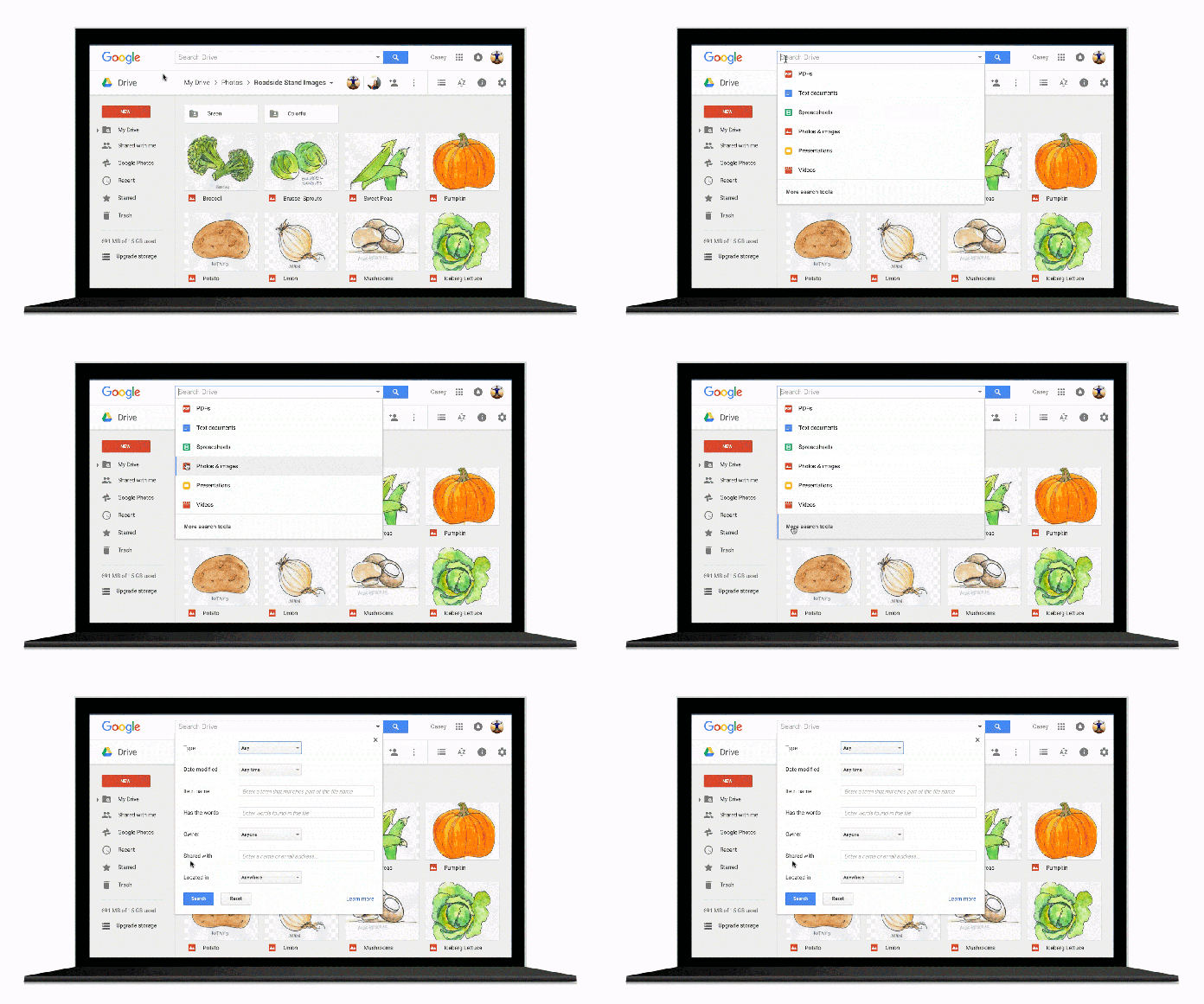
These new improvements give you the ability to:
- Narrow your search to a file type from the search box on Android, iOS, and the web.
- Open advanced search instantly from the search box – See in the gif above.
- Access recent files or search Drive from the home screen using 3D Touch on iOS.
- Search Drive using the iOS search bar without opening the Drive app.
 When you searching for old documents in your Google Drive, there are a lot of options. The ‘recent’ option or the ‘starred’ one are giving a nice overview, but it’s not enough if you are working on a lot of documents, presentations and spreadsheets. Over the years, I found the most useful ones to be:
- type: spreadsheet
- type: presentation
- from: an email
- to: an email
- after: YYYY-MM-DD
Here is the full list:
| Option | Description |
|---|---|
| Quotes | Documents that contain an exact phrase. Example: “match this phrase exactly” |
| OR | Documents with at least one of the words. Example: tacos OR nachos |
| Minus sign | Documents that exclude a word. So if you want “salsa,” but not “dancing,” use… Example: salsa -dancing |
| owner: from: |
Documents owned or shared by a specific person. Example: owner: momo@gmail.com from: momo@gmail.com |
| to: | Documents you shared with someone. Example: to: momo@gmail.com |
| is: | Items marked with a star. Example: is: starred |
| is: | Items that are trashed. Example: is: trashed |
| type: | Search by the type of document: folder, document, spreadsheet, presentation, PDF, image, video, drawing, form, script, and table. Example: type: spreadsheet |
| before: after: |
Find items that were edited before or after a certain day. This is the format: YYYY-MM-DD Example: before: 2014-05-01 after: 2014-05-01 |
| title: | Search by title. Example: title: “Conference 2014” |
| app: | Search for items that can be opened by a specific app. Example: app: “Google Docs” |
| source: | Search for items that have been shared publicly to the user’s domain, instead of the user’s default set of searchable items. Example: source: domain It’s for Google Apps users only |
Happy hunting.
Discover more from Ido Green
Subscribe to get the latest posts sent to your email.
 Ido Green